pi-mcp-adapter: one proxy tool instead of dozens of MCP definitions
Token-efficient MCP adapter for Pi coding agent
At a glance
- What is it?
- A TypeScript adapter for the Pi coding agent that replaces per-server tool definitions with a single searchable proxy tool and connects MCP servers lazily. It solves a context budget problem, but it adds a discovery step and its config precedence rules take reading.
- Who is it for?
- Adopt pi-mcp-adapter if you run the Pi coding agent and already have several MCP servers whose tool definitions crowd out your working context; the search-then-call pattern and lazy connections are aimed exactly at that. Skip it if you use one small server, if you need deterministic tool schemas in the prompt rather than discovered ones, or if you are not on Pi at all, since the install path is a Pi package.
- Can I use it commercially?
- Yes. MIT is a permissive licence: you can use, modify and sell software built on it, as long as you keep its copyright and licence notices.
- Is it still maintained?
- Yes. The repository last received commits 4 days ago.
- What is it written in?
- Mainly TypeScript, according to GitHub's language statistics.
Answers come from the project's GitHub data, last synced on November 14, 2026, and from our analysis. They are not legal advice.
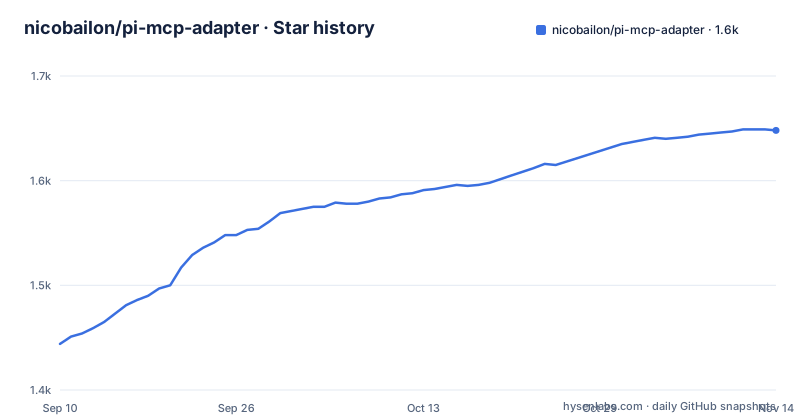
Star history
- nicobailon/pi-mcp-adapter1,648 ★ · +204
| Repository | 2026-09-10 | 2026-11-14 |
|---|---|---|
| nicobailon/pi-mcp-adapter | 1.4k | 1.6k |
204 Stars in the last 65 days, measured from the daily GitHub snapshot. Compare with other projects
Editorial analysis
The context tax that pi-mcp-adapter is built to avoid
The README opens with a number: a single MCP server can burn 10k+ tokens of tool definitions, and you pay that whether or not you call those tools. Connect a few servers and, in the project's framing, half the context window is gone before the conversation starts. The adapter's answer is to expose one proxy tool of roughly 200 tokens instead of hundreds of individual tool definitions. The README describes the result as "Two calls instead of 26 tools cluttering the context." The audience is narrow and specific: people running Pi (the badlogic/pi-mono coding agent) who want the MCP ecosystem (databases, browsers, APIs, in the README's examples) without paying the definition cost up front. If you do not run Pi, this project does not apply to you; installation goes through the Pi package manager.
Search, describe, call: the three-step data flow
The mechanism is a discovery loop rather than a static tool list. The agent calls the proxy with a search string, for example mcp({ search: "screenshot" }), and gets back matching tool names with their descriptions and parameters. The README shows chrome_devtools_take_screenshot returned with a format enum of png, jpeg, webp, a default, and a fullPage boolean. The agent then calls mcp({ tool: "chrome_devtools_take_screenshot", args: { format: "png" } }). Tool metadata is cached by the adapter, so search and describe work without a live connection; the server itself is lazy by default and will not connect until one of its tools is actually invoked. That caching detail matters, because it means an agent can enumerate capabilities offline and only pay the connection cost at call time. The args field accepts either a JSON object or a JSON string, and the README recommends the object form when the model handles it reliably, keeping the string form for providers that need simpler schemas.
Getting it running: one install command and a .mcp.json
Install is pi install npm:pi-mcp-adapter, followed by a restart of Pi. The adapter then reads standard MCP files automatically. A project .mcp.json is the preferred project config, and the README's quick-start example registers chrome-devtools with command npx and args ["-y", "[email protected]"]. The user-global shared file is ~/.config/mcp/mcp.json, with ~/.agents/mcp.json and ~/.agents/mcp/mcp.json read as tool-agnostic compatibility inputs. If you have nothing configured, /mcp setup walks through scaffolding a config, adding a curated known server, or quick-adding RepoPrompt. There is also a terminal path: pi-mcp-adapter init scans for host-specific configs and adds compatibility imports to the Pi agent dir, ~/.pi/agent/mcp.json by default, or $PI_CODING_AGENT_DIR/mcp.json when that variable is set. One caveat worth noting before you start: host-specific configs from Cursor, Claude Code, Codex and similar tools are not loaded automatically. They are compatibility inputs, shown by /mcp setup and pi-mcp-adapter init, and the normal /mcp panel does not scan them when settings.hostConfigDiscovery is "off", which the README gives as the default. Setting it to "on", or running pi-mcp-adapter init --discover-host-configs, opts in.
Six config layers, and which one wins
Precedence is listed explicitly, later entries winning: ~/.config/mcp/mcp.json, then ~/.agents/mcp.json, then ~/.agents/mcp/mcp.json, then <Pi agent dir>/mcp.json, then .mcp.json, then .pi/mcp.json. Host configs sit below all of these. The enable/disable commands are the part that deserves attention, because they do not edit the file a server came from. /mcp disable <server> and /mcp enable <server> persist only the disabled field in the project-local .pi/mcp.json, the highest-precedence Pi layer. Enabling removes the project flag when lower layers are enabled, or writes false when it needs to override a disabled lower source. The README states plainly that the source file is never rewritten and credentials are never copied, which is the right call but also means your effective configuration is spread across two places: the original definition and a small override. You need /reload after changing the flag for registered tool surfaces to refresh. The manual equivalent is adding { "disabled": true } to a server in any normal MCP config. One boundary: in-memory configurations supplied through createMcpAdapter({ config }) are isolated, do not read or write the project override, and the enable/disable commands are unavailable in that mode.
The discovery step is a real cost, not a free optimization
The trade is honest but it is a trade. A static tool list lets a model see every capability in one pass and pick one; the proxy forces a search call before the real call, so any tool the model cannot name or describe well enough to search for stays invisible. Search quality becomes a dependency of tool use. The README does not document how search ranks matches, whether it is substring, fuzzy, or embedding-based, and that is the first thing I would want to know before trusting it with a large server set. There is also a scale question: the caching of tool metadata means search works offline, but how large the cached catalog can grow and what happens when many servers are configured are open questions. And the lazy-connection default has an obvious failure mode in the other direction: the first call to any given server pays connection latency inside the tool call, so a workflow that touches many servers once each will feel slower than one with everything pre-connected. The README does not state whether pre-warming is possible.
Plugin loading, and what the README leaves unfinished
Beyond JSON config files, the adapter can load MCP servers from Agent Plugins packages. You list directories under settings.agentPluginPaths, for example ["./plugins/acme-tools"], alongside an mcpServers object, and each directory must contain a valid Agent Plugins 1.0 plugin.json. Check what happens when plugin.json is malformed, whether plugins participate in the same precedence chain, and whether their servers can be disabled through /mcp disable. Treat plugin loading as documented but not fully specified. The same goes for the DeepSeek Harness path: the README points to a third-party bridge, pi2dsh, for running the unmodified adapter in DSH, and describes that as third-party rather than supported by this project. If you depend on DSH, your support surface includes someone else's repository.
Compared with skipping MCP and writing CLI tools
The README names its own alternative directly: Mario Zechner's argument in "why you might not need MCP" that you should skip MCP and write simple CLI tools instead. The difference in approach is structural. A CLI tool is invoked by the agent like any shell command, so its interface is whatever --help prints, and there is no persistent server, no JSON-RPC handshake, and no tool definition resident in the context window at all. That is cheaper still than a 200-token proxy, and it is why the CLI route wins for anything you control and call often. The adapter's counter-argument is the ecosystem: databases, browsers, APIs that already ship MCP servers you did not write and cannot easily replace with a shell script. So the split is not which is better but which side of the line your tooling falls on. If a capability is a stable internal script, a CLI wrapper is the lower-cost design. If it is a third-party server you want to consume as-is, the proxy tool is what keeps its definitions out of your prompt.
Maintenance, versioning and the MIT licence
The repository is TypeScript, MIT-licensed, not archived, and the release cadence is tight: v2.32.1 and v2.32.0 both landed on 2026-09-01, with v2.31.0 a few days earlier on 2026-08-28. A 2.x line moving in patch and minor steps that quickly suggests active churn, which cuts both ways. You get fixes promptly; you also get a moving target, and the config surface here is large enough (six precedence layers, hostConfigDiscovery with three states, agentPluginPaths, directTools, per-server disabled flags) that a minor bump can plausibly change behaviour you depend on. Pinning a version is the cheap insurance. On licensing: MIT permits commercial use and modification, and the adapter itself imposes no copyleft obligation. That says nothing about the MCP servers you connect through it, each of which carries its own licence, and nothing about Pi, which is a separate project. Nothing in this material describes a paid tier, telemetry, or a hosted component, so the operational cost looks like configuration and upgrade testing rather than infrastructure.
Editorial conclusion
Adopt pi-mcp-adapter if you run the Pi coding agent and already have several MCP servers whose tool definitions crowd out your working context; the search-then-call pattern and lazy connections are aimed exactly at that. Skip it if you use one small server, if you need deterministic tool schemas in the prompt rather than discovered ones, or if you are not on Pi at all, since the install path is a Pi package. Before relying on it, verify three things on your own machine: which config file Pi actually detects on first run, where the effective server definition comes from under the six-layer precedence list, and whether /mcp disable writes the flag you expect into .pi/mcp.json. Those are the failure points, not the proxy call itself.
Frequently asked questions
What is pi-mcp-adapter?
It is an extension for the Pi coding agent that replaces Pi's built-in Model Context Protocol client with a single proxy tool, so tool definitions cost roughly two hundred tokens instead of many thousands. Servers start when the model first calls them and stop after ten idle minutes, and the adapter adds protocol features the built-in client leaves out, including prompts, elicitation, sampling and interactive user interface apps.
How do I install pi-mcp-adapter?
Run pi install npm:pi-mcp-adapter and then restart Pi. Installing or updating the adapter turns Pi's built-in MCP support off in Pi's settings, using the same switch the configuration command exposes. Shell commands for the adapter are pi-mcp-adapter init and pi-mcp-adapter doctor.
Does the Pi coding agent have built-in MCP support?
Yes, since Pi 0.99, and it also keeps tool definitions out of context. The adapter is an alternative to it rather than an addition: it starts servers on demand instead of starting every enabled server for the whole session, supports semantic tool search with a System One key, stores sign-in tokens in the operating system keychain, and handles servers that ask questions or show interfaces.
What does pi-mcp-adapter give up compared with the built-in client?
Two things are named: the built-in client sends roots, meaning the session directory, to servers, and the adapter does not. And Pi's permission extensions see each MCP call as its own tool call under the built-in client, while under the adapter they see proxy calls as a single tool, so existing permission rules need rethinking.
Where does pi-mcp-adapter keep OAuth tokens?
In the operating system keychain by default, where the built-in client writes them to a plain JSON file under the agent directory in the user's home folder. An encrypted file is available as an explicit opt-in instead. The test suite redirects the store to memory and disables the auth cache so that runs never touch the real keychain.
Official sources
Add this badge to your README
If you maintain this project, the badge below links readers to this analysis and shows its maintenance status from the daily GitHub snapshot. Paste the markdown into your README; add ?metric=license or ?metric=stars to the image URL for a different field.

[](https://hysenlabs.com/projects/nicobailon-pi-mcp-adapter)Star history chart for your README
[](https://hysenlabs.com/projects/nicobailon-pi-mcp-adapter)Was this useful?