pi-web-access: Web Search and Extraction for Pi
Web search and content extraction extension for Pi coding agent
At a glance
- What is it?
- pi-web-access adds web search, content extraction, GitHub cloning, PDF handling, and video understanding to Pi. Exa MCP provides a zero-configuration starting point, while direct APIs, self-hosted services, and hosted extraction introduce further configuration.
- Who is it for?
- pi-web-access fits Pi users who need web research, repository inspection, document extraction, or video analysis without writing separate provider integrations. It is a poor choice where remote extraction is prohibited, every request must use one fixed backend, or Node.js 22.19.0 is unavailable.
- Can I use it commercially?
- Yes. MIT is a permissive licence: you can use, modify and sell software built on it, as long as you keep its copyright and licence notices.
- Is it still maintained?
- Yes. The repository last received commits 1 day ago.
- What is it written in?
- Mainly JavaScript, according to GitHub's language statistics.
Answers come from the project's GitHub data, last synced on November 6, 2026, and from our analysis. They are not legal advice.
Star history
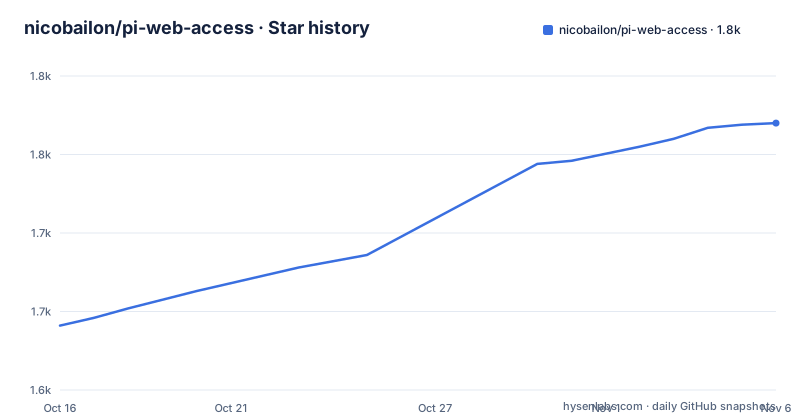
- nicobailon/pi-web-access1,770 ★ · +129
| Repository | 2026-10-16 | 2026-11-06 |
|---|---|---|
| nicobailon/pi-web-access | 1.6k | 1.8k |
129 Stars in the last 21 days, measured from the daily GitHub snapshot. Compare with other projects
Editorial analysis
What pi-web-access adds to the Pi coding agent
pi-web-access gives the Pi coding agent tools for retrieving and examining information outside the current workspace. Coding work often depends on current documentation, repository discussions, package behavior, issue details, or technical articles. This extension covers web search, URL fetching, content extraction, PDF extraction, YouTube understanding, local video analysis, and GitHub repository inspection in one package.
The target audience is broader than Pi users alone. The README also describes a local MCP server, allowing the search and fetch tools to run with Claude Code, Codex, Cursor, and other MCP clients. That makes the package relevant to developers who want a shared web-access layer across several agent environments.
One design choice is especially relevant for code research. According to the README, GitHub URLs are cloned locally instead of being scraped as HTML. The agent receives real files and a local path to explore. This is a better fit for repository analysis than extracting rendered GitHub pages, although it also means that this URL path behaves differently from an ordinary website fetch. The package description confirms that repository cloning is one of its supported capabilities rather than a separate companion tool.
How pi-web-access selects search and extraction providers
The default `auto` mode uses a documented fallback chain rather than binding every request to one service. `web_search` tries a configured SearXNG endpoint first for local or private search. If the active Pi model uses `openai-codex`, or `openai` with Sign in with ChatGPT, it then considers subscription-backed OpenAI search. Otherwise, the documented order moves through Exa, OpenAI, Brave, Parallel, TinyFish, Search1API, Searchinfinity, Querit, Tavily, Firecrawl, Jina, SERPdive, Kagi, Bocha, Ollama, Perplexity, Gemini API, and Gemini Web when browser-cookie access is enabled.
Provider choice also depends on capability. The README states that YouTube requests can try Gemini Web, its API, and Perplexity in sequence. For blocked pages, configured self-hosted Firecrawl or Crawl4AI services are tried first. Remote hosted page fetchers require explicit `fetchRouting.allowRemoteHostedProviders` opt-in when the target is a remote HTTP(S) URL.
That final restriction matters. A package capable of sending a URL to several external services can create a data-boundary problem even when the user only asked for page content. pi-web-access makes hosted routing an explicit permission rather than enabling it silently. Self-hosted SearXNG, Firecrawl, and Crawl4AI options can keep parts of the request path under the operator's control, but the README does not claim that every provider or fallback is local.
Installing pi-web-access and making the first Pi search
The README gives a single Pi package installation command. It works with the Pi package system rather than requiring a manual clone and build as the documented first step.
pi install npm:pi-web-accessAfter installation, the package can immediately use Exa MCP for search without a separately configured API key, according to the installation section. The user can then ask the Pi coding agent to run a web search or fetch a URL. If a direct provider key is needed, the documented configuration file is `~/.pi/agent/web-search.json`.
{
  "openaiApiKey": "sk-...",
  "braveApiKey": "BSA_...",
  "exaApiKey": "exa-...",
  "perplexityApiKey": "pplx-..."
}
This example is a subset of the keys shown in the README. It demonstrates that provider credentials are added as JSON properties, while the actual key values depend on the selected service. After changing Pi provider configuration, the README says to reload Pi. The package metadata declares Node.js `>=22.19.0`, so the local runtime must satisfy that engine requirement before relying on the documented install path.
OpenAI endpoint reuse and custom gateway constraints
The extension can send OpenAI-style search requests through a Responses-compatible gateway, but it applies guards around where credentials may be sent. Without an explicit opt-in, Pi credentials associated with a custom `baseUrl` are refused before a request is made. Availability checks then mark OpenAI unavailable without preventing other search providers from being attempted.
An explicit `openaiResponsesUrl` can be set to the gateway's complete Responses endpoint. Alternatively, `openaiUseProviderBaseUrl` can derive the endpoint from the Pi provider selected for the current request. The README states that `openaiUseProviderBaseUrl` defaults to `false`, and that an explicit `openaiResponsesUrl` takes precedence.
{
  "openaiSearchProviders": ["my-openai-provider"],
  "openaiUseProviderBaseUrl": true
}
With this setting, the selected provider's authentication-resolved `baseUrl` takes precedence over the model's base URL. Credentials and URL are resolved together, and candidates with missing or invalid resolved URLs are skipped in configured order. Only absolute HTTP(S) URLs are accepted. The documented derivation appends `/v1/responses` to an appropriate base path, while the official Codex base `https://chatgpt.com/backend-api` uses `/backend-api/codex/responses`. The extension does not infer whether a gateway supports Responses or `web_search`, so that capability must exist at the selected endpoint.
GitHub, PDFs, and video inputs have different retrieval paths
pi-web-access is not limited to text search results. The repository contains separate TypeScript modules for GitHub extraction, endpoint PDF extraction, Gemini PDF extraction, YouTube access through Gemini Web, and other provider integrations. The package metadata lists web search, URL fetching, GitHub cloning, PDF extraction, YouTube video understanding, and local video analysis as core functions.
For video, the README says users can point the extension at a YouTube video or a local screen recording and ask questions about its content. Documented outputs include full transcripts, visual descriptions, and frames extracted at exact timestamps. That workflow is useful when information exists only in a demonstration, recorded incident, or presentation rather than in text documentation.
The capabilities should not be collapsed into one generic extraction promise. GitHub inputs may become local clones. Remote pages may be processed by different hosted providers depending on routing. Video questions can use a separate ordered path, and PDF handling has endpoint-specific implementations. Users who need deterministic behavior across every input type will have to configure and verify each relevant path. The README excerpt does not provide a complete tool schema or a uniform output format for all these capabilities.
pi-web-access maintenance, licensing, and operational limits
The repository is not archived, and the last push was on 2026-10-16. Recent releases include `v0.41.0` on 2026-10-15, `v0.40.0` on 2026-10-13, and `v0.39.0` on 2026-10-12. This supports describing the package as recently changed, but release frequency alone does not establish that every provider remains compatible with its upstream API.
The package uses the MIT license. That permits use, modification, distribution, and sublicensing subject to the license conditions, including preservation of its copyright and license notice. This is a factual summary of the declared license, not legal advice. The published package includes `dist`, TypeScript files, `CHANGELOG.md`, `SECURITY.md`, `banner.png`, and `pi-web-fetch-demo.mp4` according to `package.json`.
The main upgrade cost is configuration surface. `package.json` names many providers, while the README documents different auth sources, endpoint rules, fallback orders, browser cookies, local services, and remote opt-ins. A provider upgrade can therefore affect routing as well as the package version. Users should check `CHANGELOG.md` for release-specific changes and avoid assuming that a newly configured provider behaves like Exa or SearXNG. The README excerpt does not document a rollback procedure.
Editorial conclusion
pi-web-access fits Pi users who need web research, repository inspection, document extraction, or video analysis without writing separate provider integrations. It is a poor choice where remote extraction is prohibited, every request must use one fixed backend, or Node.js 22.19.0 is unavailable. Before adoption, verify the provider selected by the active Pi model, review `~/.pi/agent/web-search.json`, and confirm whether `fetchRouting.allowRemoteHostedProviders` permits remote HTTP(S) targets to leave the local environment.
Frequently asked questions
Does pi-web-access require an API key for web search?
The README says the package works immediately with Exa MCP and no API key. Direct APIs and some other providers still require credentials in `~/.pi/agent/web-search.json`.
Can pi-web-access be used outside the Pi coding agent?
Yes. The search and fetch tools can run as a local MCP server for Claude Code, Codex, Cursor, and other MCP clients.
What Node.js version does pi-web-access require?
The `engines.node` field in `package.json` specifies `>=22.19.0`.
Does pi-web-access send blocked pages to remote extraction services?
The README says configured self-hosted Firecrawl or Crawl4AI services are tried first. Third-party hosted page fetchers require explicit `fetchRouting.allowRemoteHostedProviders` opt-in for remote HTTP(S) targets.
Official sources
Add this badge to your README
If you maintain this project, the badge below links readers to this analysis and shows its maintenance status from the daily GitHub snapshot. Paste the markdown into your README; add ?metric=license or ?metric=stars to the image URL for a different field.

[](https://hysenlabs.com/projects/nicobailon-pi-web-access)Star history chart for your README
[](https://hysenlabs.com/projects/nicobailon-pi-web-access)Was this useful?