Hermes Workspace keeps an unmodified agent behind a browser UI
Native web workspace for Hermes Agent — chat, terminal, memory, skills, inspector.
At a glance
- What is it?
- Hermes Workspace is a web front end for the Hermes Agent that refuses to fork it, which is why chat, memory, skills and terminal all depend on two agent-side ports being up. Chat streaming, a tmux-backed swarm, and a Monaco file browser sit on top.
- Who is it for?
- Pick the compose path if you want the agent and the workspace as two containers with the dashboard kept off the public network, and the attach path if Hermes Agent is already running on your machine. Skip it if you expected the workspace itself to hold model provider keys, because every key is configured on the agent side.
- Can I use it commercially?
- Yes. MIT is a permissive licence: you can use, modify and sell software built on it, as long as you keep its copyright and licence notices.
- Is it still maintained?
- Yes. The repository last received commits 10 days ago.
- What is it written in?
- Mainly JavaScript, according to GitHub's language statistics.
Answers come from the project's GitHub data, last synced on November 14, 2026, and from our analysis. They are not legal advice.
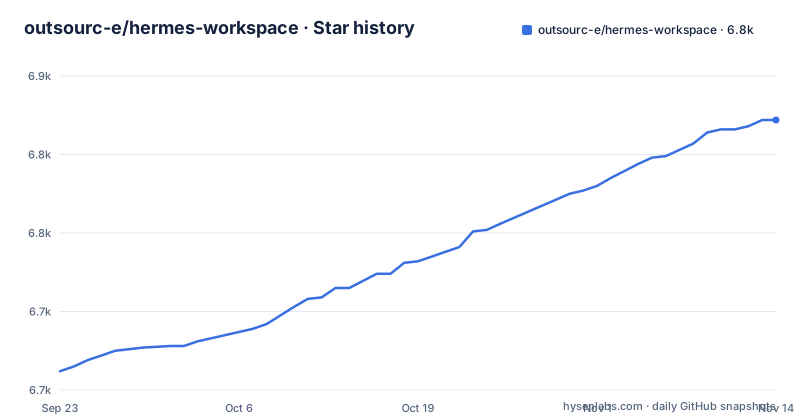
Star history
- outsourc-e/hermes-workspace6,822 ★ · +160
| Repository | 2026-09-23 | 2026-11-14 |
|---|---|---|
| outsourc-e/hermes-workspace | 6.7k | 6.8k |
160 Stars in the last 52 days, measured from the daily GitHub snapshot. Compare with other projects
Editorial analysis
Zero fork is the constraint that shapes every surface
Hermes Workspace describes itself as an AI agent's command center covering chat, files, memory, skills and terminal, and it is emphatic that it is not a chat wrapper. The v2 rewrite went further and made that a technical constraint rather than a slogan: clone, don't fork, and run on vanilla NousResearch/hermes-agent as installed by Nous's own installer. Chat, sessions, memory, skills, jobs, MCP, terminal, dashboard, Agent View and Operations are all described as being in vanilla parity with upstream.
The Conductor surface shows what that costs. It uses the dashboard mission API when that endpoint is available, and falls back to workspace-native Swarm dispatch with mode set to native-swarm when the dashboard endpoint is absent, which is the arrangement recorded for issue #262. So a missing upstream endpoint changes behaviour instead of raising an error.
That is the same idea as the capability gates listed alongside: features needing upstream endpoints render a clean placeholder rather than failing mid-action. The trade is real in both directions. You avoid maintaining a patched agent, and you also accept that some surfaces degrade to a second code path you have to debug separately.
Two ports, two processes, and one token that has to match
The workspace is a client. Everything it displays comes from two agent-side HTTP services, and a blank screen usually means one of them is not up.
The gateway serves core APIs on port 8642, and that server is opt-in: API_SERVER_ENABLED=true has to be present in the agent environment, otherwise the gateway serves messaging platforms but not port 8642 at all. The dashboard runs separately on 9119 by default and is what supplies the config, sessions, skills and jobs APIs. In the compose setup the gateway runs in the foreground on 8642 while the dashboard runs as a background process on 9119 reachable only on the private Docker network, which is why the workspace container is pointed at http://hermes-agent:8642 rather than a host address.
Authentication has one sharp edge. If the agent gateway was started with API_SERVER_KEY, the workspace must send the identical value as HERMES_API_TOKEN. If you leave one set and not the other, the mismatch is the failure.
Three install paths with different costs, and none of them is npm
package.json marks hermes-workspace as private, so there is no package to install from a registry. What you have instead is a choice of three routes, and the README puts a rough time on each.
Docker Compose is the two-minute path for self-hosters. It pulls pre-built images by default, nousresearch/hermes-agent:latest for the agent and ghcr.io/outsourc-e/hermes-workspace:latest for the workspace, so no local build happens at all:
cp .env.example .env
docker compose up
You still have to add at least one provider key to .env first, either a hosted provider key or a reachable local server such as Ollama or LM Studio. The compose file also warns that both named volumes survive container recreation and docker compose down, and that only docker compose down -v removes them, which is the line to read before typing that command. Both images are referenced by floating tag rather than by digest, so the version you run is whatever was published most recently.
curl to bash, then two terminals in two windows
The one-line path exists for local development on macOS or Linux:
curl -fsSL https://raw.githubusercontent.com/outsourc-e/hermes-workspace/main/install.sh | bashIt is a shell script piped straight into a shell, from the main branch rather than a tag, which is the usual thing to weigh before running anything of that shape. What it does is bounded though: install hermes-agent through Nous's own installer, clone the workspace repository, write a .env file, and install dependencies.
After that you run two processes in two terminals, and the workspace needs both:
hermes gateway run
cd ~/hermes-workspace && pnpm dev
The dev server answers on http://localhost:3000, and the port can be changed with PORT=4000 pnpm dev. package.json also exposes start:all, which runs the gateway and the dev server together through concurrently, so the two-window arrangement is a convention rather than a hard requirement.
There is a fourth route the README does not lead with. main points at electron/main.cjs, and electron:build, electron:build:mac and electron:build:win bundle a desktop build, bundling the server with esbuild first.
Attaching to an agent you already run, verified by three curls
If Hermes Agent is already installed, whether through the official installer, a source checkout, systemd or Docker, and it is serving the gateway at port 8642, the attach path skips the installer entirely:
git clone https://github.com/outsourc-e/hermes-workspace.git
cd hermes-workspace
pnpm install
cp .env.example .env
echo 'HERMES_API_URL=http://127.0.0.1:8642' >> .env
echo 'HERMES_DASHBOARD_URL=http://127.0.0.1:9119' >> .env
pnpm dev
Two agent-side settings decide whether that works. The gateway has to be bound to an address the workspace can reach, typically API_SERVER_HOST=0.0.0.0 with the port exposed, and API_SERVER_ENABLED=true has to be set in the agent's own environment file so port 8642 is served.
The README asks you to check all three services before opening the workspace, and the endpoints to hit are these:
curl http://127.0.0.1:8642/health
curl http://127.0.0.1:9119/api/status
curl http://127.0.0.1:3000/api/sessions
The first should return ok, the second dashboard metadata, and the third a sessions payload or an empty list.
The python3 a rename commit deleted, and the manifest pnpm insists on
Two build comments in the Dockerfile are worth more than the surrounding documentation, because both record a mistake that already happened.
The first is python3, needed by scripts/pty-helper.py for the terminal feature. It was originally added in PR #185 for issue #161, then regressed by the 2026-05-01 rename commit efcb7d14, and had to be re-added per issue #259. A rename touching a file path was enough to break the container's terminal.
The second is pnpm-workspace.yaml. The comment says it carries the allowBuilds approvals for electron and esbuild among others, and that it must be present or pnpm 10 and later fail hard on ignored build scripts. The image copies package.json, pnpm-lock.yaml, pnpm-workspace.yaml and .npmrc before running pnpm install --frozen-lockfile, which is a cache-friendly ordering rather than a stylistic choice.
The runtime stage installs curl, tini and gosu, taken from tianon/gosu:1.17-bookworm, and creates an unprivileged workspace user at uid 10010. Both stages are node:22-slim, and corepack is enabled in the build stage.
Swarm mode's role lanes and its byte-verified review gate
Swarm Mode is the part that has to justify the claim of not being a chat wrapper. It turns the workspace into a control plane described as unlimited Hermes Agents, one orchestrator, and no human manually dispatching. The workers are persistent tmux sessions, which is what keeps context across tasks, and they rotate safely and report checkpoints that carry proof rather than assertions.
Dispatch is by role, routing builders, reviewers, docs, research, ops, triage, QA and lab lanes separately, so the routing decision is made by lane rather than by whoever is watching. In front of release branches sits a byte-verified review gate, with autonomous PR and issue lanes, lab experiments and a repair playbook behind it. The claim being made is that the machine keeps moving while people are left the judgement calls.
The surfaces around it are concrete: an Orchestrator Chat for one task, a decomposed mission or a full broadcast; a control plane showing agents, roles, state, runtime and routing wires; a Kanban TaskBoard with backlog, ready, running, review, blocked and done lanes; Reports and Inbox for checkpoints, blockers and handoffs; and a built-in TUI view that attaches to tmux-backed workers or falls back to a live shell and log stream.
Fail-closed remote bind, against the 0.0.0.0 the agent needs
The security line is short and specific: auth middleware on every route, a content security policy, a path-traversal guard, and a fail-closed remote bind. The last of those deserves a second look, because the agent-side setup described earlier asks for the gateway to be bound to an address the workspace can reach, typically API_SERVER_HOST=0.0.0.0 with the port exposed. One is a refusal to listen on a wide interface by accident, the other is an instruction to do it on purpose.
The credential surface is also worth mapping. The compose file documents a hermes-agent-data volume holding agent config, sessions, skills, memory and credentials, mounted at /opt/data in the agent container and at /home/workspace/.hermes in the workspace container, read-write for config reads with the agent as the primary writer. Back that up before you clear anything. The workspace also installs as a PWA and is reachable from other devices over a tailnet, which widens who can see that interface.
What is missing is equally concrete. There is a SECURITY.md and MIT licensing.
Editorial conclusion
Pick the compose path if you want the agent and the workspace as two containers with the dashboard kept off the public network, and the attach path if Hermes Agent is already running on your machine. Skip it if you expected the workspace itself to hold model provider keys, because every key is configured on the agent side. Before the first run, set API_SERVER_ENABLED=true on the agent, since without it the gateway serves messaging platforms but never listens on 8642.
Frequently asked questions
What is Hermes Workspace?
It is a browser front end for the Hermes Agent, covering chat with SSE streaming, agent memory browsing, skills, a Monaco file browser and a cross-platform terminal. The v2 line runs on an unmodified NousResearch/hermes-agent rather than a fork.
How do I install Hermes Workspace?
Three routes: a one-line installer that pipes install.sh into bash, a Docker Compose setup that pulls ghcr.io/outsourc-e/hermes-workspace:latest, or a plain clone with pnpm install if you already run Hermes Agent. The workspace package is marked private, so there is nothing to install from npm.
What is the difference between Hermes Workspace and the Hermes agent itself?
The agent is the process that runs models, holds sessions and exposes the HTTP APIs; the workspace is only the interface on top. The workspace needs the agent gateway on port 8642 and the agent dashboard on port 9119, and it does no inference of its own.
How is the Hermes Workspace dashboard different from the agent dashboard?
The workspace dashboard is an aggregated read surface for sessions, model mix, a cost ledger, an attention card and an ops strip. The agent dashboard on port 9119 is a separate background service supplying the config, sessions, skills and jobs APIs underneath it.
How do I run Hermes Workspace once it is installed?
Start the agent gateway in one terminal with `hermes gateway run` and the dev server in another with `cd ~/hermes-workspace && pnpm dev`, then open http://localhost:3000. The start:all script in package.json runs both together if you would rather not use two windows.
Official sources
Add this badge to your README
If you maintain this project, the badge below links readers to this analysis and shows its maintenance status from the daily GitHub snapshot. Paste the markdown into your README; add ?metric=license or ?metric=stars to the image URL for a different field.

[](https://hysenlabs.com/projects/outsourc-e-hermes-workspace)Star history chart for your README
[](https://hysenlabs.com/projects/outsourc-e-hermes-workspace)Was this useful?