Raspberry Pi Audio Receiver Setup for Bluetooth, AirPlay 2, and Spotify Connect
Raspberry Pi Audio Receiver with Bluetooth A2DP, AirPlay 2, and Spotify Connect
At a glance
- What is it?
- rpi-audio-receiver is a shell-based Raspberry Pi setup project for receiving audio through Bluetooth A2DP, AirPlay 2, and Spotify Connect. Its installer is aimed at a clean Raspberry Pi OS device, not an existing installation, because the README explicitly states that there is no uninstall process.
- Who is it for?
- Adopt it on a dedicated Raspberry Pi OS 13 Lite device when you need a simple multi-protocol audio endpoint and can accept its one-device Bluetooth model. Do not adopt it for an existing system, a multi-user audio hub, or an environment requiring authenticated Bluetooth access without reviewing the installer and its service changes.
- Can I use it commercially?
- Yes. MIT is a permissive licence: you can use, modify and sell software built on it, as long as you keep its copyright and licence notices.
- Is it still maintained?
- Activity is slowing. The repository last received commits 6 months ago.
- What is it written in?
- Mainly Shell, according to GitHub's language statistics.
Answers come from the project's GitHub data, last synced on November 6, 2026, and from our analysis. They are not legal advice.
Star history
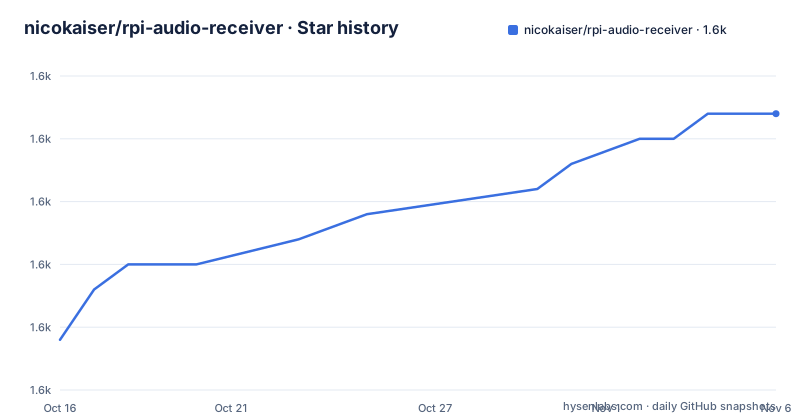
- nicokaiser/rpi-audio-receiver1,646 ★ · +9
| Repository | 2026-10-16 | 2026-11-06 |
|---|---|---|
| nicokaiser/rpi-audio-receiver | 1.6k | 1.6k |
9 Stars in the last 21 days, measured from the daily GitHub snapshot. Compare with other projects
Editorial analysis
What rpi-audio-receiver Configures
rpi-audio-receiver solves the problem of turning a Raspberry Pi into a local audio destination for phones, tablets, and computers. The repository describes three receiving paths: Bluetooth A2DP, AirPlay 2 through Shairport Sync, and Spotify Connect through Raspotify. The same Raspberry Pi can therefore serve clients that use different connection methods, while the selected internal, HDMI, USB, or I2S audio adapter becomes the output.
The target user is someone setting up a dedicated Raspberry Pi audio appliance. The requirements are specific: Raspberry Pi OS 13 Lite, a USB Bluetooth dongle, and an audio adapter such as the Adafruit USB Audio Adapter, a pHAT DAC, or a HifiBerry DAC+. The README strongly rejects using the Raspberry Pi's internal Bluetooth chipset for audio playback. It says that this chipset caused connectivity problems and recommends a USB dongle instead.
The installer asks which components to install. It configures a visible hostname, Bluetooth, AirPlay 2, and Spotify Connect. This is not a general-purpose audio server configuration tool. Its design assumes that the Raspberry Pi can be dedicated to receiving audio, which is why the irreversible installation warning matters.
Bluetooth A2DP Setup and Connection Flow
The Bluetooth component configures Bluetooth and adds a simple agent that accepts every connection. The README also says that a udev script disables discoverability while a Bluetooth device is connected. This behavior simplifies reconnection in some situations, but it also means the receiver is always open. The documented limitation says that new clients can connect at any time without authentication.
A phone, tablet, or computer sends audio over Bluetooth A2DP to the Raspberry Pi. The audio path then depends on ALSA and the output device selected by the system configuration. The project does not document a separate audio-routing command for this basic path. It does document that the internal Bluetooth adapter should not be used and that only one Bluetooth device should be connected at once, because multiple connections may cause interruptions.
The receiver can normally be found by new Bluetooth clients. For manual pairing, the README directs the user to `bluetoothctl`, turn the adapter on, start an agent, search for the device, and trust the paired device. Trusted devices can reconnect after reboot. A2DP volume control is available through a systemd override, although the README warns that it does not work on every setup.
The project also documents two optional Bluetooth trade-offs. `FastConnectable` may shorten connection time, but it may reduce sound quality. When using the internal Bluetooth module despite the warning, the user can edit `/usr/local/bin/bluetooth-udev` to disable Wi-Fi while a Bluetooth device is connected and re-enable it after removal. Those edits are not part of the basic installation flow and require care with the file.
Installing on a Clean Raspberry Pi OS Device
The README gives a two-command installation path. It downloads `install.sh` from the repository and runs it with Bash. The script asks whether to install each component, so the operator should read the prompts before confirming the Bluetooth, AirPlay 2, and Spotify Connect choices.
The following commands are copied from the README:
wget https://raw.githubusercontent.com/nicokaiser/rpi-audio-receiver/main/install.sh
bash install.sh
The installer is explicitly intended for a clean device that is not used for anything else. The README says that the installation process is not reversible and that the project has no uninstall procedure. That boundary should be checked before running the script on a Raspberry Pi containing services, files, credentials, or custom configuration.
After installation, the device's visible name is configured as the basic setup choice. The name is used as the Bluetooth name, the AirPlay client name, and the Spotify Connect name. The next real use depends on the client. A Bluetooth client should see the receiver and attempt to connect, while an AirPlay or Spotify Connect client should find the configured visible device. The README does not document a separate verification command for the AirPlay or Spotify Connect services.
AirPlay 2, Spotify Connect, and ALSA Output
For AirPlay 2, the installer adds Shairport Sync as the AirPlay 2 Audio Receiver. For Spotify Connect, it installs Raspotify, described in the repository as an open source Spotify client for Raspberry Pi. These are separate receiving layers from Bluetooth A2DP, so enabling one does not remove the need to configure the Pi's audio output.
The README lists internal audio, HDMI, USB, and I2S audio adapters as possible outputs. It gives tested examples of an Adafruit USB Audio Adapter, a pHAT DAC, and a HifiBerry DAC+. The wording is limited to devices mentioned by the repository. It does not provide a general hardware detection procedure or a claim that every adapter behaves identically.
HiFiBerry or similar I2C devices require a device tree overlay in `/boot/firmware/config.txt`. The documented overlay is `dtoverlay=hifiberry-dacplus`, with the instruction to replace `dacplus` with the overlay that fits the hardware. The same file can disable internal Bluetooth and audio when an external adapter is used:
dtoverlay=disable-bt
dtparam=audio=off
dtoverlay=vc4-kms-v3d,noaudio
dtoverlay=hifiberry-dacplus
For the documented HiFiBerry configuration, `/etc/asound.conf` is created with `defaults.pcm.card 0`, `defaults.ctl.card 0`, a `hifiberry` hardware PCM, a `dmixer`, and a `softvol` wrapper. The README says this enables the software volume mixer. A device-specific ALSA configuration is not interchangeable with every USB or HDMI adapter, so the card and overlay choices need to match the actual hardware.
Read-Only Mode and Wi-Fi Connection Constraints
The project addresses a specific operational concern for a Raspberry Pi audio endpoint: SD card corruption when the device is powered off. The README says the Raspberry Pi can boot Raspberry Pi OS in read-only mode through `raspi-config`, in its "Performance" section. Read-only operation reduces writes during normal use, but it changes how Bluetooth pairing data is persisted.
The README specifically warns that permanently saved paired devices require the Raspberry Pi to be switched back to read-write mode until all devices have been paired once. This is a direct limitation for a headless receiver whose clients are paired after installation. If a device has not been paired while the filesystem was writable, the documented read-only setup does not provide a way to save that pairing permanently.
Wi-Fi power management can also interfere with connectivity. The README provides this NetworkManager command:
sudo nmcli connection modify preconfigured wifi.powersave 2The text says that disabling Wi-Fi power management might resolve some connection issues. That wording matters. The command is an optional troubleshooting step, not a guaranteed repair, and the README does not define a diagnostic sequence for distinguishing Wi-Fi interference from Bluetooth hardware or pairing problems.
The Bluetooth udev script offers another optional approach. When edited by removing the comments around the `ifconfig` calls, it runs `ifconfig wlan0 down` on a Bluetooth device connection and `ifconfig wlan0 up` after removal. This may prevent dropouts when internal Bluetooth is used, but the README continues to recommend a USB Bluetooth dongle. The design therefore offers a workaround for a configuration the project does not consider suitable.
Limitations, Security, and Upgrade Cost
The most important limitation is the open receiver model. The Bluetooth agent accepts every connection, and the device remains open to new clients without authentication. That is useful for a private home network but unsuitable when an untrusted person could connect to the audio receiver. The README does not document a mechanism for requiring authentication on the basic setup.
Only one Bluetooth device is supported reliably according to the README. Connecting more than one can produce interruptions. The receiver also requires attention to Bluetooth hardware. The internal Raspberry Pi Bluetooth chipset is explicitly discouraged, while the external USB dongle is a stated requirement. A Pi with only internal Bluetooth may therefore fail to meet the project's own practical baseline.
The repository is not archived, and its last push was on 2026-04-29. The repository has no GitHub releases, so the README and repository history do not provide a documented release cadence or upgrade procedure. Installation has no uninstall path. This raises the operational cost of trying the project because an operator cannot rely on a documented removal command and must inspect the installation changes separately.
The repository declares the MIT license. The source file set includes `LICENSE`, so the license text is available in the repository. This article does not interpret legal obligations or provide legal advice. Anyone deploying the project should review that file and the installed Shairport Sync and Raspotify components as part of their own license review.
Compared with manually assembling separate Bluetooth, Shairport Sync, and Raspotify configuration, the project reduces setup repetition by offering one installer and several optional hardware adjustments. In exchange, it assumes a clean system, has no documented uninstall, and embeds several operational policies, including an unauthenticated Bluetooth agent and udev behavior. That trade-off suits a dedicated device more than a general-purpose Raspberry Pi installation.
Editorial conclusion
Adopt it on a dedicated Raspberry Pi OS 13 Lite device when you need a simple multi-protocol audio endpoint and can accept its one-device Bluetooth model. Do not adopt it for an existing system, a multi-user audio hub, or an environment requiring authenticated Bluetooth access without reviewing the installer and its service changes. Verify Bluetooth hardware, audio output configuration, and persistence in read-only mode first.
Frequently asked questions
How do I install rpi-audio-receiver on Raspberry Pi OS 13 Lite?
The README instructs users to download `install.sh` and run it with `bash install.sh`. The script asks whether to install each component, and the project says it should be run on a clean device.
Can rpi-audio-receiver use the Raspberry Pi's internal Bluetooth adapter?
The README does not recommend it and says the internal Bluetooth chipset is not suited to audio playback. A USB Bluetooth dongle is listed as a requirement, while the internal adapter is discussed only as a troubleshooting exception.
How many Bluetooth devices can connect to rpi-audio-receiver at once?
The documented limit is one Bluetooth device. The README warns that connecting more than one device can cause interruptions.
Does rpi-audio-receiver support AirPlay 2 and Spotify Connect?
Yes. The installer configures Shairport Sync for AirPlay 2 Audio Receiver and installs Raspotify for Spotify Connect.
Can I use read-only mode with Bluetooth pairing?
The README says read-only mode can help avoid SD card corruption during power-off, but paired devices must first be saved while the Raspberry Pi is in read-write mode. It does not document permanent pairing storage in read-only mode.
Official sources
Add this badge to your README
If you maintain this project, the badge below links readers to this analysis and shows its maintenance status from the daily GitHub snapshot. Paste the markdown into your README; add ?metric=license or ?metric=stars to the image URL for a different field.

[](https://hysenlabs.com/projects/nicokaiser-rpi-audio-receiver)Star history chart for your README
[](https://hysenlabs.com/projects/nicokaiser-rpi-audio-receiver)Was this useful?