Agent Memory Techniques: 30 Notebooks That Map the Memory Design Space for LLM Agents
Agent memory for LLMs: 30 runnable Jupyter notebooks covering conversation buffers, vector stores, knowledge graphs, episodic and semantic memory, MemGPT, Mem0, Letta, Zep, Graphiti, LoCoMo benchmarks, and production patterns.
At a glance
- What is it?
- NirDiamant/Agent_Memory_Techniques is a teaching repository, not a runtime library. It walks through conversation buffers, vector stores, knowledge graphs, episodic and semantic memory, and integrations with MemGPT, Mem0, Letta, Zep and Graphiti, with a LoCoMo benchmark track and a production patterns section.
- Who is it for?
- Adopt this repository if you are choosing a memory architecture and need to see the trade-offs side by side before committing to a library. Do not adopt it if you need a memory layer you can import into a running service; the notebooks are demonstrations, and the README points at companion courses and a book rather than a package.
- Can I use it commercially?
- Yes. Apache-2.0 is a permissive licence: you can use, modify and sell software built on it, as long as you keep its copyright and licence notices.
- Is it still maintained?
- Yes. The repository last received commits 12 days ago.
- What is it written in?
- Mainly Jupyter Notebook, according to GitHub's language statistics.
Answers come from the project's GitHub data, last synced on November 13, 2026, and from our analysis. They are not legal advice.
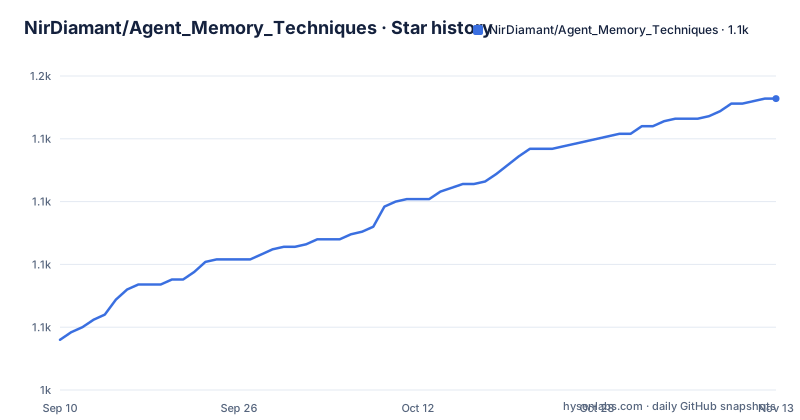
Star history
- NirDiamant/Agent_Memory_Techniques1,141 ★ · +96
| Repository | 2026-09-10 | 2026-11-13 |
|---|---|---|
| NirDiamant/Agent_Memory_Techniques | 1k | 1.1k |
96 Stars in the last 64 days, measured from the daily GitHub snapshot. Compare with other projects
Editorial analysis
What the repository is, and who the notebooks are written for
This is a collection of 30 runnable Jupyter notebooks about memory for LLM agents, published under Apache-2.0 and written for Python 3.10+. The README describes it as covering "conversation buffers, vector stores, knowledge graphs, episodic and semantic memory, working memory, MemGPT, Mem0, Letta, Zep, Graphiti, LoCoMo benchmarks, and production memory patterns." The problem it addresses is narrower than the title suggests. It is not solving memory retrieval in your agent; it is solving the absence of a comparable set of worked examples across memory designs. If you have read that Mem0, Zep or Graphiti exist and cannot say how a knowledge-graph memory differs from a vector store in code, the notebooks are the intended audience. The README offers two entry routes: start at 01 Conversation Buffer Memory, or pick a learning path. There is also a decision tree in the README, referenced as "Which technique do I need", for readers who want to choose before reading.
The mechanism is pedagogical: one notebook per technique
The repository layout is the architecture. Techniques live under all_techniques/, with each technique in its own directory (the README links to all_techniques/01_conversation_buffer_memory/ as the first). That means the unit of work is a self-contained notebook plus its assets, rather than a module you import. The data flow inside a notebook follows the technique it demonstrates: a conversation buffer keeps turns in a list, a vector store embeds and retrieves, a knowledge graph extracts entities and relations, and the named integrations call out to their respective libraries. Because the repository is Jupyter Notebook by primary language, there is no shared runtime to reason about. You read a notebook, run its cells, and observe the behaviour of the technique in isolation. That isolation is the point. It also means the notebooks do not compose into a single agent by default; if you want buffer memory plus graph memory in one process, assembling that is your work, not the repository's.
Getting a notebook running: environment and entry points
The README states Python 3.10+ and Jupyter. The practical path is to clone the repository, create a virtual environment with Python 3.10 or newer, install Jupyter, and open the notebook directory you want. The named entry point is all_techniques/01_conversation_buffer_memory/, and the README also exposes a learning path section for readers who want an ordered route. Beyond that, expect per-notebook dependencies: the topics list includes langchain, openai, anthropic, mem0, letta, zep, graphiti and at least one vector database, and each of those carries its own installation and its own API key requirements. The repository does not appear to centralise that. Treat every notebook as having its own setup step, and read its first cells before running anything that reaches a network.
Where the teaching format stops being enough
A notebook demonstrates a technique under conditions you control. Production memory has to survive conditions you do not: concurrent writers, partial failures during extraction, and retrieval that degrades as the store grows. The README lists "production patterns" among the covered topics, and there is a v1.0.0 release dated 2026-05-30, but whether those production patterns include operational concerns such as migration, backfill or eviction is worth checking before you rely on them. The other limitation is version drift. A notebook pinned to a library's API at the time of writing will not necessarily run against that library's current release, and this repository wraps several fast-moving projects. If a cell fails, the cause is as likely to be a changed constructor argument in Mem0 or Letta as it is to be your environment. Neither limitation is disqualifying for a learning resource. Both matter if you were hoping to lift a notebook into a service.
How it differs from the libraries it demonstrates
Mem0, Letta (the successor to MemGPT), Zep and Graphiti are all named in the topics and covered by notebooks. Each is a memory layer you install and call at runtime; each makes an opinion about storage and retrieval for you. This repository makes the opposite choice. It shows the options rather than choosing one, which is why a single repository can contain conversation buffers and knowledge graphs without contradiction. The practical difference: with Mem0 or Zep you get an API surface and an upgrade path, and you accept their extraction and retrieval design. With these notebooks you get the design space and no API surface. If your question is "which memory model fits my agent", the notebooks answer it. If your question is "how do I add memory to my agent this week", installing one of those libraries answers it, and the relevant notebook is useful mainly as a preview of what you are buying. The LoCoMo benchmark material is the closest the repository comes to evaluation, and the README does not state which systems are compared or on what hardware.
Licence, maintenance and the cost of keeping up
The repository is Apache-2.0, which permits commercial use and modification subject to the licence's notice and attribution conditions. That covers this repository's own content. It does not cover the third-party libraries the notebooks import, each of which carries its own licence, and some of the integrations may be hosted services with their own terms. Check those separately; nothing here is legal advice. On maintenance, the signals available are a v1.0.0 release in May 2026 and a last push in September 2026, so the repository is active. The cost you carry is not upgrade cost in the usual sense, because you are not deploying it. It is the cost of re-running notebooks when an upstream library changes, multiplied by the number of integrations you care about. The README also points to a paid course and a companion book, which tells you where the author's maintenance attention is partly directed. That is a normal arrangement for an educational repository, but it means the notebooks should be read as a snapshot of each library's API rather than a supported integration surface.
Editorial conclusion
Adopt this repository if you are choosing a memory architecture and need to see the trade-offs side by side before committing to a library. Do not adopt it if you need a memory layer you can import into a running service; the notebooks are demonstrations, and the README points at companion courses and a book rather than a package. Before you rely on any single notebook, verify its dependency versions against your own environment, check whether the notebook calls a hosted API or a local store, and confirm the licence terms of the third-party libraries it demonstrates separately from the Apache-2.0 terms of this repository.
Frequently asked questions
How to use memory in agents?
The repository's answer is thirty runnable Jupyter notebooks, starting with 01 Conversation Buffer Memory and continuing through vector stores, knowledge graphs, episodic and semantic memory, working memory, then named systems such as MemGPT, Mem0, Letta, Zep and Graphiti, plus LoCoMo benchmarks and production memory patterns. A Learning Path and a Decision Tree are provided for picking where to start.
What is in the Agent_Memory_Techniques repository?
Thirty runnable Jupyter notebooks covering conversation buffers, vector stores, knowledge graphs, episodic and semantic memory, working memory, MemGPT, Mem0, Letta, Zep, Graphiti, LoCoMo benchmarks and production memory patterns. They live under all_techniques/ alongside data/, docs/, utils/, tests/ and images/, with an llms.txt, a ROADMAP.md and a CITATION.cff at the root.
Do the Agent_Memory_Techniques notebooks need API keys?
At least one LLM key is required, either OPENAI_API_KEY or ANTHROPIC_API_KEY. Optional keys for Pinecone, Zep and Mem0 plus a Neo4j connection are present in .env.example but commented out, so the vector store and graph notebooks need extra setup. The dependencies in requirements.txt are unpinned, including chromadb, faiss-cpu, sentence-transformers, mem0ai and letta-client.
Does the repository include benchmarks for agent memory systems?
Yes. LoCoMo benchmarks are part of the same thirty notebooks as the techniques, with production memory patterns after them, so an implementation and its evaluation sit in one place on the same dependency stack. The repository does not publish a leaderboard or rank the techniques.
How do I know which agent memory technique to start with?
The README points new readers at 01 Conversation Buffer Memory in all_techniques/01_conversation_buffer_memory/, or at one of the Learning Paths, and offers a Decision Tree for readers who would rather choose visually from a map of the techniques.
Official sources
Add this badge to your README
If you maintain this project, the badge below links readers to this analysis and shows its maintenance status from the daily GitHub snapshot. Paste the markdown into your README; add ?metric=license or ?metric=stars to the image URL for a different field.

[](https://hysenlabs.com/projects/nirdiamant-agent-memory-techniques)Star history chart for your README
[](https://hysenlabs.com/projects/nirdiamant-agent-memory-techniques)Was this useful?