Nisshi is a Kafka-compatible broker that keeps its data in a database or object store
Apache Kafka® compatible broker with S3, PostgreSQL, SQLite, Apache Iceberg and Delta Lake
At a glance
- What is it?
- Nisshi, formerly Tansu, is a Rust broker that speaks the Apache Kafka API while storing messages in PostgreSQL, libSQL, S3 or memory, and it can write schema-backed topics as Iceberg or Delta Lake tables. It fits a team that wants Kafka's client ecosystem without a Kafka deployment, and it does not fit a workload that needs Kafka's replication semantics or its ecosystem tooling.
- Who is it for?
- Nisshi fits a team that already produces and consumes with Kafka clients but wants to run the broker itself on a database or object store, or wants to land schema-validated messages directly into a table format. It does not fit a production deployment that depends on Kafka's own replication, partition rebalancing guarantees or the surrounding ecosystem, and the README is explicit that the memory engine is designed for ephemeral non-production environments.
- Can I use it commercially?
- Yes. Apache-2.0 is a permissive licence: you can use, modify and sell software built on it, as long as you keep its copyright and licence notices.
- Is it still maintained?
- Yes. The repository received new commits within the last day.
- What is it written in?
- Mainly Rust, according to GitHub's language statistics.
Answers come from the project's GitHub data, last synced on October 22, 2026, and from our analysis. They are not legal advice.
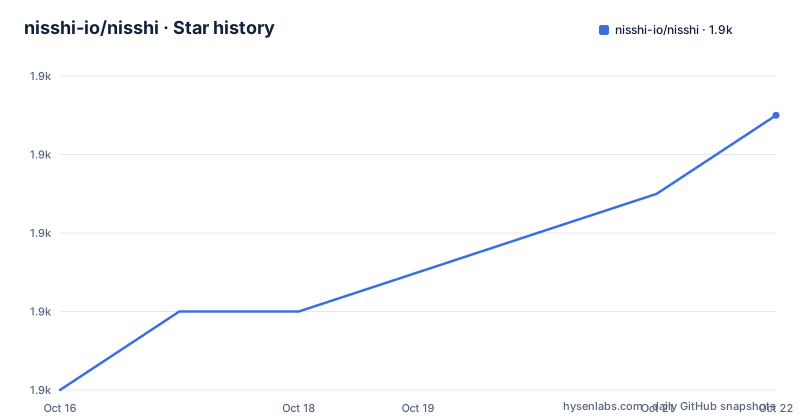
Star history
- nisshi-io/nisshi1,901 ★ · +7
| Repository | 2026-10-16 | 2026-10-22 |
|---|---|---|
| nisshi-io/nisshi | 1.9k | 1.9k |
7 Stars in the last 6 days, measured from the daily GitHub snapshot. Compare with other projects
Editorial analysis
Kafka on the wire, a database on disk
Nisshi, which the README notes is née Tansu, is described as a stateless Kafka-compatible broker with pluggable storage, offering PostgreSQL, libSQL, S3 or memory storage engines. The longer description is that it is a drop-in replacement for Apache Kafka with PostgreSQL, libSQL, S3 or memory storage engines.
The word stateless is doing real work in that description. A Kafka broker holds its log on local disks and replicates it across a cluster. Nisshi delegates that responsibility: the log lives in Postgres, in SQLite, in an S3 bucket, or in memory, and the broker itself is a stateless process in front of it. That is the whole architectural bet, and everything else follows from it.
The second pillar is schema. Schema backed topics, in Avro, JSON or Protocol buffers, can be written as Apache Iceberg or Delta Lake tables, and topics are validated by JSON Schema, Apache Avro or Protocol buffers. If a schema has been assigned to a topic, the broker will reject any messages that are invalid.
That combination is unusual. A Kafka-compatible broker that also behaves like a schema registry, and that writes its output as a columnar table format, is aimed at a specific shape of problem: getting data out of a streaming pipeline into a lakehouse without a separate ingestion job.
The Rust implementation is a single statically linked binary containing four subcommands, and the last push was on 2026-10-19, and the current release is v0.7.0-pre.3 from 2026-10-13.
One binary with four subcommands
The distribution is a single statically linked binary, and the broker subcommand is the default if no other command is supplied.
The four subcommands are broker, an Apache Kafka API compatible broker and schema registry, topic, a CLI to create or delete topics managed by the broker, cat, a CLI to consume or produce Avro, JSON or Protobuf messages to a topic, and proxy, an Apache Kafka compatible proxy.
The proxy is worth a second look, because a proxy that speaks the Kafka protocol in front of a real Kafka cluster is the migration path. Point clients at the proxy, run Nisshi as the storage layer behind it, and the client configuration does not change. The same binary serves both roles, which is what lets the same codebase be tried on a laptop and run in a cluster.
The cat subcommand is the one that makes the tool usable without a Kafka client library. It produces and consumes Avro, JSON or Protobuf messages to a topic from the command line, which means a developer can write to a topic from a shell script and see what a schema-validated topic accepted.
The CLI surface is the standard Rust clap layout, and the options are all environment-variable backed, which is the shape you want for a container.
Storage, schema registry and data lake are three separate URLs
The broker's options map onto the three things it does, and they are configured independently.
The storage engine is a single URL. The help text gives the examples: postgres://postgres:postgres@localhost, memory://nisshi/ or s3://nisshi/, with the default being memory://nisshi/. The schema registry is another URL, file://./etc/schema or s3://nisshi/, containing topic.json, topic.proto or topic.avsc. The data lake is a third, file://./lake or s3://lake/, and it is where Apache Parquet files are written.
The Iceberg integration adds two more: --iceberg-catalog, with the example http://localhost:8181/, and --iceberg-namespace, defaulting to nisshi.
Separating these three is what makes the lakehouse path possible. The schema registry and the storage engine can be local files while the data lake is an S3 bucket, or the registry can live in the same S3 bucket as the storage, and the Iceberg catalog is a service the broker points at.
The broker also picks up any environment it finds, loading any found in.env, and an example.env is provided as part of the distribution and can be copied into.env for local modification. Sample schemas live in etc/schema, used in the examples. The default cluster id is nisshi_cluster, and all members of the same cluster should use the same id.
A broker can be started by simply running nisshi, since all options have defaults:
nisshiTLS is all-or-nothing, and plaintext clients are refused
The TLS section is the most detailed part of the README, and it documents several decisions that matter for a deployment.
The listener speaks TLS when both --cert and --key are supplied as PEM files, and clap rejects one without the other. With TLS configured the listener is TLS only, so plaintext clients are refused during the handshake and clients must be configured with security.protocol=SSL, plus a truststore containing the certificate if it is self-signed. The --listener-url keeps its tcp:// scheme. TLS here provides encryption only, client authentication is still SASL. The private key can be a PKCS#8, SEC1 or RSA PEM key, and --cert and --key may point at the same file when the chain and key are kept in one PEM bundle. Any problem loading the certificate or key, or a key that does not match the certificate, fails startup rather than falling back to plaintext.
That last clause is the important one. A broker that quietly downgrades to plaintext when the key is wrong is a security problem, and this one refuses to start instead.
A passphrase protected key, the counterpart of Kafka's ssl.key.password, is read with --key-passphrase-file, and a trailing newline in the file is ignored. Only PKCS#8 encryption is supported, specifically ENCRYPTED PRIVATE KEY with PBES2 using PBKDF2-HMAC-SHA2 or scrypt and AES-CBC or Triple DES, which is what openssl pkcs8 -topk8 emits. Legacy OpenSSL PEM encryption, the Proc-Type: 4,ENCRYPTED form, and keys derived with a SHA-1 PRF are rejected at startup with the algorithm named, and the instruction is to re-encrypt the key first while keeping the passphrase.
The repository holds the matching Jaas configurations for the authentication schemes, with jaas-plain.conf and jaas-scram.conf alongside command-plain.properties, command-scram-256.properties and command-scram-512.properties.
Durability is a choice of storage engine, not a broker feature
The README is explicit about the durability story, and it maps directly onto the storage engine choice.
S3 is designed to exceed 99.999999999 percent, eleven nines, of durability. PostgreSQL with continuous archiving streams transaction log files to an archive, and the continuous archiving link points at a document. The memory storage engine is designed for ephemeral non-production environments.
That last sentence is the one to remember. The default storage engine in the CLI help is memory://nisshi/, which is convenient for a first run and meaningless for anything else, and a reader who copies the default into a deployment gets a broker that loses everything on restart. The choice has to be made deliberately.
The Postgres path is the one that most resembles a real Kafka deployment, since the log, the consumer offsets and the schema metadata all live in a database that has its own backup story. The S3 path puts the log in object storage, which is the shape that makes the lake and the broker the same system rather than two.
The workspace layout shows the storage engines as separate crates, with nisshi-storage-dynostore, nisshi-storage-null and nisshi-storage-slatedb alongside the nisshi-storage crate, which is where the Postgres, libSQL and S3 implementations sit. The nisshi-storage-null crate is the in-memory engine, and the naming makes its role clear.
A Cargo workspace with the linting turned up
The repository is a Rust workspace with resolver 3 and 22 members, and the member list is a readable map of the system.
The core crates are nisshi-broker, nisshi-client, nisshi-model, nisshi-schema, nisshi-service, nisshi-proxy, nisshi-cat, nisshi-cli and nisshi-auth. Around them sit the testing and tooling crates: nisshi-smoke-test, nisshi-perf, nisshi-generator, nisshi-otel for OpenTelemetry, nisshi-sans-io, and a fuzz crate.
The lint configuration in Cargo.toml is the part worth noticing, because it says what the maintainers consider non-negotiable. Clippy runs at warn for everything, with expect_used and unwrap_used denied. On the Rust side, unsafe_code is forbid, nonstandard_style is denied, rust_2018_idioms is denied, elided_lifetimes_in_paths is denied, and non_ascii_idents is forbidden. Rustdoc denies broken and private intra-doc links.
For a broker, forbid on unsafe code and a denial on unwrap in a workspace this size is a strong signal about the reliability posture, since a broker is the component everyone else's data passes through. Edition 2024, version 0.7.0-pre.3, licensed Apache-2.0, authored by Peter Morgan.
The Dockerfile is a scratch image, which is the standard way to ship a static binary. It copies in CA certificates from an Alpine base stage so the binary can reach S3 and Postgres over TLS, then copies the prebuilt binary with --chmod=755, because the Actions artifact drops the exec bit. The entrypoint is /nisshi and the default command is broker.
Where Nisshi is the wrong tool
The first wrong-tool case is a workload that depends on Kafka's replication guarantees. Nisshi is stateless and delegates the log to a database or an object store, and the README does not claim to reproduce Kafka's partition leadership, replication factor, or the rebalance protocol that Kafka clients expect. A consumer using the group coordination API, or a producer relying on acks=all across replicas, is relying on behaviour that this design does not provide in the same shape.
The second is the ecosystem. Kafka's value is as much its tooling, the schema registry integration, the connectors ecosystem, the schema tools, the client libraries, the years of operational knowledge. A drop-in replacement on the wire protocol is not a drop-in replacement for the ecosystem, and a team migrating to Nisshi still has to answer the question of what replaces every tool that assumed Kafka was underneath.
The third is the pre-release status. The current version is v0.7.0-pre.3, with pre.1 from 2026-07-30, pre.2 from 2026-07-31 and pre.3 from 2026-10-13. The version scheme itself is pre-release, and the naming change from Tansu to Nisshi is recent enough that the project is still finding its shape.
The fourth is the operational model. Postgres, libSQL, S3, Iceberg, Delta Lake, a schema registry, Jaas and SASL, Prometheus metrics, Grafana dashboards and OpenTelemetry, and the compose file brings up Postgres 18, a Grafana and a MinIO-compatible object store for local development. That is a lot of moving parts for a message broker, and the memory engine is the only one the README calls ephemeral and non-production.
Editorial conclusion
Nisshi fits a team that already produces and consumes with Kafka clients but wants to run the broker itself on a database or object store, or wants to land schema-validated messages directly into a table format. It does not fit a production deployment that depends on Kafka's own replication, partition rebalancing guarantees or the surrounding ecosystem, and the README is explicit that the memory engine is designed for ephemeral non-production environments. Before adopting it, check the version you are taking, since the current release is v0.7.0-pre.3, and confirm that the storage engine you need is one of the four listed.
Frequently asked questions
What is Nisshi and what does it replace?
Nisshi, which was formerly called Tansu, is a stateless broker that speaks the Apache Kafka API while storing messages in PostgreSQL, libSQL, S3 or memory, and it also acts as a schema registry validating topics with JSON Schema, Avro or Protocol buffers.
How do I start a Nisshi broker?
Run nisshi, since the broker subcommand is the default when no command is given and all options have defaults. The broker picks up any environment it finds in .env, and an example.env is shipped to copy locally. Storage, schema registry and data lake are each configured with a URL, for example postgres://postgres:postgres@localhost or s3://nisshi/.
How does Nisshi write Iceberg and Delta Lake tables?
If a schema has been assigned to a topic, the broker rejects messages that are invalid, and schema backed topics are written as Apache Parquet when the --data-lake option is provided. The --iceberg-catalog and --iceberg-namespace options point the broker at an Iceberg catalog, with the namespace defaulting to nisshi.
Does Nisshi support TLS?
The listener speaks TLS when both --cert and --key are supplied as PEM files, and one without the other is rejected by the CLI. With TLS enabled the listener is TLS only, so plaintext clients are refused during the handshake, and a certificate or key problem fails startup rather than falling back to plaintext. A passphrase protected key is read with --key-passphrase-file, and only PKCS#8 encryption is supported.
Official sources
Add this badge to your README
If you maintain this project, the badge below links readers to this analysis and shows its maintenance status from the daily GitHub snapshot. Paste the markdown into your README; add ?metric=license or ?metric=stars to the image URL for a different field.

[](https://hysenlabs.com/projects/nisshi-io-nisshi)Star history chart for your README
[](https://hysenlabs.com/projects/nisshi-io-nisshi)