naersk: cargo build, but inside Nix
Build Rust projects in Nix - no configuration, no code generation, no IFD, sandbox friendly.
At a glance
- What is it?
- Naersk is a Nix library that turns a Rust project into a derivation with a single function call, parsing your Cargo.lock, fetching the dependencies and compiling the crate inside the Nix sandbox, with no configuration file, no code generation step and no import from derivation. The design constraint that shapes everything is the absence of IFD, which is what makes the result usable on a Hydra style remote builder.
- Who is it for?
- Adopt naersk if you ship Rust binaries through Nix and want the dependency set to come from your Cargo.lock without maintaining a separate vendoring or code generation step. Do not adopt it if you need to override the derivation after the fact with overrideAttrs, because the README says you should not, and do not expect it to honour your rust-toolchain file without extra work.
- Can I use it commercially?
- Yes. MIT is a permissive licence: you can use, modify and sell software built on it, as long as you keep its copyright and licence notices.
- Is it still maintained?
- Yes. The repository last received commits 23 days ago.
- What is it written in?
- Mainly Nix, according to GitHub's language statistics.
Answers come from the project's GitHub data, last synced on November 7, 2026, and from our analysis. They are not legal advice.
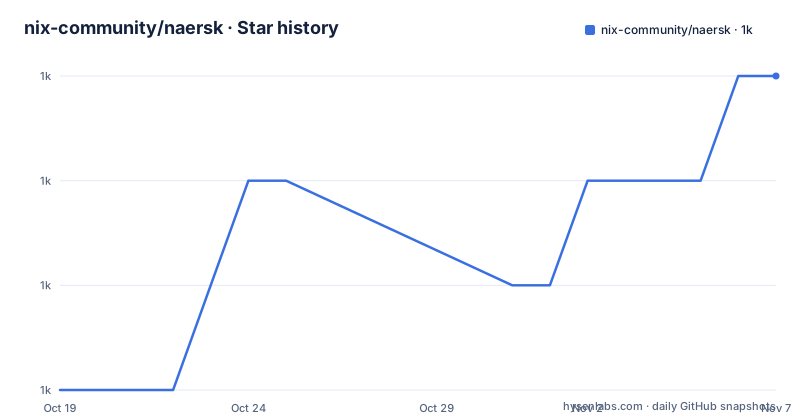
Star history
- nix-community/naersk1,016 ★ · +3
| Repository | 2026-10-19 | 2026-11-07 |
|---|---|---|
| nix-community/naersk | 1k | 1k |
3 Stars in the last 19 days, measured from the daily GitHub snapshot. Compare with other projects
Editorial analysis
One function call turns a crate into a derivation
The README's introduction is the whole pitch in a few lines. Naersk is a Nix library for building Rust projects, basically you write:
naersk.buildPackage {
  src = ./.; # Wherever your Cargo.lock and the rest of your source code are
}
and that turns your code into a Nix derivation which you can, for instance, include in your system:
environment.systemPackages = [
  (naersk.buildPackage {
    src = ./my-cool-app;
  })
];
The description in the repository metadata is the summary of the value proposition: build Rust projects in Nix with no configuration, no code generation, no IFD, sandbox friendly.
Under the hood, buildPackage parses Cargo.lock, downloads all dependencies, and compiles your application, fully utilizing Nix's sandboxing and caching abilities. The README's own summary of the result is that, with a pinch of salt, Naersk is cargo build, but inside Nix.
That framing matters for what it means in practice. The point is not to replace Cargo, it is to let Cargo do what it does inside a build system that knows the exact hash of every input. You still get a Cargo.lock, a Cargo.toml and the crates.io ecosystem. What you get in exchange is that the whole build, dependency fetching included, is a Nix derivation with a hash, so it is cached, hermetic and reproducible.
The project status line in the README reads Status: project's working!, which is a small piece of honesty from a tool in the Nix community where the phrase usually means something more tentative.
No IFD is the constraint that shapes the design
One sentence in the introduction carries most of the technical weight. If you're using Hydra, you can rely on Naersk as well because it doesn't use IFD, and all the parsing happens directly inside Nix code.
IFD, import from derivation, is the mechanism where evaluating one Nix expression requires building another one. In a Cargo based Nix setup the usual approach is to generate a Nix expression from Cargo.lock with a separate tool, or to run a fetch step during evaluation, and both of those mean a build happens outside the sandbox, at evaluation time.
Naersk does neither. The parsing of Cargo.lock happens inside Nix code, so the dependency list is computed by the evaluator rather than by an external program that has to be run first. That is why the README can say the result works on Hydra, where an evaluation-time build step would be a problem.
This is the single decision that distinguishes Naersk from the other ways of getting Rust into Nix, and it is worth understanding before you install it, because it is also the constraint that a custom solution would have to satisfy.
The cost of the design is that Naersk takes a specific view of how a Rust project is laid out. The derivation is built from a source directory in which Cargo.toml and Cargo.lock can be found, and the rest of the options either steer the build or are passed through to mkDerivation.
Two commands to set up a flake
The Setup section has two routes, and the flake route is two shell commands.
$ nix flake init -t github:nix-community/naersk
$ nix flake lock
That is the fast path, and it assumes the generated flake.nix sits next to your Cargo.toml and Cargo.lock, because the build refers to ./. and the README says that if that is not the case for you, adjust the ./. in the buildPackage call.
The longer path is to write the flake by hand, and the README gives the whole file, which is worth reading because the structure is instructive.
{
  inputs = {
    flake-utils.url = "github:numtide/flake-utils";
    naersk = {
      url = "github:nix-community/naersk";
      inputs.nixpkgs.follows = "nixpkgs";
    };
    nixpkgs.url = "github:NixOS/nixpkgs/nixpkgs-unstable";
  };

  outputs = { flake-utils, naersk, nixpkgs, ... }:
    flake-utils.lib.eachDefaultSystem (system:
      let
        pkgs = (import nixpkgs) {
          inherit system;
        };

        naersk' = pkgs.callPackage naersk {};

      in {
        packages.default  = naersk'.buildPackage {
          src = ./.;
        };

        devShell = pkgs.mkShell {
          nativeBuildInputs = with pkgs; [ rustc cargo ];
        };
      }
    );
}
The shape is the usual one. flake-utils provides eachDefaultSystem so the same code runs on every system, nixpkgs comes from the unstable channel, and callPackage turns the naersk input into a function you can call with your own nixpkgs. The devShell is marked optional in the README, and it simply puts rustc and cargo in the shell so you can work on the project without leaving Nix.
The alternative setup route is Niv, which is the older non-flake way of pinning Nix dependencies. There, niv init and niv add nix-community/naersk create a nix/sources.nix file that the default.nix imports, and the build call becomes naersk.buildPackage ./. in a couple of lines.
The rust-toolchain file is ignored by default
There is a behaviour in Naersk that surprises people, and the README states it twice, once for the flake setup and once for the Niv setup. Naersk by default ignores the rust-toolchain file, using whatever Rust compiler version is present in nixpkgs.
The reason is the no IFD design. A rust-toolchain file names a toolchain that has to be downloaded and installed, and honouring it means either fetching it during evaluation or building it as a dependency outside the sandbox. Naersk's answer is to use the compiler that the nixpkgs you are pinning already provides, which keeps the build hermetic and reproducible at the price of ignoring a file most Rust developers expect to be respected.
If you need a specific toolchain, the README shows the way to do it, and it is the same idea in both setup routes: bring in the nixpkgs-mozilla overlay, because that overlay carries the rust channel definitions, and then build the toolchain explicitly with pkgs.rustChannelOf.
toolchain = (pkgs.rustChannelOf {
  rustToolchain = ./rust-toolchain;
  sha256 = "";
  #        ^ After you run `nix build`, replace this with the actual
  #          hash from the error message
}).rust;

naersk' = pkgs.callPackage naersk {
  cargo = toolchain;
  rustc = toolchain;
};
The empty sha256 with the comment is the usual Nix idiom for a hash you do not know yet, and the comment tells you where to get it: run nix build and take the hash from the error message. After that the toolchain is passed into callPackage, so Naersk uses that cargo and rustc instead of the nixpkgs ones, and the devShell uses the same toolchain.
The practical advice is to decide which compiler you are shipping with, because the default is not the one in your rust-toolchain file, and a project that develops against one compiler and ships against another will eventually hit a difference in behaviour.
src, root and the two git fetch switches
The parameter table is where the real configuration surface is, and two entries in it are worth reading closely.
The first is the difference between src and root. src is used by Naersk as the source input to the derivation, and when root is not set, src is also used to discover the Cargo.toml and Cargo.lock. root is used by Naersk to read the Cargo.toml and Cargo.lock files, and it may be different from src. When src is not set, root is, indirectly, used as src.
That split exists for a common layout, where the Cargo manifest lives in a subdirectory of the source tree, or where the sources need cleaning before the build. The default is that one directory serves both roles, and the escape hatch is there when it cannot.
The second pair are the git fetch switches, and both have the same shape. gitAllRefs decides whether to fetch all refs while fetching Git dependencies, and the README says it is useful if the wanted revision isn't in the default branch. gitSubmodules does the same for submodules. Both require Nix 2.4 or later, and both default to false.
The rest of the options cover the build itself and the source of the crates. additionalCargoLock is an additional cargo lock used to specify crates required for the build, which is what you need for crates that are build dependencies and are not in the application's own lock file. cratesDownloadUrl is the URL for downloading crates from an alternative source, defaulting to https://static.crates.io/crates, and that is the knob for a mirror or an internal proxy. cargoBuild is the command used for the build, given as a function modifying the default value, and the default is cargo $cargo_options build $cargo_build_options with the output appended as JSON. cargoBuildOptions holds the options passed to cargo build, and they are visible during the build through the cargo_build_options environment variable, with the note that naersk relies on the --out-dir out option.
Anything that is not one of Naersk's own options is passed through into mkDerivation, so the derivation is still an ordinary derivation you can add patches, build inputs and environment variables to.
Why overrideAttrs does not work on a Naersk derivation
There is one restriction in the Usage section that deserves its own treatment, because it is the kind of thing that breaks a build script in a confusing way. Note that you shouldn't call overrideAttrs on a derivation built by Naersk, and the README links to a note on the subject below.
The reason follows from the design. Naersk does not build a derivation whose attributes describe a simple compilation step, it computes a dependency graph from your Cargo.lock and produces a derivation whose inputs are the fetched crates. The structure of that derivation is not a fixed set of attributes you can patch in place, because the inputs are derived rather than listed, and the version of the toolchain, the flags and the set of dependencies are decided during evaluation.
This is the practical boundary of the library, and it is the one to keep in mind while you plan an integration. You configure Naersk through the options that buildPackage takes, and those options include pass-through to mkDerivation for everything else. You do not configure it by taking the finished derivation and rewriting its attributes afterwards.
The examples directory shows the range of situations the project supports, and it is a good check on whether your case is one of them: hello-world, multiple-binaries, multi-target, static-musl, cross-windows and checks. The static-musl and cross-windows cases in particular are the ones that show what the dependency parsing is buying you, since a fully static build and a cross compilation are both awkward to express by hand in a derivation.
The repository also carries the machinery behind the library: build.nix, lib.nix, config.nix, crate_specific.nix, overlay.nix, a docparse directory, a readme.nix with the README.tpl.md template, a script directory and a test directory.
Editorial conclusion
Adopt naersk if you ship Rust binaries through Nix and want the dependency set to come from your Cargo.lock without maintaining a separate vendoring or code generation step. Do not adopt it if you need to override the derivation after the fact with overrideAttrs, because the README says you should not, and do not expect it to honour your rust-toolchain file without extra work. Verify first that the crate and its dependencies build in the Nix sandbox, that your Cargo.lock and Cargo.toml are where the build expects them, and that the Rust version in your nixpkgs is the one you intend to ship with.
Frequently asked questions
What does naersk do for a Rust project?
Naersk's buildPackage parses Cargo.lock, downloads all dependencies and compiles the application, fully using Nix's sandboxing and caching. The README summarises it as cargo build, but inside Nix, with no configuration, no code generation and no IFD.
How do I set up naersk with Nix flakes?
Run nix flake init -t github:nix-community/naersk and then nix flake lock, or write a flake.nix that takes the naersk and nixpkgs inputs, calls it with pkgs.callPackage and builds with naersk'.buildPackage { src = ./.; }. The flake file is expected to sit next to Cargo.toml and Cargo.lock.
Does naersk respect my rust-toolchain file?
Not by default. The README states twice that Naersk by default ignores the rust-toolchain file, using whatever Rust compiler version is present in nixpkgs. To use a custom toolchain you need the nixpkgs-mozilla overlay and pkgs.rustChannelOf, then pass the resulting toolchain as cargo and rustc to callPackage.
Why can I not use overrideAttrs on a derivation built by naersk?
The README says you should not call overrideAttrs on a derivation built by Naersk, and links to a note on the subject. Configuration is instead done through the options buildPackage accepts, some of which are used by Naersk and the rest of which are passed through into mkDerivation.
Official sources
Add this badge to your README
If you maintain this project, the badge below links readers to this analysis and shows its maintenance status from the daily GitHub snapshot. Paste the markdown into your README; add ?metric=license or ?metric=stars to the image URL for a different field.

[](https://hysenlabs.com/projects/nix-community-naersk)Star history chart for your README
[](https://hysenlabs.com/projects/nix-community-naersk)Was this useful?