Nix-on-Droid: Nix on an unrooted Android phone through proot, a Termux fork and a bootstrap zipball
Nix-enabled environment for your Android device. [maintainers=@t184256]
At a glance
- What is it?
- Nix-on-Droid gives an Android phone a Nix package manager and a declarative config module without root. It runs on proot, is aarch64 only and calls itself prototype-grade.
- Who is it for?
- Use Nix-on-Droid if you already know Nix, own a 64-bit ARM Android phone and want a declarative environment without rooting it. Skip it if you need a stable tool or a 32-bit ARM device.
- Can I use it commercially?
- Yes. MIT is a permissive licence: you can use, modify and sell software built on it, as long as you keep its copyright and licence notices.
- Is it still maintained?
- Yes. The repository last received commits 13 days ago.
- What is it written in?
- Mainly Nix, according to GitHub's language statistics.
Answers come from the project's GitHub data, last synced on November 7, 2026, and from our analysis. They are not legal advice.
Star history
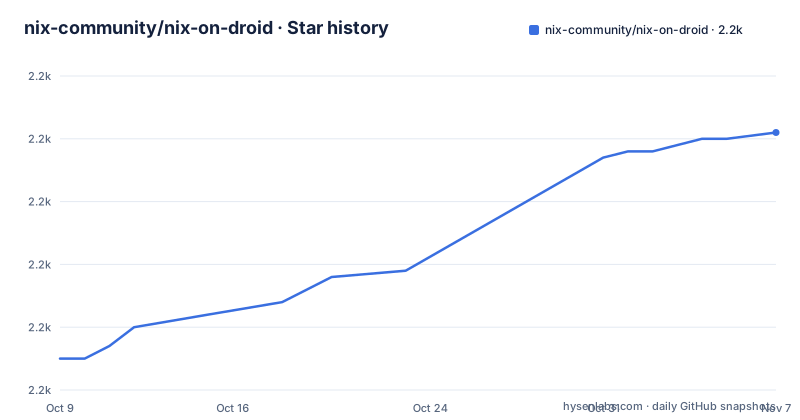
- nix-community/nix-on-droid2,201 ★ · +36
| Repository | 2026-10-09 | 2026-11-07 |
|---|---|---|
| nix-community/nix-on-droid | 2.2k | 2.2k |
36 Stars in the last 29 days, measured from the daily GitHub snapshot. Compare with other projects
Editorial analysis
proot stands in for root, user namespaces and a disabled SELinux, and the README calls the result prototype-grade
Nix-on-Droid installs the Nix package manager on Android as a single installable package. It is not NixOS running inside Android. What you get is access to nixpkgs and its precompiled software from a terminal on the phone. The README's own quality statement is that it is prototype-grade as of now, with the words but hey, it works.
The trick that makes it possible without root is stated directly. The project does not require root, user namespaces support or disabling SELinux, and relies on `proot` and other hacks instead. proot fakes a root filesystem view for the processes it launches, which is why a normal unrooted phone can run Nix at all.
The cost of the hack is performance and fidelity, and the README gives no numbers for either. Anything that depends on a kernel feature proot does not emulate will not work, and the README does not list what those are.
The terminal is a fork of the Termux terminal emulator app, kept at nix-community/nix-on-droid-app. It has no relation to Termux the distro, and the README asks readers not to pester the Termux folks about Nix-on-Droid.
aarch64 is the only tested architecture, and 32-bit ARM phones are out
The README says the project is only tested with aarch64, meaning 64-bit ARM devices. It also used to compile for i686, but the developers do not own such a device and nobody has reported whether the build worked, so it is no longer built unless a user shows up. 32-bit ARM devices are stated flatly: it would not work, and it is not an easy feat to pull off.
That covers most recent phones and excludes older ones. The practical test before installing is whether the device reports a 64-bit ARM CPU, and the README gives no command for that check.
Installation is from F-Droid, package com.termux.nix. You install it, launch the app and press OK, and expect many hundreds of megabytes of downloads to happen. The README gives no exact figure and no estimate of storage beyond that. A phone on a metered connection or with little free space is a poor first target.
No Play Store route is mentioned anywhere in the README. F-Droid, and a bootstrap zipball you host yourself, are the two paths it documents.
The config file is a Nix module at ~/.config/nixpkgs/nix-on-droid.nix, and the first build generates it
The system is configured through a file generated on the first build, at `~/.config/nixpkgs/nix-on-droid.nix`. The README's example:
{ pkgs, ... }:

{
  environment.packages = [ pkgs.vim ];
  system.stateVersion = "24.05";
}
environment.packages is the list of software installed into the environment, and system.stateVersion pins behavior the way NixOS's does. The README says to read the Nix-on-Droid changelog before changing that value, and CHANGELOG.md sits at the repository root.
There is a second location, `~/.config/nixpkgs/config.nix`, where the same module goes under the key `nix-on-droid`. The full option list is published at nix-community.github.io/nix-on-droid and is not repeated in the README.
The repository holds a modules/ directory, and the README points to modules/environment/login/default.nix for one specific detail covered later. A module system on a phone means the setup is declarative and reproducible by file, not by remembered commands.
nix-on-droid switch activates, nix-on-droid rollback goes back one build, and nothing more is documented
The `nix-on-droid` executable activates new configurations. `nix-on-droid switch` activates the current configuration. `nix-on-droid rollback` rolls back to the latest build, which the README words as the latest build, not an arbitrary earlier generation. For anything else, the README says to run `nix-on-droid help`.
The README gives no detail on how many generations are kept, whether a failed switch rolls back by itself, or what happens to data in home. If you break your login configuration, you are relying on the rollback command working in a shell you can still open. The reset the README mentions elsewhere is the Android app's clear data, with the reminder to back stuff up first, which wipes the installation.
Home Manager integration is optional. The example config explains the steps. You add the channel:
nix-channel --add https://github.com/nix-community/home-manager/archive/release-24.05.tar.gz home-manager
nix-channel --update
Then set `home-manager.config` inside the Nix-on-Droid module, either inline or as `./home.nix`, with its own `home.stateVersion`. Two state versions now have to be kept in step with their changelogs.
Building the bootstrap zipball needs an x86_64 machine with flakes, and the proot binary comes from a cache
Most users never rebuild. The README says the terminal emulator part is probably not interesting and suggests downloading a prebuilt one, with Android Studio if you must rebuild. The zipball is the part worth building, and it needs an x86_64 computer with flake-enabled Nix.
nix build ".#bootstrapZip-aarch64" --impureThe zip in `result` goes on an HTTP server, and you give the parent directory URL during installation. To trigger installation again, use clear data on the Android app. Environment variables change the sources: `NIX_ON_DROID_CHANNEL_URL` for the channel, plus `NIXPKGS_CHANNEL_URL` and `NIX_ON_DROID_FLAKE_URL`. A tl;dr in the README uses `nix run ".#deploy" -- <public_url> <rsync_target>` to do all the steps.
The proot binary is a special case. It is not built on the phone because the NDK is required to build it and is not available on mobile. Instead its derivation is pushed to cachix, and the store path is hardcoded in modules/environment/login/default.nix. On the device, evaluation downloads that path from the binary cache at nix-on-droid.cachix.org. That means the derivation must be present there or in another cache configured in nix.conf.
To build it for your own cache:
# must run on a linux-x86_64 system (cross-compile only)
nix build ".#prootTermux-aarch64"
Forks work without their own cache because proot ships inside the zipball
A hardcoded store path is an annoyance for anyone forking the repository to test a change, and the README says so. To reduce it, the proot derivation is also bundled with the bootstrap zipball. A one-off pull request, or a fork that users update only by wiping their data, does not need a binary cache.
A long-term fork is different. If you plan to maintain a fork that users can update from, you need your own binary cache holding the proot you built, since the on-device update fetches it from a cache by path.
That is a real maintenance commitment for a community fork. The README documents the build commands but not how to push to cachix or how to rotate the hardcoded path when proot changes. Someone planning a fork should read modules/environment/login/default.nix first, because that is where the pinned path lives.
The maintainer handle in the repository description is t184256, and the homepage is nix-on-droid.unboiled.info.
Flakes are experimental here, the last push was 21 August 2026, and there are no releases
The flake interface is marked in the README as experimental and subject to change. A minimal flake takes nixpkgs at `github:NixOS/nixpkgs/nixos-24.05`, takes nix-on-droid at `github:nix-community/nix-on-droid/release-24.05` with its nixpkgs input following the first, and defines `nixOnDroidConfigurations.default` by calling `nix-on-droid.lib.nixOnDroidConfiguration` with `pkgs` for aarch64-linux and a list of modules. The README points to the templates directory, and `nix flake init --template github:nix-community/nix-on-droid#advanced` creates one.
Activation with a flake uses `nix-on-droid switch --flake path/to/flake#device`, which expands to `.#nixOnDroidConfigurations.device`.
The repository is not archived. The last push to master was on 21 August 2026. It has no GitHub releases, so version tracking is through release branches such as release-24.05 and CHANGELOG.md. The examples in the README are all pinned to 24.05, so check whether a newer branch exists before copying them.
The license is MIT, and the README states that Nix-on-Droid is tested only on aarch64.
Editorial conclusion
Use Nix-on-Droid if you already know Nix, own a 64-bit ARM Android phone and want a declarative environment without rooting it. Skip it if you need a stable tool or a 32-bit ARM device. Before building a workflow on it, try nix-on-droid switch and rollback on a spare config, and back up before using clear data.
Frequently asked questions
What is Nix-on-Droid?
It is the Nix package manager on Android in a single-click installable package. It is not full NixOS inside Android, but it gives access to nixpkgs and its precompiled software.
How do I use Nix-on-Droid?
Install it from F-Droid, launch the app and press OK, then expect many hundreds of megabytes of downloads. Afterwards you configure it in ~/.config/nixpkgs/nix-on-droid.nix and activate changes with nix-on-droid switch.
Can I run Linux apps on my Android device with Nix-on-Droid?
You get access to nixpkgs' collection of precompiled software, using proot and no root access. The README describes it as prototype-grade and tested only on aarch64.
Official sources
Add this badge to your README
If you maintain this project, the badge below links readers to this analysis and shows its maintenance status from the daily GitHub snapshot. Paste the markdown into your README; add ?metric=license or ?metric=stars to the image URL for a different field.

[](https://hysenlabs.com/projects/nix-community-nix-on-droid)Star history chart for your README
[](https://hysenlabs.com/projects/nix-community-nix-on-droid)Was this useful?