NixBSD: a declarative FreeBSD built on NixOS modules and a FreeBSD kernel
An unofficial NixOS fork with a FreeBSD kernel [maintainer=@artemist,@rhelmot]
At a glance
- What is it?
- NixBSD is an attempt at a reproducible and declarable BSD based on NixOS, and it is deliberately not a fork of most of the things it depends on: native FreeBSD support is upstream in Nix as of 2026, there is no freebsd-src fork, and the modules are taken directly from nixpkgs wherever possible. Building it means building a virtual machine, and a minimal one can take over eight hours.
- Who is it for?
- NixBSD suits someone who wants a FreeBSD system described declaratively, with the same package and module tooling as NixOS, and who has the machine time and disk space to build a system image.
- Can I use it commercially?
- Yes. MIT is a permissive licence: you can use, modify and sell software built on it, as long as you keep its copyright and licence notices.
- Is it still maintained?
- Yes. The repository last received commits 23 days ago.
- What is it written in?
- Mainly Nix, according to GitHub's language statistics.
Answers come from the project's GitHub data, last synced on November 7, 2026, and from our analysis. They are not legal advice.
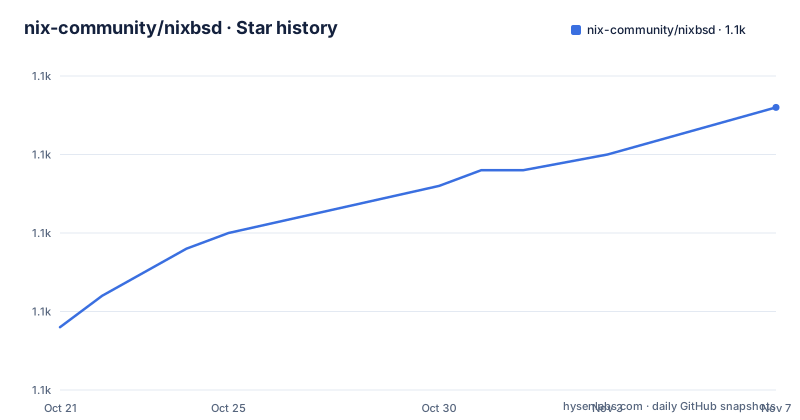
Star history
- nix-community/nixbsd1,083 ★ · +14
| Repository | 2026-10-21 | 2026-11-07 |
|---|---|---|
| nix-community/nixbsd | 1.1k | 1.1k |
14 Stars in the last 17 days, measured from the daily GitHub snapshot. Compare with other projects
Editorial analysis
What NixBSD is, and the fact that it is mostly not a fork
NixBSD is described as an attempt to make a reproducible and declarable BSD, based on NixOS. The README also notes that although theoretically much of this work could be copied to build other BSDs, all work thus far has been focused on building a FreeBSD distribution. The unusual thing about the project is what it is not. Native FreeBSD Nix support is already upstream, and a fork is no longer necessary as of 2026. There is no fork of freebsd-src either, because the changes required to FreeBSD code are minimal and concern mostly the build system, so they are included as patches in nixpkgs or as calls to sed in package files. And the modules that build the system are taken directly from nixpkgs without copying wherever that is possible, with the references to extPath in the module-list file marking where. The repository description calls it an unofficial NixOS fork with a FreeBSD kernel, maintained by two people, and the licence is MIT with the original nixpkgs files remaining under their own MIT licence and copyright.
Three components, and one of them is mostly upstream now
The Structure section names three main components. The first is Nix itself, where the situation has changed and the project says so plainly, native FreeBSD Nix support is already upstream and a fork is no longer necessary as of 2026. The second is nixpkgs, on a freebsd-staging branch, where most of the necessary changes have already merged upstream but a few are often needed during the development of features. The third is this repository, which contains modules for building a system in the way the nixos directory in nixpkgs does, and the README is explicit that upstreaming NixBSD into NixOS would require a fair amount of reorganization and changes to init systems, so is unlikely to happen anytime soon. That last sentence is the honest statement of the project's long term position, and a reader should weigh it before investing time.
The flake outputs, and why closureInfo matters more than it sounds
You build sample configurations, which are directories in the configurations folder, with the flake output .#<configName>.<outputName>. The base configuration provides a simple starting point with a user account and default services. All outputs from system.build are available, plus a few more, and the ones the README calls out for development are the ones worth understanding. The toplevel output is the top level derivation containing the kernel, the software, the activation script and more, and you find it linked in the VM image at /run/current-system after activation. The vm output is a script that runs a virtual machine containing the toplevel, booted with UEFI, and the system is booted from a writable CoW copy so activation will run and you can edit files. Then closureInfo and vmClosureInfo, which are the closure-info of the toplevel and vm derivations, and they include metadata about the build closure including a list of all packages, and keeping a copy around will prevent nix from garbage collecting all of your builds.
Building a VM: hours, tens of gigabytes, and a substituter you should think about
The tips section sets expectations honestly. Building vmImageRunner for a minimal configuration can take over 8 hours on a fast machine, so keeping around vmClosureInfo is highly recommended, but base.vmClosureInfo alone takes over 30GiB, so you may want to delete it if you are low on space. Some package checks may fail intermittently under heavy load, in which case building with --max-jobs 4 or lower so fewer packages compete for the CPU is the suggested workaround. And there is a substituter, a binary cache, in the flake, which if Artemis remembers should contain everything in .#base.vmClosureInfo and could save a few hours, but the warning is explicit, trusted substituters can maliciously modify outputs, so only use it if you trust Artemis. For watching a build, the README points at nix-output-monitor, and for flake commands you can replace nix with nom to use it.
The tldr, and the one command that needs no checkout at all
The short version is four commands, and the order is the point. You build the VM and all dependencies and make sure Nix does not delete them, which will likely take several hours, with nix build .#base.vmClosureInfo --out-link .gcroots/vm. Then you build the VM itself, where the actual build happened in the previous step so it should only take a few seconds, with nix build .#base.vm. Then you run it with result/bin/run-nixbsd-base-vm, and you log in as root with the password toor, or as bestie with the password toor. The alternative for someone who just wants to see it without a local checkout is nix run github:nixos-bsd/nixbsd#extra.vm, but the README attaches the same substituter trust warning to it, and notes that this will put VM state files in the current directory. The fact that a general user is pointed at a different repository for the quick path is a small sign of how experimental the main one still is.
nix build .#base.vmClosureInfo --out-link .gcroots/vm
nix build .#base.vm
result/bin/run-nixbsd-base-vm
The repository layout, and what a contributor has to run
The top level of the repository is a Nix project with a systems layer, so there are configurations/ for the sample configurations, modules/ for the system modules, overlays/ for package overlays, pkgs/ for packages, lib/ for shared library code, doc/ for documentation, a flake.nix with a flake.lock, a default.nix, and a TODO.md. The contribution guidance is short. Pull requests are welcome and issues can be opened on this repository, and the repository's issue tracker is used for nix and nixpkgs issues as well, which tells you the project shares a tracker with the wider Nix ecosystem. Contributions should be formatted with nixfmt, and the README points out a trap, that while you can use nix fmt, that will rebuild the universe, so you may want to run nix-shell -p nixfmt --run "nixfmt ." instead. The last push to the repository was on 2026-10-15 and there are no GitHub releases.
Editorial conclusion
NixBSD suits someone who wants a FreeBSD system described declaratively, with the same package and module tooling as NixOS, and who has the machine time and disk space to build a system image. It is the wrong choice if you need a usable FreeBSD today, since the build is a multi hour VM build rather than an install, and a poor fit if you are on NixOS stable, because the README says upstreaming NixBSD into NixOS would require a fair amount of reorganization and changes to init systems and is unlikely to happen anytime soon. Before adopting it, check the disk requirement, since base.vmClosureInfo alone takes over 30GiB, and read the substituter trust warning, because a trusted substituter can maliciously modify outputs.
Frequently asked questions
What is NixBSD?
It is an attempt to make a reproducible and declarable BSD based on NixOS, with all work so far focused on building a FreeBSD distribution. It is an unofficial NixOS fork with a FreeBSD kernel, and the primary language is Nix with an MIT licence.
Does NixBSD fork freebsd-src or Nix itself?
No. Native FreeBSD Nix support is already upstream and a fork is no longer necessary as of 2026, and there is no fork of freebsd-src, because the required changes concern mostly the build system and are carried as patches in nixpkgs or as sed calls in package files. The system modules are taken directly from nixpkgs wherever possible.
How do I build and run a NixBSD test VM?
Run nix build .#base.vmClosureInfo --out-link .gcroots/vm, which takes several hours, then nix build .#base.vm, which should be quick, then result/bin/run-nixbsd-base-vm and log in as root with the password toor, or as bestie with the password toor. You can also run nix run 'github:nixos-bsd/nixbsd#extra.vm' without a local checkout.
Why should I be careful with the NixBSD substituter?
The README warns that trusted substituters can maliciously modify outputs, so the flake's binary cache should only be used if you trust Artemis. It is worth noting the flip side, that not using it means the build takes hours rather than minutes.
What are the practical constraints when building NixBSD?
Building vmImageRunner for a minimal configuration can take over 8 hours on a fast machine, and base.vmClosureInfo alone takes over 30GiB, so you may want to delete it if you are low on space. Package checks may fail intermittently under heavy load, in which case building with --max-jobs 4 or lower is the suggested workaround.
Official sources
Add this badge to your README
If you maintain this project, the badge below links readers to this analysis and shows its maintenance status from the daily GitHub snapshot. Paste the markdown into your README; add ?metric=license or ?metric=stars to the image URL for a different field.

[](https://hysenlabs.com/projects/nix-community-nixbsd)Star history chart for your README
[](https://hysenlabs.com/projects/nix-community-nixbsd)Was this useful?