C4-PlantUML: the macro library that makes architecture diagrams readable
C4-PlantUML combines the benefits of PlantUML and the C4 model for providing a simple way of describing and communicate software architectures
At a glance
- What is it?
- Seven include files of PlantUML macros implementing the C4 model levels, plus editor snippets and themes, maintained as a standard library rather than as an application.
- Who is it for?
- C4-PlantUML does one job and does it in a way that survives contact with a real codebase: you include a macro file, call a handful of functions, and get a diagram at the abstraction level the C4 model asks for.
- Can I use it commercially?
- Yes. MIT is a permissive licence: you can use, modify and sell software built on it, as long as you keep its copyright and licence notices.
- Is it still maintained?
- Yes. The repository last received commits 10 days ago.
- What is it written in?
- Mainly PlantUML, according to GitHub's language statistics.
Answers come from the project's GitHub data, last synced on October 23, 2026, and from our analysis. They are not legal advice.
Star history
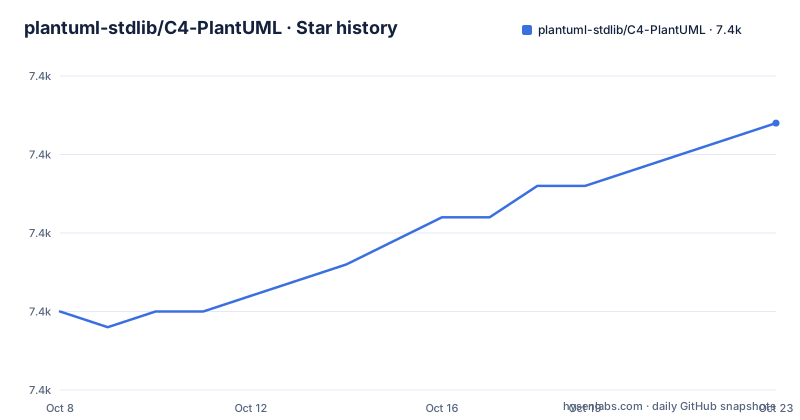
- plantuml-stdlib/C4-PlantUML7,442 ★ · +12
| Repository | 2026-10-08 | 2026-10-23 |
|---|---|---|
| plantuml-stdlib/C4-PlantUML | 7.4k | 7.4k |
12 Stars in the last 15 days, measured from the daily GitHub snapshot. Compare with other projects
Editorial analysis
A standard library of macros, not a diagram tool
GitHub classifies this repository under the PlantUML language, which is technically true and practically misleading. There is no program here. The deliverable is a set of include files that you place, or reference, at the top of a `.puml` source, after which functions like `Person`, `System`, `Container` and `Rel` become available.
The seven macro files map one to one onto the C4 model levels:
C4_Context.puml
C4_Container.puml
C4_Component.puml
C4_Dynamic.puml
C4_Deployment.puml
C4_Sequence.puml
There is also a plain `C4.puml` at the root, which is the aggregate most people include when they want everything. That file layout is the reason the project has 7,408 stars and 1,169 forks: it drops into an existing PlantUML setup without asking anyone to change their renderer, their CI, or their diagram directory.
The README positions the library for design conversations rather than for documentation pipelines, describing it as a way of describing and communicating software architectures during up-front design sessions. That framing matters, because the same macros used for a throwaway whiteboard diagram and for a diagram checked into a repository age very differently.
Layout options and the compatibility switch that hints at version drift
Two files at the root, `LayoutOptions.md` and `Themes.md`, exist because diagram output is not just a function of your source. They are the project's acknowledgement that the same macro call produces different arrangements depending on the renderer version, and that this is something a user needs to be able to correct.
The README's table of contents lists a dedicated compatibility entry for `NO_LAY_ROTATE=1`, described as a compatibility mode. Its presence tells you that default layout behaviour changed at some point in the project's history and that older diagram sources may need the old behaviour to render the way their author expected. If you are reviving a diagram written years ago, that switch is the first thing to try before rewriting the source.
Release v2.13.0 makes the same point in a different form: rounded styling can be turned on either from inside the diagram with `!ROUNDED_STYLE=1` or from the command line as `-DROUNDED_STYLE=1`. A global toggle reachable from two places is a sign the maintainers expect the same diagram to be rendered by more than one tool, sometimes with different arguments.
For teams that render diagrams in CI, the practical consequence is that pinning the PlantUML version is as important as pinning the C4-PlantUML version. Neither is enforced by anything in this repository.
Editor support that lives in the repository, not in a marketplace
The README advertises Visual Studio Code snippets among its extras, and the tree backs that up: there is a `.vscode/` directory at the root and a separate `intellij/` directory for live templates. Both are versioned alongside the macros, which means a snippet that documents a function cannot drift away from the macro that implements it.
That is a real advantage over the usual arrangement, where editor extensions live in a marketplace repository and quietly fall behind the library they autocomplete. The trade-off is distribution: you are copying files rather than installing an extension, so the snippets only apply if your workspace is set up to read them.
The sample directory follows the same philosophy of shipping everything together. It holds context, container, component, dynamic, deployment and sequence samples, several of them built around the same fictional Internet Banking System, plus variants tagged with `icons`, `styles` and `themes` in the filename. Reusing one fictional system across levels is deliberate: it lets a reader see how the same box changes meaning when you zoom from context down to component, which is the entire argument of the C4 model.
Two samples of the same diagram, one labelled old format
The samples directory contains both `C4_Dynamic Diagram Sample - message bus.puml` and `C4_Dynamic Diagram Sample - message bus - old format.puml`. Nothing else in the tree is labelled that way, and the file names carry no version numbers.
So a reader landing in that directory faces a small ambiguity that the naming does not resolve: the old-format file exists for a reason, presumably because the dynamic diagram syntax changed and existing sources written against the earlier macros still need to render, but the only signal is a filename suffix. A file called old format could mean deprecated but still supported, or could mean kept only for reference.
The rest of the samples carry no such marker. The themes, icons and styles variants of the container diagram all sit alongside the plain one, with no indication of which is the default starting point. If you are looking for a template to copy, open the plain version first and add the variants deliberately.
The same ambiguity shows up in how sources reference the library. Diagram files in the wild commonly include the macros by URL from the master branch, which means the include resolves to whatever is unreleased at the moment of rendering rather than to the version your diagram was written against. Pinning the include to a release tag is the fix, and it costs one URL change.
Visual regression tests via a hosted screenshot service
The build badge in the README points at a workflow named `run-percy-tests.yml`, and the repository carries a `percy/` directory. Percy is a hosted visual regression service: the workflow renders the sample diagrams and compares the resulting images against stored baselines, flagging any pixel difference.
For a diagram library this is close to the right kind of test, since the output is an image and any change in a macro can alter an unrelated diagram somewhere else in the set. It also means the safety net depends on an external service and on the exact renderer version the workflow installs.
The repository is not archived, and the last push was on 2026-08-26, the same day release v2.14.0 was published. That release added `SHOW_ELEMENT_TYPE()`, which lets a diagram show an element's type in the technology section rather than relying on stereotypes, with per-call parameters for hiding the stereotype on persons. It also added a companion to `SHOW_LEGEND(false)`, so the two calls interact. Version numbering is a clean v2 line with no signs of a fork in the channel.
What the README covers and what it leaves to the samples
The README is a long table of contents followed by a short introduction. Its headings cover getting started, the supported diagram types, relationship types, layout arrange elements, global layout options, sprites, custom tags and stereotypes, element and relationship properties, version information, and the editor integrations.
What it does not do is show a complete diagram in the visible portion. The walkthrough that a newcomer wants, one include line followed by a few calls and a rendered result, is what the samples directory is for, and the release notes then serve as the changelog for every function added since.
That arrangement has a cost worth naming. Functions arrive faster than prose, so the README's section list is a better index of what exists than the release notes are, and the samples are a better index of how it is meant to be used than either. Someone adding a diagram to an architecture documentation set should copy a sample file, change the boxes, and only then read the sections on tags and boundaries, since those are the ones that change rendering in ways you cannot guess from a function signature.
Editorial conclusion
C4-PlantUML does one job and does it in a way that survives contact with a real codebase: you include a macro file, call a handful of functions, and get a diagram at the abstraction level the C4 model asks for. The two things worth knowing before you depend on it are that diagram sources usually reference the library by URL on the master branch, so an unpinned include changes under you, and that layout output varies with the PlantUML version you render with, which is why the repository keeps a LayoutOptions.md and a NO_LAY_ROTATE compatibility switch. Start from the samples directory, copy the nearest one to your system, and render it once locally before you commit to the syntax.
Frequently asked questions
What are the four levels of the C4 model?
Context, container, component and code. The C4-PlantUML repository ships one macro file per level, named C4_Context, C4_Container, C4_Component and the rest, plus an aggregate C4.puml. Most diagrams in the samples directory stop at context, container and component, since the code level tends to duplicate what the repository already says better.
Do I need to install anything to use C4-PlantUML with PlantUML?
No installation step. The library is a set of include files, so you either copy them into your project or reference them by URL from a diagram source. What you do need is a working PlantUML renderer, and it helps to pin the renderer version because layout output can change between releases.
How do I stop my C4 diagrams from changing when the library updates?
Include the macros from a release tag rather than from the master branch, and pin the PlantUML version your CI renders with. Because the deliverable is text macros, an unpinned include resolves to whatever is unreleased at render time, which can move a box you had already placed.
What is the difference between C4-PlantUML and Structurizr?
Structurizr keeps the architecture model as structured code and renders views from it, so a workspace can hold several views over one model. C4-PlantUML is a macro library for text diagram sources, one diagram per file, with no shared model between them. The tradeoff is fidelity to the model against the fact that any PlantUML renderer can produce the output.
How does the project test that diagram changes look right?
The build badge points at a workflow named run-percy-tests.yml, and the repository has a percy directory, so the sample diagrams are rendered and compared against stored images through a hosted visual regression service. A hosted service means the check depends on an outside dependency as well as on the renderer version the workflow installs.
Official sources
Add this badge to your README
If you maintain this project, the badge below links readers to this analysis and shows its maintenance status from the daily GitHub snapshot. Paste the markdown into your README; add ?metric=license or ?metric=stars to the image URL for a different field.

[](https://hysenlabs.com/projects/plantuml-stdlib-c4-plantuml)Star history chart for your README
[](https://hysenlabs.com/projects/plantuml-stdlib-c4-plantuml)Was this useful?