nix2container: building OCI images from Nix without store tarballs
An archive-less dockerTools.buildImage implementation
At a glance
- What is it?
- nix2container is a Nix function set and Go implementation that turns derivations into OCI images without writing tarballs into the Nix store, and it can skip layers that were already pushed. The API is Nix facing, the plumbing is Go, and the release history is one tag old.
- Who is it for?
- nix2container suits a team that builds images from Nix derivations and wants reproducible layers, deduplication against a registry and a base image pinned by a manifest file in version control. Skip it if you want a general purpose builder, since the API is a Nix function set and the project ships a single release tag rather than a versioned tool.
- Can I use it commercially?
- Yes. Apache-2.0 is a permissive licence: you can use, modify and sell software built on it, as long as you keep its copyright and licence notices.
- Is it still maintained?
- Yes. The repository last received commits 9 days ago.
- What is it written in?
- Mainly Go, according to GitHub's language statistics.
Answers come from the project's GitHub data, last synced on November 6, 2026, and from our analysis. They are not legal advice.
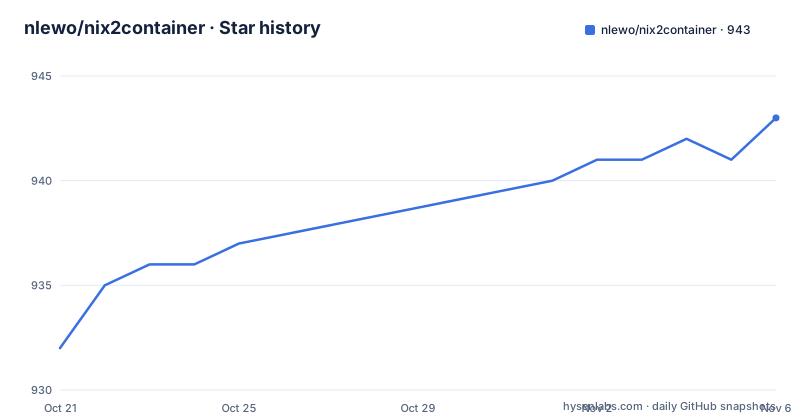
Star history
- nlewo/nix2container943 ★ · +11
| Repository | 2026-10-21 | 2026-11-06 |
|---|---|---|
| nlewo/nix2container | 932 | 943 |
11 Stars in the last 16 days, measured from the daily GitHub snapshot. Compare with other projects
Editorial analysis
The problem: every Nix built image leaves a tarball in the store
The pitch in the README is one sentence long. nix2container provides an efficient container development workflow with images built by Nix, and it does that by not writing tarballs to the Nix store and by allowing already pushed layers to be skipped without rebuilding them. That second half is the interesting claim, because skipping a pushed layer is normally impossible in a Nix model: a derivation is identified by its hash, and a Docker layer is identified by content, so the two do not line up without help. The idea came from a blog post on building a container image with Nix, and the project ships a set of examples that show the intended shape of the solution, from a hello world image to nginx, uwsgi and a layered image. The audience is a developer already using Nix for builds who now needs to publish the result as a container image without fighting the store.
The starting point is a Nix flake that calls buildImage
The README's getting started section is a complete flake. You take nix2container as a flake input, import nixpkgs for the system, and call the buildImage function from the nix2container package:
{
  inputs.nix2container.url = "github:nlewo/nix2container";

  outputs = { self, nixpkgs, nix2container }: let
    pkgs = import nixpkgs { system = "x86_64-linux"; };
    nix2containerPkgs = nix2container.packages.x86_64-linux;
  in {
    packages.x86_64-linux.hello = nix2containerPkgs.nix2container.buildImage {
      name = "hello";
      config = {
        entrypoint = ["${pkgs.hello}/bin/hello"];
      };
    };
  };
}
Note what the API is. The entrypoint is a store path, not a path inside the image, and the function rewrites it. The name is required, the tag defaults to the image output hash, and the config attribute set is described as an image configuration as defined in the OCI image specification, so anything the specification allows can be set there.
Layers, popularity and not rebuilding what the registry already has
Layer handling is where the project earns its name. The layers attribute takes a list of layers built with the buildLayer function, and if a store path in deps or contents belongs to one of those layers, that store path is skipped in the others. The README describes the use case as isolating store paths that are often updated from more stable store paths, in order to speed up build and push time. That is the same idea as the layered Docker images described in the linked blog post about Nix and layered Docker images. The maxLayers attribute, defaulting to 1, caps the number of layers created and is based on store path popularity, with the note that it applies to the image layers and not to layers added through the buildImage.layers attribute. Because layers are ordered by how often their contents change, the stable base of a system lands in a layer that rarely changes, and a registry can keep it. That is the mechanism behind skipping already pushed layers.
copyToRoot, perms and the Nix database inside the image
Three arguments control what ends up inside the image. copyToRoot, defaulting to null, takes a derivation or list of derivations copied into the image root, with the store path prefixes removed so the paths are relocated at the image root. The README suggests pkgs.buildEnv for this, with pathsToLink used to place things such as bash and coreutils into the image /bin. perms, defaulting to an empty list, sets file permissions when the tar layer is created, and the README is explicit that these permissions are not written to the Nix store. Each element is a dictionary with a path, a regex and a mode, and orMode adds bits to an existing mode, so mode 0444 combined with orMode 0200 gives 0644. initializeNixDatabase, defaulting to false, writes the Nix database into the image with all store paths added, which is only useful when you want to run nix commands inside the image, for instance a CI job that builds Nix derivations.
Base images pinned by a manifest file you keep in git
Two functions pull base images, and the second one is the interesting design. pullImage fetches an image by name and digest and stores the whole thing, manifest and layer tarballs together, in a single store path, with the supplied sha256 being the narhash of that store path. pullImageFromManifest does the same thing but from a supplied manifest file, and the README lists two advantages. Each layer archive sits in its own store path, so a shared layer between two base images downloads once and deduplicates naturally. And there is no Nix specific hash, so the base image can be updated by re-fetching the manifest.json from the registry without pulling the entire image just to compute a new narhash. The manifest therefore behaves as a lockfile, and the README says it is meant to be stored in source control alongside the Nix container definitions. The convenience script for it is:
nix run .#examples.fromImageManifest.fromImage.getManifest > examples/alpine-manifest.jsonThe examples directory carries that alpine-manifest.json file, alongside from-image.nix which uses Alpine as a base image and from-image-manifest.nix which uses the stored manifest.
Getting the image into Docker or Podman
The result is loaded with a nix run command rather than a docker build, which is the point of the whole exercise. The README shows the hello image going into the Docker daemon and running:
$ nix run .#hello.copyToDockerDaemon
$ docker run hello:latest
Hello, world!
For the bash example the same idea applies with Podman:
$ nix run github:nlewo/nix2container#examples.bash.copyToPodman
$ podman run -it bash
The Go implementation underneath is what makes this possible. The module is github.com/nlewo/nix2container on Go 1.24.0, and the dependency list is short and telling: opencontainers/go-digest and opencontainers/image-spec for the format, go.podman.io/image/v5 for the container image library, spf13/cobra for the command line, sirupsen/logrus for logging and gonum for the numeric work that the popularity based layer splitting implies. The repository layout separates the Go code into cmd/, closure/, data/, nix/ and types/ directories, with the Nix side in nix/ and a tests/ directory.
How this differs from nixpkgs dockerTools, and what the release history says
The README refers to nixpkgs dockerTools as the reference point in the fromImageEnv argument, which keeps the Env entries of a base image the way nixpkgs dockerTools does, one entry per variable in order of first appearance, with a config variable taking the position the base image gave it, and the other fields of the base configuration not inherited. The difference in approach is that dockerTools writes the image contents into the store as tarballs while nix2container does not, which is what makes the layer skipping and the manifest based base image possible. The alternative, then, is not another tool but the function you already have: keep using dockerTools and accept tarballs in the store, or move to nix2container and rework how base images and layers are pinned. On maintenance, the repository is not archived, the last push was on 2026-10-17, and there is exactly one release tag, v1.1.0 from 2026-09-24. The licence is Apache-2.0, which makes the code easy to vendor or adapt into your own Nix setup, and that is a reasonable way to insulate a build pipeline from a project with a thin release history.
Editorial conclusion
nix2container suits a team that builds images from Nix derivations and wants reproducible layers, deduplication against a registry and a base image pinned by a manifest file in version control. Skip it if you want a general purpose builder, since the API is a Nix function set and the project ships a single release tag rather than a versioned tool. Before adopting, compare the output of nix2container.packages.x86_64-linux.nix2container.buildImage against what nixpkgs dockerTools produces for the same derivation, since the two differ in how they treat the store and the environment, and check that the example manifest workflow, nix run .#examples.fromImageManifest.fromImage.getManifest, is workable in your CI before you pin a base image.
Frequently asked questions
What does nix2container do differently from nixpkgs dockerTools?
It builds OCI images from Nix derivations without writing tarballs to the Nix store, and it can skip layers that were already pushed instead of rebuilding them. The README notes that fromImageEnv keeps the Env entries of a base image the way nixpkgs dockerTools does.
How do I build a first image with nix2container?
Take nix2container as a flake input, import nixpkgs, and call nix2container.buildImage with a name and a config attribute set describing the OCI image configuration. The README's hello example sets the entrypoint to a store path, which the function relocates into the image.
How do I load a nix2container image into Docker or Podman?
Use the passthru helpers: nix run .#hello.copyToDockerDaemon followed by docker run hello:latest, or nix run github:nlewo/nix2container#examples.bash.copyToPodman followed by podman run -it bash.
What is the manifest.json file used for in nix2container?
pullImageFromManifest uses a supplied manifest file as a base image lockfile, with each layer archive in its own store path so shared layers deduplicate. Because there is no Nix specific hash, the base image can be updated by re-fetching the manifest from the registry without pulling the whole image.
Can a nix2container image run nix commands itself?
Yes, if you set initializeNixDatabase, which defaults to false and adds all store paths to the Nix database inside the image. The README describes this as useful for CI images that run Nix builds.
Official sources
Add this badge to your README
If you maintain this project, the badge below links readers to this analysis and shows its maintenance status from the daily GitHub snapshot. Paste the markdown into your README; add ?metric=license or ?metric=stars to the image URL for a different field.

[](https://hysenlabs.com/projects/nlewo-nix2container)Star history chart for your README
[](https://hysenlabs.com/projects/nlewo-nix2container)Was this useful?