nocalhost and the idea of not rebuilding an image for every change
Nocalhost is Cloud Native Dev Environment.
At a glance
- What is it?
- Nocalhost is a cloud native development environment that connects an IDE to a Kubernetes cluster, synchronises code into the running container on every change, and gives each developer an isolated space. The repository shows a control plane with Envoy and containerd behind it, a terminal client built for every platform, and a licence statement that the repository metadata does not quite agree with.
- Who is it for?
- Adopt Nocalhost if your team develops services that run on Kubernetes and the rebuild and push cycle is the slow part of your loop, and if you are willing to run a control plane in the cluster. Do not adopt it if your local Docker Compose setup already matches production closely enough, because the trade is cluster access and a running control plane for a feedback loop you may already have.
- Can I use it commercially?
- Check first. The repository uses a licence we do not classify automatically, so read its LICENSE file before any commercial use.
- Is it still maintained?
- Yes. The repository last received commits 81 days ago.
- What is it written in?
- Mainly Go, according to GitHub's language statistics.
Answers come from the project's GitHub data, last synced on November 7, 2026, and from our analysis. They are not legal advice.
Star history
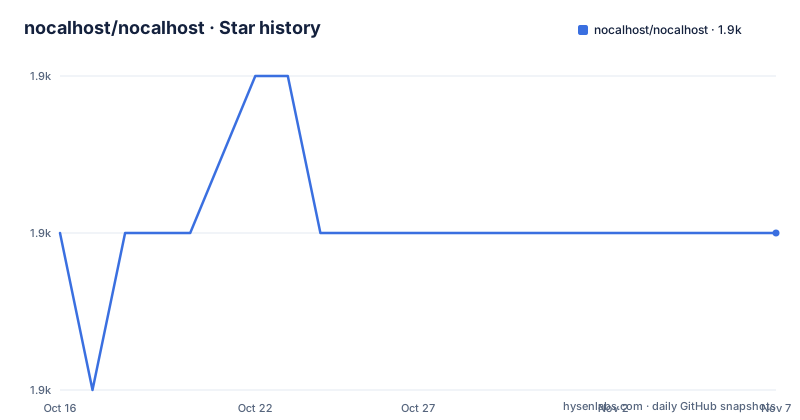
- nocalhost/nocalhost1,892 ★ · +0
| Repository | 2026-10-16 | 2026-11-07 |
|---|---|---|
| nocalhost/nocalhost | 1.9k | 1.9k |
0 Stars in the last 22 days, measured from the daily GitHub snapshot. Compare with other projects
Editorial analysis
The premise is that the rebuild is the bottleneck
Nocalhost is described as a cloud native development environment, and the name comes from No Local, which tells you the direction of travel. It is a cloud native development tool built around the IDE, and the point it makes about the developer loop is specific.
When you develop a cloud based application the usual cycle is edit, commit, build, push, deploy, wait, and observe. Every iteration pays for a container build and a push, and that cost is paid before you have learned anything from the change you just made. Nocalhost's claim is that any code change can take effect immediately on the remote side with no need to rebuild a new image, that this shortens the entire development feedback loop, and that it significantly improves research and development efficiency.
The features section puts a number on it, that the code is synchronised to the container automatically every time you make a change, which eliminates the submit, building and pushing cycles, so you see the change in under a second.
For a team whose services are containerised and deployed to a cluster, that is a large claim with a small mechanism behind it, and the mechanism is the interesting part to evaluate, because it decides what your development environment actually is.
The audience is developers who already work against Kubernetes and who have concluded that the inner loop, not the code, is what is slow. The project also positions itself for teams, with the isolated development space, so every team member can have their own environment without disturbing the others, and it has a CNCF code of conduct and a CII best practices badge, which places it in the Kubernetes ecosystem rather than in a vendor's tooling.
One click to a cluster, and a per developer space
The user facing story is three features, and they are deliberately simple.
The first is IDE support. Nocalhost provides easy to use IDE extensions for JetBrains and VSCode, and the point of the extensions is to let you develop and debug a cloud based application while your code stays on your local machine.
The second is starting development in one click. The README is blunt about what it removes, no need to configure complex development environments in your local machine any more, and Nocalhost helps you connect to any Kubernetes environment in one click.
The third is the isolated development space. Every team member gets their own independent space so that they are not disturbed by others, which is the piece that makes a shared cluster workable for development. Without it, two developers editing the same service in the same namespace overwrite each other's running state, and a shared environment quietly becomes a single developer environment where whoever restarts last wins.
Those three features together define the model. The environment lives in the cluster, the code lives on the laptop, the synchronisation moves the code, and the space keeps two people out of each other's way.
What the README does not say is how any of this is implemented, and the documentation site is where the How it works page lives, linked alongside the installation and quick start pages. That absence in the README is not a criticism so much as a note for an evaluator, because the mechanism determines the requirements, and the requirements are what you need before you install anything.
Envoy, containerd and a control plane in the dependency list
The go.mod file is where the architecture shows through, and a few of the dependencies are decisive.
There is github.com/envoyproxy/go-control-plane and its envoy module, which is the xDS control plane API, so the environment almost certainly configures proxies through xDS rather than by writing configuration files. There is github.com/containerd/containerd and github.com/docker/libcontainer, so the runtime is containerd rather than the Docker daemon, and the environment talks to the container runtime directly. There is github.com/heroku/docker-registry-client, which points at pulling images from a registry without a Docker daemon in the loop.
The API surface is a Gin server, with github.com/gin-gonic/gin, plus a validator and a JWT library for the API itself. There is Prometheus client for metrics and fsnotify for watching the filesystem, which is how a change on the laptop is noticed. There is github.com/nocalhost/remotecommand, a fork of the Kubernetes remote command library, which is what makes it possible to run commands and attach to processes in the pod rather than only watching logs. There is github.com/milosgajdos/tenus, together with tview and tcell, and those are for the nhctl command line client rather than for the server. There is go-ldap, which suggests directory integration, and miekg/dns, which suggests the environment has to resolve names.
The Makefile confirms the shape of the deployment, because it builds an api image, a dep image, a dep-installer-job image, a vpn image, a control-plane image and an envoy image. A control plane and an Envoy side by side is a service mesh in miniature, and that is a serious amount of machinery to sit in a cluster for a developer tool.
The reference to a VPN image also tells you the environment is not assumed to be on the same network as the developer's machine, which is the case where a developer's laptop cannot reach the cluster directly.
nhctl is a real client, built for every platform
nhctl is the command line client, and the Makefile gives it the kind of attention a released binary deserves.
There is a target that builds it for the current operating system, and a warning printed while it does, that the binary creates a current os executable. There is a cross build that produces executables for Linux, macOS and Windows at once, and then separate targets for each platform individually, including a dedicated osx-arm64 target for the M1. There is also a vpn-docker target that depends on nhctl-linux, which means the container image build will build the Linux client first if it is not already there.
The presence of tview, tcell and tenus in the dependency list explains what nhctl is. tview and tcell are terminal user interface libraries, so nhctl is an interactive terminal program, not a thin wrapper around curl, and it is probably what a developer keeps open to switch between environments, watch logs and attach to processes.
That is the correct shape for the tool. The IDE extension is where the code is written, but the operations on the environment, connecting, inspecting, streaming logs, are naturally terminal tasks, and a TUI keeps them in the same place as the rest of a developer's command line.
The API documentation is generated rather than written. The api-docs target runs swag init against cmd/nocalhost-api/nocalhost-api.go and prints where to look, the swagger interface on port 8080, which is a conventional Go choice and means the API surface is documented by the code that implements it.
A build matrix that says more than the README
The Makefile is a good summary of what this project actually is, because every target corresponds to a deployable piece.
The api and api-docker targets build the API server and its image, the dep-docker and dep-installer-job-docker targets build the dependency component and the job that installs it into a cluster, the vpn-docker target builds the network component, and the control-plane-docker and envoy-docker targets build the control plane and the proxy. Every one of them is a separate container image that has to be pushed somewhere and configured, and the make targets are wrappers around scripts in scripts/build/ rather than inline commands, which means the build logic lives in shell scripts that can be adjusted without touching the Makefile.
The nhctl targets follow the same script based structure, one script per platform, and the vpn-docker target shows the dependency graph being respected, since it lists nhctl-linux as a prerequisite.
For a team, the practical consequence is that installing this is closer to deploying a small platform than installing a plugin. There are at least five images, a control plane and an Envoy, and the client's connection to all of it depends on the VPN component.
That is not a criticism. A development environment that reproduces production networking, service configuration and image resolution is inherently a platform, and the project is candid enough to show you the whole list. But it does mean the operational surface of the tool is larger than the phrase cloud native dev environment suggests, and that is worth planning for before you put it in front of a team.
Apache-2.0 in the README and something else in the metadata
The README states that Nocalhost is Apache 2.0 licensed and links the LICENSE file, and the repository contains a LICENSE file, a GOVERNANCE.md and a MAINTAINERS.md. The repository's own metadata, however, records the licence as something GitHub cannot classify, a custom licence.
The most likely explanation is that the LICENSE file carries a header or an appendix that the automatic classifier does not recognise, since the README is explicit and the file is present. It is still the first thing to settle for an organisation, because a custom licence file is the document that governs what you may do with the code, and the two statements should be reconciled by the maintainers rather than by a reader.
The rest of the governance picture is conventional and respectable for a CNCF-adjacent project. The project adopts the CNCF code of conduct, it has a ROADMAP.md, a CONTRIBUTING.md, a governance file, a maintainers file, a CHANGELOG directory, and it runs the all-contributors specification with three named contributors. It carries a CII best practices badge, a FOSSA status badge for licence and security scanning, a Go Report Card badge, and separate CI workflows for the API docker image and for nhctl.
There are also two named sponsors, He3.App and CODING, and a community presence on the CNCF Slack in the nocalhost channel, plus a WeChat group for Chinese speakers, a shared meeting document and a YouTube channel for talks.
A 0.6 line with a busy October and a quiet year since
The release history is short and dense. v0.6.34 was published on 2025-10-14, v0.6.33 on 2025-10-13 and v0.6.32 also on 2025-10-13, so three releases in two days, which is what a pre-1.0 project shipping fixes looks like.
After that, the tagged releases stop, and the repository's last push was on 2026-08-19. The repository is not archived, so the branch continues to move, but there has been no published release in the year since those October tags. For a project whose value is a set of container images, a missing release means the images people install are a year old, and the changelog people are pointed to lives in the releases page rather than in a versioned artefact.
The version number itself is the other signal. At 0.6, the project is pre-1.0, which in Go usually means the module path and the exported API may still change, and the module is simply nocalhost with go 1.23.0 and a toolchain of go1.23.6.
The honest reading for an adopter is that this is an ambitious project with a real architecture, an ecosystem placement and a governance file, whose release engineering has slowed since the autumn of 2025. Whether that is a problem depends on what you need it for. If you want the feedback loop, the mechanism is there. If you need the images to be current, that is the thing to raise with the maintainers, along with the licence question.
Editorial conclusion
Adopt Nocalhost if your team develops services that run on Kubernetes and the rebuild and push cycle is the slow part of your loop, and if you are willing to run a control plane in the cluster. Do not adopt it if your local Docker Compose setup already matches production closely enough, because the trade is cluster access and a running control plane for a feedback loop you may already have. Verify three things first: which licence terms apply, since the README states Apache 2.0 while the repository's own metadata records a custom licence, that your cluster and your IDE extension combination is supported, and what your developer workflow looks like when the cluster is unavailable, since the whole model assumes connectivity. The last push was on 2026-08-19 and the newest release is v0.6.34 from 2025-10-14.
Frequently asked questions
What is Nocalhost?
A cloud native development environment whose name comes from No Local. It connects an IDE to a Kubernetes environment, synchronises code into the container on every change so there is no image rebuild and no push, and gives every team member an independent development space.
Which IDEs does Nocalhost support?
It provides extensions for JetBrains and VSCode, which let you develop and debug a cloud based application while the code stays on your local machine. The How it works page is in the project documentation at nocalhost.dev.
How does Nocalhost deliver code changes to the cluster?
The code is synchronised to the container automatically every time you make a change, which removes the submit, build and push steps and is described as showing the change in under a second. The dependency list shows filesystem watching with fsnotify and container interaction through containerd and libcontainer.
What is nhctl and how is it built?
It is the command line client, built on terminal user interface libraries such as tview and tcell. The Makefile has a target for the current operating system, a cross build for Linux, macOS and Windows, and separate targets per platform including an arm64 build for the M1, all wrapping scripts in scripts/build/nhctl.
Which components does the Nocalhost build produce?
Separate container images for the API, the dependency component, the dependency installer job, the VPN, the control plane and Envoy, plus the nhctl binaries. The API documentation is generated with swag init against cmd/nocalhost-api/nocalhost-api.go and served on the swagger interface at port 8080.
What licence is Nocalhost released under?
The README states Apache 2.0 and links a LICENSE file, while the repository's own metadata records a custom licence that GitHub cannot classify, so the terms in the LICENSE file are the ones to check. The newest release is v0.6.34 from 2025-10-14 and the last push was on 2026-08-19, and the project follows the CNCF code of conduct.
Official sources
Add this badge to your README
If you maintain this project, the badge below links readers to this analysis and shows its maintenance status from the daily GitHub snapshot. Paste the markdown into your README; add ?metric=license or ?metric=stars to the image URL for a different field.

[](https://hysenlabs.com/projects/nocalhost-nocalhost)Star history chart for your README
[](https://hysenlabs.com/projects/nocalhost-nocalhost)Was this useful?