llhttp: Native HTTP Parser Generation and Callback Integration
Port of http_parser to llparse
At a glance
- What is it?
- llhttp is a TypeScript-defined HTTP parser that uses llparse to generate C code for programs such as Node.js. It is suited to native embedders that need parser callbacks, not applications that need a complete HTTP client.
- Who is it for?
- llhttp fits native projects that need HTTP request and response parsing and can include generated C plus a native build step. It is unsuitable when the requirement is connection management, TLS, redirects, or request execution.
- Can I use it commercially?
- Yes. MIT is a permissive licence: you can use, modify and sell software built on it, as long as you keep its copyright and licence notices.
- Is it still maintained?
- Yes. The repository last received commits 34 days ago.
- What is it written in?
- Mainly TypeScript, according to GitHub's language statistics.
Answers come from the project's GitHub data, last synced on November 7, 2026, and from our analysis. They are not legal advice.
Star history
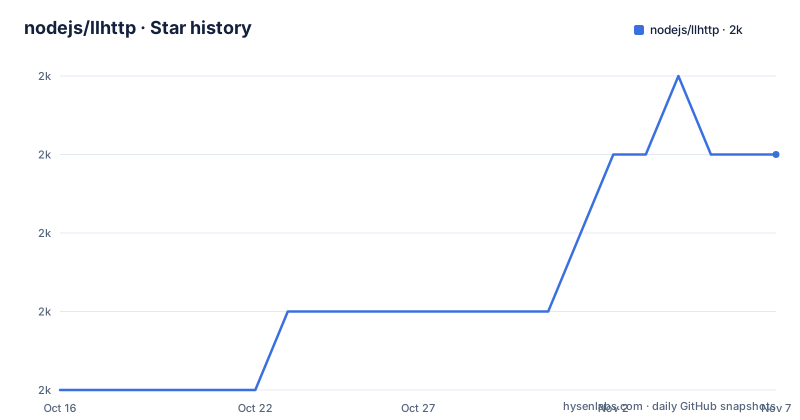
- nodejs/llhttp1,953 ★ · +3
| Repository | 2026-10-16 | 2026-11-07 |
|---|---|---|
| nodejs/llhttp | 2k | 2k |
3 Stars in the last 22 days, measured from the daily GitHub snapshot. Compare with other projects
Editorial analysis
llhttp's Parser-First Use Case
llhttp targets programs that need to parse HTTP syntax without becoming a full HTTP client. The README names Node.js as an example embedder and explains that the generated C source can be compiled and linked with an embedder's program. The parser accepts HTTP requests or responses incrementally and reports parsing progress through callbacks.
The repository is therefore infrastructure rather than an application server. It does not document socket ownership, connection reuse, TLS certificate handling, proxy configuration, redirects, or request execution. Those responsibilities remain with the program that embeds llhttp. A server, gateway, proxy, or protocol component can use the parser to decide how to interpret bytes, but it must provide its own I/O and policy layers.
The project's stated reason for existing is to make the former `http_parser` codebase easier to modify and verify. According to the README, introducing a single new method in the older implementation resulted in significant code churn. llhttp moves protocol behavior into TypeScript and uses llparse to generate the parser implementation, reducing the amount of hand-maintained low-level control flow in the C layer.
TypeScript Definitions and Generated C Architecture
The generation path is defined by the repository files. `package.json` identifies `llparse` as a dependency and defines the parser generation script as `node --import tsx bin/generate.ts`. The README states that HTTP parsing is described in TypeScript and that llparse generates the output C source file.
The parser definition is represented as an explicit state-machine graph. llparse checks the graph for loops and checks the input ranges used for header names and values. The README describes this as automatic verification, while also noting that additional checks could be performed in the future. That distinction matters. The documented mechanism verifies specified structural properties, but the repository does not claim exhaustive verification of every possible protocol interaction.
Native support is handled by a smaller C layer. The Makefile compiles generated `build/c/llhttp.c` together with `src/native/api.c` and `src/native/http.c`. It produces `build/libllhttp.a` and `build/libllhttp.so`. This separation makes the generated parser portable as C source, but it also means consumers must account for code generation, compilation, linking, and headers rather than treating the repository as a ready-made runtime package.
Installing Dependencies and Generating Parser Sources
The repository's Dockerfile provides the clearest documented development environment. It uses a Node.js Alpine image and installs `clang`, `lld`, and `wasi-sdk` before running `npm ci`. The `package-lock.json` file is present, so the documented dependency install is lockfile based.
From the repository root, the documented install and generation commands are:
npm ciThis installs the dependencies declared by the repository. The Dockerfile runs it after copying the project into `/home/node/llhttp`.
The repository's `package.json` defines the generation script with this command:
npm run buildThat script invokes `node --import tsx bin/generate.ts`. The Makefile then expects generated files at `build/llhttp.h` and `build/c/llhttp.c`. The README and Makefile do not provide a general-purpose `npm install` or package-manager installation path for native embedders, so the source workflow is the appropriate one to document here.
After generation, the Makefile provides the native build target:
make allThe documented outputs are `build/libllhttp.a` and `build/libllhttp.so`. The target uses `clang` by default and adds the flags defined in the Makefile. Installation into `/usr/local` is represented by the `INSTALL`, `PREFIX`, `LIBDIR`, and `INCLUDEDIR` variables.
First Parser Call and Callback Flow
The README provides a C usage example based on `llhttp_t`, `llhttp_settings_t`, `llhttp_init`, and `llhttp_execute`. The example selects `HTTP_BOTH`, which lets the parser choose between request and response parsing from the first input. It assigns `on_message_complete`, executes the request string `GET / HTTP/1.1\r\n\r\n`, and reports either success or an error.
The exact core of that example is:
llhttp_settings_init(&settings);
settings.on_message_complete = handle_on_message_complete;
llhttp_init(&parser, HTTP_BOTH, &settings);
After initialization, the README passes the request to `llhttp_execute`:
const char* request = "GET / HTTP/1.1\r\n\r\n";
int request_len = strlen(request);

enum llhttp_errno err = llhttp_execute(&parser, request, request_len);
The callback checks `HPE_OK` and otherwise prints the parser error name and reason. This is the first real use described by the project. It is also the boundary of the documented example. The repository does not provide a documented command that compiles the example into an executable, and the example is not identified as a named repository file, so no additional compilation command is added here.
For incremental network input, the embedder can invoke `llhttp_execute` with chunks and retain parser state between calls. The README describes incremental callbacks, but it does not document socket handling or input-buffer lifetime. Those details must be checked in `src/native/api.h` and in the embedder's own buffer management.
Callback Contracts for Headers, Bodies, and Upgrades
llhttp exposes separate completion and streaming callbacks. Completion callbacks report when a method, URL, protocol, version, status, header field, header value, or chunk component has been parsed. Streaming callbacks receive additional characters for the corresponding component. This gives an embedder direct control over how parsed fields are consumed.
The callback return values are part of the parser contract. Most callbacks can return `0` to continue, `-1` to signal an error, or `HPE_PAUSED` to pause. Streaming callbacks can return `HPE_USER` for a callback error. `on_chunk_header` places the current chunk length in `parser->content_length`. `on_reset` is called between messages on the same parser, but not before the first message.
`on_headers_complete` has additional protocol decisions. Returning `1` tells llhttp to assume that the request or response has no body and continue with the next message. Returning `2` makes the same body assumption and returns `HPE_PAUSED_UPGRADE` from `llhttp_execute`. This is useful for protocol upgrades, but it places protocol policy in the embedder. A caller that returns the wrong value can alter parsing behavior even when the input bytes are valid.
The API is therefore callback-heavy rather than buffer-oriented. A consumer must decide whether to copy data, aggregate headers, apply body limits, pause reads, or resume after a special return. The README does not define those application policies, so llhttp should not be treated as a complete request lifecycle manager.
Verification, Builds, and Upgrade Boundaries
The repository provides explicit verification through llparse's graph checks and includes separate native and WebAssembly benchmark scripts. The `bench` script runs `bench/native.ts` with `node --import tsx`. The `bench-wasm` script runs `bench/wasm.ts`. The repository also includes `examples/wasm.ts` and scripts for building WebAssembly with Docker.
The README includes a benchmark table comparing llhttp and `http_parser`. Those figures are repository-reported results for the stated workload, not a general performance guarantee for every consumer. Input size, callbacks, compiler settings, and the surrounding application can change the outcome. The table is useful as project context, but it should not be used as a substitute for testing the target workload.
Upgrades require regenerating C from the TypeScript definition and rebuilding the native library. The repository defines separate commands for TypeScript compilation, linting, testing, native benchmarks, WebAssembly benchmarks, and release preparation. The package is not archived, its last push was on 2026-10-05, and `package.json` reports version `9.4.3`. That is recent repository activity, but generated outputs still need to be checked by the embedding project.
The package uses the MIT license. The license permits broad reuse and modification under its stated conditions, including preservation of copyright and license notices. Any distribution or embedded use should review the actual `LICENSE` file. This statement describes repository metadata and is not legal advice.
llhttp Versus http_parser and Higher-Level Clients
The closest architectural alternative discussed by the project is `http_parser`. Both are low-level HTTP parsers intended for native embedding. The README contrasts the older approach, described as hand-optimized and unrolled C, with llhttp's TypeScript state-machine description and llparse-generated C. llhttp also documents automatic checks for graph loops and field spans, while `http_parser` is presented as the less maintainable baseline.
A higher-level HTTP client is a different category. `curl`, Node.js `fetch`, or a server framework handles application-level concerns such as connections, TLS, redirects, authentication, and response transfer. llhttp does not provide those services. Selecting llhttp for a simple request would add parser callbacks and native integration without replacing the client features that motivated the selection.
The practical choice depends on ownership of the protocol boundary. If an embedder already has an HTTP server or proxy and needs to parse requests or responses incrementally, llhttp's generated C and callback API fit the requirement. If the project needs an end-to-end client or server abstraction, the parser is the wrong abstraction level. The repository's README focuses on parser mechanics and API events, so it does not support claims about broader client performance or completeness.
Editorial conclusion
llhttp fits native projects that need HTTP request and response parsing and can include generated C plus a native build step. It is unsuitable when the requirement is connection management, TLS, redirects, or request execution. Verify first that the generation and Makefile build works with the target toolchain, and review `src/native/api.h` for the callbacks required by the embedder.
Frequently asked questions
What is llhttp used for?
llhttp is a low-level HTTP request and response parser that can be compiled into a native program. The README identifies Node.js as an example embedder and documents a callback-based C API.
How do I build llhttp from source?
The repository uses `npm ci` for dependency installation, `npm run build` for parser generation, and `make all` for the static and shared C libraries. These commands come from the Dockerfile, `package.json`, and Makefile.
Does llhttp work as a JavaScript HTTP client?
No. Although the parser definition is written in TypeScript, llparse generates C that is compiled and linked into an embedder. The documented API does not provide connection management, TLS, redirects, or request execution.
Official sources
Add this badge to your README
If you maintain this project, the badge below links readers to this analysis and shows its maintenance status from the daily GitHub snapshot. Paste the markdown into your README; add ?metric=license or ?metric=stars to the image URL for a different field.

[](https://hysenlabs.com/projects/nodejs-llhttp)Star history chart for your README
[](https://hysenlabs.com/projects/nodejs-llhttp)Was this useful?