Nook for macOS: A Sidebar-First Browser Built with Swift and WebKit
A new browser, not owned by Atlassian.
At a glance
- What is it?
- Nook is an open source, sidebar-first browser for Apple Silicon Macs running macOS 26.0 or later. Its Swift packages separate tab management, blocking, settings, and shared UI, but the Apple Silicon requirement and early restart under a new maintainer narrow its current adoption case.
- Who is it for?
- Nook fits macOS users who specifically want vertical tabs and are willing to require recent Apple hardware and operating systems. It does not fit Intel Mac owners, cross-platform browser users, or anyone who needs a broad migration story today.
- Can I use it commercially?
- Yes, with conditions. GPL-3.0 is a copyleft licence: if you distribute software that includes it, you must release that software's source code under the same licence. Running it internally without distributing it does not trigger that obligation.
- Is it still maintained?
- Yes. The repository last received commits 2 days ago.
- What is it written in?
- Mainly Swift, according to GitHub's language statistics.
Answers come from the project's GitHub data, last synced on October 25, 2026, and from our analysis. They are not legal advice.
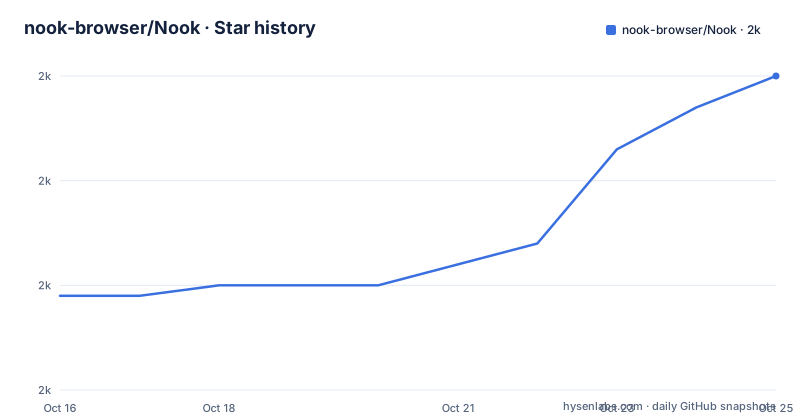
Star history
- nook-browser/Nook1,980 ★ · +21
| Repository | 2026-10-16 | 2026-10-25 |
|---|---|---|
| nook-browser/Nook | 2k | 2k |
21 Stars in the last 9 days, measured from the daily GitHub snapshot. Compare with other projects
Editorial analysis
Why Nook's Sidebar Layout Targets Tab-Heavy macOS Work
Nook addresses a specific browser interface problem: desktop browsers commonly place many tabs in a horizontal strip, while Nook organizes navigation around a vertical sidebar. The project describes this as sidebar-first navigation designed to keep tabs uncluttered. That design is most relevant to people who keep research topics, work documents, and communication sites open at the same time, since each task can occupy a visible position in the sidebar instead of compressing into the macOS tab bar.
The target audience is narrower than the README's broad description of a browser suggests. Source builds require macOS 26.0 or later and Apple Silicon, and Nook has no x86_64 slice because its on-device tab organizer depends on MLX. The project also limits the current build to the macOS side of a broader codebase. A planned iOS port exists in the repository, but the README does not describe it as a completed release or document an iOS installation path.
Nook is not presented as an Atlassian product. The description explicitly says that it is a new browser not owned by Atlassian. That distinction matters when evaluating the project name, trademark materials, support channels, and release provenance. The repository provides its own releases, source, license, and contribution files, so adoption does not depend on an Atlassian product catalog.
How Nook Coordinates WebKit, SwiftUI, and Local Packages
The repository uses a manager-based architecture. BrowserManager acts as the central coordinator, while separate managers own downloads, dialogs, split views, extension support, tab organization, and WebView coordination. Swift models use the `@Observable` macro, and SwiftUI components react to model changes. This creates a clear separation between state management and interface rendering, although the README does not publish measurements that would substantiate its speed or memory claims.
Browser state is divided between reusable Swift packages and macOS-specific code. NookTabsCore contains the tab tree, spaces, items, ordering, and on-disk store. NookWeb handles tabs, page sessions, windows, history, favicons, and search. Settings and design tokens have their own packages, as do the content blocker, site tweaks, and shared controls. Packages without AppKit dependencies are intended to support reuse by a planned iOS app.
Several managers add behavior beyond basic page display. TabOrganizerManager performs on-device LLM grouping through MLX. ExtensionManager supports WKWebExtension. NookBlocker owns filter lists, conversion through `adblock-rust`, and cosmetic filtering. NookTweaks contains site-specific behavior for YouTube, Facebook, social downloads, SponsorBlock, and routing. DevMCPServer exposes a local MCP server for browser control by a coding agent. The repository layout confirms these components exist, but the README does not document their configuration, supported extension list, model requirements, or security boundaries.
Downloading and Building Nook 1.2.3 on macOS
The README directs users to GitHub Releases for prebuilt downloads. The latest stable download is linked from the latest release page, while beta downloads come from the releases index. According to the README, betas are prereleases and one is later promoted to the official release. The current release list identifies v1.2.3 as the newest stable version, published on 2026-10-13.
A source build requires macOS 26.0 or later, an Apple Silicon Mac, and Xcode 26 or later. These are hard prerequisites rather than optional recommendations. Clone the repository and open its Xcode project with the documented commands:
git clone https://github.com/nook-browser/Nook.git
cd Nook
open Nook.xcodeproj
Xcode resolves the Swift packages when the project opens. Before compiling locally, select a personal Development Team under Signing. The README does not provide command-line build flags, environment variables, bundle identifiers, or a scripted release build, so this tutorial stops at the supported Xcode workflow rather than inventing one. After the project builds, the first visible check is the sidebar and its vertical tabs. New installations also contain an Onboarding flow, although the README does not enumerate its screens or state whether it can be skipped.
MLX and WebKit Create a Deliberate Platform Boundary
Nook's tab organizer is the clearest reason for the Apple Silicon restriction. The repository states that the on-device tab organizer depends on MLX and that MLX has no x86_64 slice. This is not a minor build preference: an Intel Mac cannot run the documented Nook build even if it meets the macOS version requirement. Users who need Nook on older or non-Apple-Silicon hardware must stop at this platform boundary.
WebKit provides the web runtime, while NookWeb coordinates tabs, page sessions, windows, history, favicons, and search. ExtensionManager adds WKWebExtension support. That architecture is compatible with macOS browser conventions, but compatibility cannot be inferred from the presence of an extension manager. The README does not state whether Nook supports particular browser extensions, whether Manifest V2 extensions work, or how permissions are presented. Installers should test the extensions they actually depend on rather than assuming parity with Safari or another Chromium browser.
The planned iOS port introduces another boundary. Shared packages are designed to avoid AppKit dependencies, but large portions of the active interface, models, and browser behavior remain under the macOS tree. The presence of `NookiOS/` shows repository work in that direction, yet the documentation does not call it releasable. Nook should therefore be judged as a macOS application whose package boundaries may support later reuse, not as a demonstrated cross-platform browser suite.
Blocking and Site Tweaks Need an Explicit Compatibility Review
NookBlocker is a substantive subsystem rather than a cosmetic feature label. According to the project structure, it handles filter lists, converts blocking data through `adblock-rust`, and includes a cosmetic engine. NookTweaks separately handles site-specific changes such as YouTube and Facebook behavior, social downloads, SponsorBlock, and routing. The repository also includes scripts for refreshing filter lists through continuous integration.
This separation can make updates more targeted than a single monolithic browser component. Filter data, cosmetic filtering, and site modifications have different responsibilities, so each can evolve through its own package boundary. However, the README does not publish the default filter lists, update cadence, toggle controls, breakage reporting process, or exact compatibility rules. It also does not claim complete parity with an established blocker.
Users should therefore treat blocking as something to verify against their own sites. A filter list can parse successfully while individual pages still retain trackers, broken layouts, or altered controls. Conversely, aggressive cosmetic rules can hide interface elements needed for normal page operation. The documented architecture shows where these behaviors live, but it does not provide a supported-site catalog or rollback procedure. This makes Nook more appropriate for users prepared to inspect specific sites than for buyers expecting a documented guarantee of blocking coverage.
Release Cadence, GPL-3.0 Obligations, and Upgrade Work
The repository is not archived, and its last push was on 2026-10-15. Recent stable releases were published for v1.2.1 on 2026-10-08, v1.2.2 on 2026-10-11, and v1.2.3 on 2026-10-13. The README also says development restarted in September 2026 under a new maintainer. These facts show current project activity, but they do not establish long-term maintenance capacity or release support policy.
The source is licensed under GPL-3.0. That matters for developers examining source availability, modification, and redistribution, but this review does not provide legal advice. The repository includes `LICENSE`, `CONTRIBUTING.md`, `CODE_OF_CONDUCT.md`, and `TRADEMARK.md`, which are the relevant project files for license, contribution, and naming questions. No homepage or separate support policy is listed.
An upgrade may affect more than the app binary. Xcode resolves Swift packages during project opening, while blocker filter lists and embedded dependencies also participate in the application. The README does not document automatic application updates, migration rollback, profile export, or a stable internal database format. Users should preserve important session data before replacing a release and inspect `CHANGELOG.md` and the release notes for that specific version.
How Nook Differs from Safari and WebKit Browser Shells
Nook is an alternative approach for macOS users who accept a narrow hardware target in exchange for a sidebar-centered browser and locally controlled source. Nook adds its own tab tree, spaces, WebView coordination, blocker packages, site tweaks, history management, and SwiftUI interface. The project is therefore more than a thin WebView wrapper in its repository design, although the README does not benchmark page compatibility or system overhead against Safari.
For users who do not need vertical tabs, Nook offers less immediate justification. The operating system requirement excludes Intel Macs, and the macOS 26.0 floor limits compatibility with maintained systems on older hardware. The new-maintainer status also means users should assess project continuity from concrete releases rather than infer it from the original codebase. The recent publication of three stable versions is a fact, not proof of future support.
Nook is more relevant when vertical organization, on-device MLX grouping, site-specific routing, or locally inspectable GPL-3.0 source are primary requirements. It is less relevant when cross-platform support, long-standing vendor support, extensive extension compatibility documentation, or a predictable migration path matter more. The source-build route also places Xcode setup and signing configuration in the adoption path.
Editorial conclusion
Nook fits macOS users who specifically want vertical tabs and are willing to require recent Apple hardware and operating systems. It does not fit Intel Mac owners, cross-platform browser users, or anyone who needs a broad migration story today. Before adoption, verify web extension compatibility, local MLX tab grouping behavior, persistence across upgrades, and the features that remain macOS-only rather than shared with the planned iOS port.
Frequently asked questions
What operating system and hardware does Nook require?
Nook requires macOS 26.0 or later and Apple Silicon. The README states that the build has no x86_64 slice because the on-device tab organizer depends on MLX.
How do I download and build Nook?
Prebuilt stable and beta downloads are available through GitHub Releases. For a source build, clone the repository, open `Nook.xcodeproj` in Xcode 26 or later, and select a personal Development Team under Signing.
Does Nook support vertical tabs and on-device tab grouping?
Yes. The documented interface is sidebar-first with vertical tabs, and TabOrganizerManager uses MLX for on-device LLM tab grouping. The Apple Silicon restriction comes from the lack of an x86_64 MLX slice.
Is Nook owned by Atlassian?
No. The repository description identifies Nook as a new browser not owned by Atlassian. It is distributed from the `nook-browser/Nook` project under GPL-3.0.
Official sources
Add this badge to your README
If you maintain this project, the badge below links readers to this analysis and shows its maintenance status from the daily GitHub snapshot. Paste the markdown into your README; add ?metric=license or ?metric=stars to the image URL for a different field.

[](https://hysenlabs.com/projects/nook-browser-nook)Star history chart for your README
[](https://hysenlabs.com/projects/nook-browser-nook)Was this useful?