Palmier Pro drives a timeline from an MCP server, and stopped being open source at v0.7.6
macOS video editor built for AI. Integrates with your agents Connects your Claude/Codex/Cursor via MCP, or use the in-app agent to work on the same project together.
At a glance
- What is it?
- Palmier Pro is a Swift video editor for macOS 26 on Apple Silicon that exposes an MCP server on localhost so coding agents can cut on the timeline. Its source stopped being public at v0.7.6, the repository takes no contributions, and every release since is a proprietary binary.
- Who is it for?
- Palmier Pro fits an editor user on an Apple Silicon Mac who wants an agent driving a real timeline and is willing to run a closed binary. Do not adopt it if you need to audit, patch, build or redistribute the code, if any part of the project must run outside macOS 26 on Apple Silicon, or if your footage cannot leave the machine during a generate.
- Can I use it commercially?
- Yes, with conditions. GPL-3.0 is a copyleft licence: if you distribute software that includes it, you must release that software's source code under the same licence. Running it internally without distributing it does not trigger that obligation.
- Is it still maintained?
- Yes. The repository last received commits 11 days ago.
- What is it written in?
- Mainly Swift, according to GitHub's language statistics.
Answers come from the project's GitHub data, last synced on November 13, 2026, and from our analysis. They are not legal advice.
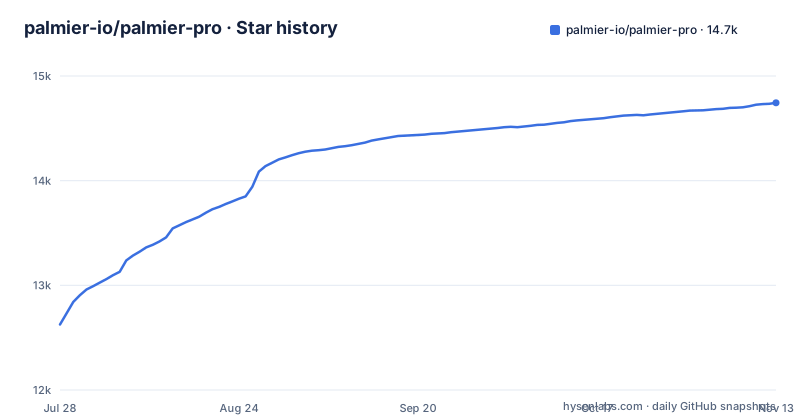
Star history
- palmier-io/palmier-pro14,744 ★ · +2,118
| Repository | 2026-07-28 | 2026-11-13 |
|---|---|---|
| palmier-io/palmier-pro | 12.6k | 14.7k |
2,118 Stars in the last 108 days, measured from the daily GitHub snapshot. Compare with other projects
Editorial analysis
GPLv3 ends at v0.7.6 and the pull request door is closed
The first thing this repository states, above the title and above the download button, is a licensing history. Releases through v0.7.6, and the source tree through a branch named `last-gpl-source`, were published under GPLv3. Every binary release after that is proprietary, its source is not published, and the terms live in a separate `BINARY_LICENSE.md`. The README's Contributing section adds that the repository no longer accepts code contributions.
That combination deserves more than a footnote. The source you can read belongs to a different, older program. v0.7.6 and the current line have diverged, so reading the published tree tells you about a build you can no longer install. The copyright reads Palmier, Inc. 2026, and the GPLv3 grant covers the source that stays in the repository rather than the application on your disk.
For an engineer the consequences are specific. You cannot patch a bug, you cannot build v0.12.1 from source, and you cannot read the code that handles your timeline footage. In a tool whose pitch is that an agent operates your edit, that is the sharpest limitation here.
macOS 26 Tahoe on Apple Silicon, and no other build exists
The requirement line is short and absolute: macOS 26 (Tahoe) or later on Apple Silicon, M series, only. One operating system generation, one processor family.
Nothing else ships. There is no Windows build, no Linux build and no mobile build, and the platform question is answered with a single sentence repeating the same constraint. That is a defensible choice for a Swift-native editor written from scratch, and the project names Premiere Pro as its benchmark, but it leaves the product with no path to any other platform.
The cost falls in two places. The floor is unusually high, since macOS 26 is required rather than merely a recent version, which excludes anything older outright. And you inherit Apple's release cadence: when the operating system moves, so does your editor, with no cross-platform build left working while a platform changes underneath it.
The MCP server is a loopback endpoint that dies with the window
The agent integration is one localhost HTTP endpoint. While the app is open, it exposes an MCP server at `http://127.0.0.1:19789/mcp`, and that address is the whole contract.
claude mcp add --transport http palmier-pro http://127.0.0.1:19789/mcpCodex takes the same URL with a different flag shape.
codex mcp add palmier-pro --url http://127.0.0.1:19789/mcpTwo properties follow from the address itself. It binds to the loopback interface, so the editor is not reachable from another machine, which is the right default for something holding an open project. And the server exists only while the application is running, so a headless automation run has to launch the GUI first. There is no command line mode and no daemon that will edit a timeline on its own, which means a scheduled job written against this endpoint fails to connect on a closed app rather than deferring the work.
Only two of the four clients get a one-click install
Setup is not symmetric across the supported clients. Claude Code and Codex get a command you type. Cursor and Claude Desktop get a menu item.
From inside the app, `Help` -> `MCP Instructions` -> `Install in Cursor` writes the configuration for you. Claude Desktop takes the same route, using an mcpb bundle shipped with the application for a one click Desktop Extension install.
Cursor also has a manual path, and it is a plain JSON file at `~/.cursor/mcp.json`.
{
  "mcpServers": {
    "palmier-pro": {
      "type": "http",
      "url": "http://127.0.0.1:19789/mcp"
    }
  }
}
That block is worth reading whichever client you use, because it shows the entire shape of the configuration: a server name, a transport type of `http`, and the loopback URL. Any MCP client that accepts an HTTP transport can be pointed at the same endpoint, so the manual file is also the reference for a client the project does not mention.
Seedance, Kling and Nano Banana Pro are named but not located
Generation happens inside the timeline rather than in a separate tool. The project names Seedance, Kling and Nano Banana Pro as the models it drives for video and images, and puts the control in the timeline editor itself instead of an export dialog.
Where the compute happens is not said. Three named providers are third party services, so an editor generating video through them is sending prompts and reference material off the machine, and there is no mention of a local model option, no API key instruction, no account section and no pricing anywhere in the documentation.
That silence is the practical issue for anyone evaluating this with client work. A timeline holds footage you may be contractually unable to upload, and no documented switch keeps generation on your own hardware. The question to put to the vendor is therefore narrow and answerable: is there a local path, and if there is not, what leaves the machine during a generate.
A Plugins directory with no documented plugin interface
The repository layout describes a large application: `Sources/`, `Tests/`, `Metal/` for GPU work, `models/`, `Plugins/`, `assets/`, `scripts/` and `docs/`, next to `Package.swift`, `Package.resolved` and a `.swift-version` file pinning the compiler. There is an appcast feed, and three files aimed at coding agents: `AGENTS.md`, `CLAUDE.md` and a `.cursor/` directory.
None of that is explained. `Plugins/` is the one that raises a question immediately, because a benchmark named Premiere Pro is defined by its plugin ecosystem, and this repository describes no interface, no manifest format and no loading mechanism. It may equally be an internal extension point for the generative features rather than anything user facing.
So `Plugins/` cannot be planned around in either direction. An editor whose stated benchmark is defined by third party plugins, shipping a directory with that name and no documentation, is not one you can extend.
Three releases in September, delivered only as binaries
The cadence is fast. v0.11.0 shipped on 2026-10-05, v0.12.0 on 2026-10-30 and v0.12.1 on 2026-11-02, three tags inside a month, and the last push to the repository was on 2026-11-02. It is not archived.
`appcast.xml` in the repository root is how those updates reach a user. A feed manifest plus binary hosting in the same place tells you the update path runs through the vendor's own server rather than through anything you assemble, and with the current source unpublished there is no build to compare the result against.
Two consequences follow. An editor moving at three releases a month will change behaviour underneath you, which argues for letting the updater run instead of pinning a version. And a breaking change in a timeline application is expensive to diagnose here, because you cannot read the diff and the code that produced the new behaviour is not published.
Premiere Pro is the stated benchmark and nothing is compared
The project names its benchmark once and moves on: Premiere Pro is called the north star, with the project's own contribution described as a take on integrating AI into that workflow. Beyond that sentence there is no comparison table, no feature matrix and no alternative editor named.
For someone choosing an editor, that absence is the gap. You cannot work out from this repository whether the AI generation covers a beat you need, whether the MCP surface can express the edits you want an agent to make, or what the timeline model does to project files you already have. What you get is a positioning claim and a menu path.
The comparison is therefore one you have to run yourself: install it on an Apple Silicon Mac running macOS 26, point one MCP client at the loopback endpoint, and find out whether an agent can place a real cut on a timeline you care about before you plan a project around it.
Editorial conclusion
Palmier Pro fits an editor user on an Apple Silicon Mac who wants an agent driving a real timeline and is willing to run a closed binary. Do not adopt it if you need to audit, patch, build or redistribute the code, if any part of the project must run outside macOS 26 on Apple Silicon, or if your footage cannot leave the machine during a generate. Verify first what the MCP endpoint will let an agent do on a timeline you care about, because v0.7.6 is the last source you can read and it is not the version you would install.
Frequently asked questions
Is Palmier Pro only for Mac?
Yes. It requires macOS 26 (Tahoe) or later on Apple Silicon, M series, and the project states that this is the only platform it supports. There is no Windows, Linux or mobile build.
Is Palmier Pro available for Windows?
No. The stated requirement is macOS 26 (Tahoe) or later on Apple Silicon only. Current releases are distributed as a macOS disk image, and the repository hosts no Windows build.
What is Palmier Pro?
A macOS video editor written from scratch in Swift, with built-in generative AI and an MCP server so agents can create and edit directly on the timeline. It connects to Claude, Codex or Cursor through MCP, and also ships an in-app agent that works on the same project.
How do I use Palmier Pro with an agent?
Open the app, then connect an external agent through MCP or use the in-app one. While the application is running it exposes the MCP server at http://127.0.0.1:19789/mcp, which is the address the client commands point at.
What is a good Palmier Pro alternative?
The project names Adobe Premiere Pro as its benchmark, calling it the north star and describing its own work as a take on integrating AI into that workflow. It names no other alternative editor and publishes no feature comparison.
Official sources
Add this badge to your README
If you maintain this project, the badge below links readers to this analysis and shows its maintenance status from the daily GitHub snapshot. Paste the markdown into your README; add ?metric=license or ?metric=stars to the image URL for a different field.

[](https://hysenlabs.com/projects/palmier-io-palmier-pro)Star history chart for your README
[](https://hysenlabs.com/projects/palmier-io-palmier-pro)Was this useful?