nvf: a modular Neovim framework for Nix users
Modular, extensible and distro-agnostic Neovim configuration framework for Nix/NixOS
At a glance
- What is it?
- nvf configures Neovim through Nix and supports standalone, NixOS, and Home Manager installation paths. It suits reproducible editor setups, but its Nix dependency is a substantial constraint.
- Who is it for?
- Adopt nvf if you already use Nix and want Neovim configuration to remain declarative, reproducible, and extensible through modules. Do not choose it merely because you want a quick standalone editor configuration.
- Can I use it commercially?
- Yes. MIT is a permissive licence: you can use, modify and sell software built on it, as long as you keep its copyright and licence notices.
- Is it still maintained?
- Yes. The repository received new commits within the last day.
- What is it written in?
- Mainly Nix, according to GitHub's language statistics.
Answers come from the project's GitHub data, last synced on November 7, 2026, and from our analysis. They are not legal advice.
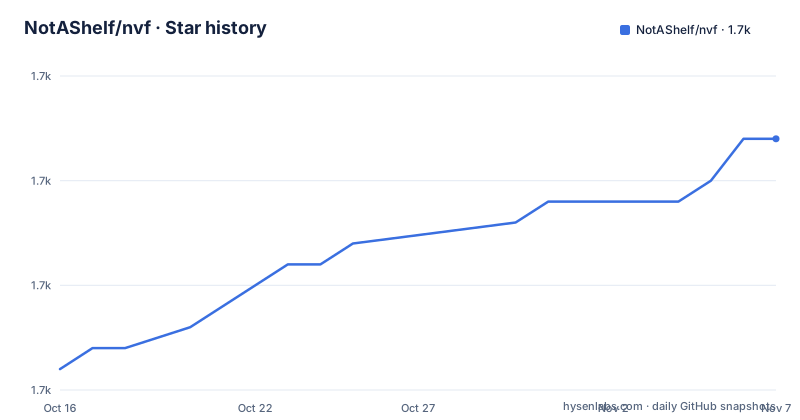
Star history
- NotAShelf/nvf1,667 ★ · +11
| Repository | 2026-10-16 | 2026-11-07 |
|---|---|---|
| NotAShelf/nvf | 1.7k | 1.7k |
11 Stars in the last 22 days, measured from the daily GitHub snapshot. Compare with other projects
Editorial analysis
Why nvf exists for Nix-managed Neovim setups
nvf addresses editor configuration as part of a Nix-managed system rather than as a collection of files copied into a Neovim directory. The README describes it as a modular, configurable, and extensible Neovim configuration written in Nix. Its target users are people who already depend on Nix, particularly NixOS users and Home Manager users who want their editor to participate in the same declarative configuration model.
The framework offers standalone, NixOS module, and Home Manager module installation options. That range matters because the same configuration framework can serve a user managing an entire system and a user who imports it into an existing Home Manager configuration. It also permits Lua configuration when a fully Nix-based setup is not preferred. This is a meaningful boundary for adoption: nvf does not ask every adopter to abandon Lua, but its main model remains centered on Nix.
Reproducibility is the central operational claim. Because nvf depends only on the Nix store, its configuration can be evaluated as code and represented by a pinned input. The README also supports plugins from inputs, `npins`, and `nixpkgs`. This differs from treating plugin acquisition as a separate concern handled by a plugin manager. It also means users need a working Nix environment and familiarity with Nix evaluation to debug module options and dependencies.
How nvf turns Nix options into a Neovim environment
The visible architecture is organized around the Nix module system. Top-level repository entries include `flake.nix`, `modules/`, `lib/`, `configuration.nix`, `default.nix`, and `npins/`. Based on that layout, `flake/` and `modules/` contain project configuration logic, while `lib/` provides reusable implementation code. The README states that configuration can be customized through the Nix module system and that users can add modules and plugins without waiting for an official module.
Configuration ordering is handled with directed acyclic graphs, or DAGs. This is more than a list of files evaluated from top to bottom. It lets configuration fragments declare their dependencies in a deterministic structure, which matters when plugins, generated settings, and modules need a defined relationship. The practical benefit is predictability. The corresponding cost is that a configuration error can occur during Nix evaluation or dependency ordering before Neovim becomes the visible part of the problem.
The framework also supports lazy loading for internal and external plugins. Lazy loading is useful for keeping plugin work out of startup paths, but the README does not document configuration details, runtime dependencies, or failure diagnostics for it. Likewise, nvf's optional Lua support is stated as a feature, but the README does not show how Lua and Nix configuration are combined. Those details should be checked in the manual before selecting nvf for a configuration that depends on mixed-language layering.
The distinction between demo packages and installed configuration is important. The README says the repository exposes a minimal `nix` package and a larger `maximal` package, but nvf does not ship a default configuration when installed through NixOS, Home Manager, or the standalone method. In other words, the demonstration packages illustrate the framework. They do not imply that installation automatically selects the demo.
Running nvf's default and maximal demo packages
The shortest documented first use is the repository's default package. It gives a prospective user a way to inspect nvf's base configuration before committing to a module setup.
Run the default package with:
$ nix run github:notashelf/nvfThis evaluates the flake's default `nix` package and launches the demo configuration. The README says that package is minimal and includes limited language support and utilities.
For broader built-in module coverage, use the `maximal` output:
$ nix run github:notashelf/nvf#maximalThe `maximal` configuration has large language coverage and is described as quite large, so the README warns that it might take a while to build. After either command finishes evaluating and building, Neovim should open with the selected demonstration configuration. These are evaluation shortcuts, not complete installation guides.
The README also says similar instructions apply to `nix profile install`, but it recommends using the module system instead. The README does not provide a complete standalone installation command, NixOS option set, or Home Manager import example. Those installation steps must come from the linked nvf manual. A reader should therefore treat the two commands above as a first evaluation of the project, not as a finished migration from an existing Neovim setup.
Standalone, NixOS, and Home Manager integration paths
nvf deliberately offers three installation models, but the README links to the manual rather than showing their full configuration. Standalone installation is positioned as an option for users who want nvf outside the NixOS or Home Manager module path. The NixOS module is intended to integrate configuration into a NixOS system declaration. The Home Manager module serves users who manage their home environment through Home Manager.
These paths should not be treated as interchangeable. A module-based setup inherits the option model and evaluation behavior of the host configuration system, while standalone installation needs its own project definition and activation path. The README does not document migration between the three methods, removal procedures, backup behavior, or how existing Neovim configuration files are reconciled. It also does not identify an explicit rollback procedure. Those are practical adoption questions rather than details that can be inferred from the existence of modules.
The repository's `flake.nix`, `flake.lock`, and `npins/` entries indicate that Flake-based dependency management is part of the distribution model. However, the README does not show the exact module import syntax or option names. It would be unsafe to invent a Home Manager module or NixOS declaration. Users should consult the nvf manual for the path matching their setup and confirm how their existing editor state is preserved before applying it.
The stated `nix profile install` route offers a more direct installation shape, but the README still recommends the module system. That recommendation indicates a design preference, not merely a command-line convenience. It reflects nvf's main value as a declarative framework integrated with an existing Nix-managed environment.
nvf's limitations compared with a Lua-first Neovim setup
The clearest limitation is the cost of adopting a second configuration language and tooling chain. nvf is designed around Nix, so a user who does not already understand Flakes, Nix expressions, module options, DAG ordering, or Nix store dependencies has more to learn before editing the configuration. A conventional Lua-first Neovim setup starts from Neovim's own configuration conventions and can keep plugin declarations, Lua modules, and runtime behavior in one ecosystem. The README acknowledges this alternative by allowing users who prefer Lua configuration to bring it into nvf.
The distinction is not that Lua is universally simpler. It is that a Lua-first setup does not require Nix to express editor composition, while nvf does. In exchange for the extra Nix layer, nvf provides declarative composition, Nix-managed inputs, standalone packaging, and integration options for NixOS and Home Manager. Projects that value those properties can justify the added conceptual surface.
There are also unresolved limits in the documented scope. The README does not specify the supported Neovim version, editor start-time behavior, plugin loading order defaults, conflict handling, or compatibility with non-Nix operating systems. Its portability claim says that nvf works on all platforms because it depends on the Nix store, but it does not enumerate them. Users requiring a particular system-level integration should verify those details in the manual and repository documentation.
The demo packages can also create a misleading first impression. Seeing `maximal` open quickly or slowly says little about an empty installation because the README explicitly says there is no default configuration shipped through the three installation methods. Evaluation should focus on the module options and plugin sources that will appear in the user's own configuration.
Maintenance signals and the cost of following nvf releases
The repository is not archived. Its last push was on 2026-10-16. The listed releases are `v26.07` on 2026-07-26, `v0.8` on 2025-12-12, and `v0.7` on 2024-12-04. This release history shows a versioned project with a more recent `v26.07` release and an earlier `v0.x` sequence. The README links to separate release notes for breaking and non-breaking changes.
Upgrade work is therefore part of adopting nvf. A user must track a framework whose configuration is expressed through a Nix module system, read release notes, and account for changes in module options, plugin inputs, and package evaluation. The documentation does not claim that upgrades are automatic or that breaking changes are absent. Its statement that changes will be communicated in release notes establishes a source to consult, not a guarantee of migration cost.
The project uses the MIT license according to the repository metadata. That identifies the license associated with the code, but this review does not interpret legal obligations. Users still need to review the repository `LICENSE` file themselves, especially when combining nvf with plugins, modules, or configuration fragments that have separate licenses.
For operational upkeep, the relevant distinction is between receiving updates and validating them. The last-push date indicates repository activity, while actual upgrade effort depends on the user's pinned input, Home Manager or NixOS configuration, plugin inputs, and release notes. A reproducible setup helps create a defined starting point, but reproducing it after a change still requires evaluation and inspection.
Editorial conclusion
Adopt nvf if you already use Nix and want Neovim configuration to remain declarative, reproducible, and extensible through modules. Do not choose it merely because you want a quick standalone editor configuration. Verify first that your intended installation path is documented for your environment and that you are prepared to maintain the Nix expression, plugin inputs, module ordering, and release upgrades. For nvf, the decisive first check is whether `nix run github:notashelf/nvf` works in your existing Nix setup.
Frequently asked questions
How do I run the default nvf configuration?
The README gives `nix run github:notashelf/nvf` for the default package. It describes that package as minimal, with limited language support and various utilities.
How do I try the larger nvf configuration?
Use `nix run github:notashelf/nvf#maximal`. The README warns that the `maximal` configuration is large, has broad language coverage, and might take a while to build.
Does installing nvf automatically give me a default Neovim configuration?
No. The README says the `nix` and `maximal` outputs are demo packages, and that nvf does not ship a default configuration when installed through NixOS, Home Manager, or the standalone method.
Can nvf be used with Home Manager?
Yes. The README lists a Home Manager module as an installation option. It does not include the exact import or option syntax, so the linked manual is the documented source for those details.
Does nvf require Lua for every configuration change?
No. The README says nvf can be customized through the Nix module system and says users who are not comfortable with a full Nix configuration can bring their Lua configuration instead.
Official sources
Add this badge to your README
If you maintain this project, the badge below links readers to this analysis and shows its maintenance status from the daily GitHub snapshot. Paste the markdown into your README; add ?metric=license or ?metric=stars to the image URL for a different field.

[](https://hysenlabs.com/projects/notashelf-nvf)Star history chart for your README
[](https://hysenlabs.com/projects/notashelf-nvf)Was this useful?