nx-examples: a read-mostly tour of an Nx monorepo
Example repo for Nx workspace
At a glance
- What is it?
- nx-examples is the reference workspace the Nx team keeps on GitHub to show what a polyglot monorepo looks like when Angular, React, Nest, Express and Node live side by side. It is a teaching artifact, not a template to fork blindly, and the value is in reading how the pieces are wired rather than in shipping its apps.
- Who is it for?
- nx-examples earns a place in a learning setup, either as a sandbox to try nx g, nx affected and nx dep-graph against real projects, or as a reference when you are wiring an existing codebase into Nx and want to see how apps, libs, jest and eslint configs are meant to sit together. It is not a production starter, since the package name is nx-example, the version is 0.0.0 and the manifest is marked private.
- Can I use it commercially?
- Not without permission. GitHub finds no licence file in the repository, and without a licence all rights are reserved by default: you may read the code but not reuse it. Check the README, or ask the authors, before using it.
- Is it still maintained?
- Yes. The repository last received commits 16 days ago.
- What is it written in?
- Mainly TypeScript, according to GitHub's language statistics.
Answers come from the project's GitHub data, last synced on November 6, 2026, and from our analysis. They are not legal advice.
Star history
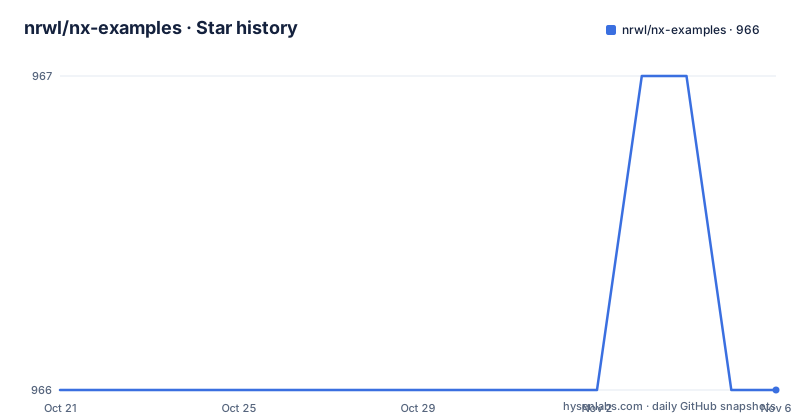
- nrwl/nx-examples966 ★ · +0
| Repository | 2026-10-21 | 2026-11-06 |
|---|---|---|
| nrwl/nx-examples | 966 | 966 |
0 Stars in the last 16 days, measured from the daily GitHub snapshot. Compare with other projects
Editorial analysis
One workspace holding Angular, React, Nest and Express
The repository exists so that Nx can be demonstrated rather than described. Its own documentation states plainly that the project was generated using Nx, and then it shows the shape of the result: several applications and libraries living in a single workspace, each reachable through the same nx command line.
The plugin list in the project notes is the clearest statement of scope. React, Web for framework-less front ends, Angular, Nest, Express and Node are the core plugins, each installed as a dev dependency, and a long tail of community plugins sits on top of that list. The React plugin, for example, is added like this:
npm install --save-dev @nx/reactThe stated purpose of those plugins is to add capabilities for developing different types of applications and tools: generating applications and libraries, plus the devtools to test and build projects.
What makes this different from a plain npm workspaces setup is the plugin model. Frameworks are not just dependencies, they are Nx plugins with generators attached, so a new React app and a new Nest service are created by the same kind of command. The framework list also tells you what the demo is built to show: a full stack application with a preferred framework, a shared project dependency graph, and one command surface for both frontend and backend developers.
The repository also carries a .nx directory, CLAUDE.md, mise.toml, tools/ and a .claude/ directory, which tells you this is an actively worked example rather than a frozen sample.
The package.json scripts are the real API
Most people meet an Nx workspace by reading the package.json, and this one is unusually readable because it maps every workflow to a named script. The scripts block defines start as nx serve, build as nx build, test as nx test, lint as a workspace-lint call chained with nx lint, and e2e as nx e2e.
Then there is a whole affected family: affected:apps, affected:libs, affected:build, affected:e2e, affected:test, affected:lint, affected:dep-graph, and a bare affected that runs nx affected. These exist because the interesting Nx behaviour is not running one project, it is running only the projects a change touched.
Two more scripts are worth noting for day-to-day work. format points at nx format:write, with format:check as the non-writing counterpart, which is the one to wire into CI so a formatting run does not silently rewrite files. update runs nx migrate latest, which is the documented path for moving the workspace to a newer Nx version rather than editing versions by hand.
The dependency list pins concrete versions, with Angular packages at 21.2.0, React at 18.3.1, the Nx Angular plugin at 24.0.0-beta.4, and ngrx packages at 21.0.0 for state management. The workspace uses yarn, with a yarn.lock at the root and a .yarnrc.yml.
Generating a React app, a library and a component
The project notes walk the generation path in order. An application is created with the generator below, and the note under it says you can use any of the other listed plugins to generate applications instead:
nx g @nx/react:app my-appA library uses the same shape of command with a different generator, and the same substitution applies:
nx g @nx/react:lib my-libThe library detail is the one that shows how Nx differs from a scripts folder. Libraries are described as shareable across libraries and applications, and the documentation notes they can be imported from @nx-example/mylib. That is the workspace-scoped import path, which Nx sets up so apps and libraries can import the library by name.
Within an application, code scaffolding works the same way. A component is generated with the command below, where the project flag says which application the component belongs to:
nx g @nx/react:component my-component --project=my-appThe generator name carries the plugin prefix, so the same shape of command works across frameworks once you swap the prefix.
The repository layout backs this up: apps/ and libs/ are the two top level source directories, and the workspaces field in package.json lists apps/*, libs/*, libs/*/* and libs/*/*/*, which is how deeply nested library groups are declared.
Running, building and testing a single project
Each workflow is a subcommand with the project name as its argument, and the documentation is direct about the outcome of each one.
The development server is started with this command, and the app is then at http://localhost:4200/:
nx serve my-appThe documentation states that the app reloads automatically when source files change, so the dev loop is a single long-running command rather than a script you re-run.
Building is done with the command below, and the artifacts land in the dist/ directory. A production build adds the --prod flag. Unit tests run through Jest with nx test my-app, and end-to-end tests run through Cypress with nx e2e my-app:
nx build my-app
nx test my-app
nx e2e my-app
To see the shape of the workspace there is nx dep-graph, which draws the dependencies between projects. That command is the one to reach for when you want to know why a change to a library triggered a rebuild of four apps, because it shows the project graph rather than the file tree.
The configuration behind these commands sits in the root files: jest.config.ts and jest.preset.js for the unit test layer, tsconfig.json and tsconfig.base.json for TypeScript, .eslintrc.json with .eslintignore for linting, .prettierrc and .prettierignore for formatting, and nx.json as the workspace configuration.
Affected targets are where Nx pays off
The project notes list the affected commands separately from the per-project ones, and the distinction is the reason to look at this repository rather than at a single app.
nx affected:test executes the unit tests affected by a change. nx affected:e2e does the same for end-to-end tests. The package.json adds affected:build, affected:apps, affected:libs, affected:lint, affected:dep-graph and the catch-all affected command that runs nx affected.
For a monorepo with many apps, this is the difference between a pull request that takes a minute and one that takes half an hour, and it works because Nx maintains a project dependency graph rather than guessing from the file system. When a shared library changes, the graph tells Nx which apps and which of their tests are downstream.
Two details are worth flagging. First, affected is only as good as the declared dependencies, so a workspace with sloppy import boundaries will produce a wrong affected set no matter how good the graph is. Second, the affected commands need a base reference to compare against, typically the target branch, and the documentation does not say how this particular repository configures that. The upstream Nx documentation covers it.
Nx Cloud is the hosted companion described in the documentation, which pairs with Nx to enable building and testing more rapidly, with a stated factor of up to 10 times, by sharing the computation cache between machines and CI runs. Read that as a vendor claim about their own service, not as a measured outcome of this repository.
Why a demo workspace is not a starter template
The most common mistake with a repository like this is to treat it as a template to copy. The metadata pushes against that. The package name is nx-example, the version is 0.0.0, and the manifest is marked private. There are no GitHub releases for this repository, so there is no version history to pin against, and the last push was on 2026-10-19, which tells you the code moves constantly as the Nx team reshapes it.
The dependency set also argues against forking. This workspace installs Angular, React, Express, Nest, Node and ngrx. A team that only ships one of those inherits the whole install and the whole upgrade surface. The package.json declares the licence as MIT even though the repository metadata does not list one, so if you copy code out of it, read the LICENSE file rather than relying on the manifest field.
What the workspace is genuinely good for is reading. It shows where nx.json, jest.config.ts, .eslintrc.json and tsconfig.base.json belong, how apps and libs are laid out, and how the plugin model expresses framework choice. It is also a safe sandbox for trying nx g, nx affected and nx dep-graph without disturbing a codebase that matters.
The gap to be aware of: the documentation links out to nx.dev for the interactive tutorial and the documentation, and it does not document how this particular workspace configures caching, task targets or its CI pipeline, even though a .circleci directory exists at the root.
Editorial conclusion
nx-examples earns a place in a learning setup, either as a sandbox to try nx g, nx affected and nx dep-graph against real projects, or as a reference when you are wiring an existing codebase into Nx and want to see how apps, libs, jest and eslint configs are meant to sit together. It is not a production starter, since the package name is nx-example, the version is 0.0.0 and the manifest is marked private. Check first that the plugin set in package.json matches the framework you actually use, because this workspace installs Angular and React and the Nx plugins for both, and read the nx.json file before copying any config from it.
Frequently asked questions
What is nx-examples used for?
It is the example repository for an Nx workspace, generated using Nx, used to demonstrate generating applications and libraries with the nx command line and running builds and tests for several frameworks in one workspace.
How do I generate a React application in an Nx workspace?
The documentation gives the command nx g @nx/react:app my-app. The same form works for other plugins, for example nx g @nx/react:lib my-lib for a library and nx g @nx/react:component my-component --project=my-app for a component.
How do I run only the tests affected by my change in nx-examples?
Use nx affected:test for unit tests and nx affected:e2e for end-to-end tests. The package.json also defines affected:build, affected:apps, affected:libs, affected:lint and affected:dep-graph scripts.
Which frameworks does the nx-examples workspace combine?
The documentation lists React, Web, Angular, Nest, Express and Node as the core plugins, each installed with npm install --save-dev, and the package.json pins Angular 21.2.0, React 18.3.1 and ngrx 21.0.0.
How do I see how the projects in nx-examples depend on each other?
Run nx dep-graph, which the documentation describes as showing a diagram of the dependencies of your projects. The same script exists in the package.json as dep-graph, with an affected:dep-graph variant.
Official sources
Add this badge to your README
If you maintain this project, the badge below links readers to this analysis and shows its maintenance status from the daily GitHub snapshot. Paste the markdown into your README; add ?metric=license or ?metric=stars to the image URL for a different field.

[](https://hysenlabs.com/projects/nrwl-nx-examples)Star history chart for your README
[](https://hysenlabs.com/projects/nrwl-nx-examples)Was this useful?