NsCDE: CDE's look running on FVWM, and a maintainer away from returning
Modern and functional CDE desktop based on FVWM
At a glance
- What is it?
- NsCDE is a Common Desktop Environment theme rebuilt as an FVWM configuration with Python and shell drivers, a theme generator covering Motif through Qt5, and CDE backdrops and palettes. The author has said he will return in September after three years away, during which the Firefox and Thunderbird themes stopped matching cleanly.
- Who is it for?
- Adopt NsCDE if you want the CDE look on a modern X11 system and you are comfortable editing theme coloursets and Python drivers yourself, because the project is a configuration environment rather than a program and its value is entirely in how willing you are to tune it. Do not adopt it expecting a supported distribution, since documentation lives in share/doc/NsCDE and a wiki rather than in a manual anyone maintains on a schedule.
- Can I use it commercially?
- Check first. The repository uses a licence we do not classify automatically, so read its LICENSE file before any commercial use.
- Is it still maintained?
- Yes. The repository last received commits 10 days ago.
- What is it written in?
- Mainly CSS, according to GitHub's language statistics.
Answers come from the project's GitHub data, last synced on October 23, 2026, and from our analysis. They are not legal advice.
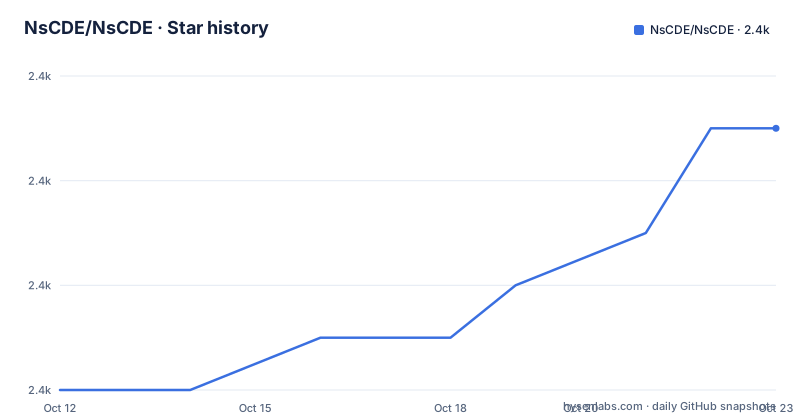
Star history
- NsCDE/NsCDE2,355 ★ · +5
| Repository | 2026-10-12 | 2026-10-23 |
|---|---|---|
| NsCDE/NsCDE | 2.4k | 2.4k |
5 Stars in the last 11 days, measured from the daily GitHub snapshot. Compare with other projects
Editorial analysis
What NsCDE is: a heavyweight FVWM theme with drivers
The README is unusually direct about the architecture, and it uses blunt phrasing throughout: NsCDE is a heavy FVWM user, a heavyweight FVWM theme on steroids, and largely a wrapper around the window manager, sort of like a heavyweight theme.
Strip the emphasis away and the composition is clear. It is a set of FVWM applications and configurations, enriched with Python and shell background drivers, a handful of additional free software tools, custom FVWM applications, and a lot of configuration. The author classifies the result as a lightweight hybrid desktop environment.
FVWM is the main driver, and the README names why: its customization options, its GUI script engine, colorsets, and modules. FVWM3 is supported as well, which matters for current installations where the original fvwm is not what ships.
The visual target is CDE, the Common Desktop Environment of commercial UNIX systems in the nineties. NsCDE supports CDE backdrops and palettes by mapping them onto FVWM colorsets, and it carries some original CDE data such as icons, palettes and backdrops.
One more capability is worth flagging because it changes what kind of project this is: NsCDE can be dropped into an existing desktop environment as an FVWM window manager wrapper for session handling and extra desktop functionality. That is a genuinely different deployment mode from running it as your whole session.
The theme generator, and why six toolkits matter
A retro look is easy; making modern applications match it is the hard part, and that is what the theme generator is for. The README says it generates themes for Xt, Xaw, Motif, GTK2, GTK3, Qt4 and Qt5.
Read that list as a compatibility statement with a date attached. Xt and Xaw and Motif are the widget toolkits of the era NsCDE imitates, which is obvious. GTK2 and GTK3 cover the two generations of free desktop toolkits. Qt4 and Qt5 are there for commercial applications, and Qt4's presence is the tell: a toolkit from the 2010s being supported means the generator has been maintained across a decade of application churn, or carried forward without being re-tested.
The unifying idea is that the user gets one retro visual experience across almost all X11 applications, rather than a retro panel sitting next to applications that ignore it. That is the whole argument for a theme generator rather than a wallpaper.
The README also lists the polish applied over the original era: XFT font rendering, unicode, dynamic changes, rich keyboard and mouse bindings, desk pages, and rich menus. Those are the features that separate NsCDE from running a stock CDE look, and they are the reason the author frames the project as a blend of usability and compatibility rather than a nostalgia reproduction.
Why not just run CDE, which is open source now
The README anticipates the obvious objection and answers it directly, which makes this the most useful section in the document.
The answer has three parts. CDE is a product from the nineties based on Motif, and a long time has passed since then, so it does not benefit from a modern X11 stack. Specifically, the author points out that in CDE there is really no XFT font rendering and no immediate dynamic application changes.
Both of those are experience-level defects rather than cosmetics. Without XFT, fonts are bitmap-era and scale badly. Without dynamic application changes, a running program that changes its own colours does not update, which breaks the illusion for anything that themes itself at runtime.
The third part is about the window manager. The author considers dtwm, CDE's window manager, inferior to FVWM and to some third party solutions that can be paired with it. That is a subjective judgement stated as fact, but it is the load-bearing claim: replacing dtwm with FVWM is what allows the modern behaviour the first two points lack.
So the project is best described as CDE's data and appearance, driven by a window manager that has kept pace. That also explains why it needs Python and shell helpers: FVWM gives you the framework, and the CDE feel has to be assembled on top.
Building and installing: autotools, and documentation in the tree
The repository layout is traditional Unix build tooling. There is configure.ac with aclocal.m4 and Makefile.am, an autogen.sh for bootstrapping, a generated configure and Makefile.in already committed, and a Makefile.am at the top level for the whole project.
The source tree is divided by role: bin/ for installed programs, src/ for sources, lib/ for libraries, data/ for data files, nscde_tools/ for the project's own tools, patches/ for patches applied to other components, po/ for translations, pkg/ and xdg/ for packaging metadata, doc/ for documentation, ac-aux/ for autotools support files, and .github/ for the workflow configuration.
Documentation is not in the README. The README points at share/doc/NsCDE/* for the full documentation and at a wiki page for the FAQ, and adds screenshots, two Imgur galleries, and two YouTube sets: twelve commented screen capture videos, plus a newer set of seven describing features from the last two years and NsCDE 2.X.
The author also pre-empts criticism of the writing in a line that has charm: he apologises for bad English in the docs and proposes a rand() function inserting the, a, an would be more accurate. For a project whose documentation is a barrier to adoption, that honesty is worth something.
There is also a LICENSE file, a COPYING file, a ChangeLog, a ReleaseNotes.txt, a TODO and an INSTALL.md, which is a mature set of project files for something that is mostly configuration.
Who the author says this is for, and who it is not
The README addresses its audience several times, and the message is consistent enough to quote as positioning.
It says NsCDE is designed for UNIX oriented users and generally technical people, and not for general public use or for introducing beginners to Linux. Later it says older and mature system administrators, programmers and generally people with a Unix background are will be attracted to it, that beginners are a poor fit, and that it is intended for people who do not like modern hypes, meaning interfaces that try to mimic Mac and Windows and reimplement their ideas poorly for non-technical users.
That is an unusually direct statement of who to keep out, and it is useful information rather than modesty. A desktop environment is the layer a user touches before anything else, and a configuration-heavy environment built on colorsets is exactly the kind of thing that frustrates someone who wants a login screen and a window.
The origin story also explains the shape of the project. The author created the environment for his own use years ago as a patchwork of ad-hoc hacks and senseless configurations with dysfunctional menus, then spent months rewriting it into something consistent enough to publish. Everything in the current tree, including the naming conventions that are hard to parse at first glance, comes from one person's working setup.
The stated main goal is to revive the look and feel of CDE from the nineties and the first decade of the twenty-first century, but with a more polished interface, and to be a real working environment rather than an eye candy toy.
The state of the project, in the author's own words
The first thing in the README is a notice addressed to everyone, and it is the most current information in the document.
It says the author has been busy for the past three years and that many asked if the project is alive. It says there is a plan to return in autumn. And it gives two concrete reasons for the delay: Firefox and Thunderbird CSS are too far forward now, and the themes for them, which were in a mess anyway, no longer match cleanly. It also notes there are things to fix and to commit, and closes with September and a promise to return.
The version history explains the shape of that three-year gap. The numbered versions run 2.1 in March 2022, 2.2 in July 2022, and 2.3 in June 2023, while the repository itself was pushed to on 2026-07-05. So there have been commits after 2.3 without a numbered version following them.
The Firefox and Thunderbird point deserves emphasis because it is not about the author being busy. It is a technical dependency moving underneath the project. Browser and mail client UIs are among the most frequently redesigned applications on a Linux desktop, and a theme that matched their CSS a few years ago no longer does. Fixing that is not a matter of catching up on commits.
For anyone evaluating this, the practical question is whether you want the CDE look badly enough to maintain the browser and mail themes yourself. Everything else in the tree is FVWM configuration that still works; those two applications are the moving parts.
Alternatives, and when nothing here fits
Three comparison points are worth weighing, and none of them is another theme.
The first is the original CDE itself, now open source. It gives you the authentic result with none of the porting work, and the README's objections to it are about Motif-era limitations rather than about appearance. If your tolerance for a non-XFT, non-modern window manager is high, the original is the more honest choice.
The second is another FVWM-based environment. FVWM has a long history of elaborate themes and configurations, and the difference between them is usually taste rather than architecture. NsCDE's specific claim is the CDE data it carries: backdrops, palettes and icons from the original, mapped into FVWM colorsets. If what you want is retro Unix generally, this is one option among several; if you want CDE specifically, it is the option.
The third is a modern desktop environment, and here the README is openly dismissive, arguing that interfaces mimicking Mac and Windows reimplement those ideas poorly. That argument is a matter of taste, and readers who prefer GNOME or KDE will not be persuaded by it. The practical question is whether you want a desktop you configure or a desktop that configures itself.
One boundary is absolute: this is an X11 project. Nothing here applies to Wayland, and a window manager wrapper plus colorsets is an architecture that has no direct equivalent in a compositor-based stack. That is not a criticism so much as a reminder of how specific this project is to a particular era of Unix.
Editorial conclusion
Adopt NsCDE if you want the CDE look on a modern X11 system and you are comfortable editing theme coloursets and Python drivers yourself, because the project is a configuration environment rather than a program and its value is entirely in how willing you are to tune it. Do not adopt it expecting a supported distribution, since documentation lives in share/doc/NsCDE and a wiki rather than in a manual anyone maintains on a schedule. Verify four things first. Read the notice at the top of the README before anything else, because it states the author was away for three years, plans to return in September, and says the Firefox and Thunderbird CSS had moved too far forward for the themes to match cleanly. Confirm your toolkit coverage, since the theme generator names Xt, Xaw, Motif, GTK2, GTK3, Qt4 and Qt5, and Qt4 in that list is a decade old. Decide whether FVWM or FVWM3 is your window manager, since the README supports both and everything else is configuration layered on top. And check the build, which is autotools with autogen.sh and configure rather than a modern package recipe. Start by reading the FAQ in the wiki and the documents under share/doc/NsCDE before you install anything, because the documentation is the actual product here.
Frequently asked questions
What is NsCDE?
A retro UNIX desktop environment that mimics the CDE look using FVWM, built from FVWM configurations and applications, Python and shell background drivers, and original CDE backdrops, palettes and icons. FVWM3 is supported as well.
Which application toolkits does NsCDE theme?
The theme generator covers Xt, Xaw, Motif, GTK2, GTK3, Qt4 and Qt5, mapping CDE backdrops and palettes onto FVWM colorsets so applications from several toolkits share one look.
Why would I use NsCDE instead of the original CDE?
The README argues that CDE is a nineties Motif-based product with no XFT font rendering and no immediate dynamic application changes, and that its window manager dtwm is inferior to FVWM. NsCDE keeps the look and changes the driver.
Is NsCDE actively developed?
The README opens with a notice saying the author was busy for three years, plans to return in September, and that Firefox and Thunderbird CSS had moved too far forward for the themes to match cleanly. Versions 2.1, 2.2 and 2.3 are dated 2022 to 2023.
Where is the NsCDE documentation?
Under share/doc/NsCDE in the source tree, with a FAQ in the project wiki, plus screenshot galleries and two sets of YouTube screen capture videos covering NsCDE 2.X features.
Official sources
Add this badge to your README
If you maintain this project, the badge below links readers to this analysis and shows its maintenance status from the daily GitHub snapshot. Paste the markdown into your README; add ?metric=license or ?metric=stars to the image URL for a different field.

[](https://hysenlabs.com/projects/nscde-nscde)Star history chart for your README
[](https://hysenlabs.com/projects/nscde-nscde)Was this useful?