flake-utils for building multi-system Nix flakes
Pure Nix flake utility functions [maintainer=@zimbatm]
At a glance
- What is it?
- numtide/flake-utils provides pure Nix helpers for generating output attributes across systems, merging subflakes, flattening derivations, and constructing simple flakes. It suits flake authors who want repeatable output structure without depending directly on nixpkgs inside the utility library.
- Who is it for?
- Adopt flake-utils when a flake has repeated per-system output structure and its convenience helpers match your layout. Do not adopt it for a small, unusual flake whose outputs do not fit those conventions.
- Can I use it commercially?
- Yes. MIT is a permissive licence: you can use, modify and sell software built on it, as long as you keep its copyright and licence notices.
- Is it still maintained?
- Yes. The repository last received commits 25 days ago.
- What is it written in?
- Mainly Nix, according to GitHub's language statistics.
Answers come from the project's GitHub data, last synced on November 6, 2026, and from our analysis. They are not legal advice.
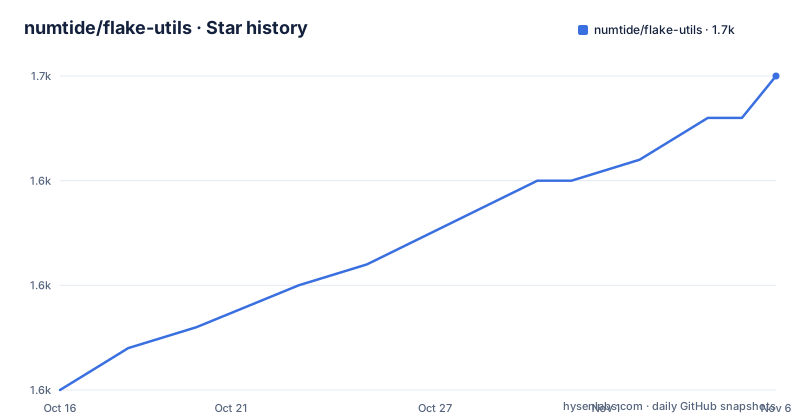
Star history
- numtide/flake-utils1,650 ★ · +15
| Repository | 2026-10-16 | 2026-11-06 |
|---|---|---|
| numtide/flake-utils | 1.6k | 1.7k |
15 Stars in the last 21 days, measured from the daily GitHub snapshot. Compare with other projects
Editorial analysis
Why flake-utils avoids a direct nixpkgs dependency
flake-utils solves a narrow but common Nix problem: writing the same package, app, check, shell, or configuration structure for several systems without repeating the attribute hierarchy. Its stated goal is a collection of pure Nix functions that do not depend on nixpkgs. That makes the helper layer suitable for code that manipulates flake outputs rather than a general replacement for nixpkgs.
The intended users are authors of other Nix flakes. A consumer still supplies `nixpkgs` when packages need `pkgs.hello`, but the utility functions themselves can remain independent of it. This separation also allows an output helper to be evaluated without pulling package selection into every abstraction.
The project is most useful when a flake produces the same kind of outputs on more than one system. It is a poor fit when a project has one target, unusual nested attributes that must remain nested, or output conventions that differ from those implemented by `simpleFlake`. The library reduces repeated structure, but it does not remove the need to understand the Nix flake output schema.
How system iteration builds flake attributes
The core mechanism is `eachSystem`. It accepts a list of system names and a function, invokes that function once per system, then places the returned attributes under the corresponding system key. The README gives a concise model: calling it with `[ system.x86_64-linux ]` and returning `{ hello = 42; }` produces `{ hello.x86_64-linux = 42; }`. A larger list generates one `hello` entry for every selected system.
`allSystems` contains all systems defined in nixpkgs. `defaultSystems` is narrower, containing `x86_64-linux`, `aarch64-linux`, `x86_64-darwin`, and `aarch64-darwin`. `eachDefaultSystem` supplies that default list to `eachSystem`, which covers common desktop and server targets without requiring every flake author to write the list again.
The `system` value is an attribute set built from `allSystems`. Access such as `system.x86_64-linux` can expose misspelled system names through editor completion or tooling such as rnix-lsp. The list itself remains the source used for iteration.
Two pass-through variants change this behavior. `eachSystemPassThrough` passes the selected system to the callback without adding a system key by itself. `eachDefaultSystemPassThrough` does the same with `defaultSystems`. This matters for outputs whose required hierarchy is not system-first, including home configurations or NixOS configurations. Choosing the injecting or pass-through form is therefore a design decision based on the flake output schema, not merely a shorter callback.
Adding flake-utils and creating a first per-system app
The README does not document a separate installation command. For a flake consumer, the documented installation mechanism is to declare `github:numtide/flake-utils` as an input. The following example also shows the intended first use: build a package for each default system and expose it through the flake `apps` output.
Add the input, accept `nixpkgs` and `flake-utils` in `outputs`, and use `eachDefaultSystem` to return `packages`:
{
  inputs.flake-utils.url = "github:numtide/flake-utils";
  outputs = { self, nixpkgs, flake-utils }:
    flake-utils.lib.eachDefaultSystem (system:
      let pkgs = nixpkgs.legacyPackages.${system}; in
      {
        packages = rec {
          hello = pkgs.hello;
          default = hello;
        };
      }
    );
}
This code creates `packages.<system>.hello` and `packages.<system>.default` for each entry in `defaultSystems`. The README's fuller example additionally wraps the package with `mkApp`:
apps = rec {
  hello = flake-utils.lib.mkApp {
    drv = self.packages.${system}.hello;
  };
  default = hello;
};
`mkApp` derives its default name from `drv.pname` or `drv.name` and constructs the structure expected under `apps` and `defaultApp`. The repository provides this example under `examples/each-system/flake.nix`; the README does not give a command for evaluating it.
Controlling the systems inherited by eachDefaultSystem
The default four-system list is convenient but not fixed at the call site. flake-utils accepts a `systems` input, and a consumer can make another flake follow that input through `inputs.flake-utils.inputs.systems.follows`. The documented pattern first declares a systems input that resolves to only `x86_64-linux`, then directs flake-utils to follow it:
inputs.systems.url = "github:nix-systems/x86_64-linux";
inputs.flake-utils.url = "github:numtide/flake-utils";
inputs.flake-utils.inputs.systems.follows = "systems";
With that relationship in place, `eachDefaultSystem` uses the systems exposed by the `systems` input. Users of the resulting flake can then control that list further through the same input boundary. This is more flexible than hard-coding four names in every downstream flake.
The trade-off is an additional input relationship to inspect. An engineer adopting the pattern should check which flake owns the systems list and whether users of the consuming flake are expected to override it. If that ownership is unclear, `allSystems` and `eachSystem` may be easier to reason about because the list is explicit at the call site. The README points to the `nix-systems` project for more detail on this pattern, but it does not specify compatibility behavior for every possible systems input.
Flattening derivations and melding subflake outputs
`flattenTree` addresses a structural rule of flakes: outputs such as `packages` and `checks` expect a flat attribute set of derivations. The function traverses nested attributes marked with Nix's `recurseIntoAttrs` mechanism and returns only derivations, joining their paths with `/`. According to the README, `{ hello = pkgs.hello; gitAndTools = pkgs.gitAndTools; }` yields `hello` plus entries such as `gitAndTools/git` and `gitAndTools/hub`.
This is useful when a package directory naturally forms a tree but the flake interface requires names without the source hierarchy. It also changes the visible output names. A team must decide whether `gitAndTools/git` is an acceptable public package name and whether consumers depend on those names. The transformation should not be applied merely because nested attributes look tidier in source.
`meld` solves a different composition problem. It takes an attribute set and a list of paths, then merges subflakes using common inputs. The README identifies it as a way to divide a large flake with many components into manageable parts. Unlike `flattenTree`, it does not discard hierarchy. It combines flake outputs according to shared inputs. The README gives the signature and purpose but no full example, so exact conflict behavior is not documented there.
The assumptions behind simpleFlake
`simpleFlake` is the highest-level helper documented by the project. It accepts `self`, a `nixpkgs` flake instance, a `name`, optional `config`, an optional `overlay`, optional `preOverlays`, an optional `shell`, and an optional supported-systems list. It then produces a value intended to be compatible as flake output. Its default system list matches the four names used by `defaultSystems`.
A consumer can use it with the following documented structure:
outputs = { self, nixpkgs, flake-utils }:
  flake-utils.lib.simpleFlake {
    inherit self nixpkgs;
    name = "simple-flake";
    overlay = ./overlay.nix;
    shell = ./shell.nix;
  };
The helper is opinionated. The README says it assumes the `name` maps to the project name and that the overlay contains packages under an attribute with that name prefix. The shell may be a file or function. This can remove substantial output boilerplate for a conventional package flake.
It is the wrong abstraction when that package naming convention fails, when overlays must be assembled in another way, or when the flake has specialized outputs beyond the expected package structure. `eachDefaultSystem` exposes more control because the author writes the output attributes directly. The repository includes `examples/simple-flake/` and separate files named `simpleFlake.nix`, `flattenTree.nix`, and `allSystems.nix`, but the README does not document internal control flow or every conflict rule.
Release history, license, and upgrade exposure
The repository is not archived, and its last push was on 2026-10-13. The listed release history contains `v1.0.0`, dated 2022-05-21, with the release description "It's a stable mess". The recent repository activity and older listed release are separate signals: one says the default branch received a push, while the other does not establish that a new release was published. The README does not provide a migration guide for later `main` revisions.
flake-utils uses the MIT license. Code imported into a flake is therefore subject to that license's notice and permission terms, subject to normal review of the actual license file and dependency context. This article does not provide legal advice.
Because the library sits inside `flake.nix`, upgrading it can affect output generation for every consumer. A practical first check is the resolved `flake.lock` entry, followed by evaluation of the consuming flake. If `simpleFlake` is used, inspect its expected `name`, overlay, shell, and systems inputs first. Smaller consumers that use only `eachSystem` or `mkApp` have a narrower upgrade surface, although their resolved input still changes when the lock entry changes.
Editorial conclusion
Adopt flake-utils when a flake has repeated per-system output structure and its convenience helpers match your layout. Do not adopt it for a small, unusual flake whose outputs do not fit those conventions. Before pinning it, verify the selected systems, whether `simpleFlake` assumptions match your package names and overlays, and how upgrading from `v1.0.0` affects your flake inputs.
Frequently asked questions
How do I add flake-utils to a Nix flake?
Declare `inputs.flake-utils.url = "github:numtide/flake-utils";`, then access its helpers through `flake-utils.lib` in the `outputs` function. The README does not provide a separate package installation command.
What systems does flake-utils use by default?
`defaultSystems` contains `x86_64-linux`, `aarch64-linux`, `x86_64-darwin`, and `aarch64-darwin`. A consumer can override the list by making flake-utils follow a configurable `systems` input.
When should I use eachSystemPassThrough instead of eachSystem?
Use `eachSystemPassThrough` when the callback needs the system value but should not receive an automatically injected system key. The README associates pass-through use with outputs such as home configurations and NixOS configurations.
Official sources
Add this badge to your README
If you maintain this project, the badge below links readers to this analysis and shows its maintenance status from the daily GitHub snapshot. Paste the markdown into your README; add ?metric=license or ?metric=stars to the image URL for a different field.

[](https://hysenlabs.com/projects/numtide-flake-utils)Star history chart for your README
[](https://hysenlabs.com/projects/numtide-flake-utils)Was this useful?