notesGPT: a Convex, Clerk and Together.ai template that turns voice notes into action items
Record voice notes & transcribe, summarize, and get tasks
At a glance
- What is it?
- Nutlope/notesGPT records a voice note, transcribes it with Whisper, summarizes it with Mixtral and extracts tasks. This article covers the services you must sign up for, the two-stage setup, and the gaps its own to-do list admits.
- Who is it for?
- Take notesGPT as a template to study or fork if you want a working example of Convex, Clerk and Together.ai wired into a voice-note app, and expect to account for three vendors from the first run. Do not adopt it as a finished product, because the author's own list still includes editing action items, keeping recordings and a PWA.
- Can I use it commercially?
- Yes. MIT is a permissive licence: you can use, modify and sell software built on it, as long as you keep its copyright and licence notices.
- Is it still maintained?
- Yes. The repository last received commits 136 days ago.
- What is it written in?
- Mainly TypeScript, according to GitHub's language statistics.
Answers come from the project's GitHub data, last synced on November 25, 2026, and from our analysis. They are not legal advice.
Star history
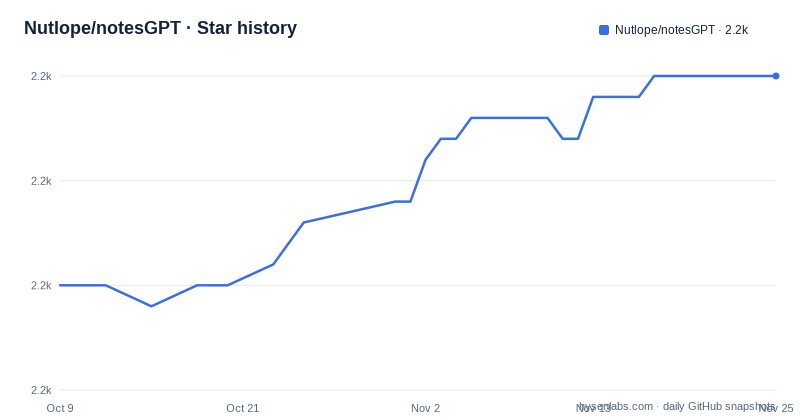
- Nutlope/notesGPT2,165 ★ · +10
| Repository | 2026-10-09 | 2026-11-25 |
|---|---|---|
| Nutlope/notesGPT | 2.2k | 2.2k |
10 Stars in the last 47 days, measured from the daily GitHub snapshot. Compare with other projects
Editorial analysis
Three vendors have to be configured before one note gets recorded
notesGPT describes itself as a way to record voice notes, transcribe them, summarize them and get tasks. The README headline is shorter: generate action items from your notes in seconds, powered by Convex, Together.ai and Whisper. Each of those three names is a separate account you create.
Convex holds the database and the cloud functions. It also supplies File Storage for the recordings and vector search over the notes. Clerk handles user authentication. Together Inference provides the LLM, which the README names as Mixtral, and also runs the Whisper transcriptions. Together Embeddings produce the vectors that the search feature uses.
That split has a practical meaning. There is no local database to start and no local model to download. Anyone who clones the repository inherits three dashboards, three sets of keys and the billing terms attached to each. The frontend is Next.js with the App Router and the styling is Tailwind CSS, so the part that runs on your machine is thin and the rest sits behind other companies' APIs. The MIT licence covers the code in the repository and nothing about those services.
npm run dev starts the Convex backend and the Next.js frontend side by side
Setup begins with npm install and then npm run dev. The scripts in package.json show what that command does. The dev script is npm-run-all --parallel dev:backend dev:frontend, where dev:backend is convex dev and dev:frontend is next dev. Both processes run in the same terminal session.
There is also a predev script, convex dev --until-success. It runs before dev and keeps trying until Convex is ready, which is why the first run prompts you to log into Convex and create a project instead of simply failing. The build script is next build, and no test script is defined in package.json.
The lockfile situation is worth a look. The repository contains pnpm-lock.yaml and pnpm-workspace.yaml, while the README tells you to use npm install. Both package managers can read package.json, but the lockfile that pins versions belongs to pnpm. Installing with npm means the versions are resolved fresh from the semver ranges in package.json, so what you run can differ from what the author ran. The repository also includes .example.env as a template for local variables and middleware.ts at the root, where Clerk's request handling would be expected.
The CLERK_ISSUER_URL step is where most first runs stop
After Convex login, the dev command asks for CLERK_ISSUER_URL. The README breaks this into four sub-steps. Make a Clerk account. Copy CLERK_SECRET_KEY and NEXT_PUBLIC_CLERK_PUBLISHABLE_KEY into .env.local. Follow steps 1 to 3 of the Convex and Clerk guide and copy the Issuer URL. Then add CLERK_ISSUER_URL to your Convex Environment Variables, paste the Issuer URL as the value and click Save.
The example value given for the Issuer URL has the shape https://some-animal-123.clerk.accounts.dev. Your own will carry a different generated name.
The variables live in two different places, and that is the trap. The two Clerk keys go into the local .env.local file, read by Next.js. CLERK_ISSUER_URL goes into the Convex dashboard, read by the Convex backend. Putting the issuer URL in the wrong file leaves authentication half configured: the README states that after this stage the frontend and backend should be running and you should be able to log in, but not record. A working login screen therefore proves only that Clerk works. It says nothing about whether the recording pipeline will function.
Recording stays disabled until TOGETHER_API_KEY lands in Convex
The last two setup steps decide whether the app does anything useful. Step five is to make a Together account and get an API key. Step six is to save that key as the Convex environment variable TOGETHER_API_KEY. It is set in the Convex dashboard, the same place as the issuer URL, not in .env.local.
This tells you where the model calls happen. If the key lives in Convex, the transcription and summary requests are made from Convex cloud functions, not from the browser, and the key never ships in the frontend bundle. The README does not spell this out, but the placement of the variable follows from where it has to be set.
The dependency list backs up the Together dependency: together-ai at ^0.40.0 sits next to openai at ^4.20.1 and @instructor-ai/instructor at ^0.0.5. The README does not say what each is used for, so that pairing should not be read as more than a list of installed packages. Zod is at ^4.4.3. Anyone who wants a different model provider has to change code, because there is no setting that selects one, and the README documents no alternative to Together for either Mixtral or Whisper.
Search works through embeddings, but only after you press the button
The README names two pieces behind note search: Together Embeddings for the vectors and Convex Vector search for the index. That gives semantic lookup over saved notes instead of plain keyword matching, using a vector store that lives inside the same Convex deployment as the notes.
The to-do list is blunt about how finished the experience is. One item reads: make the search experience a little smoother overall by searching automatically on entering text. In other words, search does not yet fire as you type. A reader evaluating the app should plan on submitting a query explicitly.
Recordings are the other gap. Voice notes are stored in Convex File Storage, but another item says to keep recording for future playback and display it on the page somewhere. That item sits among unfinished tasks, so the README does not claim playback exists. One item also wants the purple microphone animated in sync with your voice, which means the recording button does not respond to input level today. These are small details, but each one is a visible difference between a demo template and a note-taking product you would rely on every day.
Completed action items are deleted outright and cannot be edited
The feature that gives the project its pitch is action items, and the unfinished list says the most about it. One entry reads: store completed action items for the future instead of fully deleting them. The word fully matters. Today a completed item is removed, not archived, and nothing in the README suggests an undo or a history view.
Another entry is to be able to edit action items after the fact and set a due date for them. So extracted tasks are fixed at the wording the model produced, and no due date field exists. If the model phrases a task badly, the reader works around it instead of correcting it.
The summary also has an open item: prompt engineer the summary a little more to be more useful than what is currently displaying. The author is saying the current summary output is not yet good. Integrations are absent too, since a Notion export of transcript, summary and action items is still a planned task. For a user who needs notes to leave the app, the practical routes today are copying text by hand or reading the data in Convex. None of this is hidden, which is to the README's credit, but it is a clear statement of what the template cannot do.
Dependency versions pull in different directions, and the last push was in July 2026
package.json mixes old and new ranges. The framework is next 16.2.6, pinned exactly, with react and react-dom at ^19 and @clerk/nextjs at ^7.3.7. Next to them sit eslint-config-next at 14.0.1, tailwindcss at ^3.3.0, eslint at ^8, lucide-react at ^0.292.0 and convex-helpers at ^0.1.15. The lint config is two major versions behind the framework it is meant to check, so lint output on this repository comes from an older ruleset than the code uses.
That pattern suggests dependencies were bumped selectively. The repository is not archived, and the last push was on 2026-07-12. There are no GitHub releases, so nothing marks a version to pin, and package.json declares version 1.0.0 with private set to true. It is a deployable template, not a published package.
For a team, the upgrade work lands on you. Tailwind 3 and ESLint 8 are choices to revisit before building on this, and the roadmap in the README includes UI updates based on Youssef's redesign and a landing page that needs smaller text and images for multiple screen sizes. Treat the project as a snapshot of a working app with an open task list rather than as a maintained product with a changelog.
Editorial conclusion
Take notesGPT as a template to study or fork if you want a working example of Convex, Clerk and Together.ai wired into a voice-note app, and expect to account for three vendors from the first run. Do not adopt it as a finished product, because the author's own list still includes editing action items, keeping recordings and a PWA. Before building on it, read package.json, where eslint-config-next 14.0.1 sits next to next 16.2.6.
Frequently asked questions
Is NoteGPT safe to use?
The notesGPT repository is MIT-licensed and its code is open for inspection, and recordings go to Convex File Storage while transcription runs through Together. The README makes no statement about the safety of the hosted site at usenotesgpt.com.
Is NoteGPT completely free?
The code is free under the MIT licence, but running your own copy needs Convex, Clerk and Together accounts, and Together provides the Whisper and Mixtral calls. The README gives no pricing for any of them.
Which is the best AI note taker app?
The README names no competitors and makes no ranking. It lists unfinished work for notesGPT itself, including editing action items, storing completed ones, keeping recordings for playback and a Notion integration.
Official sources
Add this badge to your README
If you maintain this project, the badge below links readers to this analysis and shows its maintenance status from the daily GitHub snapshot. Paste the markdown into your README; add ?metric=license or ?metric=stars to the image URL for a different field.

[](https://hysenlabs.com/projects/nutlope-notesgpt)Star history chart for your README
[](https://hysenlabs.com/projects/nutlope-notesgpt)Was this useful?