ollama-js wraps the Ollama REST API in one npm package, with a separate browser entry and two routes to cloud models
Ollama JavaScript library
At a glance
- What is it?
- ollama-js is the official JavaScript client for Ollama, shipping a Node entry, a browser entry, streaming through AsyncGenerator and two ways to reach cloud models. This review covers the exports, the cloud setup, the request options and the release gap.
- Who is it for?
- Use ollama-js when a Node or browser project needs to call a local Ollama server or Ollama's cloud with typed chat, generate, pull and tool-calling methods and one runtime dependency. Do not put OLLAMA_API_KEY into browser code, because the cloud API route authenticates with a bearer header you set yourself.
- Can I use it commercially?
- Yes. MIT is a permissive licence: you can use, modify and sell software built on it, as long as you keep its copyright and licence notices.
- Is it still maintained?
- Yes. The repository last received commits 6 days ago.
- What is it written in?
- Mainly TypeScript, according to GitHub's language statistics.
Answers come from the project's GitHub data, last synced on November 24, 2026, and from our analysis. They are not legal advice.
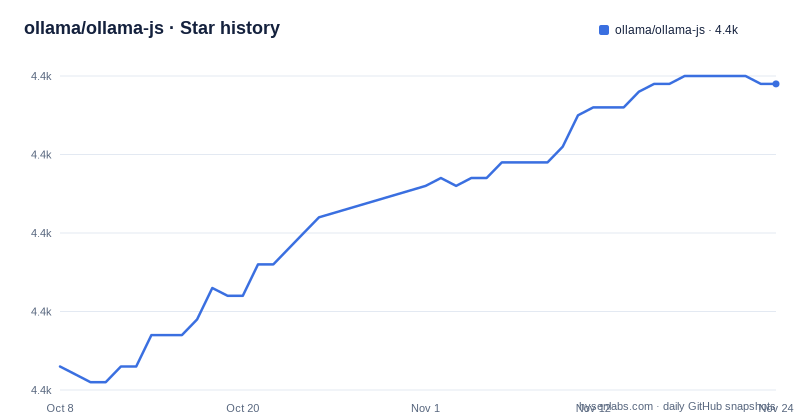
Star history
- ollama/ollama-js4,419 ★ · +36
| Repository | 2026-10-08 | 2026-11-24 |
|---|---|---|
| ollama/ollama-js | 4.4k | 4.4k |
36 Stars in the last 47 days, measured from the daily GitHub snapshot. Compare with other projects
Editorial analysis
Two package entries: ollama for Node and ollama/browser for everything else
Install with `npm i ollama`. The package.json exports map has two public entries, each shipped as both CommonJS and ES module with type declarations. The root entry points to dist/index.cjs and dist/index.mjs. The `./browser` entry points to dist/browser.cjs and dist/browser.mjs.
The README separates the two use cases. In Node, `import ollama from 'ollama'` gives a ready-made client. To use the library without Node, import the browser module with `import ollama from 'ollama/browser'`. Choosing the wrong entry is the first mistake a new user makes, since the default import is built for Node.
The package has one runtime dependency, whatwg-fetch, at ^3.6.20. Everything else in package.json is a development dependency: unbuild for the build, vitest for tests, ESLint, Prettier and TypeScript. The version field in the repository reads 0.0.0, so the real version is set at publish time, and the release tags are the place to read it.
The API follows the Ollama REST API, and the README links the endpoint documentation in the main Ollama repository.
Setting stream to true turns every call into an AsyncGenerator
Streaming is a single flag. Setting `stream: true` modifies the function call so that it returns an `AsyncGenerator`, where each part is an object in the stream. The README example loops over the result with `for await (const part of response)` and writes `part.message.content` to stdout.
The flag appears on chat, generate, pull and push in the API reference. For pull and push, the stream yields progress objects, and the return type is `ProgressResponse`. The examples directory has a pull-progress folder for that case.
The consequence for your code is that the return type depends on one boolean. With stream left off, chat resolves to a ChatResponse. With it on, you must iterate, and any code that reads response.message directly breaks. Decide per call site, and keep streaming code in its own function rather than toggling the flag from a variable.
Cancelling a stream has its own example, in the abort folder.
Cloud models through a local Ollama need ollama signin and a model name ending in -cloud
The first cloud route keeps your local workflow. Larger models are offloaded to Ollama's cloud while your code still talks to the local server. The README gives three steps. Sign in once with `ollama signin`. Pull a cloud model with `ollama pull gpt-oss:120b-cloud`. Then use it as usual, and the call offloads automatically.
In code, the import changes from the default client to the class: `import { Ollama } from 'ollama'`, then `new Ollama()` with no arguments. The model name in the request is `gpt-oss:120b-cloud`, and streaming works the same way.
Two details matter. The cloud suffix in the model name is what routes the work to the cloud, and a local model of the same family has a different name. And the sign-in belongs to the machine running the Ollama server, not to your JavaScript process, so a deployed Node service needs the sign-in on its host. The README links a page listing the models currently available on Ollama's cloud, and the list changes without the library changing.
The direct Cloud API sets host to https://ollama.com and sends a bearer header
The second route skips the local server entirely. You create an API key on ollama.com, export it as `OLLAMA_API_KEY`, and point the client at `https://ollama.com`:
import { Ollama } from 'ollama'

const ollama = new Ollama({
  host: 'https://ollama.com',
  headers: { Authorization: 'Bearer ' + process.env.OLLAMA_API_KEY },
})

const response = await ollama.chat({
  model: 'gpt-oss:120b',
  messages: [{ role: 'user', content: 'Explain quantum computing' }],
  stream: true,
})

for await (const part of response) {
  process.stdout.write(part.message.content)
}
The model name here is `gpt-oss:120b`, without the -cloud suffix, which differs from the local route. Authentication is a plain Authorization header that you build yourself from the environment variable.
That design has a security edge. The library does not manage the key for you, so a key placed in code that runs in a browser is readable by every visitor. Keep this route on a server, and let the browser talk to your own backend.
Chat options such as think, logprobs and keep_alive depend on the model
The chat request takes a model, a messages array, and optional fields. Each message has a role of user, system or assistant, a content string, optional images as Uint8Array or base64 strings, and an optional `tool_name` that tells the model which executed tool produced a result.
The `format` option sets the expected response format, with `json` the documented value. The `think` option accepts true, false or a level of high, medium or low, and the README adds that it requires model support. The same note applies to `logprobs`, with `top_logprobs` controlling how many top candidates come back per token.
The `keep_alive` option decides how long the model stays loaded. A number means seconds. A string needs a duration suffix, and the README shows 300ms, 1.5h and 2h45m. A wrong unit is an easy mistake, so prefer an explicit string over a bare number.
The `tools` field takes a list of tool calls the model may make, and `options` configures the runtime. If you pass think to a model that cannot reason, expect the request to fail or the flag to be ignored; the README does not say which, so test with your model.
generate adds suffix, raw and experimental image-generation fields
The generate method takes `prompt` instead of messages. Beyond the shared options, it adds `suffix`, the text that comes after the inserted text, which supports fill-in-the-middle completion. The examples folder has a fill-in-middle directory for that. It also adds `system` to override the model's system prompt, `template` to override its template, and `raw` to bypass the prompt template and send the prompt directly.
Three fields are marked Optional and Experimental: `width`, `height` and `steps`. They set image size in pixels and the number of diffusion steps, and apply to image generation models only. The examples include an image-generation folder. Since they are experimental, expect their shape to change between releases.
Pull and push each accept an `insecure` flag, described as permitting servers whose identity cannot be verified. Turning it on removes a protection, so keep it off outside a private network you control.
For the methods beyond create, check the rest of the README's API section and the TypeScript types under src/. Other example directories cover logprobs, multimodal input, structured_outputs, thinking, tools and websearch.
Release tags run v0.6.2, v0.6.3 and v0.6.4, with ten months between the last two
The repository is not archived, and the last push landed on 2026-10-16. Tagged releases are v0.6.2 on 2025-10-30, v0.6.3 on 2025-11-13 and v0.6.4 on 2026-09-29. Two weeks separate the first pair, and about ten months separate the second.
The gap has a practical reading. Changes pushed to main after v0.6.4 are not in the npm package until the next tag, so a feature you see in the README may not be installed yet. The README documents think, logprobs and the image fields, so confirm your installed version exposes them before you write code against them.
The license is MIT. The test script runs `vitest --run`, the build runs unbuild, and `prepublishOnly` rebuilds before publishing. ESLint is at version 8 and the TypeScript ESLint packages at version 5 in the dev dependencies, so contributors work on an older lint toolchain. Questions about Ollama in Python do not belong here, because this package targets JavaScript and TypeScript only.
Editorial conclusion
Use ollama-js when a Node or browser project needs to call a local Ollama server or Ollama's cloud with typed chat, generate, pull and tool-calling methods and one runtime dependency. Do not put OLLAMA_API_KEY into browser code, because the cloud API route authenticates with a bearer header you set yourself. Before building on options such as think, logprobs or image generation, confirm that your chosen model supports them, since the README marks those as requiring model support.
Frequently asked questions
What does the Ollama JavaScript library do?
It integrates a JavaScript project with Ollama through an API built around the Ollama REST API. It offers chat, generate, pull, push and create methods, streaming, and access to cloud models.
How do I use ollama-js in a browser?
Import the browser module with import ollama from 'ollama/browser'. The default import from 'ollama' is the entry for Node.
How do I use Ollama cloud models from JavaScript?
Either sign in with ollama signin and pull a model such as gpt-oss:120b-cloud, or create an API key, set OLLAMA_API_KEY and point the client host at https://ollama.com.
Official sources
Add this badge to your README
If you maintain this project, the badge below links readers to this analysis and shows its maintenance status from the daily GitHub snapshot. Paste the markdown into your README; add ?metric=license or ?metric=stars to the image URL for a different field.

[](https://hysenlabs.com/projects/ollama-ollama-js)Star history chart for your README
[](https://hysenlabs.com/projects/ollama-ollama-js)Was this useful?