Nuxt Image for responsive formats and CDN-backed images
Plug-and-play image optimization for Nuxt applications.
At a glance
- What is it?
- Nuxt Image adds `<nuxt-img>` and `<nuxt-picture>` components to Nuxt applications, with IPX processing or third-party image providers. It fits teams that want responsive image delivery without building provider-specific markup by hand.
- Who is it for?
- Adopt Nuxt Image when a Nuxt application needs responsive images through a unified component layer or several delivery providers. Do not choose it for a non-Nuxt project or a Nuxt 2 application on the main branch.
- Can I use it commercially?
- Yes. MIT is a permissive licence: you can use, modify and sell software built on it, as long as you keep its copyright and licence notices.
- Is it still maintained?
- Yes. The repository last received commits 1 day ago.
- What is it written in?
- Mainly TypeScript, according to GitHub's language statistics.
Answers come from the project's GitHub data, last synced on November 7, 2026, and from our analysis. They are not legal advice.
Star history
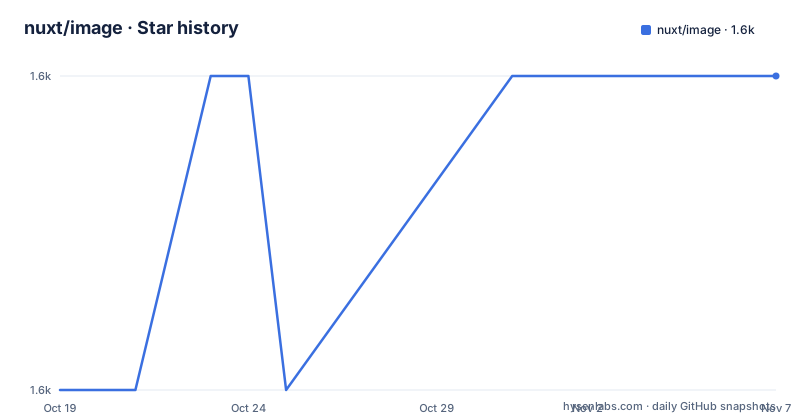
- nuxt/image1,551 ★ · +1
| Repository | 2026-10-19 | 2026-11-07 |
|---|---|---|
| nuxt/image | 1.6k | 1.6k |
1 Stars in the last 19 days, measured from the daily GitHub snapshot. Compare with other projects
Editorial analysis
The Nuxt image delivery problem Nuxt Image addresses
Nuxt Image is aimed at developers building Nuxt applications that serve images from local assets, built-in processing, or external image CDNs. Its central abstraction is straightforward: `<nuxt-img>` replaces the native `<img>` element, while `<nuxt-picture>` replaces `<picture>`. That matters when an application needs responsive sizes or modern formats such as WebP and AVIF without assembling provider URLs and image markup independently for each route.
The module supports more than 20 providers, according to the README. This makes it relevant to applications whose image delivery may change during development or operation. A team can begin with the built-in optimizer and then consider a hosted image CDN without changing the application-facing component model. The README does not enumerate all providers or document provider-specific configuration, so those details must be checked in the linked documentation.
Nuxt Image also generates responsive sizes. For developers, this concentrates image behavior in a Nuxt module instead of making every component responsible for calculating widths, selecting formats, and producing provider-specific URLs. For maintainers, that centralization can make delivery changes easier to locate, although the repository does not quantify migration savings or runtime savings.
The supported application boundary is important. The current branch is for Nuxt 3, 4, and 5. Nuxt 2 users are directed to the repository's `v0` branch, so installing `@nuxt/image` from the main line into a Nuxt 2 project would not match the compatibility stated in the README.
How Nuxt Image connects components, IPX, and providers
The visible architecture has three parts. Application templates use `<nuxt-img>` or `<nuxt-picture>`. The module provides Nuxt-aware image behavior and a runtime layer. Processing then comes from the built-in `unjs/ipx` optimizer or from one of the supported image providers.
The built-in option keeps image transformation close to the Nuxt application. The README identifies `unjs/ipx` as the resizer and transformer, while also naming capabilities such as resizing, transformation, responsive sizes, and modern output formats. It does not expose the full request flow, cache policy, storage behavior, or deployment requirements for IPX in the repository summary. Those are meaningful adoption details, particularly for serverless and edge deployments, and should not be inferred.
Provider support follows a different delivery model. Instead of relying only on local processing, an application can direct requests to a supported image service. The exact URL format, configuration keys, supported transformations, and authentication behavior vary by provider and are not listed in the README. The package structure nevertheless shows a provider-oriented design: `@nuxt/image` exports the module entry, a general runtime entry, and a wildcard runtime provider entry.
The repository is written primarily in TypeScript and distributed as an ECMAScript module. Its `package.json` marks `@nuxt/image` as side-effect free and publishes the built `dist` directory. These details indicate a conventional Nuxt module package with build-time module code separated from runtime components, although the repository files do not expose the complete internal request lifecycle.
Installing Nuxt Image and reaching a first working example
The documented installation path uses Nuxt's module installer. Run it from an existing Nuxt project. According to the README, this installs the `@nuxt/image` dependency and registers the module for the application.
npx nuxt module add imageAfter that command completes, the README does not provide enough configuration or template syntax to create a reliable first component example without guessing. In particular, it gives no documented `nuxt.config.ts` image block, provider key, local directory, or exact `<nuxt-img>` attributes. The next documented route is the Nuxt Image documentation at `https://image.nuxt.com`.
The README also links to a StackBlitz playground. Its source is the project example directory, and the repository includes `example/`, `playground/`, and `playground-v5/`. These are the appropriate places to inspect a complete working setup. The short README example link points to the StackBlitz playground, while contributor instructions describe running the repository's own playground.
For contributors rather than package users, the README gives a separate development sequence. Corepack must first be enabled, dependencies are installed with pnpm, and `pnpm dev:prepare` generates type stubs. The development server then starts the playground.
corepack enable
pnpm install
pnpm dev:prepare
pnpm dev
These contributor commands operate on the repository checkout, not an existing application. The package manifest also exposes separate scripts for the Nuxt 5 playground, builds, generated output, linting, tests, and type checks.
Responsive markup and format choices without assumed defaults
Choosing between `<nuxt-img>` and `<nuxt-picture>` follows their native counterparts. Use `<nuxt-img>` where an image element is sufficient. Use `<nuxt-picture>` where the application needs picture-based selection, such as explicit source alternatives. The README establishes that relationship, but it does not document the module's exact generated `srcset`, `sizes`, `picture`, `source`, or format-selection syntax.
That omission prevents a safe configuration walkthrough for widths, densities, quality, formats, or provider defaults. It would be misleading to claim that AVIF is always selected or that WebP is preferred without a documented priority and fallback configuration. The feature list confirms that the module can optimize modern formats, but not how developers configure them.
The project is most useful when image markup is repeated throughout a Nuxt application or when delivery must work across providers. It may be excessive for a small application with one static image and no responsive requirements. Native `<img>` and `<picture>` remain the direct alternative because the Nuxt components are described as drop-in replacements for those elements.
Before adopting the module for a production site, inspect rendered output and browser requests rather than judging optimization by source markup alone. Confirm that requested widths match the application's layout, that chosen formats have suitable fallbacks, and that the configured provider accepts every transformation requested by the component. The README does not provide a performance benchmark or claim a particular reduction in transfer size.
Where Nuxt Image is the wrong layer
The clearest wrong-tool case is a Nuxt 2 application using the current branch. The README explicitly reserves this branch for Nuxt 3, 4, and 5 and directs Nuxt 2 users to `v0`. Adopting the current package without following that branch distinction would create a version mismatch.
Nuxt Image is also unsuitable as a generic image service for applications outside Nuxt. Its published entry points are Nuxt module and runtime package exports, and its user interface is expressed through Nuxt components. A server application or another frontend framework would need to use IPX or a CDN directly rather than treat `@nuxt/image` as a standalone universal API.
A second limitation is documentation depth in the README. It names 20-plus providers and modern formats, but it does not explain provider credentials, regional image domains, cache invalidation, transformation limits, signed URLs, or deployment topology. Those are not minor implementation details for a site that relies on remote image delivery. The absence of documentation in the README does not prove those features are missing. It means they cannot be verified from that source.
Static-only image needs may also be a poor fit. If an application has no responsive resizing, format negotiation, provider switching, or Nuxt-wide image convention, the native HTML approach can be simpler. Adding a module introduces another dependency and runtime layer without a documented requirement in that case.
Release maintenance, upgrade work, and MIT terms
The repository is not archived, and its last push was on 2026-10-15. The listed releases are v2.1.0 on 2026-07-28, v2.0.0 on 2025-11-05, and v1.11.0 on 2025-07-30. Those dates show recent repository activity and a major-version transition, but they do not by themselves establish the compatibility or stability of every provider integration.
The repository's declared package version is 2.1.0, matching the newest listed release. Its `main` package field points to `dist/module.js`, and it publishes only the `dist` directory. An upgrade can therefore affect the generated module build, runtime components, provider adapters, or application output. The changelog contents and migration guide are not shown, so the article cannot state what changed between v1.11.0 and v2.0.0 or whether upgrades require configuration changes.
For contributors, the package manifest provides concrete checks: `pnpm test`, `pnpm test:types`, `pnpm test:built:types`, and `pnpm lint`. The last two commands target prepared Nuxt projects, while the standard test command prepares the playground before running Vitest with coverage. Consumers should first inspect the documented migration notes for the target major version rather than assuming compatibility across major releases.
The repository is published under the MIT License. That identifies the stated licensing model, but it is not legal advice. Teams should review the actual `LICENSE` file and their own compliance requirements when distributing the module or incorporating licensed code.
Editorial conclusion
Adopt Nuxt Image when a Nuxt application needs responsive images through a unified component layer or several delivery providers. Do not choose it for a non-Nuxt project or a Nuxt 2 application on the main branch. Before adoption, verify provider-specific configuration and delivery behavior against the linked documentation, then inspect the application output for its intended sizes and formats.
Frequently asked questions
How do I install Nuxt Image?
From an existing Nuxt project, the README directs users to run `npx nuxt module add image`. This installs the `@nuxt/image` dependency and registers the module.
Which Nuxt versions does the main branch support?
The README states that the branch is compatible with Nuxt 3, 4, and 5. It directs Nuxt 2 users to the repository's `v0` branch.
Can Nuxt Image use a CDN instead of its built-in optimizer?
Yes. The README says the module can use a favorite image CDN and says it supports more than 20 providers. Provider-specific configuration is not included in the README.
Official sources
Add this badge to your README
If you maintain this project, the badge below links readers to this analysis and shows its maintenance status from the daily GitHub snapshot. Paste the markdown into your README; add ?metric=license or ?metric=stars to the image URL for a different field.

[](https://hysenlabs.com/projects/nuxt-image)Star history chart for your README
[](https://hysenlabs.com/projects/nuxt-image)Was this useful?