The Nuxt modules registry is a folder of YAML files that sync themselves
Discover the Nuxt modules to add any CMS, Database, UI, Auth and integrations into your Vue application.
At a glance
- What is it?
- nuxt/modules is the registry behind nuxt.com/modules, and it is closer to a data pipeline than to a curated directory. Each listing is a YAML file in the modules directory, generated from the module's own package.json by a sync command, reviewed by a pull request, and published as a single modules.json consumed over npm or from a CDN.
- Who is it for?
- This repository fits a maintainer of a Nuxt module who wants the module listed, or a developer who wants the catalogue as data rather than as a web page to scrape. It is the wrong place for a module that only loads a third party script, because the README routes those to the separate Nuxt Scripts registry.
- Can I use it commercially?
- Yes. MIT is a permissive licence: you can use, modify and sell software built on it, as long as you keep its copyright and licence notices.
- Is it still maintained?
- Yes. The repository last received commits 4 days ago.
- What is it written in?
- Mainly TypeScript, according to GitHub's language statistics.
Answers come from the project's GitHub data, last synced on November 7, 2026, and from our analysis. They are not legal advice.
Star history
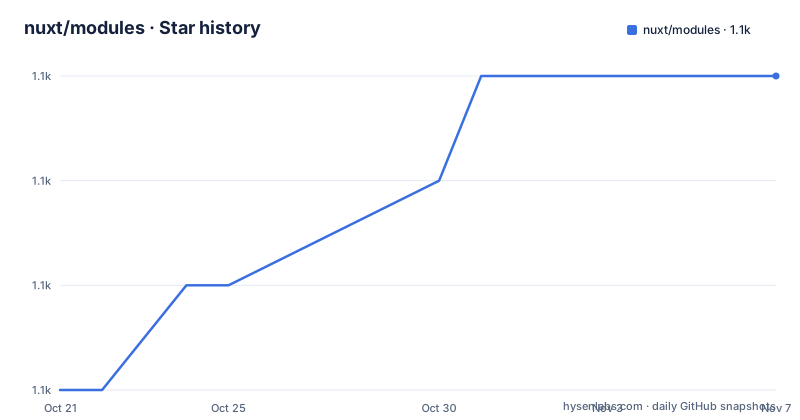
- nuxt/modules1,055 ★ · +3
| Repository | 2026-10-21 | 2026-11-07 |
|---|---|---|
| nuxt/modules | 1.1k | 1.1k |
3 Stars in the last 17 days, measured from the daily GitHub snapshot. Compare with other projects
Editorial analysis
A listing is a YAML file generated from package.json
The repository's job is described in one line in the Modules Database section. Metadata of Nuxt modules is maintained in YAML files inside the modules directory and automatically synced from upstream to fetch the latest information.
That last clause is the important one. The registry does not ask a maintainer to fill in a form. A sync command reads the module's own package.json and produces the metadata file, which is then reviewed as a pull request. The upstream repository stays the source of truth for the name, the description and the npm package, and the registry is a mirror of it with a human review step.
The generated file lands at modules/<name>.yml, and the contributor then sets a category and optionally an icon before opening the pull request. The listing website is at nuxt.com/modules, and the module author guide is at nuxt.com/docs/guide/going-further/modules.
That design has an obvious consequence. A listing can go stale only if the sync stops running or if the upstream package.json changes in a way the schema cannot express, and the README has an answer for the second case: if some data is outdated, open a pull request with the fix. The registry is meant to be corrected in public, one file at a time.
One command creates the file, with a syntax for branches and monorepos
Adding or updating a module is a single command.
pnpm sync <name> <repo>The example in the README is pnpm sync tailwindcss nuxt-modules/tailwindcss, which is the name of the entry and the repository it comes from.
Two syntax extensions cover the cases where a plain repo is not enough. To sync with a branch other than main, you suffix the repo with #repo-branch, for example pnpm sync tailwindcss nuxt-modules/tailwindcss#dev. And if the module lives in a subdirectory of a monorepo, you add the path after the branch, for example pnpm sync scripts nuxt/scripts#main/packages/script.
That third form is the one worth remembering, because it is how a large organisation publishes a module that is not the root package of its repository. The path after the branch says which package inside the monorepo is the module.
The contribution flow is then four steps. Fork and clone the repository and run pnpm install. Run pnpm sync with the name and the repository, which creates the YAML file from the repository's package.json. Set the category in the generated file to one of the values in lib/categories.ts, and optionally add an icon to the icons directory and reference it with the icon field. Then open the pull request, and the README is explicit that you do not need to open an issue first.
The schema decides what a listing is allowed to say
The schema table in the README is the contract for a listing, and the column that matters is the second one, which marks which fields are filled in automatically by the sync and which are set by hand.
Three fields are auto synced. The description is a short description of what the module does, and the npm field is the package name. The maintainers field is a list where each item has a name, a github and an avatar. The remaining fields are manual, and they are the ones that require a decision.
The name is the canonical name or integration name, and the repo is the GitHub repository in the format org/name or org/name#main/path. The type field has three values, community for the nuxt-community organisation, official for the nuxt organisation, and 3rd-party. The category has to be one of the values in lib/categories.ts, which is the list the website filters on, so a typo means a listing that no one can find.
The compatibility field is the one with the most structure. The nuxt field specifies a semver range for the supported Nuxt version, and requires.bridge can be set to true or optional to describe Nuxt 2 bridge compatibility. The learn_more field points at the website or the relevant integration site, and the mcp field holds an MCP Server URL, which is a newer addition to the schema and a signal about where the ecosystem is heading.
One rule about wording is worth repeating because it is the most common review comment. The description should say what the module does, and there is no need to mention Nuxt or Nuxt versions, since the catalogue is already a Nuxt catalogue and the compatibility field carries the version information.
Script loaders belong in the Nuxt Scripts registry instead
There is one category of module this registry explicitly does not want, and the README explains the routing.
If your module mainly loads a third party script, of the kind that covers analytics, a tag manager, a chat widget, a consent manager, a captcha, ads or an embed, the instruction is to check whether Nuxt Scripts already supports it. The service is at scripts.nuxt.com/scripts, and its registry is the separate nuxt/scripts repository. If it is not supported there, the suggestion is to add it to that registry rather than to this one.
Modules that build on Nuxt Scripts are welcome too, and the README gives the condition: for example when they add more than an API for the script, or when the script is not a fit for the registry.
The reason is structural rather than editorial. A script loader is a configuration problem, a tag to place in the head with the right attributes, and the same script is often needed by several frameworks. A module is a build time integration with a Nuxt application, with its own configuration, its own composables and its own build behaviour, and the two kinds of thing have different lifetimes and different audiences.
For a maintainer, this is the first decision to make before writing any YAML, because the pull request you are about to open has to go to one of the two repositories.
Consuming the catalogue: an npm package and two CDNs
The compiled data is published, and there are three ways to get it.
The first is the npm package, @nuxt/modules, whose version in the manifest is 0.6.0 and whose main entry is modules.json. Installing it is the usual thing.
# npm
npm install @nuxt/modules

# pnpm
pnpm add @nuxt/modules
Then the list can be imported directly, in either module system.
// ESM
import modules from '@nuxt/modules'

// CommonJS
const modules = require('@nuxt/modules')
The second and third are the CDNs, which serve the same compiled JSON without an install step.
https://cdn.jsdelivr.net/npm/@nuxt/modules@latest/modules.json
https://unpkg.com/@nuxt/modules@latest/modules.json
For a website that wants to show a catalogue, the CDN route needs nothing installed and nothing built. For a build script that wants to resolve module metadata, the npm package is the better fit, and the import example shows that the default export is the list itself.
One caveat is in the URLs themselves. Both point at the latest tag, so the JSON can change under you, and a tool that pins a version of the data needs to pin the version in the URL or in the dependency rather than rely on the latest tag.
The build is a small TypeScript CLI with a pinned toolchain
The maintenance section shows the two commands that matter. pnpm sync with no arguments updates all current modules, and pnpm build generates modules.json.
The package.json shows how they are wired. The build script runs pnpm cli build, and the cli script runs node --env-file-if-exists=.env./lib/cli.ts, so the CLI is a TypeScript file executed directly with Node rather than a compiled binary, and it reads a local.env file when one exists. The sync script is pnpm cli sync, and the test script is pnpm lint and pnpm sync together, which means the test of the registry is that it syncs and lints cleanly. The release script runs pnpm cli version and then publishes with the latest tag and no git checks.
The dependency list shows what the sync does. ofetch is the HTTP client it uses to reach the upstream repositories, @octokit/rest is the GitHub API client, js-yaml and globby handle the YAML files and the file discovery, p-limit and picocolors are the concurrency and terminal output helpers, and @clack/prompts is the interactive prompt library.
The toolchain is pinned hard, with devEngines requiring node ^24.21.0 and pnpm 12.11.2, and onFail set to download, so a contributor without the right versions gets them installed rather than an error. The repository is a pnpm workspace with a renovate.json, an eslint.config.mjs and a tsconfig.json, and the last push was on 2026-10-15 with the project not archived and MIT licensed, made by the Nuxt Team.
Editorial conclusion
This repository fits a maintainer of a Nuxt module who wants the module listed, or a developer who wants the catalogue as data rather than as a web page to scrape. It is the wrong place for a module that only loads a third party script, because the README routes those to the separate Nuxt Scripts registry. Verify first that the generated description says what the module does rather than naming Nuxt, and that the category you set is one of the values in lib/categories.ts, since the pull request review checks both.
Frequently asked questions
How do I add my Nuxt module to the registry?
Fork and clone the repository, run pnpm install, then run pnpm sync <name> <repo>, which creates modules/<name>.yml from your repository's package.json. Set the category to one of the values in lib/categories.ts, optionally add an icon from the icons directory, and open a pull request. You do not need to open an issue first.
How do I sync a module from a branch other than main?
You suffix the repository with #repo-branch, for example pnpm sync tailwindcss nuxt-modules/tailwindcss#dev. If the module lives in a subdirectory of a monorepo, add the path after the branch, for example pnpm sync scripts nuxt/scripts#main/packages/script.
Which modules should not be listed in the Nuxt modules registry?
Modules that mainly load a third party script, such as analytics, a tag manager, a chat widget, a consent manager, a captcha, ads or an embed. The README asks you to check the Nuxt Scripts registry at scripts.nuxt.com/scripts first, and to contribute to the nuxt/scripts repository if it is not supported there.
How do I read the list of Nuxt modules?
Install the @nuxt/modules package and import the default export, with import modules from '@nuxt/modules' in ESM or require('@nuxt/modules') in CommonJS. The same compiled JSON is also available from jsdelivr and unpkg at the modules.json path of the package.
How is the modules.json file built?
The build script runs pnpm cli build, which executes the TypeScript CLI in lib/cli.ts with Node. Running pnpm sync with no arguments updates every current module from upstream, and the test script runs lint and sync together.
Official sources
Add this badge to your README
If you maintain this project, the badge below links readers to this analysis and shows its maintenance status from the daily GitHub snapshot. Paste the markdown into your README; add ?metric=license or ?metric=stars to the image URL for a different field.

[](https://hysenlabs.com/projects/nuxt-modules)Star history chart for your README
[](https://hysenlabs.com/projects/nuxt-modules)Was this useful?