lualine.nvim: a Lua statusline that loads only what you list
A blazing fast and easy to configure neovim statusline plugin written in pure lua.
At a glance
- What is it?
- lualine.nvim is a Neovim statusline plugin written in Lua, requiring Neovim 0.7 or newer. Its design bet is that a statusline should render only the components you name, and the README's own startup table is the clearest evidence of that trade.
- Who is it for?
- Adopt lualine.nvim if you run Neovim 0.7 or newer, write your config in Lua, and want a statusline whose cost scales with the components you actually name. Skip it if you are pinned to an older Neovim without using a compatibility tag, or if you want a statusline that configures itself with no file to edit.
- Can I use it commercially?
- Yes. MIT is a permissive licence: you can use, modify and sell software built on it, as long as you keep its copyright and licence notices.
- Is it still maintained?
- Yes. The repository last received commits 169 days ago.
- What is it written in?
- Mainly Lua, according to GitHub's language statistics.
Answers come from the project's GitHub data, last synced on November 15, 2026, and from our analysis. They are not legal advice.
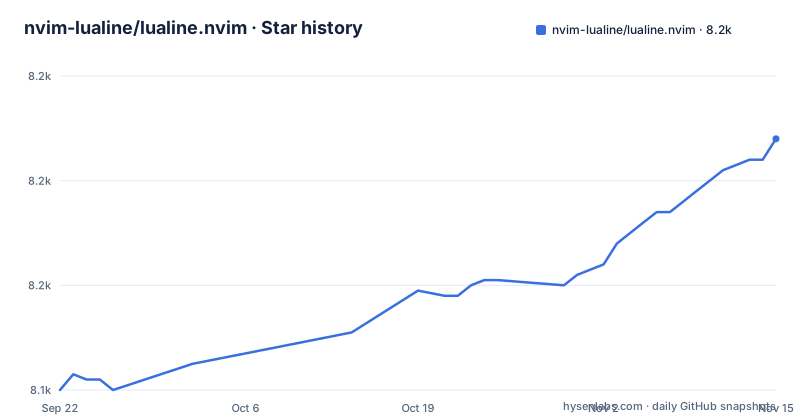
Star history
- nvim-lualine/lualine.nvim8,188 ★ · +48
| Repository | 2026-09-22 | 2026-11-15 |
|---|---|---|
| nvim-lualine/lualine.nvim | 8.1k | 8.2k |
48 Stars in the last 54 days, measured from the daily GitHub snapshot. Compare with other projects
Editorial analysis
The problem lualine.nvim solves, and who it is for
Neovim ships a statusline, but it is configured through the older Vimscript options, and anything beyond a filename and a line number means writing your own expression. lualine.nvim replaces that with a Lua configuration table: you declare which components appear in which section, and the plugin renders them. The README describes it as a statusline written in Lua, and states the requirement plainly: Neovim 0.7 or newer. For earlier versions it points at compatibility tags such as compat-nvim-0.5.
The audience is people who already keep their Neovim configuration in Lua and want the statusline to be part of it rather than a separate Vimscript layer. That is a narrower audience than it first appears. If your init is still a single init.vim, the README shows how to call the plugin anyway, by wrapping the Lua in a heredoc, but you are then maintaining two languages for one visual element.
The layout is fixed and small. Six sections, labelled A through C on the left and X through Z on the right, each holding a list of components. The default configuration puts mode in lualine_a, branch, diff and diagnostics in lualine_b, filename in lualine_c, encoding, fileformat and filetype in lualine_x, progress in lualine_y, and location in lualine_z. Everything else is opt-in.
How the component model and refresh loop actually work
The README's performance claim is not that the plugin is written efficiently in the abstract. It is that lualine loads only the components you specify, and nothing else. That is an architectural statement about the configuration table: your sections table is the load list. A component you never name is never pulled in, so the cost of the statusline tracks the length of your configuration rather than the size of the plugin.
The README supports this with a startup-time table measured with dstein64/vim-startuptime, using a clean init.vim with only vim-startuptime, vim-plug and the statusline plugin installed, averaged over 20 runs. Control is 17.2 ms, lualine 24.8 ms, lightline 25.5 ms, airline 79.9 ms. The table is dated 18-04-2022 and the README says the measured time is complete Vim startup, not time spent in the plugin. Read it as a snapshot from that date on that machine, not as a current guarantee.
Rendering is driven by two mechanisms. The refresh table sets per-surface intervals: statusline, tabline and winbar each default to 1000 milliseconds, with refresh_time at 16, annotated in the README as roughly 60fps. Separately, an events list triggers redraws on WinEnter, BufEnter, BufWritePost, SessionLoadPost, FileChangedShellPost, VimResized, Filetype, CursorMoved, CursorMovedI and ModeChanged. The two work together: events handle the moments that matter, and the interval bounds how stale a component can get when nothing fires.
Installing lualine.nvim and getting a first statusline
The README gives installation snippets for four plugin managers. With lazy.nvim, the entry names lualine.nvim and declares nvim-web-devicons as a dependency:
{
    'nvim-lualine/lualine.nvim',
    dependencies = { 'nvim-tree/nvim-web-devicons' }
}
That dependency is only needed for icons. If you skip it, set icons_enabled to false in the options table, or leave it true and accept that the icon glyphs will not render. The README also notes that icons require a patched font.
For Neovim 0.12, the README shows vim.pack.add with both repository URLs passed as a list. For vim-plug the snippet is a Plug line for lualine.nvim plus a commented choice of icon provider, and for packer.nvim it is a use block with the same optional requires.
Once the plugin is on your runtimepath, starting it is one call:
require('lualine').setup()With no arguments you get the default configuration: mode on the left, branch, diff and diagnostics next, filename in the middle, encoding, fileformat and filetype on the right, then progress and location. If you want to see what is actually in effect, the README provides a getter:
require('lualine').get_config()Calling that is the fastest way to confirm that your options table was merged as you expected, particularly after you start overriding sections. In a .vim file, the README's approach is to wrap the setup call in a lua heredoc block, which it illustrates with lua << END and a closing END.
Theming, separators, and what the README leaves thin
Themes are selected by name through a single option. The README's example is options = { theme = 'gruvbox' }, and all available themes are listed in THEMES.md. The default is theme = 'auto', which derives the theme from your colorscheme.
If a built-in theme is close but not right, you can require it as a table and mutate it before setup. The README's example loads the gruvbox theme, sets custom_gruvbox.normal.c.bg to '#112233', and passes the modified table as the theme option. Note the shape: themes are indexed by mode, then by section, then by foreground and background keys. The README points to a wiki page for the full theme structure rather than documenting it inline, so anyone doing more than a colour tweak is reading the wiki.
Separators come in two kinds. section_separators sit between sections, component_separators sit between components inside a section. The defaults are the powerline glyphs, left and right, for both. The README's note here warns that if you view it in a browser, the separator characters will probably not be visible. That is a real annoyance: copying separator glyphs out of a rendered README is unreliable, and the safer source is the default configuration block itself.
The README does list the available components, from branch, buffers and diagnostics to searchcount, selectioncount and lsp_status, and shows custom components built from Lua functions, Vim functions, statusline items and Vim variables; the doc directory ships with the plugin as well. Treat the README as the shape of the configuration and :help lualine as the reference.
Where lualine.nvim is the wrong tool
The version floor is the first hard boundary. Neovim 0.7 or newer, with compatibility tags for older releases. If you are on a distribution-packaged Neovim that lags behind, you are choosing between upgrading Neovim and using a compat tag, and the README does not document what those tags change.
The second boundary is the one the plugin advertises as its strength. Loading only the components you specify means the plugin will not guess. There is no automatic discovery of what your statusline should show, and no preset that adapts to a language or a workflow. A user who wants a statusline that configures itself will find lualine.nvim's explicitness to be work rather than convenience.
The refresh model has its own cost. A 16 millisecond refresh_time and a 1000 millisecond interval per surface are defaults you can change, but the events list is long: CursorMoved and CursorMovedI are in it. Components that do real work on every cursor movement are your responsibility, not the plugin's. If you write an expensive custom component, the refresh table is where you look.
Finally, the startup table is from 2022 and the README says so. It compares three statusline plugins against a control on one machine with a minimal init. It is not a current measurement, and it is not a measurement of lualine in a real configuration with a dozen components. Anyone citing that table as a present-day result is overreading it.
Alternatives and the difference in approach
The README's own comparison names lightline and airline alongside lualine. The startup table puts lualine at 24.8 ms and lightline at 25.5 ms, effectively level on that measurement, with airline at 79.9 ms. So the interesting difference is not raw startup time between lualine and lightline. It is the configuration model.
lualine.nvim is configured in Lua, with a table of sections and a separate table of options. That means your statusline config is ordinary Lua: you can require a theme module, mutate a table, and pass the result back. The README's custom theme example does exactly that, and it is the kind of thing that is awkward when configuration is expressed as Vimscript variables.
Airline's cost in that table is roughly three times the others, and the README attributes lualine's position to loading only specified components. That is the real architectural split: a statusline that ships a large default surface versus one that assembles itself from your list.
There is also the question of what you are already running. If your configuration is Vimscript-first and you have no interest in moving it, adding a Lua plugin means either a heredoc wrapper or a mixed configuration. That is a cost the README acknowledges by showing the heredoc form, but it does not pretend the cost is zero.
Maintenance, upgrade cost, and the MIT licence
The repository is not archived, and the last push was on 2026-05-31. The repository has no published GitHub releases, so installation happens from the default branch, master. That is worth understanding before you adopt it: with no tagged releases, your plugin manager is tracking a moving branch, and an update is whatever landed since your last pull. Pinning to a commit is possible with most managers, but the project itself does not offer version numbers to pin to.
The upgrade surface is small and mostly additive. Configuration is a single setup call with a table, and the README documents a get_config getter, so checking what a change did to your effective configuration is a one-line operation. The compatibility tags for older Neovim versions suggest the maintainers treat Neovim-version breakage as a real category.
The licence is MIT. That is permissive: it allows use, modification and redistribution with the licence text retained, and it disclaims warranty. If you vendor lualine.nvim into a larger distribution, the LICENSE file at the repository root is what you carry. This is not legal advice, and if your situation involves redistribution at scale, read the licence text itself rather than a summary.
The development tooling is visible in the repository layout and Makefile: luacheck for linting lua/lualine, tests and examples, stylua for formatting with .stylua.toml, and a test target that runs scripts/test_runner.sh against a temporary XDG home. A check target runs lint and test together. That matters if you plan to contribute rather than just consume: make check is the gate, and make precommit_check additionally runs docgen and format.
Editorial conclusion
Adopt lualine.nvim if you run Neovim 0.7 or newer, write your config in Lua, and want a statusline whose cost scales with the components you actually name. Skip it if you are pinned to an older Neovim without using a compatibility tag, or if you want a statusline that configures itself with no file to edit. Before committing, check that your Neovim reports 0.7 or higher, decide whether you want nvim-web-devicons and a patched font, and read THEMES.md for the theme name you intend to pass to options.theme.
Frequently asked questions
What is lualine.nvim?
It is a Neovim statusline plugin written in Lua, configured through a setup call with a table of sections and options. The README states it requires Neovim 0.7 or newer.
Does Neovim use Lua?
The README does not discuss Neovim's scripting languages generally. It does say lualine.nvim is written in Lua, and it shows how to call the setup function from a .vim file by wrapping it in a lua heredoc block.
What are some alternatives to lualine.nvim?
The README's startup comparison names lightline and airline alongside lualine. In that table, from 2022, lightline measured 25.5 ms and airline 79.9 ms against lualine's 24.8 ms, with a control at 17.2 ms.
Official sources
Add this badge to your README
If you maintain this project, the badge below links readers to this analysis and shows its maintenance status from the daily GitHub snapshot. Paste the markdown into your README; add ?metric=license or ?metric=stars to the image URL for a different field.

[](https://hysenlabs.com/projects/nvim-lualine-lualine-nvim)Star history chart for your README
[](https://hysenlabs.com/projects/nvim-lualine-lualine-nvim)Was this useful?