typora_plugin: a directory of plugins, some of them switched off by default
Typora Plugin. Feature Enhancement Tool.
At a glance
- What is it?
- typora_plugin is a collection of plugins for the Typora Markdown editor, organised into categories rather than argued for one at a time: ten for navigation and management, more than twenty for editing, sixteen component integrations and a view and theme group that includes blur and defocus filters. Each entry carries a default column, and a cross in it means the plugin ships disabled.
- Who is it for?
- typora_plugin fits a Typora user who wants one specific capability the editor lacks, such as a command palette, a table sorter, a slide renderer or document encryption, without committing to a different editor.
- Can I use it commercially?
- Yes. MIT is a permissive licence: you can use, modify and sell software built on it, as long as you keep its copyright and licence notices.
- Is it still maintained?
- Yes. The repository last received commits 1 day ago.
- What is it written in?
- Mainly JavaScript, according to GitHub's language statistics.
Answers come from the project's GitHub data, last synced on November 15, 2026, and from our analysis. They are not legal advice.
Star history
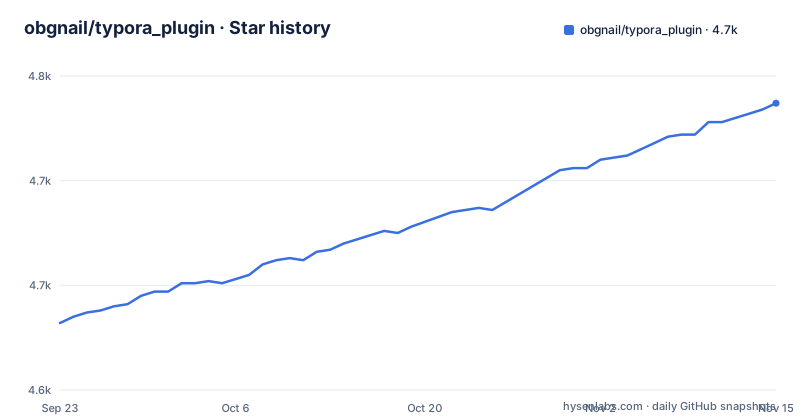
- obgnail/typora_plugin4,737 ★ · +105
| Repository | 2026-09-23 | 2026-11-15 |
|---|---|---|
| obgnail/typora_plugin | 4.6k | 4.7k |
105 Stars in the last 53 days, measured from the daily GitHub snapshot. Compare with other projects
Editorial analysis
Navigation and management, with six of ten disabled
The first table is the smallest and the most concrete. Ten plugins sit under navigation and management: a window tab bar, a multi-fields file searcher, auto numbering, a bookmark manager, cursor history navigation, a global configuration panel, a one-click plugin update, local resource redirection, a workspace manager and a file retrieval plugin built on ripgrep. The third column is the interesting one. It is headed Default, and a cross appears against the bookmark manager, cursor history navigation, local resource redirection, the workspace manager and ripgrep retrieval, while window tab bar, the file searcher, auto numbering, the preferences panel and the updater carry nothing. The pattern is consistent across the file: features that change how you navigate or where your files live are opt-in, while the structural conveniences are on.
Twenty-five editing plugins, from folding to encryption
The enhance editing table is the largest and covers everything from layout to cryptography. Folding appears four times over, for chapters, lists, tables and long images, each disabled by default. Then there is a Chinese and English text spacer, slash commands, mouse gesture recognition, a file templater engine, code block enhancements, a right-side outline view, an embedded command line environment, a global command palette, a context menu integration, a pie menu, a datatables plugin for filtering sorting and paging, a table resizer, an image resizer, a high-frequency editing toolset, a writing area width slider, CJK symbol auto-pairing, inline HTML text stylization, static resource management, Markdownlint static analysis, base64 image conversion for HTML and PDF export, a native HTML preview and editor, a setting for the resource storage location, and document encryption and decryption. Eleven of those carry the default-off cross.
Sixteen component integrations, and none of them is on
A third table is a pure list of third-party renderers, and it is the easiest part of the file to skim because there is nothing to decide. Markmap, ECharts, Chart.js, Vega-Lite, DrawIO, abc.js, tui.calendar, WaveDrom, Marp, PlantUML, Infographic, Function Plot, Callouts, Kanban, Timeline and a chat bubble component. Every entry is described only as an integration, and the Default column is empty for all sixteen, which in this file means none of them carries the default-off cross.
Blur, defocus and a read-only lock in the view group
The view and theme table starts with the accessibility-adjacent entries, which is unusual enough to notice. Dark mode rendering is listed first, then an image-free, text-first mode, then focus management described as applying a Gaussian blur to inactive nodes, and then a defocus visual relief filter under the plugin name myopic_defocus. A read-only state lock and an independent image viewer follow. The blur and defocus pair is the part that separates this from a purely decorative theme collection: both change what you can read rather than how the page looks, which is why they appear alongside a read-only lock rather than in a cosmetic group.
The repository is a plugin directory plus a development folder
The repository layout is minimal and says something about how the project is built. There is a plugin directory, which is where the entries in those tables actually live, plus a develop directory, an assets directory and a small set of files: AGENTS.md, an editor configuration, a gitignore, a gitattributes file and the two readme files. The Simplified Chinese readme is a separate document at the root, README-cn.md, linked from the English one. There is no package manifest or bundler configuration at the root.
An embedded command line sits next to a command palette
Three plugins in the editing table overlap in a way that suggests three different answers to the same request. There is an embedded command line environment under the name commander, a global command palette, and a context menu integration for the right-click menu. If what you want is to run something occasionally, the palette or the menu is the smaller commitment; if you want a shell while writing, the commander is the one that adds it. Right beside them sit slash commands, which is a fourth way of invoking the same actions, and a file templater engine for inserting reusable blocks. Four entry points to the same plugin surface is either a strength or a maintenance problem depending on whether they share state, and the file does not say.
Tables get a filter plugin, a resizer and a folder, separately
Table handling is split across four entries, which is the clearest example of the catalogue approach. collapse_table folds a table out of the way and is off by default. resize_table changes column widths. datatables adds filtering, sorting and paging to a table and is also off by default, presumably because it changes how a static Markdown table is read rather than how it looks. And resize_image covers images rather than tables, sitting next to them because the same kind of drag adjustment applies.
One-click updating and a workspace manager carry real risk
Two entries in the first table deserve a second look because they touch files outside a single document. The one-click plugin update updates the plugins themselves, and the workspace manager, disabled by default, is described as managing workspaces, which in an editor context usually means switching between sets of folders. Local resource redirection and the setting for the resource storage location do the same job at a smaller scale, moving where images and attachments are read from and written to. Both of the latter two are also off by default. Those are the entries to read the linked documentation for before enabling.
Editorial conclusion
typora_plugin fits a Typora user who wants one specific capability the editor lacks, such as a command palette, a table sorter, a slide renderer or document encryption, without committing to a different editor. It does not fit someone who wants a coherent extension system, because the file presents a catalogue rather than a framework, and it does not fit anyone who needs to know what a plugin does before installing it, since each entry here is a name and a one-line description. Before you install, check four things: which plugins are marked off by default so you know what you are opting into, whether the ones you want depend on external tools such as ripgrep, and whether you are comfortable patching a local Typora installation to load them at all.
Frequently asked questions
What is the typora_plugin project?
A collection of plugins for the Typora Markdown editor, described as a feature enhancement tool. The file organises them into categories: navigation and management, editing enhancements, component integrations and view and theme, with a default column marking which ones ship switched off.
How many plugins does typora_plugin provide?
The tables show ten in navigation and management, twenty-seven in enhance editing, sixteen component integrations and a view and theme group that begins with dark mode, an image-free mode, blur focus management, a defocus filter, a read-only lock and an independent image viewer.
Which typora_plugin features are enabled by default?
Each table has a Default column and a cross marks the plugins that are not on out of the box. Among them are the bookmark manager, cursor history navigation, local resource redirection, the workspace manager, ripgrep file retrieval, all four folding plugins, mouse gestures, the pie menu, datatables, base64 export, the HTML editor, the resource storage location setting and document encryption.
Does typora_plugin have a command palette or a terminal?
Both are listed among the editing enhancements, as separate plugins: an embedded command line environment named commander, which is on by default, and a global command palette, also on by default. A context menu integration and slash commands offer two further ways to reach the same actions.
Can typora_plugin encrypt a document?
There is a plugin for document encryption and decryption, and it is one of the entries marked off by default. Details such as the format and key handling are in that plugin's own documentation section.
Is typora_plugin available in Chinese?
The repository carries a separate Simplified Chinese readme, README-cn.md, linked from the English one. The repository also holds an AGENTS.md file, an assets directory, a develop directory and the plugin directory where the entries live.
Official sources
Add this badge to your README
If you maintain this project, the badge below links readers to this analysis and shows its maintenance status from the daily GitHub snapshot. Paste the markdown into your README; add ?metric=license or ?metric=stars to the image URL for a different field.

[](https://hysenlabs.com/projects/obgnail-typora-plugin)Star history chart for your README
[](https://hysenlabs.com/projects/obgnail-typora-plugin)Was this useful?