Lotion: the Notion desktop client that shipped themes which did nothing
Unofficial Notion.so app for Linux
At a glance
- What is it?
- Lotion wraps Notion in a frameless, multi-tab Electron shell for Linux. Its own release notes admit that the seven themes in v1.5 appeared in the menu and silently did nothing, which makes v1.6.0 the interesting version to read about.
- Who is it for?
- Lotion is worth reading for one specific reason: it publishes its failures. Issue 150, seven themes that existed only as menu entries, a rewritable Arch PKGBUILD because the AUR package does not exist, and an unsigned macOS build with a section explaining that the certificate costs 99 dollars a year, all appear in public rather than in a changelog that only lists wins.
- Can I use it commercially?
- Yes. MIT is a permissive licence: you can use, modify and sell software built on it, as long as you keep its copyright and licence notices.
- Is it still maintained?
- Yes. The repository last received commits 17 days ago.
- What is it written in?
- Mainly JavaScript, according to GitHub's language statistics.
Answers come from the project's GitHub data, last synced on October 23, 2026, and from our analysis. They are not legal advice.
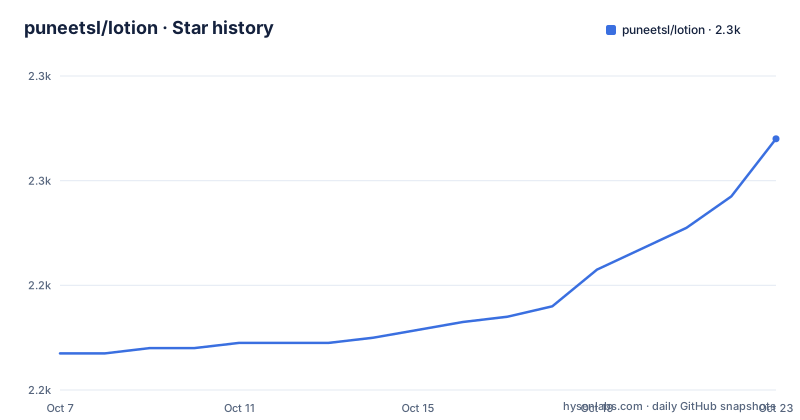
Star history
- puneetsl/lotion2,268 ★ · +41
| Repository | 2026-10-07 | 2026-10-23 |
|---|---|---|
| puneetsl/lotion | 2.2k | 2.3k |
41 Stars in the last 16 days, measured from the daily GitHub snapshot. Compare with other projects
Editorial analysis
A quoted refusal as the project's founding document
Lotion's README explains its own existence by quoting a Notion maintainer: we do not want to release on platforms that we cannot ensure the quality, the team is still small and we don't use Linux ourselves. That sentence is the whole premise, and it is also the reason the project has to keep doing things that a first-party desktop app never has to, like explaining its own custom CSS injection points.
The project describes itself as an unofficial, Electron-based desktop client for Notion, focused on Linux. The badges give version 1.6.0 and Electron 41.7.0, and the description field in the repository metadata says the same thing the README does: an unofficial Notion.so app for Linux.
That description is narrower than the actual output. The installation section covers a `.deb`, an `.rpm`, a `.zip` for portable use, two macOS builds split by architecture, and a Windows installer plus a zip plus an ia32 build. The GitHub topics still say `linux-notion`, which is a leftover from when that was accurate. A repository whose metadata understates its platform reach is usually a project that started narrow and grew, which is worth knowing before you file a bug that assumes Linux only.
The window is the product
Lotion's feature list spends most of its length on the shell rather than on Notion, and that is the correct focus for a wrapper. The window is frameless with a custom 32 pixel title bar that contains the tab bar, and the tab bar is where most of the engineering went.
Tabs support click-to-switch, drag-and-drop reordering, pinning, dynamic titles and favicons. They overflow in a Chrome-style fashion, shrinking before they disappear, and once shrunk the mouse wheel scrolls horizontally with fade indicators showing what is hidden. Navigation controls for back, forward and refresh sit inside the same bar rather than in a separate toolbar. Both session restore and native window decorations are opt-in, and the native decorations mode is honest about its cost: one tab per window.
Spell check is right-click based with multi-language support, external links open in the system browser, and zoom shortcuts are mapped so that `Ctrl` plus `+`, `=`, `-` and `0` work across layouts like Spanish and German rather than only US. That last detail is the kind of thing that only gets fixed after users on other layouts report it.
The dependency list backs this up. `@atlaskit/pragmatic-drag-and-drop` for the tab reordering, `react` 18 with `react-dom`, `@reduxjs/toolkit` and `redux` for state, `electron-store` for configuration, `electron-updater` for updates, `better-sqlite3` as a native addon alongside `bindings` and `node-addon-api`, plus `colord` for colour manipulation and `luxon` for time handling. An Electron app with a compiled SQLite binding is not a thin wrapper.
Ten themes, and the release where seven of them were lies
The current theme list is Default, Dracula, Nord, Gruvbox Dark, Monokai, Noir, four Catppuccin variants and Sakura, which is ten. The release notes for v1.6.0 explain where most of them came from, and in doing so admit that the previous batch never worked.
The v1.6.0 notes say the built-in themes now actually apply to Notion, and cite issue 150 as the fix. The stated cause is that the seven themes shipped in v1.5, Dracula, Nord, Gruvbox Dark and the Catppuccin variants, existed only in the menu: no CSS was bundled, so selecting one silently did nothing, on every operating system. The phrase the notes use is that theming silently no-oped for everyone.
The fix is instructive because it is not an invention. Notion declares its design tokens as `--c-*` custom properties, and they land on `.notion-dark-theme` and `.notion-light-theme` on the body element. Lotion bundles theme CSS in `assets/themes/` and overrides those properties on the right selectors with `!important` to win the cascade. Three new themes came with it: Monokai, Noir, a high-contrast black and white with a single red accent, and Sakura, a pastel light theme.
The release also added system-theme sync, where picking a light theme such as Sakura or Catppuccin Latte flips Notion's own use-system-setting appearance to light and dark themes flip it back. That is the kind of small coordination that only matters if you have used both systems side by side.
Custom CSS with the selector problem written down
The README documents user themes as a file drop, at `~/.config/Lotion/themes/<name>.css`, and then does something rarer than most projects: it explains why naive CSS does not work.
The example block carries its own comment. Notion declares `--c-*` on `.notion-dark-theme`, which sits on the body element, so an override has to land on that selector rather than only on `:root`, and `!important` is needed to win against Notion's own redeclarations. The block then sets a small palette, background, secondary background, tertiary background for hover, primary and secondary icon colours, and `--c-palUiBlu600` which is Notion's primary blue, remapped to the accent.
The selector list is long on purpose: `:root`, `:root.dark`, `:root.light`, `body`, `body.notion-body`, `.notion-dark-theme`, `.notion-light-theme` and `.notion-app-inner`. That redundancy is a record of trial and error against an application that renames its classes without notice, and it is the most reusable knowledge in the repository.
After editing, the logo menu offers Reload Custom CSS to re-inject the stylesheet, and the README points at any file in `assets/themes/` as a complete template. A theme pick from the menu is also enough to trigger it. For a wrapper around someone else's frontend, this is the section to bookmark.
Packaging that admits what is missing
Arch is the interesting case because the README states a limitation instead of hiding it: the `lotion-bin` package is not on the AUR yet, and you should build it locally from the PKGBUILD shipped in the repository. The stated benefit is that the PKGBUILD downloads the official `.deb` artifact, so you get the same binary as the GitHub release without running `npm install`.
git clone https://github.com/puneetsl/lotion.git
cd lotion
makepkg -si
The result installs a `lotion` command to `/usr/bin/lotion` and registers a desktop entry. `PKGBUILD.md` explains the packaging mechanism and `knol/AUR_SUBMISSION.md` is an invitation to maintain the AUR package, which tells you this repository treats distribution packaging as something it can hand to a user rather than something it must own.
Debian and Fedora are one line each, with the version pinned into the filename so you cannot install the wrong one:
sudo apt install ./lotion_1.6.0_amd64.deb
sudo dnf install ./lotion-1.6.0-1.x86_64.rpm
macOS is the section with the most caveats, because the app is unsigned and the README explains the cost, $99 a year for an Apple Developer ID, with a sponsorship link as the remedy. It gives two fixes, stripping the quarantine attribute from the zip before extraction or from the `.app` after, plus the right-click Open path. Explaining Gatekeeper instead of telling people to disable it is the correct call.
A build tree that has absorbed two toolchains
The directory listing shows a project that has been through a migration. There are four webpack configs, `webpack.main.config.js`, `webpack.renderer.config.js`, `webpack.plugins.js` and `webpack.rules.js`, alongside `build.js` and `forgeInterfaces.js`, which is the Electron Forge layout. There is also a `tsconfig.json` in a repository whose package metadata reports JavaScript as the primary language.
Alongside the Forge path sits `playwright.config.js` and a `playwright` npm script that runs `playwright test`, so end-to-end coverage exists alongside the older test script, which is a stub that prints an error and exits 1. Dependencies pin `@electron-forge/cli` and `core` at 7.11.2 with makers for deb, dmg, rpm, squirrel and zip, and an `overrides` block pinning `asar` to 3.2.6, `@electron/universal` to 2.0.1 and webpack to 5.98.0.
The remaining directories explain the rest. `i18n/` backs the multi-language spell check, `assets/` holds the banner, screenshot, theme screenshot and the bundled theme CSS, `config/` and `scripts/` are conventional, `src/` is the application, and `knol/` is the project's own working notes directory, since the README points into it for AUR instructions.
Metadata: 2,224 stars, 97 forks, 27 open issues, MIT, last pushed 2026-09-13, not archived. The issue count is the lowest of any project in this batch, and given that the maintainer documents broken themes and unsigned builds in public, it looks like a small queue rather than a neglected one.
Editorial conclusion
Lotion is worth reading for one specific reason: it publishes its failures. Issue 150, seven themes that existed only as menu entries, a rewritable Arch PKGBUILD because the AUR package does not exist, and an unsigned macOS build with a section explaining that the certificate costs 99 dollars a year, all appear in public rather than in a changelog that only lists wins. The v1.6.0 theme fix is the most instructive piece of engineering in the repository, because the solution was not to invent a theming layer but to find the selectors Notion already uses and override its `--c-*` variables with `!important`. If you want to understand how a third party wraps someone else's web app, the `assets/themes/` files and the CSS block in the README are where the real craft sits, and if you want to install it, the `.deb` or the shipped PKGBUILD are the two paths that do not need Node at all.
Frequently asked questions
Is Lotion safe to use with my Notion account?
It is an unofficial client that talks to Notion's own service rather than a local copy of your pages, and it authenticates the way any third-party web client must. The repository states plainly that it is not affiliated with Notion, and the README documents every account-level concern it knows about, including the fact that it is unsigned on macOS. Review what it stores locally before you connect a workspace you care about.
Does Lotion work on macOS and Windows, or only Linux?
It ships for all three. The release includes a Windows installer, a Windows zip and an ia32 build, plus separate macOS archives for Intel and Apple Silicon, in addition to the `.deb`, `.rpm` and portable Linux zip that the README focuses on. Only the repository description and part of the topic list still say Linux, which is out of date.
How do I add my own theme to Lotion?
Drop a CSS file at `~/.config/Lotion/themes/<name>.css`, then pick it from the logo menu or use Reload Custom CSS to re-inject it. Overriding Notion's `--c-*` custom properties only on `:root` will not work, because Notion declares them on `.notion-dark-theme` and `.notion-light-theme` on the body element, and `!important` is needed to beat its own redeclarations.
Why is there no AUR package for Lotion?
The README says the `lotion-bin` AUR package does not exist yet and tells you to build from the PKGBUILD shipped in the repository instead. That PKGBUILD downloads the official `.deb` from the GitHub release, so you get the published binary without running `npm install`, and `makepkg -si` installs a `lotion` command plus a desktop entry.
Official sources
Add this badge to your README
If you maintain this project, the badge below links readers to this analysis and shows its maintenance status from the daily GitHub snapshot. Paste the markdown into your README; add ?metric=license or ?metric=stars to the image URL for a different field.

[](https://hysenlabs.com/projects/puneetsl-lotion)Star history chart for your README
[](https://hysenlabs.com/projects/puneetsl-lotion)Was this useful?