Merlin for OCaml: completion setup for Vim and Emacs
Context sensitive completion for OCaml in Vim and Emacs
At a glance
- What is it?
- Merlin is an OCaml editor service with built-in support for Vim and Emacs. It suits developers who want context-sensitive editor assistance outside an OCaml-LSP workflow, provided compiler compatibility and configuration are checked.
- Who is it for?
- Adopt Merlin when your primary OCaml editor is Vim or Emacs and you want Merlin's editor-specific service integration. Do not select it as the documented default for an editor without a maintained integration, and choose OCaml-LSP when the editor uses LSP.
- Can I use it commercially?
- Yes. MIT is a permissive licence: you can use, modify and sell software built on it, as long as you keep its copyright and licence notices.
- Is it still maintained?
- Yes. The repository last received commits 3 days ago.
- What is it written in?
- Mainly OCaml, according to GitHub's language statistics.
Answers come from the project's GitHub data, last synced on November 7, 2026, and from our analysis. They are not legal advice.
Star history
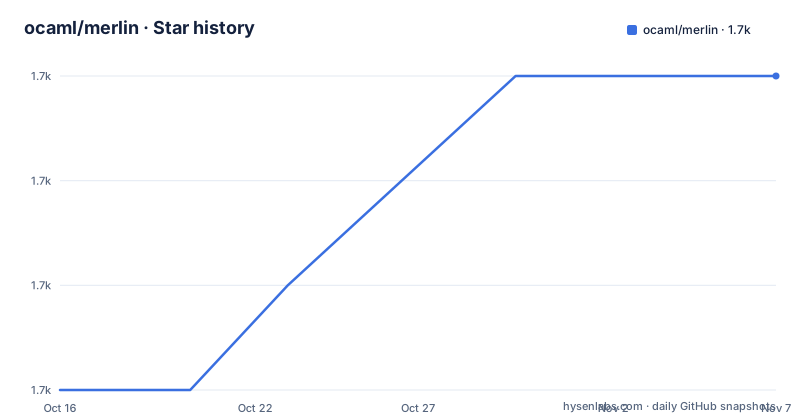
- ocaml/merlin1,710 ★ · +3
| Repository | 2026-10-16 | 2026-11-07 |
|---|---|---|
| ocaml/merlin | 1.7k | 1.7k |
3 Stars in the last 22 days, measured from the daily GitHub snapshot. Compare with other projects
Editorial analysis
Merlin's target problem for OCaml developers
Merlin addresses editor assistance for OCaml source code. It is intended for developers who work in Vim or Emacs and want completion that reflects the code around the cursor rather than treating OCaml identifiers as unrelated words. The README describes Merlin as an editor service that provides modern IDE features, while explicitly stating that Emacs and Vim support is included out of the box.
The project is not limited to a Vim completion source. Its repository contains the `ocamlmerlin` and `ocamlmerlin-server` programs, an Emacs library at `emacs/merlin.el`, Vim integration under `vim/`, and the `dot-merlin-reader` package. The Makefile builds the core packages and creates local links for `ocamlmerlin`, `ocamlmerlin-server`, and `dot-merlin-reader`. This makes Merlin an application with editor adapters rather than a mode that must be rewritten separately for every editor.
The intended audience is fairly specific. OCaml developers using Vim or Emacs can follow the documented opam and editor setup paths. Developers using Visual Studio Code are directed by the README to the official OCaml Platform extension and OCaml-LSP instead. For editors without official support, the README recommends considering OCaml-LSP with an available LSP plugin. That distinction matters when choosing between Merlin and a language-server-based setup.
Merlin service, editor adapters, and version branches
Merlin runs as an editor service, with Vim and Emacs responsible for invoking the appropriate executable when an OCaml file is opened. The README does not document the complete request protocol, so the exact editor-to-service message format cannot be confirmed from the repository documentation. The separate `ocamlmerlin` and `ocamlmerlin-server` targets show that the project has distinct executable components, but their internal responsibilities are not explained in the README.
Version compatibility is more explicit. Since version 4.0, Merlin has a dedicated branch for each OCaml major and minor version. The README gives `411` as the branch for OCaml 4.11.*, and says that `main` is usually synchronized with the branch compatible with the latest almost-released OCaml version. This means that selecting `main` is reasonable for a recent OCaml toolchain, while older compiler lines may require an older branch.
For OCaml versions between 4.02 and 4.10, the README directs developers to the 3.4 branch. It also warns that this branch will not contain the most recent features. That is a real trade-off. A compatible editor service may lack newer behavior, but using `main` without checking compiler compatibility could leave the build or analysis environment mismatched. The branch choice should therefore follow the OCaml version in the active switch, not merely the latest release visible on GitHub.
Installing Merlin with opam and running the first setup
:set rtp+=<SHARE_DIR>/merlin/vimThe default Vim configuration is located at `<SHARE_DIR>/merlin/vim/plugin/merlin.vim`. The README also recommends registering the local help documentation with `:helptags <SHARE_DIR>/merlin/vim/doc`. That step is useful when you want Vim's own help system to include Merlin's documentation.
Configuring Emacs and optional integrations
(push "<SHARE_DIR>/emacs/site-lisp" load-path)
(setq merlin-command "<BIN_DIR>/ocamlmerlin")
(autoload 'merlin-mode "merlin" "Merlin mode" t)
(add-hook 'tuareg-mode-hook #'merlin-mode)
(add-hook 'caml-mode-hook #'merlin-mode)
The `merlin-command` setting is needed only when `ocamlmerlin` is not already in `PATH`. The README lists optional integrations for `merlin-iedit`, `merlin-company`, and `merlin-ac`. Those integrations are commented out in the basic configuration, so enabling them is a separate choice rather than a required part of the core setup. The README also says an installable core Merlin package and the integration packages are available through MELPA.
Building a source checkout for the intended OCaml line
opam pin menhir 20230608The pin is tied to parser development and is not presented as a required step for every opam installation. Older OCaml versions must be matched to the corresponding Merlin branch before building.
Known boundaries and the OCaml-LSP alternative
Merlin's clearest boundary is editor coverage. Vim and Emacs are supported out of the box. Visual Studio Code is documented through the official OCaml Platform extension, which the README says requires OCaml-LSP. Install that server with:
opam install ocaml-lsp-serverThat is not simply a different packaging choice. The Visual Studio Code extension communicates through OCaml-LSP and the Language Server Protocol, whereas the Merlin setup invokes Merlin-specific files and binaries from Vim or Emacs. For editors without official support, the README suggests OCaml-LSP with the editor's LSP plugin if one exists. It also lists wiki pages for Acme, Atom, and Spacemacs, but those pages are not equivalent to maintained out-of-the-box support.
Merlin leaves some operational details undocumented. The README does not explain how to recover a failed service connection, inspect a request, or configure a remote development environment. The repository Makefile has `clean`, `test`, `preprocess`, `promote`, and `bench` targets, but the README does not present them as a user installation tutorial. This limitation matters when diagnosing an editor that does not receive completion.
The repository is not archived, and its last push was on 2026-10-16. Listed releases include v5.9 on 2026-10-12, v5.8.1-506_preview on 2026-07-31, and v5.8.1-505 on 2026-07-31. The project is licensed under MIT. That license covers the repository's use and modification terms, while operational compatibility still depends on the OCaml compiler, dependencies, editor, and selected branch.
Editorial conclusion
Adopt Merlin when your primary OCaml editor is Vim or Emacs and you want Merlin's editor-specific service integration. Do not select it as the documented default for an editor without a maintained integration, and choose OCaml-LSP when the editor uses LSP. Verify first that your OCaml switch matches the intended Merlin branch, that `ocamlmerlin` is available through `PATH`, and that `<SHARE_DIR>` points to the installed data files. The final decision should follow that concrete compatibility and configuration check.
Frequently asked questions
How do I install Merlin for OCaml?
With a working opam installation, run `opam install merlin` followed by `opam user-setup install`. The README says `opam-user-setup` configures Emacs and Vim for the current Merlin installation.
How do I configure Merlin in Vim?
Ensure that `ocamlmerlin` can be found in `PATH`, then add `<SHARE_DIR>/merlin/vim` to Vim's runtime path. The README also gives `:helptags <SHARE_DIR>/merlin/vim/doc` for registering Merlin's Vim documentation.
Can I use Merlin in editors other than Vim and Emacs?
Vim and Emacs are supported out of the box. The README points Visual Studio Code users to OCaml Platform with OCaml-LSP, and recommends considering OCaml-LSP with an editor's LSP plugin for editors without official support.
Official sources
Add this badge to your README
If you maintain this project, the badge below links readers to this analysis and shows its maintenance status from the daily GitHub snapshot. Paste the markdown into your README; add ?metric=license or ?metric=stars to the image URL for a different field.

[](https://hysenlabs.com/projects/ocaml-merlin)Star history chart for your README
[](https://hysenlabs.com/projects/ocaml-merlin)Was this useful?