OCaml 5.5.2: two compilers, a 64-bit only native backend, and five live branches
The core OCaml system: compilers, runtime system, base libraries
At a glance
- What is it?
- The ocaml/ocaml repository holds the whole toolchain: a bytecode compiler, a native code compiler that since 5.0 only targets 64-bit processors, and a runtime rewritten for domains and effect handlers. It also keeps 4.14 alive while asking maintainers to measure their own regressions.
- Who is it for?
- The honest fit is OCaml when you want the module system and class based object system the project documents, and your targets sit in Tier 1. Walk away if your deployment needs 32-bit native output, or if you need someone else to have measured the 5.x garbage collector on your workload, because the project hands that measurement back to you.
- Can I use it commercially?
- Check first. The repository uses a licence we do not classify automatically, so read its LICENSE file before any commercial use.
- Is it still maintained?
- Yes. The repository received new commits within the last day.
- What is it written in?
- Mainly OCaml, according to GitHub's language statistics.
Answers come from the project's GitHub data, last synced on November 15, 2026, and from our analysis. They are not legal advice.
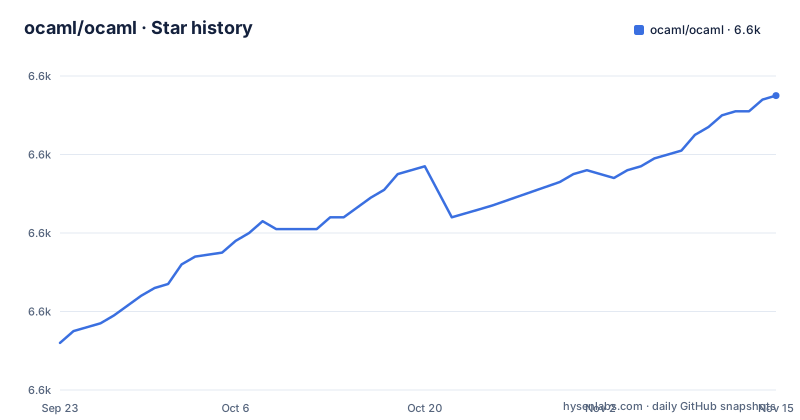
Star history
- ocaml/ocaml6,635 ★ · +63
| Repository | 2026-09-23 | 2026-11-15 |
|---|---|---|
| ocaml/ocaml | 6.6k | 6.6k |
63 Stars in the last 53 days, measured from the daily GitHub snapshot. Compare with other projects
Editorial analysis
One language, two compilers, and a REPL that also batch builds
OCaml is a functional, statically typed language from the ML family. Its module system extends the one in Standard ML, and a class based object system sits on top of both. The repository holds the entire toolchain rather than one binary: a bytecode compiler, a native code compiler, the runtime system, and the base libraries that travel with them.
The split between the two compilers shapes everyday decisions. The bytecode compiler emits compact code that a C program then interprets. It runs quickly, keeps memory requirements moderate, and is portable to many 32 or 64 bit platforms. It works either as a standalone batch oriented compiler that produces standalone programs, or as an interactive REPL. The native compiler takes longer to compile and generates bigger code, and the programs it produces run faster while keeping that same moderate memory footprint.
So the choice between them is a tradeoff about build time and binary size, not about which language features you get. Nothing in the documentation claims one backend compiles a different dialect of the language than the other.
The 5.x runtime rewrite reaches further than domains and effect handlers
A CAUTION block at the top of README.adoc records that the developer team released OCaml 5.0.0 in December 2022, and that 5.x features a full rewrite of the runtime system. Two named capabilities come with it: shared memory parallel programming using domains, and native support for concurrent programming using effect handlers.
The rewrite reaches past those two. The project cites the large number of changes, especially to the garbage collector, as the reason 4.14 remains supported. That is the part that decides whether existing code keeps its numbers after an upgrade, and the project makes no claim on your behalf. Maintainers of existing codebases are strongly encouraged to evaluate OCaml 5.x and to report any performance degradations on the issue tracker. The regression check is delegated to the people who own the code.
OCaml 4.14 is called the final release in the 4.x series, originally released in March 2022, and it remains supported for the time being. That is a conditional phrase rather than a promise with a date attached.
Native code stopped at 64 bits and 32-bit is not coming back
From OCaml 5.0 onwards, native compilation is available only on 64-bit systems. The project says it plainly: native compilation on 32-bit systems is no longer available, nor are there plans to bring it back. There is no compatibility switch and no second build mode that keeps those targets alive.
This bites in two places. Embedded boards, older workstations, and hosts where a 32-bit address space is a hard constraint drop out of native compilation entirely. The bytecode compiler is what remains, and its stated reach is many 32 or 64 bit platforms. A team that standardized on ocamlopt output for a 32-bit target has to change the shape of its build, not just one compiler flag.
The 4.14 branch is where that capability still exists, since the restriction arrives with 5.0. Anything needing 32-bit native output has to pin itself to the older series rather than negotiate with a flag.
Tier 1 and Tier 2 divide support by processor, not by feature
Native platform support is published as a two column table keyed by architecture, and the columns mean different things. Tier 1 is labelled actively maintained. Tier 2 is labelled maintained when possible.
On x86 64 bits, Linux, Windows, and FreeBSD sit in Tier 1, while macOS, NetBSD, OpenBSD, DragonFly, and OmniOS (Solaris) sit in Tier 2. On ARM 64 bits, Linux and macOS are Tier 1 and FreeBSD, OpenBSD, and NetBSD are Tier 2. Power 64 bits is Tier 1 for Linux little-endian with ABIv2, and Tier 2 for Linux big-endian with ABIv2. RISC-V 64 bits and IBM Z (s390x) carry Linux in Tier 1 only, with nothing in Tier 2 beside them.
ARM Mac developers can note that macOS on ARM 64 bits is Tier 1, while macOS on x86 64 bits is Tier 2. Anything outside the table is untested: other operating systems for the listed processors have not been tested, though the compiler may work on them with little work. That sentence is a hint from the project, not a support commitment.
Five branches build at once through two CI providers
The badge block covers five branches simultaneously: trunk, 5.6, 5.5, 5.4, and 4.14. Each branch carries its own build badge, and trunk carries a separate hygiene badge alongside it. Two CI providers appear in that block, GitHub Actions for build and hygiene, and AppVeyor for build.
That layout answers a versioning question directly. Someone on 5.x is not forced onto the newest branch, and someone on 4.x still receives work on a branch with its own status page. A 5.6 branch sitting beside 5.5 and 5.4 also means the next series is developed in public rather than in a staging area.
The recent releases line up with those branches: 5.5.2 published on 2026-10-23, 5.5.1 published on 2026-09-04, and 5.5.0 published on 2026-06-19. The last push on the default branch, trunk, is dated 2026-10-30, and the repository is not archived. Release cadence and branch policy are documented separately in release-info/introduction.md and release-info/calendar.md.
Installation points at two documents, not a command to paste
The README itself gives no install command. Installation is delegated to two files in the repository root. Machines running Unix, Linux, macOS, WSL, or Cygwin are sent to INSTALL.adoc. Native Microsoft Windows has its own file, README.win32.adoc.
The build is driven by a set of top level makefiles rather than a single script. The main one includes Makefile.common and Makefile.best_binaries, and its variables name the host architectures the native backend targets:
CAMLC = $(BOOT_OCAMLC) $(BOOT_STDLIBFLAGS) -use-prims runtime/primitives
CAMLOPT=$(OCAMLRUN) ./ocamlopt$(EXE) $(STDLIBFLAGS) -I otherlibs/dynlink
ARCHES=amd64 arm64 power s390x riscv
VPATH = utils parsing typing bytecomp file_formats lambda middle_end \
  middle_end/closure mid
The BOOT_ prefixed variables point at the bootstrap compiler, which is how a build gets a working ocamlc before the tree's own compiler exists. Note also OCAMLLEX ?= $(BOOT_OCAMLLEX), which resolves to the bootstrapped lexer. If you need the exact command sequence rather than this layout, INSTALL.adoc holds it.
The tree shows a compiler that rebuilds itself from boot/
The repository root is a build system, not a wrapper. Directories such as parsing, typing, lambda, bytecomp, middle_end, and driver hold the compiler passes, while runtime, stdlib, and otherlibs hold the runtime and the libraries that ship with it. asmcomp sits beside bytecomp for native code generation, compilerlibs holds the compiler libraries, and testing appears twice: testsuite for the distribution, ocamltest for the test driver.
Two entries matter to anyone tracing how a build starts. boot is the bootstrap compiler used to compile the tree with itself, and VERSION records the version under construction. BOOTSTRAP.adoc sits next to INSTALL.adoc, with configure, configure.ac, and aclocal.m4 handling the configure step, and Makefile.cross and Makefile.dev standing by for cross builds and developer workflows.
BOOTSTRAP.adoc
INSTALL.adoc
README.win32.adoc
VERSION
boot/
runtime/
stdlib/
Editor defaults live in .ocp-indent, and dune and dune-project sit at the root, so the build carries its own metadata alongside the makefiles.
Bug reports want a small program and no generated prose
The issue tracker at github.com/ocaml/ocaml/issues is the single destination for bug reports, and the bar is stated concretely. A report should include a complete program, preferably small, that exhibits the unexpected behavior, along with the configuration in use and the machine type.
The same paragraph asks reporters to avoid adding generated contents or explanation to a bug report, and points at AI.md for the longer version of that guideline. That file sits at the top level of the repository beside CODE_OF_CONDUCT.md, CONTRIBUTING.md, and HACKING.adoc. Anyone changing the tree itself is directed to HACKING.adoc and CONTRIBUTING.md for the mechanics.
Two smaller notes round out the support surface. The manual is distributed as HTML, PDF, and Emacs Info files at ocaml.org/manual/latest/, with the full distribution at ocaml.org/docs/install.html. For contact, the project names discuss.ocaml.org, the caml-list mailing list at [email protected] with subscription through the sympa interface, and the #ocaml channel on libera.chat.
Editorial conclusion
The honest fit is OCaml when you want the module system and class based object system the project documents, and your targets sit in Tier 1. Walk away if your deployment needs 32-bit native output, or if you need someone else to have measured the 5.x garbage collector on your workload, because the project hands that measurement back to you. Before committing, read INSTALL.adoc for your host, find your operating system in the architecture table, and expect to file your own performance degradations if the numbers move.
Frequently asked questions
What is OCaml used for?
The project describes OCaml as a functional, statically typed language from the ML family, with a module system extending that of Standard ML and a class based object system. What this repository provides is the compilers, the runtime system, and the base libraries.
how to install ocaml
Installation instructions live in INSTALL.adoc for Unix, Linux, macOS, WSL, and Cygwin, and in README.win32.adoc for native Microsoft Windows. The complete distribution is also reachable through the install page at ocaml.org/docs/install.html.
Is OCaml better than C++?
The documentation makes no comparison with C++. It does state that native compilation is available only on 64-bit systems from OCaml 5.0 onwards, that 32-bit native compilation is gone, and that no plans exist to bring it back.
how to run ocaml code in terminal
The bytecode compiler serves as an interactive REPL as well as a standalone batch oriented compiler that produces standalone programs. The native compiler is the one to pick when runtime speed matters, at the cost of longer compiles and bigger code.
Official sources
Add this badge to your README
If you maintain this project, the badge below links readers to this analysis and shows its maintenance status from the daily GitHub snapshot. Paste the markdown into your README; add ?metric=license or ?metric=stars to the image URL for a different field.

[](https://hysenlabs.com/projects/ocaml-ocaml)Star history chart for your README
[](https://hysenlabs.com/projects/ocaml-ocaml)Was this useful?