Octelium names three competitors in every use case, and it runs on Kubernetes underneath
A next-gen FOSS self-hosted unified zero trust secure access platform that can operate as a remote access VPN, a ZTNA platform, API/AI/MCP gateway, a PaaS, an ngrok-alternative and a homelab infrastructure.
At a glance
- What is it?
- A look at a self-hosted zero trust access platform written in Go: an architecture of identity-aware proxies at layer 7 sitting on Kubernetes, two access paths with and without a client, secretless access enumerated across four protocols, and a Makefile that treats the build as four protobuf API surfaces and leaves one protoc plugin unpinned.
- Who is it for?
- Octelium fits a team that has services behind NAT, several protocols of long-lived credentials to stop distributing, and either a Kubernetes cluster or a willingness to run one, since that is the substrate rather than an optional extra. It does not fit someone who wants a single static binary on one host, or a team that has already standardised on a managed zero trust product and has no reason to self-host.
- Can I use it commercially?
- Yes, with strict conditions. AGPL-3.0 is a network copyleft licence: if people use a modified version over a network, for example as a hosted service, you must offer them its source code under the same licence.
- Is it still maintained?
- Yes. The repository received new commits within the last day.
- What is it written in?
- Mainly Go, according to GitHub's language statistics.
Answers come from the project's GitHub data, last synced on November 15, 2026, and from our analysis. They are not legal advice.
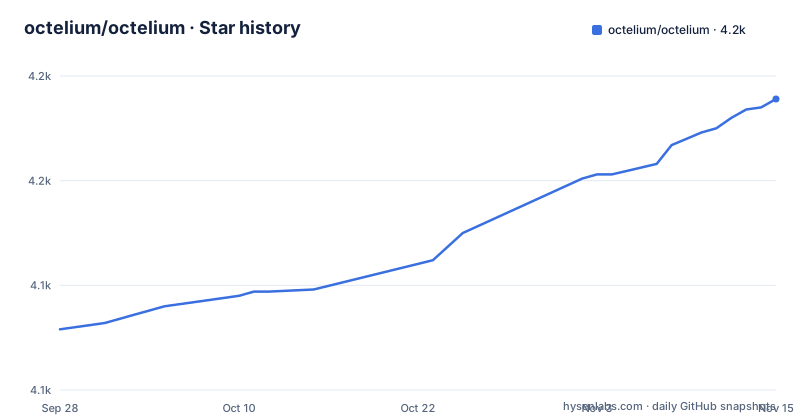
Star history
- octelium/octelium4,189 ★ · +110
| Repository | 2026-09-28 | 2026-11-15 |
|---|---|---|
| octelium/octelium | 4.1k | 4.2k |
110 Stars in the last 48 days, measured from the daily GitHub snapshot. Compare with other projects
Editorial analysis
Every use case names the products it is an alternative to
The use case list is unusual in how it is written. Each entry names three specific commercial or open products and says what it is an alternative to, and none of them is hedged.
For remote access, it is an alternative to OpenVPN Access Server, Twingate and Tailscale. For zero trust network access, it is similar to Cloudflare Access, Google BeyondCorp and Teleport. For self-hosted tunnels and reverse proxies, it is an alternative to ngrok or Cloudflare Tunnel. For container hosting, it is similar to Vercel or Netlify. For an API gateway, an alternative to Kong Gateway or Apigee.
That is ten named products across five use cases, and it tells you something a feature list would not: the project is positioning itself as a single thing that spans five tool categories that are usually bought separately. Whether it is a good substitute in any one of them is a question the readme does not answer, and these are claims rather than comparisons with measurements.
What each entry does add is a link to a worked example in the documentation. The tunnel entry links an example of a self-hosted ngrok alternative, the PaaS entry links one for Next.js and Vite applications, the API gateway entry links its own. So the pattern is a claim followed by something you can look at.
The remaining three use cases are the ones with no named competitor: AI gateways, MCP and agent-to-agent architectures, and homelab infrastructure.
Two access paths: a WireGuard or QUIC client, or no client at all
The platform describes itself as providing secretless access through two paths, and the split between them is the design decision that determines whether it fits your users.
The first is private, client-based access over WireGuard or QUIC tunnels. The second is public, clientless access, described in BeyondCorp terms. Both are offered to humans and to workloads, and both apply context-aware access control on a per-request basis.
The layer matters as much as the transport. The architecture is described as identity-aware proxies controlling access at the application layer, and the identity model is described as layer-7 aware. So the decision to allow a request is made per request against policy, not once per connection at the network layer.
The consequence for a clientless browser user is that there is nothing to install and nothing to tunnel. The consequence for a workload is that a service can be reached without a VPN client on the host.
The stated reach is wide: any private or internal resource behind NAT in any environment, and also publicly protected resources such as SaaS APIs and databases. That second half is what makes the SaaS API use case possible, because the resource is not yours and you cannot put an agent in front of it.
Secretless access is enumerated across four protocols
The feature that does the most work is described as dynamic secretless access, and it is defined by what stops being distributed rather than by what is added.
Because the platform is aware of the application layer, a user can reach a resource protected by application-layer credentials without those credentials being exposed, managed or handed out. Four cases are named.
For HTTP APIs, without sharing API keys and access tokens. For SSH servers, without sharing passwords and private keys. For Kubernetes clusters, without distributing kubeconfigs. And for PostgreSQL and MySQL databases, including compatible ones such as MariaDB and CockroachDB.
Read as a list, that is a credential inventory: bearer tokens, SSH private keys, kubeconfig files and database passwords. Each is a long-lived secret that is currently being copied to people or to machines, and each is one this design removes from the distribution path.
The Kubernetes case is the one that follows from the substrate. If the platform already runs on Kubernetes, then reaching a cluster through the platform without a kubeconfig is a smaller step than it would be for a tool that lives outside the cluster.
The SaaS API use case makes the same point for things you do not host, and the documentation links three examples for it: a generic one, an AWS Lambda one, and an AWS S3 one.
Kubernetes is the substrate, and an ingress controller is one of the use cases
One sentence in the feature list settles the deployment question: the architecture is built on top of Kubernetes for automatic scalability.
That is not a packaging detail. Kubernetes is what the identity-aware proxies run on and what provides the scaling, so this is a cluster product whether or not you wanted one. It also means the platform inherits Kubernetes' own operational surface, including whatever version your cluster is on.
The irony the project is not shy about is that Kubernetes also appears on the other side of the product. There is a use case for Kubernetes as a gateway or ingress, described as a more advanced alternative to standard ingress controllers and load balancers, where you route to any Kubernetes service through dynamic, layer-7 aware policy-as-code. The documentation links an example of an open source Kubernetes ingress controller.
So Kubernetes appears three times: as the substrate, as a target to be reached without kubeconfigs, and as a traffic manager to be replaced. Each of the three is a different job, and a team that already runs ingress controllers has to work out which of the three they actually want.
There is also a container deployment use case, described as PaaS-like, for deploying and hosting containerised applications. That is the fourth Kubernetes-adjacent thing in the product, and it is the one that most resembles the Vercel and Netlify comparison.
MCP and agent-to-agent traffic are a use case with their own policy model
One use case entry is longer than the others and it is the one that has no named competitor, which is a fair signal that it is the newest part of the product.
It describes secure infrastructure for Model Context Protocol gateways and for Agent2Agent Protocol based architectures. Both protocols are named with their own documentation links.
The capabilities listed for it are specific rather than general. Identity management. Authentication over standard OAuth2 client credentials and bearer authentication. Secure remote access and deployment. And identity-based, layer-7 aware access control via policy-as-code, with visibility.
Two things are worth pulling out of that list. The authentication methods are the two standard machine-to-machine ones, which means an agent calling a tool is authenticated the way a service would be rather than with something bespoke. And access control is policy-as-code at layer 7, which is the same model as the rest of the platform, applied to a traffic pattern the platform did not previously have to handle.
The AI gateway use case sits next to it and is described as scalable, with identity-based access control, routing and visibility for any AI language model provider. The word any is doing the work there, since the point of a gateway in front of several model providers is that the application above it does not have to know which one it is talking to.
The homelab entry names the containers it expects you to point at
The homelab use case is the most concrete in the list, because it names specific things.
The first half is reach: connect and provide secure remote access to all your resources behind NAT from anywhere, and the examples given are your laptop, IoT devices, cloud providers, Raspberry Pis and routers.
The second half is hosting, and here the named containers are the interesting part. The text says you can remotely test heavy containers, and gives examples as LLM runtimes such as Ollama, databases such as ClickHouse and Elasticsearch, and Pi-hole.
That is a coherent list in a way that matters. Ollama is a model runtime you would not want to expose to a network. ClickHouse and Elasticsearch are databases with their own authentication layers that you would not want to bolt onto a public IP. Pi-hole is a DNS service whose whole job is being reachable. Each is a service that benefits from an identity-aware proxy in front of it and is awkward to secure by other means on a home network.
The documentation links two examples in this category: remote development with Visual Studio Code through a code server, and Pi-hole.
It is also the use case where the Kubernetes substrate is least obvious. A single Raspberry Pi with a tunnel is the natural mental model, and it is worth working out which of the two access paths you would use on hardware like that.
Dual licensed, both licence files in the tree, and a release every two weeks below 1.0
Two licence facts, one of which is unusual.
The repository description names AGPL-3.0, and the tree carries a file named for the AGPL version three licence. There is also a second licence file named for Apache, and the badge row in the readme links both licence pages. So the project is dual licensed rather than licensed under one copyleft licence, and both texts are committed next to each other.
That combination matters more than it might look. An AGPL project is one where the copyleft reaches network use, and adding an Apache licence gives consumers a permissive option. For an infrastructure platform that people may want to modify without publishing, the second file is the one most integrators will look for.
The release cadence is the other fact. Three tags, each a fortnight apart: v0.42.0 on 2026-09-08, v0.43.0 on 2026-09-21 and v0.44.0 on 2026-10-05.
So this is a project shipping roughly every two weeks and still below version 1.0. That combination means you should expect breaking changes at a rate a platform team of that size cannot avoid, and it means the tag you pin matters. The repository is not archived and the last push was on 2026-10-04, so the cadence is current rather than historical.
The build injects six git values and leaves one protoc plugin unpinned
The Makefile is where the shape of the codebase shows, and three things in it are worth reading closely.
The first is the version injection. Six values are computed from git and passed as linker flags into a package under the utils path: the commit hash, the tag, the semver, the branch, the image registry and the image prefix. The tag is looked up with an exact match against a version pattern and its error output is suppressed, so a build from a non-tagged commit gets an empty tag rather than a failed build. The registry defaults to a container registry variable and the prefix to the project name, so images are named consistently by default and overridable.
The second is the API surface. The protobuf definitions live under an apis directory with four separate roots: main, cluster, client and rsc. Four surfaces means four independently versioned contracts, and the Makefile has a separate generation target that installs the protobuf code generators. Two of those three installs are pinned to exact versions, and the third, the documentation generator, is installed at its latest release with no version constraint.
The third is the workspace layout. The repository root has a workspace file and its sum file, which is Go's mechanism for a multi-module repository, and that is consistent with four separate API modules and separate client and cluster components in the tree. The generated API documentation is written to a temporary directory as JSON, and a template for that generation lives in a directory named unsorted.
Editorial conclusion
Octelium fits a team that has services behind NAT, several protocols of long-lived credentials to stop distributing, and either a Kubernetes cluster or a willingness to run one, since that is the substrate rather than an optional extra. It does not fit someone who wants a single static binary on one host, or a team that has already standardised on a managed zero trust product and has no reason to self-host. Before you commit, read the use case that matches your problem and follow the example it links, because the comparisons it draws against named commercial products are its own claims and not benchmark results, and check the licence question first, since it is dual licensed and the tree carries both files.
Frequently asked questions
How does Octelium compare with Cloudflare Access?
The readme lists Cloudflare Access as one of the products its Zero Trust Network Access use case is similar to, alongside Google BeyondCorp and Teleport, and separately names Cloudflare Tunnel as one of the products its self-hosted tunnel use case is an alternative to, alongside ngrok. Those are the project's own positioning claims rather than comparisons with measurements.
What protocols can Octelium give secretless access to?
Four are named: HTTP APIs without sharing API keys and access tokens, SSH servers without sharing passwords and private keys, Kubernetes clusters without distributing kubeconfigs, and PostgreSQL and MySQL databases including compatible ones such as MariaDB and CockroachDB. The SaaS API case extends the same idea to third-party services you do not host.
Does Octelium need a client installed on the user's machine?
It supports both paths. There is zero-config client-based access over WireGuard or QUIC tunnels, and there is clientless BeyondCorp access. Both apply identity-based, layer-7 aware, context-aware access control on a per-request basis, for humans and for workloads.
What does Octelium need in order to run?
Kubernetes. The architecture is described as built on top of Kubernetes for automatic scalability, using a scalable set of identity-aware proxies that control access at the application layer. It is also offered as a Kubernetes ingress alternative and gateway, and as a container deployment platform.
What licence is Octelium under, and how often does it release?
It is dual licensed: the tree carries both a licence file for AGPL-3.0 and one for Apache, and the readme badges both. Releases land roughly every fortnight and the version is still below 1.0, with v0.42.0 on 2026-09-08, v0.43.0 on 2026-09-21 and v0.44.0 on 2026-10-05.
Official sources
Add this badge to your README
If you maintain this project, the badge below links readers to this analysis and shows its maintenance status from the daily GitHub snapshot. Paste the markdown into your README; add ?metric=license or ?metric=stars to the image URL for a different field.

[](https://hysenlabs.com/projects/octelium-octelium)Star history chart for your README
[](https://hysenlabs.com/projects/octelium-octelium)Was this useful?