@octokit/core: the extendable base of the Octokit client
Extendable client for GitHub's REST & GraphQL APIs
At a glance
- What is it?
- @octokit/core is the base client for GitHub's REST and GraphQL APIs, and its value is that it is a small core with a plugin and hook system rather than a full SDK. It suits a developer who wants a GitHub client they can extend, and the README says plainly that if you do not need the plugin API you should use the request or graphql packages directly.
- Who is it for?
- Adopt @octokit/core if you want a GitHub client you can extend with plugins and hooks, and you need both the REST and GraphQL surfaces in one object. Skip it if you only need to make occasional REST calls, because the README itself points you at @octokit/request or @octokit/graphql directly, and skip the plugin architecture if you do not need it.
- Can I use it commercially?
- Yes. MIT is a permissive licence: you can use, modify and sell software built on it, as long as you keep its copyright and licence notices.
- Is it still maintained?
- Yes. The repository last received commits 1 day ago.
- What is it written in?
- Mainly TypeScript, according to GitHub's language statistics.
Answers come from the project's GitHub data, last synced on November 7, 2026, and from our analysis. They are not legal advice.
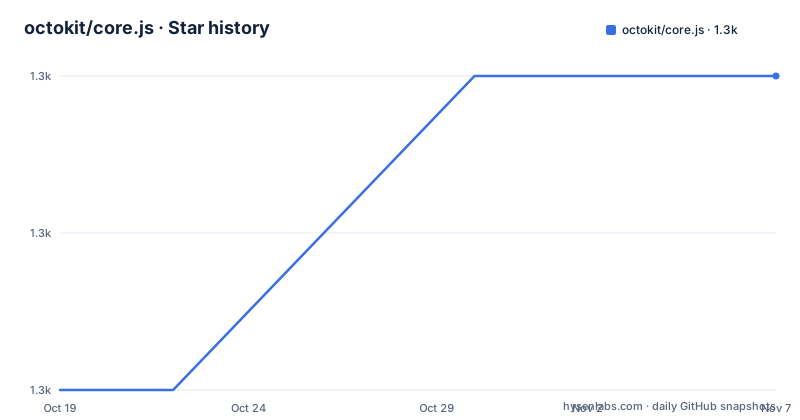
Star history
- octokit/core.js1,288 ★ · +2
| Repository | 2026-10-19 | 2026-11-07 |
|---|---|---|
| octokit/core.js | 1.3k | 1.3k |
2 Stars in the last 19 days, measured from the daily GitHub snapshot. Compare with other projects
Editorial analysis
A core with extensions, and the honest case against it
The README opens with a positioning statement that is unusual in a client library, because it tells you when not to use it. If you need a minimalistic library to utilise GitHub's REST API and GraphQL API which you can extend with plugins as needed, then `@octokit/core` is a great starting point. And if you don't need the Plugin API, then using `@octokit/request` or `@octokit/graphql` directly is a good alternative. That second sentence is the most useful thing in the document. A client that offers a plugin system is a client that asks you to understand the plugin system, and for a script that makes three API calls the overhead is not worth it. The topics list is short, with octokit-js and plugin, which tells you the whole project is about the extension model. The primary language is TypeScript, the licence is MIT, the last push was on 2026-10-15, and the releases are v7.0.8 on 2026-08-30, v7.0.7 on 2026-08-01 and v7.0.6 on 2025-10-31.
Usage in a browser and in Node
The usage table covers two environments. In a browser you load the package directly from esm.sh with a module script:
<script type="module">
  import { Octokit } from "https://esm.sh/@octokit/core";
</script>
In Node you install it and import it:
import { Octokit } from "@octokit/core";with `npm install @octokit/core`. One practical note follows the table, and it will bite anyone on TypeScript. As the package uses conditional exports, you will need to adapt your `tsconfig.json`, with a link to the TypeScript documentation on package.json exports. Conditional exports are how a package offers different builds for `import` and `require`, and TypeScript needs to be told to resolve them the same way Node does. A mismatch shows up as a type error on the import itself rather than on anything you wrote, which is a confusing first experience if you have not hit it before.
REST and GraphQL on the same object
The two API surfaces are two methods on the same instance, which is the convenience the core package provides over the alternatives. The REST example creates a client with a personal access token and calls a route with a templated path:
const octokit = new Octokit({ auth: `personal-access-token123` });

const response = await octokit.request("GET /orgs/{org}/repos", {
  org: "octokit",
  type: "private",
});
The GraphQL example uses the same client and a different method:
const response = await octokit.graphql(
  `query ($login: String!) {
    organization(login: $login) {
      repositories(privacy: PRIVATE) {
        totalCount
      }
    }
  }`,
  { login: "octokit" },
);
Note the templated route syntax in the REST call, with `{org}` in the path and the value passed alongside, and the variable passing in the GraphQL call. Both are the packages' own conventions, and the README points at `@octokit/request` and `@octokit/graphql` for the full documentation of the two methods respectively. The core package does not reimplement them, it wires them together.
The options that change where requests go
The options table covers seven constructor arguments, and a few of them solve problems you will hit in production. `options.baseUrl` is the GitHub Enterprise Server one, set to the root URL of the API, so for a host of `github.acme-inc.com` you set it to `https://github.acme-inc.com/api/v3`. `options.previews` is an array of strings for REST endpoints that require preview headers, settable globally on the constructor or per request through `mediaType.previews`. `options.request` sets a default request timeout and, in Node only, an `http(s).Agent` for proxy usage. `options.timeZone` sets the `Time-Zone` header using a name from the Olson database, and the documentation is clear that this header determines the timezone used for generating the timestamp when creating commits, which is the kind of detail that produces a commit dated wrong by a day. `options.userAgent` sets a custom user agent string for your app or library. And `options.authStrategy` defaults to `@octokit/auth-token`.
Defaults, and the shallow merge that trips people up
You can create a new Octokit class with customised default options using `Octokit.defaults`:
const MyOctokit = Octokit.defaults({
  auth: "personal-access-token123",
  baseUrl: "https://github.acme-inc.com/api/v3",
  userAgent: "my-app/v1.2.3",
});
const octokit1 = new MyOctokit();
const octokit2 = new MyOctokit();
The documentation is explicit about the merge semantics, and it is the detail to read. If you pass additional options to your new constructor, the options will be merged shallowly, so a nested object in your defaults is replaced rather than combined with the same nested object in the constructor arguments. The example makes it concrete, with a default of `foo: { opt1: 1 }` and a constructor argument of `foo: { opt2: 1 }` producing `{ foo: { opt2: 1 } }` and `opt1` gone. If you need a deep or conditional merge, you can pass a function instead, receiving the current options and returning the merged result.
Hooks and plugins, the reason the package exists
The table of contents lists Hooks and Plugins as separate sections after the options and defaults, and they are the extension points the whole package is built around. The dependency list in the package manifest shows the mechanism, with `before-after-hook` providing the hook system and `universal-user-agent` composing the user agent string across environments. Plugins are the higher level of the two, and the README's own framing is that you can build your own Octokit with plugins and defaults, and that a plugin API is what distinguishes this package from the request and graphql packages. The practical value of hooks is that they run around every request, which is where a team can put logging, retry, rate-limit handling, custom headers or a cache without wrapping the client at every call site. The practical cost is that behaviour added this way is invisible at the call site, so a project that relies heavily on hooks has an implicit contract that is only discoverable by reading the setup code.
The build, the tests and the release pipeline
The repository is a small, focused TypeScript project, with `src/`, `test/`, `scripts/`, a `vite.config.js`, a `tsconfig.json` and a `CODE_OF_CONDUCT.md` and `SECURITY.md`. The build is a node script followed by the TypeScript compiler, `node scripts/build.mjs && tsc -p tsconfig.json`, which is the pattern of a package that bundles with esbuild and then emits declarations separately. The tests use vitest with coverage, and there is a separate `test:typescript` script that type-checks a dedicated file under strict settings including `--exactOptionalPropertyTypes` and `--strict`, which is a separate concern from the unit tests and is how the public type surface is verified. Linting is prettier over the source, the tests and the README, with a `pretest` hook that runs the check first, so a formatting violation fails the test run. Releases are driven by `semantic-release-plugin-update-version-in-files`, and the manifest sets `publishConfig` with public access and provenance enabled, which is the supply chain attestation npm supports.
Editorial conclusion
Adopt @octokit/core if you want a GitHub client you can extend with plugins and hooks, and you need both the REST and GraphQL surfaces in one object. Skip it if you only need to make occasional REST calls, because the README itself points you at @octokit/request or @octokit/graphql directly, and skip the plugin architecture if you do not need it. Before you start, note that the package uses conditional exports, so your tsconfig.json needs adapting, and that the `baseUrl` option is what makes it work against GitHub Enterprise Server.
Frequently asked questions
When should I use @octokit/core instead of @octokit/request?
Use @octokit/core if you want to extend the client with plugins, hooks and defaults. The README says that if you don't need the Plugin API, using @octokit/request or @octokit/graphql directly is a good alternative.
How do I point @octokit/core at a GitHub Enterprise Server instance?
Set the baseUrl option to the root URL of the API, for example `new Octokit({ baseUrl: "https://github.acme-inc.com/api/v3" })`.
How do I set a custom timezone for commits with @octokit/core?
Use the timeZone option, which sets the Time-Zone header using a name from the Olson database, for example `new Octokit({ timeZone: "America/Los_Angeles" })`. That header determines the timezone used for generating the timestamp when creating commits.
How do default options merge in @octokit/core?
Shallowly, so a nested object in the defaults is replaced rather than combined with the same nested object passed to the constructor. If you need a deep or conditional merge, pass a function to Octokit.defaults that receives the current options and returns the merged result.
Official sources
Add this badge to your README
If you maintain this project, the badge below links readers to this analysis and shows its maintenance status from the daily GitHub snapshot. Paste the markdown into your README; add ?metric=license or ?metric=stars to the image URL for a different field.

[](https://hysenlabs.com/projects/octokit-core-js)Star history chart for your README
[](https://hysenlabs.com/projects/octokit-core-js)Was this useful?