The repository is six READMEs and no source
Automatically downloads, installs, and deploys genuine Windows and Office with one click. This tool is completely free, ad-free, green, non-toxic, simple, efficient and safe.
At a glance
- What is it?
- Mocreak deploys Windows and Office from a graphical interface, and its public repository contains nothing but six README files in different languages and an images folder. Every engineering claim in the project therefore arrives as an assertion, with no code, licence or changelog behind it.
- Who is it for?
- Mocreak is a closed deployment tool with a documentation-only public repository, so anyone considering it has to evaluate claims rather than code. Three things to establish before running it on a machine you care about.
- Can I use it commercially?
- Not without permission. GitHub finds no licence file in the repository, and without a licence all rights are reserved by default: you may read the code but not reuse it. Check the README, or ask the authors, before using it.
- Is it still maintained?
- Yes. The repository last received commits 180 days ago.
- What is it written in?
- GitHub does not report a main language for this repository.
Answers come from the project's GitHub data, last synced on November 15, 2026, and from our analysis. They are not legal advice.
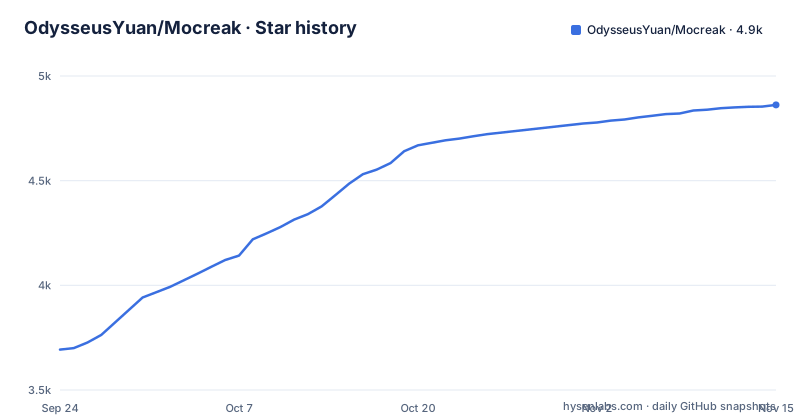
Star history
- OdysseusYuan/Mocreak4,862 ★ · +1,169
| Repository | 2026-09-24 | 2026-11-15 |
|---|---|---|
| OdysseusYuan/Mocreak | 3.7k | 4.9k |
1,169 Stars in the last 52 days, measured from the daily GitHub snapshot. Compare with other projects
Editorial analysis
Eight top-level entries and not one of them is code
The repository contains a .github directory, an images directory, and six readme files: the English original plus Simplified Chinese, Traditional Chinese, Japanese, Russian and German. That is the whole listing. There is no src directory, no installer, no build script, no manifest, no tests and no LICENSE file, and the repository metadata agrees by reporting no primary language and no licence. Six translations of one document is a deliberate choice about who the reader is, and it is a good one, but it means the public record of this project is a description rather than an implementation. Anything a reader wants to check about how the tool behaves has to be taken on the word of a file that cannot be audited from here, and no amount of reading the repository will change that.
What the file claims for Windows
The Windows section lists what the tool does to an operating system, and the claims are specific enough to be checked on a machine afterwards. It offers customizable options to install various x64 distributions of Windows 10 and 11, with languages from multiple countries or regions selectable as the default for new systems, and both online download and installation and offline installation. It says the system custom components can be highly customized, that the build is based on a native compilation mode and constructs a Windows operating system that adapts to your computer on demand, and that apart from the necessary restarts you can keep using the computer during the install. For hardware it claims compatibility policies so that machines not meeting the TPM, CPU or memory requirements still install smoothly, and it says no complex settings need configuring afterwards because a local account can sign in directly.
Defender and Notepad are listed as installable components
One line in the Windows list deserves to be read on its own. The system custom components that need to be installed can be highly customized, and the file gives as an example that you can even choose not to install Windows Defender, Notepad, etc. The rest of that list is uncontroversial: Notepad is a convenience, and an image without it is a smaller image. Windows Defender is the built-in antivirus and endpoint protection on a freshly installed system, so a deployment tool that offers to leave it out is changing the security posture of the machine it builds, and it does so as a convenience feature in a list of options rather than as a switch with a warning attached. Nothing else in the document discusses the consequences, and there is no setting described that turns it back on afterwards in an unattended image.
Offline installation means media you already have
The Windows and Office sections both advertise dual strategies, online download and installation alongside offline installation, and the offline half is the one that raises a question the repository never answers. Offline installation presupposes installation media: an ISO or a set of images that the tool reads from disk. Since nothing in the repository contains an image, and no download location is named for the media itself, the media has to come from somewhere the user already has. That matters more than it sounds for an operating system installer, because the images a deployment tool applies are exactly the artefact an attacker would want to substitute, and a tool that accepts them from a local path has no way to vouch for them. The document names the mechanism as a native compilation mode that constructs a Windows operating system on demand, and then stops there.
Office deployment covers four versions and any combination
The Office section reads like a feature matrix. It claims one-click download, install and deployment of the latest Office 2016, 2019, 2021 and 2024 versions, installation to other partitions including solid state drives, mechanical disks, removable disks, flash disks and memory disks, and any combination of Word, PowerPoint, Excel, Outlook, OneNote, Access, Visio, Project, OneDrive and Lync/Skype, with interface language selectable from multiple countries or regions. Two entries describe behaviour that changes an existing machine: before installing, the software automatically detects conflicting Office components and uninstalls them, and there is a completely remove Office Components mode for when Office is no longer needed. Automatic removal of a conflicting install on a machine you did not prepare is the kind of feature to try on a spare system first.
The stability claim has nothing behind it
There is a section headed Run and Test, and it is two sentences. The software supports running under the x64 system architecture of Windows 10 and above, and it has been tested on x64 systems of multiple Windows system versions and runs normally and stably. Neither claim can be checked from the repository, because there is no test suite, no configuration for a test environment, no continuous integration configuration beyond a .github directory, and no changelog. The version history is three tags: v3.0.2 on 2026-03-16, v3.1.0 on 2026-04-22 and v3.1.1 on 2026-05-19. The last push to the default branch master carries the same timestamp as v3.1.1, so that release is the current state of the tree.
The terms are a README paragraph, not a licence
The applicable scenarios section states three conditions in prose. Without the formal written consent of the developer, no person, enterprise or institution may use any direct or indirect means to commercialize the product, and the author reserves the right to pursue legal responsibilities against violators. The tool is only for non-profit purposes, based on personal learning, research or appreciation of Windows and Office software. And it is strictly prohibited to crack or decompile the software through illegal means. There is no LICENSE file in the repository and the metadata licence field is empty, so these three sentences are the entire statement of terms, and they sit in a document whose visible portion is wrapped in translate:start and translate:end comment markers, meaning they exist once per language, in six places.
Copyright registration numbers and a foxmail contact
The last two sections are about provenance rather than software. Copyright protection claims the software has obtained multiple copyrights including modification protection, and gives two numbers: Soft Copyright No. 12752724 and Soft Copyright No. 13022732. Those are Chinese software copyright registrations, which is a filing rather than an open licence, and the document is explicit about the difference by prohibiting decompilation. The About section gives one email address, [email protected], for suggestions and doubts, and a copyright line reading 2024 to 2026 mocreak.com with all rights reserved. The homepage in the repository metadata is that same domain, and the GitHub repository carries the documentation and the release tags.
Editorial conclusion
Mocreak is a closed deployment tool with a documentation-only public repository, so anyone considering it has to evaluate claims rather than code. Three things to establish before running it on a machine you care about. Where the Windows and Office media comes from, since the repository says nothing about it and offers an offline path that assumes you already have the images. Whether opting out of Windows Defender during installation is acceptable in your environment, because the README presents that as a feature. And what the terms are, since there is no LICENSE file and the only conditions are a README paragraph restricting use to non-profit purposes and forbidding decompilation.
Frequently asked questions
What is Mocreak?
A Windows and Office deployment tool, described as an office enhancement tool that automatically downloads, installs and deploys genuine Windows and Office with one click. The README presents it as free, ad-free and non-profit, for personal learning, research or appreciation of Windows and Office software.
What does the Mocreak repository actually contain?
Documentation only: README.md plus translations in Simplified Chinese, Traditional Chinese, Japanese, Russian and German, along with a .github directory and an images directory. There is no source code, no build file, no tests and no LICENSE, and the repository metadata reports no primary language and no licence.
Which Windows versions does Mocreak deploy?
Customizable x64 distributions of Windows 10 and 11, with online download and installation or offline installation, a choice of languages from multiple regions as the default for new systems, and compatibility policies for machines that do not meet the TPM, CPU or memory requirements.
Can Mocreak leave Windows components out during installation?
Yes, and the README lists it among the customizable system components, saying you can choose not to install Windows Defender, Notepad, or similar. Nothing else in the document discusses the effect of leaving Defender out of an installed system.
Is Mocreak open source?
No. The repository contains no source code, its licence metadata is empty and there is no LICENSE file. The only stated terms are in the README, which restricts use to non-profit purposes, forbids commercialization without written consent, prohibits cracking or decompiling, and cites Chinese software copyright registrations 12752724 and 13022732.
Official sources
Add this badge to your README
If you maintain this project, the badge below links readers to this analysis and shows its maintenance status from the daily GitHub snapshot. Paste the markdown into your README; add ?metric=license or ?metric=stars to the image URL for a different field.

[](https://hysenlabs.com/projects/odysseusyuan-mocreak)Star history chart for your README
[](https://hysenlabs.com/projects/odysseusyuan-mocreak)Was this useful?