ponymusic: an app with no backend of its own, so you run the API and type its address in
An Android online music player like NetEase Cloud Music, based on Media3 and ExoPlayer
At a glance
- What is it?
- A Kotlin Android player for NetEase Cloud Music that plays local files and streams online music through an unofficial API. It ships no server: you deploy one, or run it on the phone with Termux, and point the app at it. That makes the login flow travel to whatever address you configured, and it makes the licences and release tags worth checking.
- Who is it for?
- Find out where you stand with the service terms before installing this, because the app talks to an unofficial NetEase Cloud Music API that someone else wrote and that you host yourself. Read what that server exposes: the documented setup puts it on your local network with no authentication described between the app and the server, and the app will send your NetEase login to whatever address you typed, so never point it at a deployment you do not control.
- Can I use it commercially?
- Not without permission. GitHub finds no licence file in the repository, and without a licence all rights are reserved by default: you may read the code but not reuse it. Check the README, or ask the authors, before using it.
- Is it still maintained?
- Yes. The repository last received commits 60 days ago.
- What is it written in?
- Mainly Kotlin, according to GitHub's language statistics.
Answers come from the project's GitHub data, last synced on November 15, 2026, and from our analysis. They are not legal advice.
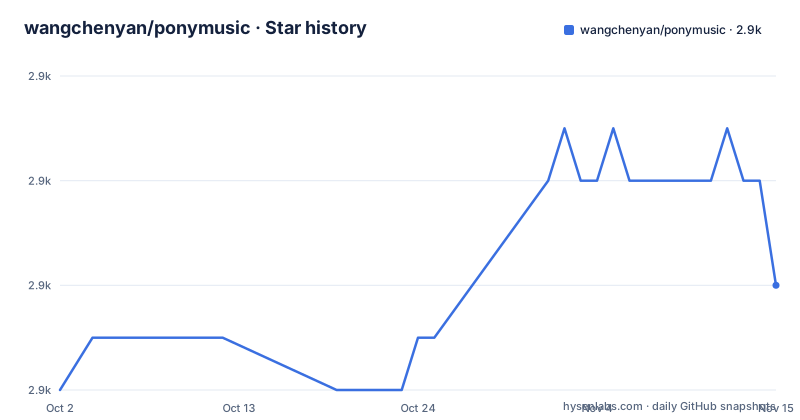
Star history
- wangchenyan/ponymusic2,854 ★ · +2
| Repository | 2026-10-02 | 2026-11-15 |
|---|---|---|
| wangchenyan/ponymusic | 2.9k | 2.9k |
2 Stars in the last 44 days, measured from the daily GitHub snapshot. Compare with other projects
Editorial analysis
The app ships no server, so the install flow starts with one
The installation instructions begin before the app is even mentioned, and the first step is not optional. The README states that an unofficial API is used, so a server has to be deployed yourself, and points at a Node.js API project for NetEase Cloud Music or a maintained fork of it, to be installed and run according to that project's own instructions. The one network requirement stated is that the computer running the server and the phone must be on the same local network. Step two is the ordinary part, downloading the latest package from the releases page. Step three is where the architecture becomes visible: you open the app, tap the hamburger button in the top left, open the drawer, choose the domain setting, and type the address from step one including the port. There is no default server, no bundled proxy and no account field that identifies a backend.
Your NetEase login goes to whatever address you typed
This is the security consequence of the design and it is worth stating plainly. The app has no fixed endpoint; the base address is a user setting. Logging in to NetEase Cloud Music, whether by phone verification code or by scanning a QR code, therefore happens through the server at the configured domain, and that server is a third party project running on your machine or on a network you share. Nothing in the documentation describes a key, a certificate or any pinning between the app and that server, so the app trusts the address as given. Two practical consequences follow. First, pointing the app at a deployment operated by someone else hands that operator your NetEase login, so the address should only ever be one you control. Second, a server bound to a local network address is reachable by every other device on that network, and the documentation describes no authentication in front of it.
The server can run on the phone, through Termux
There is a documented path that removes the computer entirely, and it is the most interesting thing about the setup. Since the only reason for a computer is to host the backend API, the same server can run on the Android phone itself. The instructions install Termux, described as an open source terminal emulator for Android, then install Node.js inside it and check the result:
pkg install nodejs
node -v
npx NeteaseCloudMusicApi@latest
The server announces itself in the console, and the line to look for is server running @ http://localhost:3000. The last step is then to open ponymusic, enter that loopback address as the domain, and restart the app. So the phone becomes both the client and the backend, reachable only from itself, which removes the local network exposure that comes with running the server on a desktop.
The player core was replaced in 2.3.0, and the rest is a long fix list
The version history reads as an Android app that has been patched for a long time, and the player engine is the most recent structural change. Version 2.3.0 upgraded the playback core to Media3 plus ExoPlayer and fixed a failure loading playlists with more than a thousand songs. Before that, 2.0.0 rewrote the app in Kotlin and switched its interface to NetEase Cloud Music, adding daily recommendations, the playlist square, leaderboards and search. The 2.4.0 notes add a home screen widget built with Glance, a landscape mode that the changelog says suits large screens better, and adaptation to Android 16. Earlier entries are mostly repair work with dates attached: notification bar playback control in 1.2.3, a fix for a phone that could not scan local music, an ANR when playing network songs on a weak connection, split-screen support, local filtering by size and duration, lockscreen integration with the system media centre, and a fix for a background service crash on some devices.
Firebase sits in the dependency list next to five libraries by the same author
The dependency section credits the usual stack first: Media3 with ExoPlayer for playback, MVVM for the screens, Retrofit for networking, Room for the database, Hilt for injection and Glide for images. Firebase is listed too, for analytics and crash collection, which is the one entry in that list with a privacy dimension rather than a functional one. Then there are five projects by the same author: a routing framework for componentised Android apps, a draggable lyric view, a general purpose Android library described as for personal use, and a multitype adapter for RecyclerView. That concentration is a design decision rather than a defect, and it also means an installation pulls code from five repositories that are not part of this project.
The documentation is a series of blog posts and the homepage is one of them
The repository's own metadata lists a blog post as the project homepage, and the README opens with a list of six articles published on a Chinese developer community rather than with usage documentation. They run from a first introduction through the basic player functionality, a vinyl record player interface, auto-scrolling lyrics and automatic loading of more items in the online music list. There is also a video link on a Chinese video platform, and a screenshots section. The README itself is written in Chinese throughout, which is worth knowing before searching for English references to this project, and the functional list is short enough to summarise: local files, album art, draggable lyrics, notification controls, a widget, night mode and a sleep timer locally, and the NetEase Cloud Music account features online.
The newest tag is a beta from October 2025, and one tag is misspelled
The release list is three entries and none of them is a stable version. The newest is 2.4.0-beta01, published on 2025-10-30. Before it, 2.3.0-beta01 on 2024-03-29, and 2.2.0 on 2024-03-25, whose tag and title are spelled bete01 rather than beta01. Since then the default branch has been pushed to repeatedly, with the last commit dated 2026-09-16, roughly eleven months after the newest tag. So the pattern is a beta release followed by a long stretch of unreleased work, which matters for anyone who installs from the releases page expecting current behaviour. The project's own TODO list shows the same shape: the widget, the Android 14 adaptation, adding online music to a list without downloading, and editing song info are all ticked, while automatic caching of online music is the one item left open.
No licence file at the root, though the README reproduces Apache 2.0
Licensing here needs two sources read together. The README carries a license section reproducing the Apache License 2.0 text with a copyright line naming wangchenyan and the year 2024. The repository metadata, however, records no licence at all, and the tree at the top level contains no LICENSE file: .gitignore, a committed .idea/ directory, README.md, app/, art/, build.gradle.kts, gradle.properties, gradle/, gradlew, gradlew.bat and settings.gradle.kts. Nothing contradicts the stated terms, but nothing in the repository itself is the authoritative licence file either. A committed IDE directory alongside a Kotlin DSL build setup completes a tree that is otherwise conventional.
Editorial conclusion
Find out where you stand with the service terms before installing this, because the app talks to an unofficial NetEase Cloud Music API that someone else wrote and that you host yourself. Read what that server exposes: the documented setup puts it on your local network with no authentication described between the app and the server, and the app will send your NetEase login to whatever address you typed, so never point it at a deployment you do not control. After that, the project is a competent Android player with a sensible local half, a Glance widget, lyrics you can drag to seek and a notification bar remote, and the newest tag is a beta from October 2025 while commits have continued since. Check the tag you install and note that the repository carries no licence file even though the README reproduces Apache 2.0.
Frequently asked questions
Does ponymusic need a computer or a server to work?
It needs a server for the online features, but not a computer. The API server can be deployed on a desktop with the phone on the same local network, or run on the phone itself through Termux, where Node.js and the server are installed and the app is pointed at a loopback address.
Where does ponymusic get its online music data?
From an API server you deploy yourself, either the NeteaseCloudMusicApi project or a maintained fork of it, because the app uses an unofficial API. The app stores only the address including the port, set from the drawer menu, and ships with no default backend.
What can ponymusic do besides playing local files?
Locally: album art, lyrics you can drag to adjust playback progress, notification bar controls, a home screen widget, night mode and a sleep timer. Online, against NetEase Cloud Music: login by verification code or QR, playlist sync, daily recommendations, a playlist square, leaderboards, search, liking, downloading, playlist management, and settings for streaming and download quality.
Which player engine does ponymusic use, and which Android versions work?
Media3 with ExoPlayer, since version 2.3.0, which also fixed loading of playlists holding more than a thousand songs. The stated requirement is Android 6.0 or newer, and the changelog records adaptation to Android 13, 14 and 16 across releases.
What licence is ponymusic released under?
The README reproduces the Apache License 2.0 with a copyright line naming wangchenyan and the year 2024. There is no LICENSE file at the root of the repository, and no licence is recorded in the repository metadata, so the README section is the only statement of terms available.
Does ponymusic send usage data anywhere?
Firebase is listed among the dependencies for analytics and crash collection. Local storage uses Room, and logging into NetEase Cloud Music goes through the API server you configured, which is a separate third party project.
Official sources
Add this badge to your README
If you maintain this project, the badge below links readers to this analysis and shows its maintenance status from the daily GitHub snapshot. Paste the markdown into your README; add ?metric=license or ?metric=stars to the image URL for a different field.

[](https://hysenlabs.com/projects/wangchenyan-ponymusic)Star history chart for your README
[](https://hysenlabs.com/projects/wangchenyan-ponymusic)Was this useful?