vertical-stack-in-card: grouping Home Assistant cards into one
📐 Home Assistant Card: Group multiple cards into a single sleek card.
At a glance
- What is it?
- Vertical Stack In Card is a custom Lovelace card for Home Assistant that takes several cards and puts them inside a single card with one border. It is one JavaScript file, installable from the community store or by hand, and it exists to solve a specific kind of dashboard clutter.
- Who is it for?
- vertical-stack-in-card suits anyone who has decided that a dashboard should read as a set of panels rather than a wall of separate cards, and who wants that grouping without giving up the standard cards inside it. It is a poor fit if you are on the new Lovelace editor only, because the documented setup path is the YAML configuration or the resource menu.
- Can I use it commercially?
- Yes. MIT is a permissive licence: you can use, modify and sell software built on it, as long as you keep its copyright and licence notices.
- Is it still maintained?
- Yes. The repository last received commits 37 days ago.
- What is it written in?
- Mainly JavaScript, according to GitHub's language statistics.
Answers come from the project's GitHub data, last synced on November 6, 2026, and from our analysis. They are not legal advice.
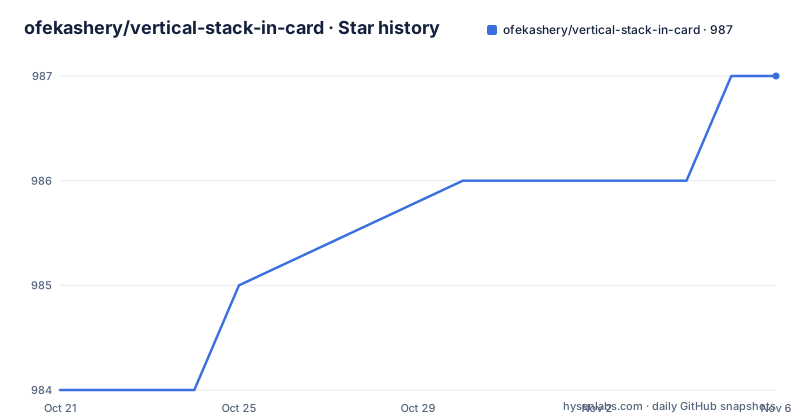
Star history
- ofekashery/vertical-stack-in-card987 ★ · +3
| Repository | 2026-10-21 | 2026-11-06 |
|---|---|---|
| ofekashery/vertical-stack-in-card | 984 | 987 |
3 Stars in the last 16 days, measured from the daily GitHub snapshot. Compare with other projects
Editorial analysis
What problem it solves on a dashboard
The description is short and the problem it addresses is the kind you only notice once you have built a dashboard.
Vertical Stack In Card is a custom Lovelace card for Home Assistant, allowing you to group multiple cards into a single sleek card. It offers a clean, organized way to display multiple cards in your Home Assistant dashboard.
That is the whole feature, and it is worth being clear that this is a layout card rather than a data card. It does not add sensors, it does not change how entities are shown, and it does not draw anything of its own. It takes cards that already exist, the standard glance card, the entities card, anything else, and puts a single border and a single title around a group of them.
The reason that is worth a piece of software is that Home Assistant's default dashboard is a grid of separate cards, each with its own rounded border, and a dozen of them reads as a dozen of them. Grouping them under one heading is the difference between a list of devices and a set of rooms.
The repository is a single JavaScript file at the root, with the configuration options and the installation instructions in the readme, and the readme opens with a screenshot of the result.
Five options, and the custom CSS escape hatch
The configuration table is short, and every option earns its place.
The type is required and has to be the custom card name that identifies this card, so it is not optional in any sense. The cards key takes the list of cards to include, and it is the only other required field.
The title is an optional string, displayed at the top of the card, and it defaults to nothing, so a grouped card without a title is a normal state rather than an error. The horizontal option is a boolean that flips the stack to lay the cards out side by side instead of one above another, and it defaults to false, which is the vertical arrangement the card is named for.
The last option is the interesting one. The styles key takes an object for adding custom CSS for advanced styling, and it also defaults to nothing.
That single field is what turns this from a convenience into a tool. Because the card is a wrapper around other cards, the natural objection is that you cannot style the result the way you want, and the styles option is the answer to that. The defaults are sensible and the escape hatch exists, which is the right balance for a component that sits in the middle of somebody else's dashboard.
A smaller thing worth noting: the option names are unprefixed. There is no namespace on the configuration keys, which is a little unusual for a Home Assistant card and means the card owns a small, clean slice of the configuration namespace.
Installing through the community store
The community store route is three steps and is the recommended one.
Open HACS in Home Assistant, search for the card by name, install it, and follow the setup instructions. The store handles the download and the resource registration, and the version shown in the readme is the one that matches the query string used in the manual instructions, which is a useful detail for keeping the two routes in step.
The repository carries the metadata file the store needs, and there is a version file at the root, so the store listing and the manual instructions are generated from the same source rather than typed by hand twice.
For a Home Assistant user, the community store is the normal route, and the reason to read the manual instructions instead is usually one of two: you do not run the store, or you want to understand what the store is doing to your configuration before you let it.
The badges at the top of the readme show the version, the download count and the continuous integration status, which is the usual convention for a card in this ecosystem and a quick way to see whether the project is still being worked on.
Installing by hand, and telling Home Assistant about the file
The manual route is a download and a move, and then the part that everybody gets wrong, which is registering the file as a resource.
You download the JavaScript file into the www directory of your configuration directory:
wget https://raw.githubusercontent.com/ofekashery/vertical-stack-in-card/master/vertical-stack-in-card.js
mv vertical-stack-in-card.js /config/www/
Then, if you configure Lovelace with YAML, you add a reference to the file inside your configuration.yaml:
resources:
  - url: /local/vertical-stack-in-card.js?v=1.1.4
    type: js
The version query string on the URL is the caching mechanism. Without it, a browser or the Home Assistant frontend may keep serving the copy of the file it already has, and an update to the card appears to do nothing until something forces a refresh. The number in the query string has to match the version you actually installed.
The alternative is the graphical editor, and the readme walks through it in four steps because there is a prerequisite that is easy to miss. Advanced mode has to be enabled in your user profile first, which you reach by clicking your user name. Then you navigate to the configuration, to the Lovelace dashboards, to the resources, and click add resource, filling in the URL with the same versioned path and setting the resource type to the JavaScript module. Finally you create the resource and refresh the browser.
That the resource type is a module rather than a script is a detail that matters with current Home Assistant versions, and the readme is right to spell it out rather than assuming you know.
Using it: a group of cards under one title
The usage example is a single card configuration, and it is the clearest illustration of the idea.
type: 'custom:vertical-stack-in-card'
title: My Card
cards:
  - type: glance
    entities:
      - sensor.temperature_sensor
      - sensor.humidity_sensor
      - sensor.motion_sensor
  - type: entities
    entities:
      - switch.livingroom_tv
      - switch.livingroom_ac
      - light.ambient_lights
The structure is the obvious one. The outer key sets the card type, the title gives the group a heading, and the cards list contains complete card configurations, each of which is exactly what you would write on its own.
That last point is the one to appreciate. The contents of the group are not references to cards defined elsewhere, they are inline configurations, which means you can mix card types inside one group. The example puts a glance card, which is a compact row of entities, above an entities card, which is a list with more room. Nesting a rich card inside a plain group is the thing that makes the wrapper worth having.
To use a different layout, the same block with the horizontal option set to true lays the cards out in a row instead of a column, and the styles object lets you adjust the appearance of the result beyond what the built-in options allow.
A single file project with a real history
The repository is unusually small, and the layout says everything about how the project works.
There is one JavaScript file at the root, which is the card itself, plus the readme, the licence, a version file and the metadata file for the community store. There is a.github directory at the root, which is where the continuous integration configuration lives. There is no build step, no package manifest, no source directory and no test suite, which is exactly how a Home Assistant custom card is normally distributed: as a file the frontend loads at run time.
The release history shows recent, frequent work. Version 1.1.2 came out on 2026-07-31, then 1.1.3 and 1.1.4 on the same day, 2026-10-01, and the last push to the repository was on 2026-10-01 with the repository not archived. The two releases on the same day suggest a fix followed by a version bump, or a couple of small corrections shipped together.
The acknowledgements are worth reading, because they describe the project's lineage. Two people are thanked for their inspiration and their contributions to the foundation of the project, and a third is thanked for improving the visual editor and the grid layout support. That last credit tells you the card has a visual editor as well as the YAML configuration, and the readme's own installation section is the YAML route.
The licence is MIT, the language is JavaScript, and the topic tags place it squarely in the Home Assistant and Lovelace ecosystem.
Editorial conclusion
vertical-stack-in-card suits anyone who has decided that a dashboard should read as a set of panels rather than a wall of separate cards, and who wants that grouping without giving up the standard cards inside it. It is a poor fit if you are on the new Lovelace editor only, because the documented setup path is the YAML configuration or the resource menu. Before you install it manually, remember the version query string on the resource URL, because that is what tells Home Assistant to pick up a new copy of the file.
Frequently asked questions
What does the vertical-stack-in-card Lovelace card do?
It groups multiple cards into a single card, so a group of standard Home Assistant cards appears inside one border under one title. It is a layout card rather than a data card, and the cards inside it are complete card configurations in the same list you would write on its own.
How do I install vertical-stack-in-card manually?
Download the JavaScript file into the www directory of your Home Assistant configuration directory, then register it as a resource. With YAML configuration, add a resources entry pointing at the local path with a version query string and the js type, and with the graphical editor enable advanced mode in your user profile and add it under the Lovelace dashboards resources.
Why does the resource URL end with a version query string?
It is the cache busting mechanism. The readme shows the URL with a version parameter matching the installed release, and without it the frontend can keep serving an older copy of the file, so an update appears to have no effect until the browser is forced to refresh.
What configuration options does the card support?
The type, which must be the custom card name, and the cards list are required. Optionally there is a title shown at the top, a horizontal boolean that stacks the cards side by side instead of vertically, and a styles object for adding custom CSS.
Official sources
Add this badge to your README
If you maintain this project, the badge below links readers to this analysis and shows its maintenance status from the daily GitHub snapshot. Paste the markdown into your README; add ?metric=license or ?metric=stars to the image URL for a different field.

[](https://hysenlabs.com/projects/ofekashery-vertical-stack-in-card)Star history chart for your README
[](https://hysenlabs.com/projects/ofekashery-vertical-stack-in-card)Was this useful?