oil-motion hands the asset decision to a budget script and blocks generation when an approval hash is missing
Design and implement web animations that respond to scroll, drag, pointer, or state changes, covering assets, timelines, and runtime.
At a glance
- What is it?
- oil-motion is a skill for coding agents, not a library you call. You describe an animation and hand over your assets; the agent designs key frames, generates video, cleans it frame by frame, picks an asset format and writes the interaction code. Two decisions in its documentation are unusual and worth reading on their own: the input source is deliberately decoupled from the playback mode, and bulk generation is gated behind a pilot whose approval file carries an artifact hash.
- Who is it for?
- oil-motion is worth understanding even if you never install it, because it is a careful answer to a problem most animation tools solve badly, which is making an interactive web animation whose subject genuinely changes rather than merely moves. Three things to weigh.
- Can I use it commercially?
- Yes. MIT is a permissive licence: you can use, modify and sell software built on it, as long as you keep its copyright and licence notices.
- Is it still maintained?
- Yes. The repository last received commits 49 days ago.
- What is it written in?
- Mainly Python, according to GitHub's language statistics.
Answers come from the project's GitHub data, last synced on November 22, 2026, and from our analysis. They are not legal advice.
Star history
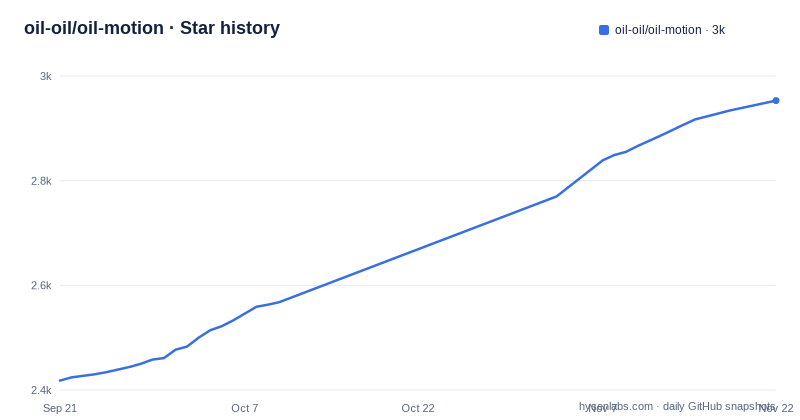
- oil-oil/oil-motion2,953 ★ · +535
| Repository | 2026-09-21 | 2026-11-22 |
|---|---|---|
| oil-oil/oil-motion | 2.4k | 3k |
535 Stars in the last 62 days, measured from the daily GitHub snapshot. Compare with other projects
Editorial analysis
The interface is a sentence to another agent
This is a skill package, and its user interface is a sentence. Installation is either handing the repository address to your agent and asking it to install the skill, or one command:
npx skills add oil-oil/oil-motionAfterwards the page's own examples are instructions in the imperative: tell the agent to turn two product photographs into an animation that unfolds as the page scrolls, or to design three directions first with an explanation of what each expresses and what it costs before any frames are generated. The page is explicit that generation, checking, compression and the front end are all the agent's work. The repository matches that shape: a skill definition file, an agents directory, a references directory for the detail, scripts, tests, an evaluations directory and a TypeScript configuration. There is no library entry point and no import, and the page says you do not run the scripts by hand during normal use.
Input source is not playback mode, and that is the design
The single most useful sentence on the page is a correction to an obvious assumption. Scroll, mouse and state changes are described as input sources only, and are said not to determine how the animation plays. The input value can be mapped continuously onto animation progress, or it can trigger a transition that plays normally from start to finish, or the animation can be left to play on its own. That separation is what makes the same asset set reusable across a scrolling product page and a hover interaction, and it is the difference between a system that thinks in triggers and one that thinks in control signals. The pipeline diagram that follows makes the same point structurally: reference material and intent and control method at the top, then key frames, then generated motion, then frame-by-frame cleanup, then compression to the size the page actually displays, and only at the last step the mapping from scroll, mouse, drag, touch or device orientation onto animation progress.
The model does what pixels must do, the program does what numbers can do
The page argues for generated video with an argument rather than an assertion. Limb rotation, product deformation, material change and foreground occlusion all belong in the generated footage, because moving or scaling still images in the browser is usually unconvincing. Then it draws the line the other way. Displacement, scale, cropping, playback speed, follow damping and maximum rotation speed are left to the program, on two grounds: handling them in code is more stable, and it is easier to adjust later. That is a small, clean architectural claim, and it has a consequence for anyone budgeting the work, because the video only needs to contain the change that cannot be expressed as a transform. It also explains the frame-by-frame cleanup stage: pauses at the head and tail, near-duplicate frames, flicker and structural drift are all things a generated sequence contains and a program cannot retroactively invent.
Three asset forms, and the choice is not yours
A table maps use case to format, and the reasoning in the last column is the useful part. When scene narrative, camera movement, environmental light and ground contact all matter, the recommendation is a baked full-keyframe video, because the background and the subject come out of the same generation and there is no keying risk. For transparent reuse of something small, ring-shaped or two-dimensional, or something the user jumps between often, the answer is an image atlas with transparency, keyed at build time so random access stays responsive. For transparent reuse at large size over a long timeline on a single axis of scrolling, the answer is a green-screen video with keying done in the graphics pipeline, because compression is better and a large atlas would eat memory. Then the paragraph that settles it: the agent runs a budget script, adopts whichever single form fits, and does not pass the choice to you or implement two.
An approval file with an artifact hash blocks generation before it goes online
This is the mechanism worth knowing about, and it is one sentence long. Before producing in bulk, the agent builds a first-screen pilot: one pair of key frames and one short clip, mounted on a real page and accepted. Once that passes, a file containing an artifact hash is written. After that, if a later segment has no approval file, or the checksums of its boundary frames do not match, the generation script refuses to proceed before it goes online. Read carefully, that is a supply-chain gate applied to creative work: the paid, non-deterministic step is fenced behind a human acceptance of a cheap one, and every subsequent segment is checked against a recorded hash rather than trusted. It exists because every generation call is billed and because the model can quietly change a product's structure between frames.
Keys go to the system credential store, and the tool stops if it cannot
The key handling is specified tightly enough to be worth quoting in summary. Before the first generation, the agent opens a local configuration page that you fill in yourself, so the key never has to be pasted into a conversation. It is stored in the operating system's credential store, named explicitly for the three desktop platforms, and reused automatically afterwards. That page needs a recent Node runtime. And if the credential service is not available, the process stops rather than falling back to writing the key in plain text. One caveat is stated in the same paragraph and is easy to miss: this configuration path has been verified on real hardware only on macOS. Local processing of video and image sequences you already have needs nothing beyond Python 3.10 and a media toolkit, so the API key is only involved when frames are being generated.
It declines most animations, and says which ones
The scope section is short and unusually honest. The skill is for interactive animation whose subject itself has to change: a character turning its head, a product coming apart, a material shifting, a camera moving through an interior, or existing green-screen footage and sprite sheets reorganised into web assets that respond to input. Everything else is declined. Interface transitions, button feedback and layout motion that plain CSS, JavaScript, SVG, a vector animation format or real-time 3D can do should be handed to ordinary front end work. Standalone finished video editing and single still illustrations are out of scope too. The last part of the quality checklist is in the same spirit: the program can clean up drift, colour differences, duplicate frames and encoding problems, but it cannot fix a wrong motion design, and that requires going back to the key frames.
Editorial conclusion
oil-motion is worth understanding even if you never install it, because it is a careful answer to a problem most animation tools solve badly, which is making an interactive web animation whose subject genuinely changes rather than merely moves. Three things to weigh. The cost model, where every generation call is billed and your prompts, reference images and boundary key frames go to a third-party model service, so the pilot gate is not ceremony but the thing standing between you and an expensive mistake. The asset decision, which the skill takes away from you on purpose and resolves with a budget script, so you should understand its reasoning before you accept the answer. And the verification gap, which the page states plainly: the local configuration path that stores your key in the system credential store has been checked on real hardware only on macOS, so on other systems you are the first test.
Frequently asked questions
What is oil-motion?
A skill for coding agents that turns product images, video or sprite sheets into interactive web animation controlled by scroll, pointer, drag, touch or device orientation. You describe the intent and the assets, and the agent does the generation, cleanup and front end work.
Do I need an API key to use oil-motion?
Only to generate key frames or video with a model. Processing video and image sequences you already have needs just Python 3.10 and FFmpeg. When it does generate, prompts, reference images and boundary key frames go to a third-party model service and every call is billed.
How does oil-motion store my API key?
In the operating system's credential store, entered by you in a local configuration page rather than pasted into a chat. The page needs Node 22.18 or newer, the process stops rather than falling back to plaintext if the credential service is unavailable, and it has been verified on real hardware only on macOS.
What does the pilot approval gate in oil-motion do?
Before bulk generation the agent builds a first-screen pilot, mounts it on a real page for acceptance, and writes an approval file carrying an artifact hash. A later segment without that file, or one whose boundary frame checksums do not match, blocks the generation script before it goes online.
What kinds of animation does oil-motion decline?
Interface transitions, button feedback and layout motion that CSS, JavaScript, SVG, a vector animation format or real-time 3D can already do, plus standalone video editing and single still images. Those are handed to ordinary front end work instead.
Official sources
Add this badge to your README
If you maintain this project, the badge below links readers to this analysis and shows its maintenance status from the daily GitHub snapshot. Paste the markdown into your README; add ?metric=license or ?metric=stars to the image URL for a different field.

[](https://hysenlabs.com/projects/oil-oil-oil-motion)Star history chart for your README
[](https://hysenlabs.com/projects/oil-oil-oil-motion)Was this useful?