bundlejs, a bundle size checker that does its bundling in your browser
An online tool to quickly bundle & minify your projects, while viewing the compressed gzip/brotli bundle size, all running locally on your browser.
At a glance
- What is it?
- bundlejs bundles, minifies and compresses npm packages entirely client side with esbuild compiled to WebAssembly, then reports the gzip and brotli size. It is the same idea as bundlephobia, except the work happens on your machine, and the author is candid about the gaps.
- Who is it for?
- bundlejs suits a developer who wants to know what a package will actually cost in a bundle, including with treeshaking and mixed CommonJS and ESM, without installing anything locally. It does not suit a build pipeline that needs the numbers in CI, and it does not suit a machine with a tight memory budget, since the README names the memory use of esbuild and monaco as a known problem.
- Can I use it commercially?
- Yes. MIT is a permissive licence: you can use, modify and sell software built on it, as long as you keep its copyright and licence notices.
- Is it still maintained?
- Yes. The repository last received commits 14 days ago.
- What is it written in?
- Mainly TypeScript, according to GitHub's language statistics.
Answers come from the project's GitHub data, last synced on November 7, 2026, and from our analysis. They are not legal advice.
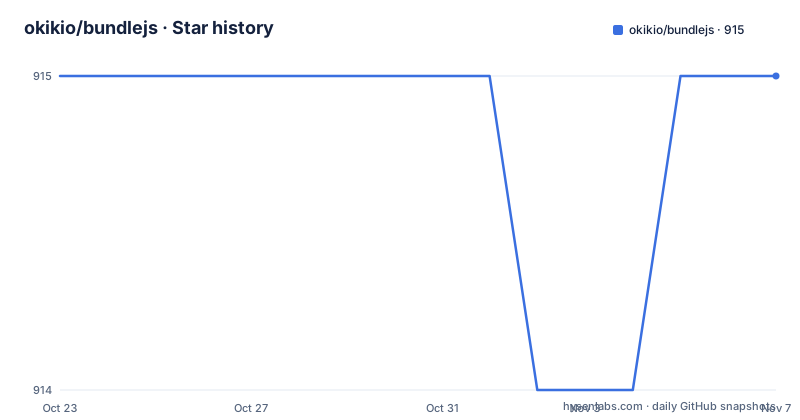
Star history
- okikio/bundlejs915 ★ · +0
| Repository | 2026-10-23 | 2026-11-07 |
|---|---|---|
| okikio/bundlejs | 915 | 915 |
0 Stars in the last 15 days, measured from the daily GitHub snapshot. Compare with other projects
Editorial analysis
The bundling happens where you can see it
bundlejs is an online tool for checking the minified gzip and brotli size of npm packages, and its distinguishing feature is stated in the README: bundle does all the bundling locally in your browser.
That matters because the number such a tool reports is only as good as the bundling behind it. A tool that fetches a prebuilt file and reports its compressed size is measuring the publisher's build, with its tree shaking decisions, its polyfills and its format choices. bundlejs assembles the bundle itself, so the number reflects what esbuild produces from the packages you name, in the module formats you name, with the treeshaking you request.
The README positions the tool as similar to bundlephobia, with the difference spelled out: bundle does the bundling locally in the browser, and it can treeshake and bundle multiple packages together, both CommonJS and ESM, all without having to install any npm packages, and with TypeScript support.
The architecture document linked from the README says the same thing in system terms. bundlejs runs entirely in the browser, performing bundling, minification and compression locally to determine package sizes without server-side processing. There is a deeper set of documentation on the project's DeepWiki pages covering the system architecture and the core bundling process.
For a developer, the practical effect is that nothing about your project leaves the machine and nothing has to be installed. You open a page, type a package name and read a size.
esbuild in WebAssembly and three compression ports
The component list in the README is worth reading because it explains why the numbers are comparable.
The editor is monaco-editor, which gives you the code editing surface and, in principle, autocomplete and hover information. The bundler and treeshaker is esbuild, run in the browser. Compression is handled by three WebAssembly ports: denoflate as a wasm port of gzip, deno_brotli as a wasm port of brotli, and deno_lz4 as a wasm port of lz4. Human readable sizes come from the bytes package, and the esbuild-visualizer project is used to visualize and analyse the bundle to see which modules are taking up space. Analytics are handled by umami, chosen for private, publicly available analytics and general usage stats, all without cookies.
Running esbuild in the browser is the technical crux. The bundler that most JavaScript toolchains use is a native binary, and the browser has no native binaries, so the same engine has to be compiled to WebAssembly, which is the esbuild-wasm route the repository topics point to.
The three compressors explain why the tool can report gzip, brotli and lz4 side by side. Brotli is what a modern CDN serves, gzip is the older baseline, and lz4 is there for comparison.
The costs of this design are stated by the author rather than hidden. The project is not perfect, and the README names the work still in progress: autocomplete, hover intellisense, better mobile support, and the high memory usage of esbuild and monaco, plus some edge case packages, with monaco-editor given as the example.
Treetshaking expressed in the URL
The most interesting feature is that the whole configuration lives in the address bar, which makes results shareable without a server account.
The URL takes a q parameter for the packages and a treeshake parameter for the methods to treeshake. The README's example asks for react, react-dom, vue and @okikio/animate, but only the Animate and toStr methods from @okikio/animate, expressed as a treeshake value of [*],[*],[*],[{Animate,toStr}]. If you do not care about treeshaking and just want a couple of packages, the query alone is enough.
There is a second mechanism for sharing a reproducible bundle, the shareable link, whose path looks like /?share=PTAEGEB... The string value of the input code editor is compressed into a string and placed into the URL, and you create one by clicking the Share button, which copies the URL to your clipboard.
The bundle parameter controls whether the code is bundled when the share URL is loaded, so a shared link can either show the editor state or run the bundling immediately.
That combination, a query that selects packages and export lists, and a share link that carries the whole editor state, is what makes the tool usable in a code review. A colleague can open a link and see the exact bundle and the exact size that was being discussed, without installing anything or running the build.
Badges turn a size check into a repository artefact
The badge feature is the part that pushes bundlejs from a tool into a workflow.
The README shows a light mode and a dark mode badge you can paste into a README, pointing at the bundlejs.com badge SVG endpoints. The API form is the same idea against a deployed instance, with a query for the package, a badge=detailed parameter and a badge-style choice for how the badge renders.
The API is now hosted at two domains, deno.bundlejs.com and edge.bundlejs.com, and the README explains how to make a badge: replace the bundlejs.com domain with deno.bundlejs.com and add /?badge. The announcement is framed with some humour about everyone having a badge.
The value is that a size number that lives in a README is checked on every rebuild rather than reported once in a chat message. A package that grows by a megabyte because someone imported the whole library becomes visible in the repository rather than in a code review comment that gets resolved and forgotten.
The other shared-mechanism detail is worth noting for anyone using the API: the URL carries the package selection and the treeshake specification, so a badge can point at a specific configuration, not just a package name. The README notes that the same URL queries can be used to create unique bundles when a user clicks the badge.
Building it, and the replay script at the root
The repository is a private package on npm, versioned 0.0.8 in package.json, using pnpm at 10.33.0 with a workspace file and a lockfile. The build runs through gulp:
"build": "gulp build",
"watch": "gulp --watch",
"preview": "gulp watch",
"test": "pnpm build",
"repl": "tsx repl.ts"
The test script being the build is a small sign of how young the project is, and the repl script is more interesting: repl.ts sits at the root of the repository next to env.js and util.js, and it is run with tsx, which suggests a way to drive the bundler from a terminal rather than through the browser.
The rest of the tree is a standard modern web setup. There is a src/ directory for the application and a plugins/ directory, a vercel.json for deployment, a gitpod configuration with .gitpod.Dockerfile and .gitpod.yml, a .devcontainer/ directory, mise.toml for tool versions, and a tailwind.config.cjs. Release handling is automated with semantic-release, the commit style is Conventional Commits, and commits go through the Commitizen CLI with a husky hook running commitlint.
The published releases are old. They are v0.2.0 from 2022-03-12, v0.1.0 from February 2022 and v0.0.5 from October 2021, while the last push to the repository was on 2026-08-31. So the tags do not tell you what the deployed site is running, and the live service is the thing to judge.
Where the numbers can mislead
The tool's own README lists the limitations, and they are worth repeating before you paste a number into a decision.
Autocomplete and hover intellisense are unfinished, so you are typing package names and export names without the editor helping you. Mobile support is incomplete, which is odd for a tool whose selling point is that it needs no installation. And the high memory usage of esbuild and monaco is a real constraint on the machines where you would most want a quick check, which is often a laptop with a browser full of tabs.
The edge case packages are the deeper issue. Some packages are built around assumptions that a bundler in a browser does not meet, and monaco-editor is given as the example, which is an awkward one because monaco is itself the editor this tool uses.
Then there is the question of what the number means. A bundle size measured in a browser is a bundle size for that bundler, that configuration and that set of exports. It is not necessarily the size your own application ships, because your application tree shakes differently, imports differently and splits chunks differently. The tool is a good way to compare packages against each other on equal terms, and a weaker way to predict what your build will produce.
The alternative approach for absolute accuracy is the one the tool is trying to avoid: install the packages locally and run esbuild yourself. That gives you the true number for your configuration, at the cost of a node_modules directory and a build step. The reasonable use of bundlejs is for comparing options quickly, then confirming the choice with a real build.
Editorial conclusion
bundlejs suits a developer who wants to know what a package will actually cost in a bundle, including with treeshaking and mixed CommonJS and ESM, without installing anything locally. It does not suit a build pipeline that needs the numbers in CI, and it does not suit a machine with a tight memory budget, since the README names the memory use of esbuild and monaco as a known problem. Before you rely on it, try the packages you actually ship, including one with a native or unusual shape such as monaco-editor, and check whether the figure matches what your own build produces, because the tool measures a bundle it assembled in the browser.
Frequently asked questions
What is bundlejs and how is it different from bundlephobia?
bundlejs is an online tool for checking the minified gzip and brotli size of npm packages, similar to bundlephobia, but it performs the bundling, minification and compression locally in your browser instead of on a server. That lets it treeshake and bundle multiple packages together, both CommonJS and ESM, with TypeScript support and no npm install.
Which tools does bundlejs use under the hood?
monaco-editor for the code editor, esbuild as the bundler and treeshaker, denoflate, deno_brotli and deno_lz4 as WebAssembly ports of gzip, brotli and lz4, the bytes package for human readable sizes, esbuild-visualizer to show which modules take up space, and umami for cookie-free analytics.
How do the URL parameters for packages and treeshaking work?
You add ?q={packages}&treeshake={methods to treeshake} to the URL, for example ?q=react,react-dom,vue,@okikio/animate&treeshake=[*],[*],[*],[{Animate,toStr}], which selects the packages and the exports to keep from each one. A shareable link carries the compressed editor state in a /?share=... path, and adding &bundle bundles the code as soon as the link loads.
Can I put a bundle size badge in my README?
Yes. The README shows light and dark badge SVG endpoints on bundlejs.com, and the API form is available on deno.bundlejs.com and edge.bundlejs.com. The badge endpoint takes the same query parameters, so it can point at a specific package and treeshake configuration rather than a package name alone.
What are the known limitations of bundlejs?
The author states that the project is not perfect and lists work still in progress: autocomplete, hover intellisense, better mobile support, the high memory usage of esbuild and monaco, and some edge case packages, with monaco-editor given as the example.
Official sources
Add this badge to your README
If you maintain this project, the badge below links readers to this analysis and shows its maintenance status from the daily GitHub snapshot. Paste the markdown into your README; add ?metric=license or ?metric=stars to the image URL for a different field.

[](https://hysenlabs.com/projects/okikio-bundlejs)Star history chart for your README
[](https://hysenlabs.com/projects/okikio-bundlejs)Was this useful?