okteto: three commands in the open-source CLI, and a comparison table that admits it
Develop your applications directly in your Kubernetes Cluster
At a glance
- What is it?
- A Kubernetes development tool that swaps your deployment for a container with your toolchain in it and syncs files both ways, so a save on your laptop updates the running pod. The readme is unusually direct that the open-source build is a single-developer tool and that the team features are not in it.
- Who is it for?
- Use it if you develop against a real cluster and want the inner loop of editing locally against remote resources, because that is exactly what it does and it does it without building images. Two things to be clear about before you rely on it.
- Can I use it commercially?
- Yes. Apache-2.0 is a permissive licence: you can use, modify and sell software built on it, as long as you keep its copyright and licence notices.
- Is it still maintained?
- Yes. The repository received new commits within the last day.
- What is it written in?
- Mainly Go, according to GitHub's language statistics.
Answers come from the project's GitHub data, last synced on November 23, 2026, and from our analysis. They are not legal advice.
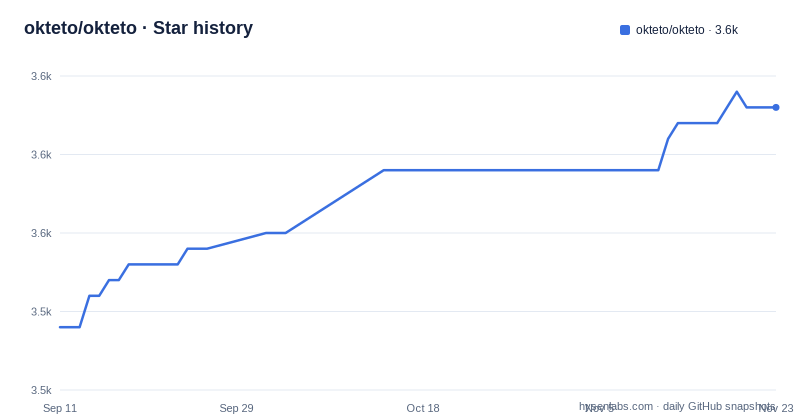
Star history
- okteto/okteto3,558 ★ · +14
| Repository | 2026-09-11 | 2026-11-23 |
|---|---|---|
| okteto/okteto | 3.5k | 3.6k |
14 Stars in the last 73 days, measured from the daily GitHub snapshot. Compare with other projects
Editorial analysis
The open-source CLI has three commands and one capability
The readme lists exactly three commands for the open-source build:
- `okteto context` - `okteto up` - `okteto down`
One selects a cluster context, one replaces the deployment with a development container, one tears it down. A note under the list adds the boundary that matters: the open-source version only supports the dev section of the Okteto manifest, and for additional features and full functionality it points at the commercial platform. So the whole open-source surface is a manifest section and three verbs. That is a small product, and it is a coherent one, because the entire value proposition is that `okteto up` gives you a container with your toolchain in it and your deployment's configuration around it.
The comparison table says Not Available seven times, which is the honest part
Most projects in this position bury the boundary. This one puts it in a table and fills in every cell:
| Feature | Open Source CLI | Platform CLI | |---|---|---| | Development Containers | Available | Available | | Build Service | Not Available | Available | | User Management | Not Available | Available | | Access Control | Not Available | Available | | Automated Scaling | Not Available | Available | | Secrets Management | Not Available | Available | | Observability Tools | Not Available | Available |
Seven rows read Not Available in the open-source column, one row reads Available in both, and the support row is cut off mid-word in the copy here, having shown community support against a premium label. Read that table next to the earlier sentence recommending the commercial product to anyone who wants their whole team sharing a cluster for development, and the shape of the project is clear. The open-source tool is for one developer against a cluster you already have access to. Everything involving other people, credentials or scaling is not in it.
The file sync that makes the loop instant is a third-party tool
The mechanism behind the headline promise is worth naming, because the readme does not. It says you keep writing code in your local editor, that as soon as you save a file the change goes to the development container, and that your application updates using whatever hot-reload mechanism you already have. The image definition shows what does the carrying:
FROM syncthing/syncthing:${SYNCTHING_VERSION}@${SYNCTHING_SHA} AS syncthingSo synchronisation is continuous file sync software from another project, pinned by version and by digest, copied into the final image alongside three binaries built from this repository's own tools module. Two consequences follow. The two-way nature of it means local edits overwrite remote files and remote changes come back, which is what makes an editor feel local and is also a genuine conflict risk. And the root of the repository carries a sync ignore file as well as a tool ignore file, two files that have to agree and that nothing described keeps them in agreement.
Both major versions of Helm are installed in the same image
The image definition declares its versions as build arguments under a comment about centralising version control, and among the Kubernetes tooling it lists three versioned tools, then four Okteto components, then the base images. The Helm entry is worth stopping on, because there are two:
ARG HELM3_VERSION=3.22.0
ARG HELM4_VERSION=4.2.4
Shipping both the current major and the next major of the cluster package manager in one image is a deliberate compatibility choice, since manifests written for one may not run on the other and the tool helps people with both. It also means two binaries to patch, two sets of flags to document and roughly double that portion of the image. Nobody has to guess why, because the comment above the block says the versions are centralised for easier updates. What a reader cannot tell from the file is which one the tool prefers by default.
Base images are pinned by digest, downloaded tools by version
The image pins everything, and it pins two different kinds of thing in two different ways. Six components carry both a version and a digest: the sync tool, the Go toolchain, Alpine, BusyBox, and the others, with the digests written out in full. Five others carry only a version number, and they are the ones that get downloaded into the image rather than used as a base: the cluster command line tool, both Helm majors, the configuration overlay tool, and Git. One carries only a digest with no version at all, which is the Debian slim base. The result is that every base layer is immutable and every fetched binary is pinned by version alone. That is a reasonable split, and it means an audit of the image has two different jobs depending on whether it is reading a FROM line or an install step.
There is no Windows build for ARM
The build file lists five release targets, and they are not symmetric:
PLATFORMS := linux/amd64/okteto-Linux-x86_64/osusergo*netgo*static_build darwin/amd64/okteto-Darwin-x86_64/osusergo*netgo*static_build windows/amd64/okteto.exe/osusergo*static_build linux/arm64/okteto-Linux-arm64/osusergo*netgo*static_build darwin/arm64/okteto-Darwin-arm64/osusergo*netgo*static_buildBoth Linux and macOS have a 64-bit ARM build, and Windows has only one, for the older architecture. So a developer on an ARM Windows machine has no prebuilt binary for the platform they are on, while the same developer on ARM macOS or ARM Linux does. Every target is built with cgo disabled and a set of build tags that force static linking, and each one writes a checksum file next to itself, using a different checksum command depending on which system the build is running on. That last detail is a small sign of a project whose maintainers build on more than one operating system.
The test suite empties the three variables that would reach a real cluster
One line in the test target is a better safety practice than most projects document:
OKTETO_DEPLOYABLE="" OKTETO_FORCE_REMOTE="" OKTETO_DEPLOY_REMOTE="" go test -p 4 -race -coverprofile=coverage.txt -covermode=atomic ./...Three environment variables are explicitly emptied before the tests run. Those are the variables that decide whether the tool deploys something, whether it talks to a remote machine, and whether it deploys remotely. Emptying them means a test cannot reach a real cluster even if a developer's shell has them set, and a test that accidentally triggers a deploy path fails instead of deploying. The rest of the target is thorough: the race detector on, four packages in parallel, coverage written atomically. The integration suite is split into three further targets behind build tags, with timeouts of an hour, fifteen minutes and none.
A local build reports itself as a commit hash
The build file defaults the version to a short commit identifier when nothing is supplied:
ifeq ($(strip $(VERSION_STRING)),)
VERSION_STRING := $(shell git rev-parse --short HEAD)
endif
That value is then stamped into the binary with a linker flag, so a build made without an explicit version identifies itself to the user as the commit it came from. That is more useful than a hardcoded placeholder, and it means a binary built from a dirty working tree reports the same hash as a clean one, which is the limit of the approach. The rest of the repository is conventional and thorough: a linter run through pre-commit and a second linter with a five minute timeout, a copyright header template that implies headers are enforced on every file, a configuration for a static analysis service, a coverage service configuration, an owners file, and a file whose name is a pun on the maintainer's, configuring an image update bot.
Editorial conclusion
Use it if you develop against a real cluster and want the inner loop of editing locally against remote resources, because that is exactly what it does and it does it without building images. Two things to be clear about before you rely on it. The open-source CLI is three commands and one capability; everything else in that comparison table belongs to the commercial platform, including secrets management and access control, which matters because your development container inherits your deployment's secrets by design. And the reverse direction matters too: a development container has your cluster credentials and your deployment's configuration, so treat it as a privileged thing that happens to look like a shell. The file sync is a third-party continuous sync tool copied into the image, so if you are auditing what runs, that is the dependency to look at first.
Frequently asked questions
what is okteto
A tool for developing applications directly in a Kubernetes cluster. Running okteto up replaces your deployment with a development container holding your toolchain, and that container inherits the secrets, configuration maps, volumes and other settings of the original deployment. File changes on your machine reach the container, so your application updates using whatever hot reload you already have, with no image build and no manifest applied.
is okteto free
The command line tool is open source under the Apache licence and consists of three commands. The readme includes a feature table in which seven of eight rows read Not Available for the open source build, including user management, access control, secrets management, automated scaling, observability and the remote build service. Those belong to the commercial platform, which the readme recommends to teams wanting to share a cluster.
Which commands does the open-source Okteto CLI have?
Three: okteto context, okteto up and okteto down. The open source version also only supports the dev section of the Okteto manifest, whose schema is published in the repository as a JSON schema file. The full command set, including build, deploy and destroy, comes with the platform and its Helm chart.
How does Okteto move my code into the cluster?
With a third-party continuous file sync tool, copied into the image by version and digest. The repository root carries both a tool ignore file and a sync ignore file for that tool, which have to be kept in agreement. Once a change lands, your application updates using a hot reload mechanism you already have, rather than anything Okteto builds.
Does Okteto have a build for Windows on ARM?
Not among the release targets. The build file lists five combinations: Linux and macOS on both the older and the ARM 64-bit architectures, and Windows on the older architecture only. All of them are built with cgo disabled and static linking, and each writes a checksum file beside the binary using whichever checksum command the build host provides.
Official sources
Add this badge to your README
If you maintain this project, the badge below links readers to this analysis and shows its maintenance status from the daily GitHub snapshot. Paste the markdown into your README; add ?metric=license or ?metric=stars to the image URL for a different field.

[](https://hysenlabs.com/projects/okteto-okteto)Star history chart for your README
[](https://hysenlabs.com/projects/okteto-okteto)Was this useful?