trousseau keeps secrets in one encrypted file you can sync
File based encrypted key-value store
At a glance
- What is it?
- trousseau is a Go key-value store that keeps everything in a single encrypted file, using either OpenPGP asymmetric encryption with recipient restriction or AES256 with a passphrase, and it can be pushed to S3, ssh and gist or synced through a file service. The idea is aimed at administrators who need to share certificates and keys across a cluster, and at anyone who wants one safe place for passwords.
- Who is it for?
- trousseau suits an operations team that needs to hand certificates and service passwords to a cluster of servers without leaving plaintext keys in configuration files or repositories, and it suits anyone who wants a password store that is a file they can sync and back up themselves.
- Can I use it commercially?
- Yes. MIT is a permissive licence: you can use, modify and sell software built on it, as long as you keep its copyright and licence notices.
- Is it still maintained?
- Yes. The repository last received commits 46 days ago.
- What is it written in?
- Mainly Go, according to GitHub's language statistics.
Answers come from the project's GitHub data, last synced on November 7, 2026, and from our analysis. They are not legal advice.
Star history
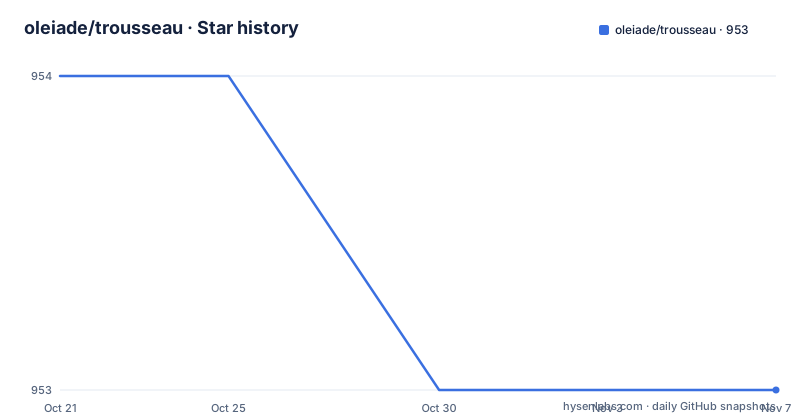
- oleiade/trousseau953 ★ · -1
| Repository | 2026-10-21 | 2026-11-07 |
|---|---|---|
| oleiade/trousseau | 954 | 953 |
-1 Stars in the last 17 days, measured from the daily GitHub snapshot. Compare with other projects
Editorial analysis
One file, two encryption models
Trousseau is described as an encrypted key-value store designed to be a simple, safe and trustworthy place for your data, and it stores data in a single encrypted file.
That single file is the whole architecture, and it is the reason the tool is interesting. There is no daemon, no server and no database to run. What you have is a file that can be copied, backed up, synced between machines, committed to version control in its encrypted form, or pushed to object storage. The README says it can be easily synced across devices using Dropbox or OneDrive, and that it can be exported and imported to and from multiple remote storages using integrated S3, ssh and gist support.
Two encryption styles are supported, and the choice is the one decision that shapes everything else. Asymmetric encryption uses OpenPGP, so access to the store is restricted to the recipients it was encrypted for. Symmetric encryption uses AES256 with a passphrase you provide.
The README's guidance on the choice is practical rather than ideological. OpenPGP is described as probably the best choice if you intend to share the store with multiple servers or with gpg capable devices, and it can also suit sharing with a team or selected people. AES256 is described as probably the best choice for storing sensitive personal information such as passwords, bank details or bitcoins and syncing it across devices.
That framing captures the real difference. OpenPGP solves distribution, where each recipient holds their own private key. AES256 solves possession, where everyone who needs the data knows one passphrase.
Built for sharing certificates across a cluster
The stated origin of the project explains its feature set better than a feature list would.
The README says Trousseau was created with private keys and certificates sharing across a cluster in mind, and that it has proved useful to anyone who needs to store and eventually share a password store, bank account details or more sensitive data.
For administrators and operations teams, the README lists three uses. The first is storing sensitive data, with no more plain certificates and keys in repositories and configuration files, and the observation that infrastructure relies on many certificates and private keys of different kinds, ssl, rsa, gpg, with Trousseau providing a way to store their content in a single file that can be safely versioned with a version control system. The second is sharing passwords, keys and other critical data with co-workers and servers in a cluster, encrypting the store content for specific recipients so that only the intended recipient can import and read-write it. The third is deploying keys to servers in a safe and normative way, by encrypting the store for each server selectively.
The third point is the one with operational weight. Encrypting a separate store per server means a key can be revoked by destroying the store that contained it, rather than by rotating a credential everywhere it was pasted.
The everyday use case in the same README is more modest: storing sensitive data such as passwords, bank account details or bitcoin wallets, and syncing the store to remote services to share it between devices.
Four ways to supply the passphrase
Any store encrypted with OpenPGP needs the primary key passphrase on every decryption, and Trousseau offers four routes for supplying it. This is the part of the tool that most affects whether it is usable unattended.
The first is the system keyring manager. The supported managers are the macOS keychain and the Linux gnome secret-service and gnome-keychain, with the note that more might be added on demand. To use it you set the TROUSSEAU_KEYRING_SERVICE environment variable to the name of the keyring key holding the Trousseau main gpg key passphrase:
export TROUSSEAU_KEYRING_SERVICE=my_keyring_key
trousseau get abc
The second is the gpg-agent daemon. You start the agent, export GPG_AGENT_INFO and the master key identifier, and Trousseau does the rest:
export GPG_AGENT_INFO=path_to_the_gpg_agent_info_file
export [email protected]
trousseau get abc
The third is a plain environment variable, TROUSSEAU_PASSPHRASE, which is the simplest to script and the least safe, since the passphrase sits in the process environment of whatever runs the command.
The fourth is the interactive option, where Trousseau asks for the passphrase on the command line:
trousseau --ask-passhphrase get abcNote that the flag name in the documentation is spelled with a double h. If you are scripting against this, copy the spelling exactly.
The routing between keyring, agent, environment and prompt is the interesting part of the design, because it lets the same store work for an interactive user on a laptop and for an automation job on a server that has no terminal.
Multiple stores, remote storage and the S3 path
Two operational details decide how the tool behaves in a fleet.
The first is the store location. The TROUSSEAU_STORE_ environment variable selects which data store to use when you have more than one, with the default being $HOME/.trousseau. The global store option serves the same purpose on the command line, and the README notes that data stores are created at $HOME/.trousseau by default while the store option lets you select where Trousseau creates or opens the store.
That matters more than it sounds. A single default store is fine for one person on one machine. A deployment that keys each server separately needs a way to point the tool at the right file for a given target, and both the environment variable and the global option exist for that.
The second is remote storage. The README lists integrated S3, ssh and gist support for exporting and importing, and describes the workflow as creating a Trousseau store, adding key-value pairs, pushing it to S3 and re-importing it from another device.
The dependency list confirms this is real integration rather than a plan. The AWS SDK for Go v2 is present with the config and the S3 service packages. The GitHub client library, go-github, is there for gist support.
So the tool can act as a small secret distribution step in a deployment pipeline: the store is the artifact, S3 or gist or ssh is the transport, and the encryption decides who can open it.
Package managers, and a build guide from the GOPATH era
Installation is documented for Linux and macOS, with a source build as a fallback, and the source build instructions have not kept pace with the rest of the project.
On Linux, with each release at or above 0.4.1 the project distributes packaged binaries for the Linux OS as well as .deb and .apk packages that you install with the standard procedures, such as dpkg -i on Debian.
On macOS, the Homebrew route is a formula:
brew install oleiade/tap/trousseauAlternatively, download the macOS archive that matches your machine from the project's releases page, extract it with `unzip`, and install the extracted `trousseau` executable into a directory on your PATH. Check the actual archive name and contents for the release you selected.
Then there is the build it section, which is where the mismatch is. It asks for a Go compiler of at least 1.5, marked as mandatory, and git, then for the go system dependencies bzr, svn, hg and git in your PATH, then a properly set GOPATH, then:
go build github.com/oleiade/trousseau/cmd/trousseauThat is a GOPATH era instruction, and the repository has moved on. The project is now a Go module, with go.mod declaring the module path github.com/oleiade/trousseau and requiring go 1.24.0, and the repository layout has cmd/, internal/ and pkg/ directories, which is a module layout rather than a GOPATH layout.
The practical consequence is that a modern Go toolchain will not follow those steps literally. The dependency names bzr, svn, hg and git in PATH are likewise from an era when the store could be kept in different version control backends, and the current documentation does not revisit them.
What the dependency list says about the design
The go.mod file is a compact description of how the tool is put together.
The command line is handled by urfave/cli v3, the same library the README's usage examples reflect with commands like create and get. Configuration parsing and defaults use BurntSushi/toml with go-defaults for filling in unset values, and validation of inputs uses go-ozzo/ozzo-validation, with mergo for merging structures. The CLI shape is therefore conventional: TOML configuration, defaults applied automatically, validated options.
The keyring integration is the tmc/keyring library, which is what lets the same binary talk to the macOS keychain and the Linux secret service and gnome-keychain rather than implementing three backends.
The cryptographic side leans on golang.org/x/crypto, plus two packages from the same author, oleiade/serrure and oleiade/reflections. Terminal handling uses golang.org/x/term, which is what makes the interactive passphrase prompt behave properly, and the OAuth2 library supports the authenticated remote storage paths.
Two details are worth a second look. The AWS SDK is v2, the current generation, and it is used for S3 rather than being wrapped by the project, so the integration inherits the SDK's own behaviour and update cadence. And the go-github dependency is the current v68 line for gist support.
There is also a.goreleaser.yml at the top level of the repository, which is the GoReleaser configuration file. That matches the packaged.deb and.apk distribution and the macOS zip archives, and it means the release pipeline for the binaries is automated even where the version tags are not recent.
Release history is old, the repository is not
The version history is the fact to weigh before adopting this.
The most recent tagged release is v0.4.1, published on 2019-08-23. Before that came 0.4.0 on 2016-08-13, titled Symmetric AES256 encryption, and 0.3.6 on 2016-08-12, titled Refresh. So the symmetric AES256 mode described throughout the README arrived in 2016 and the last tag is from 2019.
Against that, the repository itself is not dormant. The last push was on 2026-09-23, a month before this review, and the repository is not archived. The top level contains a CHANGELOG.md alongside a History.md, plus CONTRIBUTING.md, AUTHORS.md and a LICENSE, and there is a .github/ directory for the workflow and templates.
The gap between the tags and the pushes is a normal pattern for a project whose day-to-day work happens on the default branch, with releases cut only when there is a reason to publish binaries. It also means there is no released version that includes whatever the recent commits contain.
So the practical guidance depends on how you want to consume it. If you want a packaged binary, you are looking at what was published in 2019, and you should check the packages for your distribution or build from the current source. If you want the current code, you build it yourself, and you inherit the responsibility for its correctness.
The licence is MIT, which is permissive and unlikely to be the deciding factor. The deciding factor for most people is whether the project does one thing well enough that you would rather not have written the script yourself, and for an encrypted key-value file shared across a cluster, the answer is often yes.
Editorial conclusion
trousseau suits an operations team that needs to hand certificates and service passwords to a cluster of servers without leaving plaintext keys in configuration files or repositories, and it suits anyone who wants a password store that is a file they can sync and back up themselves. It is the wrong choice for a service that needs a running secret store with an audit trail and per-request access control, and the wrong choice if you are starting a new deployment, because the newest tagged release is v0.4.1 from 2019 even though the repository itself received a push on 2026-09-23. Before you rely on it, decide which encryption mode fits your sharing pattern, since OpenPGP restricts access to named recipients while AES256 uses a single passphrase, and check whether the build instructions match your Go toolchain, because the documented source build still uses the GOPATH era command.
Frequently asked questions
What is trousseau and how does it store data?
Trousseau is an encrypted key-value store that keeps its data in a single encrypted file. It supports asymmetric encryption using OpenPGP and symmetric encryption using AES256, and the file can be synced across devices or exported to and from S3, ssh and gist.
How do I supply the passphrase for an OpenPGP encrypted trousseau store?
There are four options: the system keyring manager through TROUSSEAU_KEYRING_SERVICE, the gpg-agent daemon through GPG_AGENT_INFO and TROUSSEAU_MASTER_GPG_ID, the TROUSSEAU_PASSPHRASE environment variable, or the interactive --ask-passhphrase global option.
How do I install trousseau on Linux and macOS?
On Linux, releases at or above 0.4.1 ship packaged binaries plus .deb and .apk packages installed with standard procedures such as dpkg -i. On macOS, the Homebrew formula is brew install oleiade/tap/trousseau, or you can unzip the release archive and place the executable yourself.
Can trousseau hold more than one data store?
Yes. The TROUSSEAU_STORE_ environment variable selects which store to use when you have several, with the default being $HOME/.trousseau, and the global store option selects the location from the command line.
How current is the trousseau release?
The most recent tagged release is v0.4.1 from 2019-08-23, after 0.4.0 in 2016 which added symmetric AES256 encryption. The repository itself is not archived and the last push was on 2026-09-23, so the current source is ahead of the last published release.
Official sources
Add this badge to your README
If you maintain this project, the badge below links readers to this analysis and shows its maintenance status from the daily GitHub snapshot. Paste the markdown into your README; add ?metric=license or ?metric=stars to the image URL for a different field.

[](https://hysenlabs.com/projects/oleiade-trousseau)Star history chart for your README
[](https://hysenlabs.com/projects/oleiade-trousseau)Was this useful?