elasticsearch-gmail turns a Gmail Takeout mbox into a searchable Elasticsearch index
Index your Gmail Inbox with Elasticsearch
At a glance
- What is it?
- oliver006/elasticsearch-gmail is a single-file Python importer that reads a downloaded Gmail mailbox and bulk loads it into Elasticsearch. It suits one time archive imports, and its bundled snippets predate the Elasticsearch version it tells you to run.
- Who is it for?
- Adopt this importer if your goal is a one time forensic or space audit pass over a mailbox you already downloaded, and accept that you own the Elasticsearch container, the mapping and the reindex step afterwards. Skip it if you want live inbox search, an incremental sync or a maintained import pipeline; the repository gives you a script and no scheduler.
- Can I use it commercially?
- Not without permission. GitHub finds no licence file in the repository, and without a licence all rights are reserved by default: you may read the code but not reuse it. Check the README, or ask the authors, before using it.
- Is it still maintained?
- Yes. The repository last received commits 3 days ago.
- What is it written in?
- Mainly Python, according to GitHub's language statistics.
Answers come from the project's GitHub data, last synced on November 7, 2026, and from our analysis. They are not legal advice.
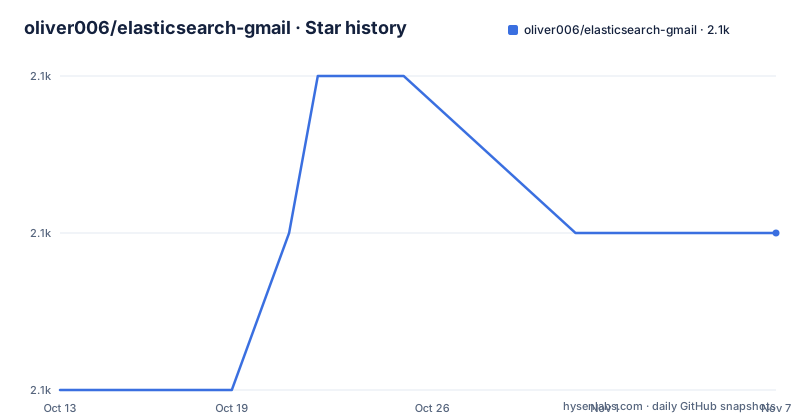
Star history
- oliver006/elasticsearch-gmail2,060 ★ · +1
| Repository | 2026-10-13 | 2026-11-07 |
|---|---|---|
| oliver006/elasticsearch-gmail | 2.1k | 2.1k |
1 Stars in the last 25 days, measured from the daily GitHub snapshot. Compare with other projects
Editorial analysis
One mailbox becomes one index named gmail
The project starts from a problem of volume rather than search quality. The author looked at an inbox of well over 50k emails taking up about 12GB and had no way to tell which senders fill it, how much space each message costs, or who actually writes to him. The answer offered here is not a better mail client. It is an offline import path that turns every message into a JSON document and puts it into an Elasticsearch index called gmail, using the message id as the document id.
Gmail access takes the slow, blunt route. Instead of the Gmail API you go to the Google Takeout custom Gmail page, download the whole mailbox, and work on the archive offline. There is no OAuth client, no API quota to watch, and no incremental sync anywhere in the repository, so new mail is never picked up after the import finishes. A `sample.mbox` file is bundled so you can exercise the pipeline while Google prepares the real download.
Python's standard `mailbox` module does the heavy lifting, which is why the tool is not Gmail only. The processing loop has this shape; `convert_msg_to_json` and `upload_item_to_es` are functions from the project:
import mailbox

mbox = mailbox.mbox('emails.mbox')  # or mailbox.MH('inbox/')
for msg in mbox:
    item = convert_msg_to_json(msg)
    upload_item_to_es(item)

print("Done!")
An mbox file is one long concatenated stream of messages; an MH mailbox is a directory of numbered files. Swap the constructor and the same loop walks the tree. Every `--infile=` in the examples becomes `--indir=` when you point it at MH.
A pinned single node container and three pinned packages
The cluster is expected at `http://localhost:9200`, and the README gives one container command that pins the whole stack in a single line. The image is the OSS distribution at tag 7.10.2, discovery is forced to a single node, and CORS is switched on so a browser based explorer such as dejavu can read the index:
docker run --name es -d -p 9200:9200 -e http.port=9200 -e http.cors.enabled=true -e 'http.cors.allow-origin=*' -e http.cors.allow-headers=X-Requested-With,X-Auth-Token,Content-Type,Content-Length,Authorization -e http.cors.allow-credentials=true -e "discovery.type=single-node" docker.elastic.co/elasticsearch/elasticsearch-oss:7.10.2Read what that command does not enable: no security module, no credentials, no TLS, port 9200 published to the host, and `http.cors.allow-origin=*`. This is a laptop cluster for a private mailbox, and anyone following the command verbatim on a shared machine is publishing an unauthenticated write endpoint.
The Python side is equally pinned. `requirements.txt` is three lines and nothing else:
pip3 install -r requirements.txtThose lines are `beautifulsoup4==4.6.0`, `chardet==3.0.4` and `tornado==6.5.8`. The HTTP client is Tornado, the HTML stripping for the optional body indexing flag is BeautifulSoup, and chardet handles encodings that Gmail attaches to exported mail. There is no Elasticsearch Python client in that list: the importer talks to the cluster over plain Tornado `HTTPRequest` objects against `http://localhost:9200`, so there is no library version to drift against the 7.10.2 image.
The sample mailbox run prints two different totals
You can exercise the whole pipeline before Google finishes the Takeout export. The bundled `sample.mbox` goes in through the same script and the same flags:
$ python3 src/index_emails.py --infile=sample.mbox
[I index_emails:173] Starting import from file sample.mbox
[I index_emails:101] Upload: OK - upload took: 1033ms, total messages uploaded:      3
[I index_emails:197] Import done - total count 16
The log carries three facts worth pausing on. First, the counts disagree: the upload line reports 3 messages uploaded, the final line reports a total count of 16. Those are two different counters, one per batch upload and one at the end, and nothing in the README says which one is the number of documents now sitting in the gmail index. Anyone using this to measure a mailbox has to reconcile 3 against 16 before drawing conclusions.
Second, the log tags `index_emails:173`, `:101` and `:197`. Those are line numbers in `src/index_emails.py`, and they sit far beyond anything shown in the README. The code fragments in the tutorial are excerpts with the real file much longer, which is the first place a reader is told that the repository, not the page, is the contract.
Third, this run happened in 1033ms for three messages. A batch of that size is overhead, not throughput. The timing number only becomes meaningful on a real mailbox, and the log is where you watch it.
Headers get normalized before anything reaches the cluster
Everything between the mailbox file and the bulk request is `convert_msg_to_json`. It lowercases every header key and decodes values as UTF-8 with errors ignored, which is what makes the fields queryable as lowercase names:
def convert_msg_to_json(msg):
    result = {'parts': []}
    for (k, v) in msg.items():
        result[k.lower()] = v.decode('utf-8', 'ignore')
Address headers then get split on commas after newline, tab, carriage return and space characters are stripped, and each piece goes through `normalize_email`:
for k in ['to', 'cc', 'bcc']:
    if not result.get(k):
        continue
    emails_split = result[k].replace('\n', '').replace('\t', '').replace('\r', '').replace(' ', '').encode('utf8').decode('utf-8', 'ignore').split(',')
    result[k] = [ normalize_email(e) for e in emails_split]

if "from" in result:
    result['from'] = normalize_email(result['from'])
Stripping spaces before splitting will mangle display names that contain a space inside a quoted name, which is common in exported mail. The price is a clean one token per address list.
Timestamps are where the code and its own comment disagree. The README states that Elasticsearch expects timestamps in microseconds, then converts like this:
if "date" in result:
    tt = email.utils.parsedate_tz(result['date'])
    result['date_ts'] = int(calendar.timegm(tt) - tt[9]) * 1000
`calendar.timegm` returns seconds and the multiplier is 1000, so `date_ts` lands in milliseconds, not microseconds. Gmail labels get the same treatment, split from `x-gmail-labels`, lowercased and stripped, with the raw header deleted afterwards so it is not indexed twice.
One hundred documents per POST to the bulk endpoint
The naive path is a PUT per document, and the README shows it in full before dismissing it:
def upload_item_to_es(item):
    es_url = "http://localhost:9200/gmail/email/%s" % (item['message-id'])
    request = HTTPRequest(es_url, method="PUT", body=json.dumps(item), request_timeout=10)
    response = yield http_client.fetch(request)
    if not response.code in [200, 201]:
        print "\nfailed to add item %s" % item['message-id']
One request per message, a 10 second timeout each, and a failure line on any code outside 200 or 201. The chosen alternative is the `_bulk` endpoint, where documents are accumulated in memory and flushed on a threshold:
upload_data = list()
for msg in mbox:
    item = convert_msg_to_json(msg)
    upload_data.append(item)
    if len(upload_data) == 100:
        upload_batch(upload_data)
        upload_data = list()

if upload_data:
    upload_batch(upload_data)
The flush size is 100 documents, and the tail is sent after the loop so a mailbox whose size is not a multiple of 100 is not silently truncated. Each document is preceded by its control line, and the whole batch goes up as one POST with a 240 second timeout instead of 100 separate 10 second requests:
def upload_batch(upload_data):

    upload_data_txt = ""
    for item in upload_data:
        cmd = {'index': {'_index': 'gmail', '_type': 'email', '_id': item['message-id']}}
        upload_data_txt += json.dumps(cmd) + "\n"
        upload_data_txt += json.dumps(item) + "\n"

    request = HTTPRequest("http://localhost:9200/_bulk", method="POST", body=upload_data_txt, request_timeout=240)
The batch is assembled by string concatenation in memory. That is fine for 100 documents and wasteful for anything larger, and there is no checkpoint file, so an interrupted import of a large mailbox restarts from message one.
The bulk payload still names a document type
Every control line carries three keys: `_index` set to gmail, `_type` set to email, and the _id field set to the message id. Every search example in the README uses the same shape of path, `http://localhost:9200/gmail/email/_search`, and the single document PUT targets `http://localhost:9200/gmail/email/%s`. Meanwhile the container command pins `docker.elastic.co/elasticsearch/elasticsearch-oss:7.10.2`, which is a version 7 cluster.
That combination is the thing to check first on any fresh install. The code was written against a typed index and the container was moved to a newer line where mapping types are on the way out, yet nothing in the repository sets a mapping, installs a plugin, or passes a compatibility flag to make the two agree. The last push to the repository was on 2026-09-02. If the importer errors on the first batch, this is the first pair of values to compare: the type name in the control line against what your cluster accepts at version 7.10.2.
The second detail is the same one from a different angle. The index name, type name and id are decided per document, so a mailbox containing two messages with the same message id overwrites the earlier one instead of creating a second copy. Gmail does emit duplicates across folders, and the bundled sample file is small enough that this is easy to overlook.
An empty parts list keeps content size at zero
The original question was which mail takes up the space, so the README breaks out a size field. The snippet reads a `parts` list and sums the length of each part's content:
parts = json_msg.get("parts", [])
json_msg['content_size_total'] = 0
for part in parts:
    json_msg['content_size_total'] += len(part.get('content', ""))
Two things are visible here. The variable is called `json_msg`, while the converter earlier builds `result` and returns it, so these two snippets are not one function as printed. Also note that `convert_msg_to_json` opens with `result = {'parts': []}` and nothing in the shown code ever appends to it. The body indexing flag mentioned in the prerequisites is what fills parts, and the snippet that would do it is not in the README.
Run the documented path without that flag and `parts` stays empty on every document, so `content_size_total` is 0 for the entire mailbox. Any aggregation over that field reports that nothing uses space, which is the opposite of the result the author was trying to produce. That makes `content_size_total` a field to inspect on your first imported batch before trusting a size breakdown of 12GB of mail.
Batch errors get printed and never retried
The batch uploader parses the response body and looks at one flag:
    response = http_client.fetch(request)
    result = json.loads(response.body)
	if 'errors' in result:
	    print result['errors']
If the bulk response sets `errors`, the whole flag is printed and the loop continues to the next 100 documents. Individual item failures inside a bulk response are not parsed, not retried, and not written anywhere. Because the document id is the message id, a document that fails once keeps failing on every later run, and there is no report of how many documents actually landed.
The same holds at the process level. A timeout at 240 seconds, a container restart, or a laptop that sleeps mid import all end the run with no resume point. Re-running is cheap for `sample.mbox` and expensive for a real mailbox.
The last query example in the README stops in the middle of a line. It is meant to search `date_ts` for `gte` against a relative bound, and it is cut off at the opening string:
curl -XGET 'http://localhost:9200/gmail/email/_search?pretty' -d '{
"filter": { "range" : { "date_ts" : { "gte": "now
So the closest thing to query documentation ends before the closing brace, and no rollback, mapping setup or index deletion step is given anywhere else in the repository.
Editorial conclusion
Adopt this importer if your goal is a one time forensic or space audit pass over a mailbox you already downloaded, and accept that you own the Elasticsearch container, the mapping and the reindex step afterwards. Skip it if you want live inbox search, an incremental sync or a maintained import pipeline; the repository gives you a script and no scheduler. Before trusting any result, run `python3 src/index_emails.py --infile=sample.mbox` against the pinned container, confirm the document count in the log matches what `mbox` contains, and check `content_size_total` is not stuck at zero.
Frequently asked questions
Does oliver006/elasticsearch-gmail need Gmail API credentials to index a mailbox?
No. You download the mailbox through Google Takeout and the scripts read the resulting archive with Python's mailbox module, so there is no OAuth client or API key in requirements.txt.
Can oliver006/elasticsearch-gmail import an MH mailbox instead of a Gmail mbox file?
Yes. The mailbox constructor changes from mailbox.mbox to mailbox.MH, and every --infile= parameter in the examples becomes --indir= pointing at the MH directory.
How many documents does oliver006/elasticsearch-gmail send per request?
One hundred documents per POST to http://localhost:9200/_bulk, sent with a request_timeout of 240 seconds, and any remainder is flushed after the loop finishes. The single document example it replaces used one PUT per message with a 10 second timeout.
What Python version do the scripts in oliver006/elasticsearch-gmail target?
The quickstart runs python3, but the code fragments in the README use print statements in Python 2 style and a bare yield inside upload_item_to_es without the coroutine decorator. Check src/index_emails.py in the repository before running it on your Python 3 interpreter.
Does oliver006/elasticsearch-gmail pick up new mail after the import?
No. The importer walks the mailbox file once and exits, and the repository contains no scheduler, watcher or incremental sync, so a second run is a full reimport.
Official sources
Add this badge to your README
If you maintain this project, the badge below links readers to this analysis and shows its maintenance status from the daily GitHub snapshot. Paste the markdown into your README; add ?metric=license or ?metric=stars to the image URL for a different field.

[](https://hysenlabs.com/projects/oliver006-elasticsearch-gmail)Star history chart for your README
[](https://hysenlabs.com/projects/oliver006-elasticsearch-gmail)Was this useful?