OWASP Nettacker is a modular scanner where the module choice is the whole safety surface
Automated Penetration Testing Framework - Open-Source Vulnerability Scanner - Vulnerability Management
At a glance
- What is it?
- Nettacker automates reconnaissance, port and service scanning, subdomain enumeration and credential checks against targets you are authorized to test, with a database that turns each scan into drift detection for CI. The README opens with a permission warning, and that is the first fact to weigh.
- Who is it for?
- Use Nettacker for repeat reconnaissance and asset drift detection inside a range you own or have written permission to test, and run it through the Docker image so the sqlite database stays in a directory you control. Do not point it at third party infrastructure on the strength of a bug bounty scope alone, and remember that the brute force and evasion modules ship in the same box.
- Can I use it commercially?
- Yes. Apache-2.0 is a permissive licence: you can use, modify and sell software built on it, as long as you keep its copyright and licence notices.
- Is it still maintained?
- Yes. The repository last received commits 1 day ago.
- What is it written in?
- Mainly Python, according to GitHub's language statistics.
Answers come from the project's GitHub data, last synced on November 14, 2026, and from our analysis. They are not legal advice.
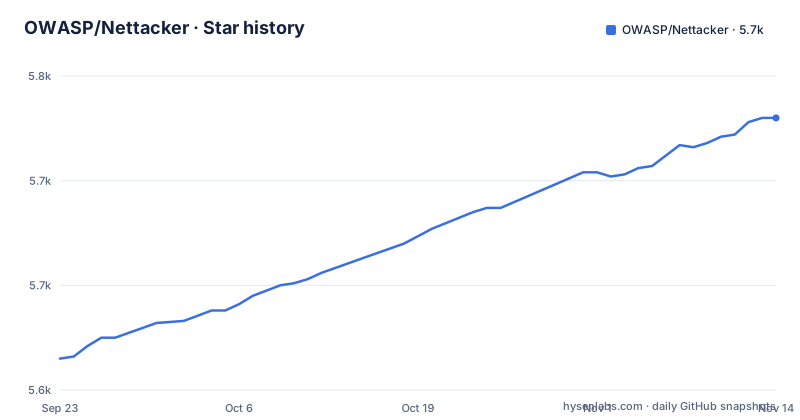
Star history
- OWASP/Nettacker5,730 ★ · +115
| Repository | 2026-09-23 | 2026-11-14 |
|---|---|---|
| OWASP/Nettacker | 5.6k | 5.7k |
115 Stars in the last 52 days, measured from the daily GitHub snapshot. Compare with other projects
Editorial analysis
The module you name is the only thing that decides what runs
Nettacker is built as separate modules, one per task: port scanning, directory discovery, subdomain enumeration, vulnerability checks and credential brute forcing. Nothing runs because it is enabled by default; the scan is the module you ask for.
Targets are equally open ended. A single IPv4, an IP range, a CIDR block, a domain name or a full HTTP and HTTPS URL are all accepted, they can be mixed in one command, and a file of them can be loaded with `-l/--targets-list`.
The Docker quick start is the shortest way to see the shape of a command:
# Basic port scan on a single IP address:
$ docker run owasp/nettacker -i 192.168.0.1 -m port_scan
# Scan the entire Class C network for any devices with port 22 open:
$ docker run owasp/nettacker -i 192.168.0.0/24 -m port_scan -g 22
# Scan all subdomains of 'owasp.org' for http/https services and return HTTP status code
$ docker run owasp/nettacker -i owasp.org -d -s -m http_status_scan
# Display Help
$ docker run owasp/nettacker --help
`-i` carries the target, `-m` names the module, and `-g 22` narrows a port scan to a single open port. The third line pairs `-d` and `-s` with the `http_status_scan` module.
The web UI comes up on port 5000 behind an API key
One command starts the web interface:
$ docker-compose upThe API key printed by the CLI is what you log in with. The interface is then reachable at `https://localhost:5000`, and the key can be read again later with `docker logs nettacker_nettacker`. Results land in `.nettacker/data/results` and the scan history lives in a sqlite file at `.nettacker/data/nettacker.db`. Because the compose file shares your nettacker folder, bringing the stack down with `docker-compose down` does not take the database with it.
Two details in that section deserve a second look. The port mapping is `5000:5000` and the service starts with `--start-api --api-host 0.0.0.0`, so the API binds every interface inside the container and the published port is reachable from wherever Docker exposes it. And the Web GUI paragraph still names a public hostname, `nettacker-api.z3r0d4y.com:5000`, with a parenthetical noting it is pointed at localhost. Treat that line as a documentation leftover rather than a service you should expect to resolve.
The same CLI also offers a REST API, which is how Nettacker is meant to sit inside other tooling rather than be clicked through.
A two stage image that ships a wheel instead of the source tree
The Dockerfile is where the dependency weight is visible. The base image is a build argument, `ARG PYTHON_IMAGE=python:3.11.16-slim`, used by both stages. The builder installs `gcc` and `libssl-dev`, installs Poetry, and lays down dependencies with `poetry config virtualenvs.in-project true` and `poetry install --no-cache --no-root --without dev --without test`, after copying `poetry.lock` and `pyproject.toml` first so the dependency layer caches.
The runtime stage then copies only the virtualenv and the built wheel, puts the venv on PATH, and installs it with `pip install --no-deps --no-cache-dir nettacker-*.whl` before deleting the wheel file. OCI labels carry the title, the project URL, the source repository and `Apache-2.0` as the license. The result is an image with no build tooling and no source in the final layer.
`docker-compose.yml` builds from the local `Dockerfile` with context `.`, sets `docker_env=true`, and bind mounts `./nettacker:/usr/src/owaspnettacker/nettacker`.
Python 3.10 to 3.12, and a protocol list with a dependency behind each entry
`pyproject.toml` names the project `nettacker`, licenses it Apache-2.0, declares classifiers for Python 3.10 and 3.11, and constrains the interpreter with `python = "^3.10, <3.13"`. The version in that file is `0.4.2`, ahead of the newest tag.
The console entry point is `nettacker = "nettacker.main:run"`, and the dependency list explains the protocol coverage in the README. HTTP and HTTPS work goes through `aiohttp` and `requests`. SMB has `impacket`, SSH has `paramiko`, and `pysocks` is there for the proxy support the evasion section advertises. The database side is `apsw` for sqlite plus `sqlalchemy`, which is what makes the stored scan history queryable. `flask` backs the web interface, `texttable` produces the table output, `py3dns` and `pyopenssl` handle name and certificate work, and `uvloop` is pinned behind the marker `sys_platform != 'win32'`, so Windows installs run without the faster event loop.
There is a `[tool.nettacker]` table with `release_name = "QUIN"`, and the package build includes `tests/**/*` in the sdist, which means the test tree travels with the source distribution.
Stored scan history is what turns a scanner into a CI tool
The single feature that distinguishes Nettacker from a one shot port scanner is its database. Past scans are kept so results can be searched and compared with the current run, and the README names what that comparison is for: new hosts, new open ports, new vulnerabilities, surfaced over time.
That reframes the tool from scanning to inventory control. The use cases section leans on it directly: shadow IT and asset discovery through historical data, CI/CD and compliance monitoring by tracking infrastructure change between runs, and attack surface mapping across internal and external assets. Reports export as HTML, JSON, CSV and plain text, so a drift finding can leave the tool as a build artifact or a ticket input rather than staying in a web session.
The remaining use cases are the expected reconnaissance ones: automating recon, misconfiguration checks and service discovery for repeatable penetration testing, default credential and directory checks with built in or custom wordlists, and scaling subdomain enumeration for bug bounty work. The CLI, the REST API and the web UI all exist so a scan can be typed by hand, scripted into a pipeline, or clicked through.
v0.4.1 shipped in 2026 after a two year gap, and master is ahead of it
The release history is uneven in a way worth planning around. v0.3.3 landed on 2024-01-20, v0.4.0 on 2024-09-27, and v0.4.1 only on 2026-08-24, while the last push to master was 2026-10-30. The repository is not archived, so work is continuing, and `pyproject.toml` already carries `0.4.2`, meaning the branch is ahead of the newest tag. Anyone pinning a version should decide deliberately between the published artifact and the branch.
The project governance files are in good shape for an OWASP project: `SECURITY.md`, `CODE_OF_CONDUCT.md`, `CONTRIBUTING.md`, `ADOPTERS.md` and `AGENTS.md`, plus `EXTERNAL_LIBRARIES_LICENSES.md` for the bundled third party licenses. Documentation is built with `mkdocs.yml` and `.readthedocs.yml` from the `docs/` directory, and the README links the Read the Docs installation and usage pages rather than repeating them.
Development runs through a `Makefile` with `check` fanning out to `pre-commit run --all-files` plus tests. `package` removes `dist` and runs `poetry build`, `test-unit` runs pytest against `tests/unit`, and `test-package` runs `tests/package` with coverage disabled and `addopts` cleared so the packaged wheel is exercised on its own. Linting is `ruff`, pinned to a range.
The disclaimer comes before the feature list, and evasion ships in the same box
The first substantive thing in the README is a disclaimer: the software was created for automated penetration testing and information gathering, it must be used responsibly and ethically, and you should "DO NOT TARGET SYSTEMS OR APPLICATIONS WITHOUT OBTAINING PERMISSIONS OR CONSENT" from the system owners or administrators. Contributors are named as not responsible for illegal usage.
Read that against the module list and the evasion section, which offers configurable delays, proxy support and randomized user agents to reduce detection by firewalls or IDS systems. Those capabilities are standard in scanners used for authorized work, and they are also the capabilities that turn an unauthorized run into a legal problem.
Authorization is also the only stated limit on scope. Nettacker maps hosts, ports and services, enumerates subdomains, tests credentials and checks vulnerabilities. For a team, the practical guard is procedural: keep target lists in version control next to the written authorization, and prefer the CI drift use case over ad hoc scanning of ranges you do not own.
Editorial conclusion
Use Nettacker for repeat reconnaissance and asset drift detection inside a range you own or have written permission to test, and run it through the Docker image so the sqlite database stays in a directory you control. Do not point it at third party infrastructure on the strength of a bug bounty scope alone, and remember that the brute force and evasion modules ship in the same box. Verify first that the tag you install matches the branch you read, since v0.4.2 sits on master while the newest published release is v0.4.1.
Frequently asked questions
how to use nettacker
The Docker path is the shortest: docker run owasp/nettacker -i 192.168.0.1 -m port_scan for a single host, or docker-compose up for the web UI on https://localhost:5000 logged in with the API key the CLI prints. Full install and usage pages are on Read the Docs.
Where does OWASP Nettacker keep its scan data?
The local sqlite database is .nettacker/data/nettacker.db and the default results path is .nettacker/data/results. docker-compose shares your nettacker folder, so the data survives docker-compose down.
Does OWASP Nettacker work without Docker?
The project is a Poetry Python package requiring Python ^3.10, <3.13, with the console script nettacker = "nettacker.main:run". The README points at the Read the Docs installation page for the non Docker path and keeps the Dockerfile instructions separate.
What can OWASP Nettacker scan?
Targets can be a single IPv4, an IP range, a CIDR block, a domain name or full HTTP and HTTPS URLs, mixed in one command or loaded from a file with -l/--targets-list. Modules cover HTTP/HTTPS, FTP, SSH, SMB, SMTP, ICMP, TELNET and XML-RPC, and scans run in parallel.
Is OWASP Nettacker still being updated?
The repository is not archived and the last push to master was on 2026-10-30. Releases are less frequent: v0.4.1 is dated 2026-08-24, after v0.4.0 in September 2024, and the branch already carries version 0.4.2 in pyproject.toml.
Official sources
Add this badge to your README
If you maintain this project, the badge below links readers to this analysis and shows its maintenance status from the daily GitHub snapshot. Paste the markdown into your README; add ?metric=license or ?metric=stars to the image URL for a different field.

[](https://hysenlabs.com/projects/owasp-nettacker)Star history chart for your README
[](https://hysenlabs.com/projects/owasp-nettacker)Was this useful?