dsh-mnemon splits an agent's memory into three tiers and shows you which one a turn read
Composable, view-based memory for DeepSeek Harness. Pluggable sources and strategies, with three-tier memory out of the box.
At a glance
- What is it?
- A DeepSeek Harness plugin that keeps runtime notes in context, searches project documents, and recalls long-term facts from named memory spaces. Every turn displays the memories it read and wrote, and one main strategy plus optional enhancements can be swapped without moving data.
- Who is it for?
- Use it if your DeepSeek Harness sessions restart from nothing and you want to see exactly what a turn pulled in rather than trust an opaque store. Check your host version before installing, because the plugin targets DSH 0.2.0-rc.2 and 0.1.7-rc.2 and older hosts are pinned back to v0.5.16.
- Can I use it commercially?
- Yes. MIT is a permissive licence: you can use, modify and sell software built on it, as long as you keep its copyright and licence notices.
- Is it still maintained?
- Yes. The repository received new commits within the last day.
- What is it written in?
- Mainly TypeScript, according to GitHub's language statistics.
Answers come from the project's GitHub data, last synced on November 15, 2026, and from our analysis. They are not legal advice.
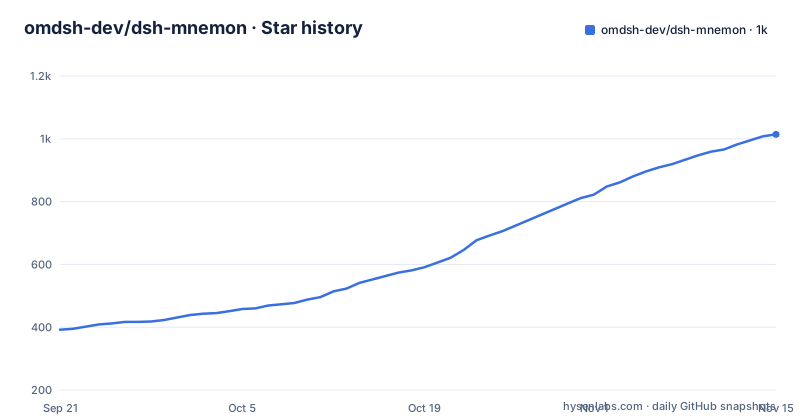
Star history
- omdsh-dev/dsh-mnemon1,014 ★ · +622
| Repository | 2026-09-21 | 2026-11-15 |
|---|---|---|
| omdsh-dev/dsh-mnemon | 392 | 1k |
622 Stars in the last 55 days, measured from the daily GitHub snapshot. Compare with other projects
Editorial analysis
Memory is split three ways, and each tier reaches the agent differently
The design starts from a specific complaint: an agent that starts every session from scratch keeps asking what it was already told, and putting everything in one store is no better because it either floods each turn or misses what matters.
So there are three kinds, and they do not share a mechanism:
Runtime memory holds preferences, working agreements and facts needed on the next turn, and is injected every turn as compact USER.md and MEMORY.md.
Project Documents hold designs, investigations, procedures and handoffs, and are searched first, then read when relevant.
Memory Spaces hold durable facts, decisions, entities and their relationships, recalled on demand from whichever Providers are enabled.
A memory space is one named, Provider-backed scope for long-term evidence. The Chinese product term is 记忆空间, which tells you this taxonomy came from a Chinese-language product rather than being invented for this project.
The turn memory bar names every document the turn read and wrote
Under each reply sits a bar listing the documents and memories that turn read and that turn wrote. One click opens any of them in the Memory System, which shows everything stored and lets you edit it.
That is the part that changes how you trust an agent. Instead of asking what the model was given, you read the bar and see the inputs and the outputs of a specific turn. When an answer cites something you did not save, the bar tells you it was never in the store.
The Memory System goes further with a graph that links memories through the entities they mention, and an Ask Agent that answers with the memories it cites, by content rather than by label.
A brain mark hands the fact to a task agent that deduplicates before writing
Saving is not a save button. When a conversation surfaces something worth keeping, you select the brain mark under the reply, trim the candidate down to the sentence worth keeping, and send it.
A task agent receives it and does three things before writing: it removes duplicates, it distils the text, and it picks the right Memory Space. The receipt then names where it went and opens that space in one click.
The duplication step is what makes a memory store usable over months, and the receipt is what makes it auditable. A store that appends every highlight is the same flood problem the project set out to solve, and the distillation step is the guard against it.
The trimming step is deliberate too: you cut the candidate before the agent sees it, so the model reduces rather than selects.
One main strategy and optional enhancements, swapped without moving data
Composition happens on the Plugins page. You pick one main strategy and any optional enhancements, each with its own settings page, and switching them does not move any data.
Two main strategies ship out of the box. Layered keeps runtime memory resident and reads the other two tiers on demand. General offers every available source within one budget and lets the model decide how to use each.
The trade is real. Layered gives predictable token cost because one tier is always present and the others are only touched when needed. General gives the model room, but its behaviour depends on a budget you set rather than on a rule the plugin applies.
Everything else on that page, storage scope, ZIP backup and interface settings, sits alongside the strategy switches, which means one screen configures both what is remembered and where it lives.
Local is the default, and the other seven Providers move your memories off the machine
Storage can be global, per workspace or centralized, with ZIP backup available. The default is local, through Mnemon Native.
The alternative is one of eight third-party Providers, enabled from the Memory Spaces page. The package keyword list names the ecosystems involved, including openviking, honcho, mem0, hindsight, holographic memory, retaindb, byterover and supermemory, which is a fair indicator of which memory services this plugin is meant to sit in front of.
Nothing about that switch is presented as a trade-off in the documentation. The practical consequence is that enabling a Provider changes where durable facts, decisions and entity relationships are written, and the graph in the Memory System follows them there.
Installation goes through the harness Plugins page, or through a profile flag
The short path needs Node.js 22.19 or later and pnpm:
npm install --global pnpm
npx @deepseek-ai/dsh web
Then in the page that opens, go to Plugins, Add plugin, type dsh-mnemon, Install, then Enable now. Open Memory System in the sidebar to see each memory component and Provider in the Status view.
For Memory Spaces specifically you also need the Mnemon CLI, installed with `npm install --global @mnemon-dev/mnemon`, unless you enable a different Provider instead. That extra step is easy to miss because it is not part of the plugin install.
The same package serves the desktop app's Plugins page, the command line with `dsh plugin --profile web add dsh-mnemon`, and Headless with the headless profile. There is no separate headless build to choose.
Host compatibility is narrow, and older hosts are pinned back a hundred releases
Supported host versions are DSH 0.2.0-rc.2, on both the npm latest and next tags, and 0.1.7-rc.2. Anything older needs v0.5.16 kept in place.
That last number is the detail to notice. The current release is v0.5.21, so an older host is not one minor version behind, it is pinned roughly a hundred patch releases back. The plugin keeps working there, but nothing in that range lands.
The release names tell the same story from the other direction: v0.5.19, v0.5.20 and v0.5.21 all carry the same description, Composable Memory Plugins, published on 2026-09-28 and 2026-09-30. Three releases in three days under one label reads as a stabilization push rather than three features, and the demo gallery is pinned to the v0.5.19 screens.
The package itself requires Node 20 or later as its engine floor, below the 22.19 the guide asks for.
Editorial conclusion
Use it if your DeepSeek Harness sessions restart from nothing and you want to see exactly what a turn pulled in rather than trust an opaque store. Check your host version before installing, because the plugin targets DSH 0.2.0-rc.2 and 0.1.7-rc.2 and older hosts are pinned back to v0.5.16. Decide in advance where storage lives, since local is the default and the other seven Providers send your memories elsewhere, and read the receipt after your first save to confirm a fact landed in the space you expected.
Frequently asked questions
What are the three kinds of memory in dsh-mnemon?
Runtime memory for preferences and facts needed next turn, injected every turn as compact USER.md and MEMORY.md. Project Documents for designs and procedures, searched first and then read when relevant. Memory Spaces for durable facts and entities, recalled on demand from enabled Providers.
How do I save a fact to memory in dsh-mnemon?
Select the brain mark under the reply, trim the candidate down to the sentence worth keeping, and send it. A task agent removes duplicates, distils it and writes it to the right Memory Space, and the receipt names where it went.
Which DeepSeek Harness versions does dsh-mnemon support?
DSH 0.2.0-rc.2 on the npm latest and next tags, and 0.1.7-rc.2. Older hosts need v0.5.16 kept in place, which is well behind the current v0.5.21.
Where is dsh-mnemon memory stored by default?
Locally, through Mnemon Native, with scope set to global, per workspace or centralized and ZIP backup available. One of eight third-party Providers can be enabled instead from the Memory Spaces page.
What is the difference between the Layered and General strategies in dsh-mnemon?
Layered keeps runtime memory resident and reads Project Documents and Memory Spaces on demand. General offers every available source within one budget and lets the model decide how to use each one.
Official sources
Add this badge to your README
If you maintain this project, the badge below links readers to this analysis and shows its maintenance status from the daily GitHub snapshot. Paste the markdown into your README; add ?metric=license or ?metric=stars to the image URL for a different field.

[](https://hysenlabs.com/projects/omdsh-dev-dsh-mnemon)Star history chart for your README
[](https://hysenlabs.com/projects/omdsh-dev-dsh-mnemon)Was this useful?