omegaee/my-fingerprint: Browser Fingerprint Protection Extension
保护你的浏览器指纹 | Protect Your Browser Fingerprints | Chrome, Edge, Firefox | 扩展 / Extension
At a glance
- What is it?
- omegaee/my-fingerprint is a Manifest V3 browser extension for Chrome, Edge, and Firefox that modifies browser fingerprint APIs through JavaScript injection. It is aimed at users who want configurable fingerprint protection, with explicit trade-offs around site compatibility and detection resistance.
- Who is it for?
- Users who want lightweight browser fingerprint protection and can manage site-specific exceptions may find omegaee/my-fingerprint appropriate, while users seeking complete environment simulation or anti-detection behavior should verify its JavaScript injection model first.
- Can I use it commercially?
- Yes. Apache-2.0 is a permissive licence: you can use, modify and sell software built on it, as long as you keep its copyright and licence notices.
- Is it still maintained?
- Yes. The repository last received commits 2 days ago.
- What is it written in?
- Mainly TypeScript, according to GitHub's language statistics.
Answers come from the project's GitHub data, last synced on November 6, 2026, and from our analysis. They are not legal advice.
Star history
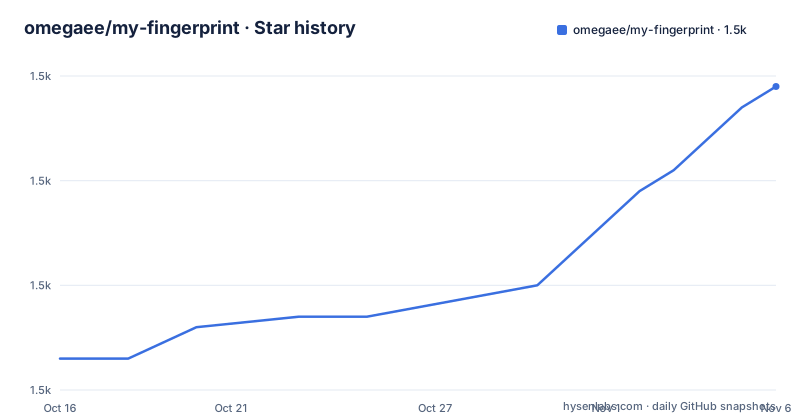
- omegaee/my-fingerprint1,489 ★ · +26
| Repository | 2026-10-16 | 2026-11-06 |
|---|---|---|
| omegaee/my-fingerprint | 1.5k | 1.5k |
26 Stars in the last 21 days, measured from the daily GitHub snapshot. Compare with other projects
Editorial analysis
What my-fingerprint Changes in the Browser
omegaee/my-fingerprint addresses cross-site tracking based on browser fingerprinting. The README states that websites can combine several browser characteristics to recognize a user across sites, especially when those characteristics are combined with IP information and browser storage. The extension is not presented as a replacement for a fingerprint browser. Its stated approach is lighter and is based on JavaScript injection.
The listed targets cover Canvas, WebGL, Audio, Fonts, WebRTC, WebGPU, DomRect, language, timezone, graphics driver information, UserAgent, screen dimensions, and resolution. The extension can also monitor when pages access fingerprint APIs. This gives users a visible indication of which parts of the browser surface a page is probing, although the README does not explain how the monitoring results are stored or exported.
The intended users are people who want to reduce fingerprint-based identification without changing their entire browsing environment. That includes users of Chrome, Edge, and Firefox who want configurable protection rather than a separate specialized browser profile. The project also supports Firefox for Android through a separate add-on link. The extension is licensed under Apache-2.0, and its package metadata identifies the primary implementation language as TypeScript.
JavaScript Injection and Manifest V3 Boundaries
The core design is native injection into browser behavior rather than replacing the browser with a complete virtual environment. The README describes the implementation as lightweight, dependency-free injection with low performance overhead. It also says that the recommended script setting is “快速注入”, or fast injection, to improve compatibility and performance. The repository structure supports this description: the package uses TypeScript, React, Vite, and the `@crxjs/vite-plugin`, while the manifest is represented by `manifest.ts`.
The practical consequence is important. The README compares this extension with a fingerprint browser and says that a fingerprint browser can simulate a complete environment for deeper disguise and anti-detection scenarios. my-fingerprint instead modifies selected fingerprint values through injected scripts. That approach may be sufficient for reducing the stability of some identifying signals, but the repository documentation does not claim that it reproduces an entire device, operating system, browser build, network identity, or hardware profile.
The extension also supports strong and weak fingerprint groups. Strong groups are described as highly unique user characteristics that are often used with other fingerprint items or IP information. Weak groups contain frequently repeated basic information and are intended for lighter protection. The project’s own FAQ warns that changing every possible item is not always better. Excessive modification can interfere with web functions or create abnormal behavior. This is a meaningful limitation for sites that use several browser APIs together.
Installing and Starting my-fingerprint
For Edge, the README links to the Edge Add-ons listing. Firefox users can install the desktop add-on, and separate links are provided for Firefox for Android. Chrome is not listed as a store release. The README says that Chrome users must install it manually and that the browser must be Chrome 102 or later, with version 120 or later recommended.
The manual installation instructions are straightforward. Download the `.zip` file from the project’s latest GitHub release for Chrome or Edge, open the browser’s extension management page, and drag the package into that page before enabling it. The README does not give a separate command for this operation, so the store or release-page workflow is the documented installation path.
For Firefox, download the `.xpi` file from the latest GitHub release, drag it into the browser window, and click add. The Firefox requirement is version 136 or later. Store updates may arrive later than GitHub releases because extension-store review can delay publication. The extension is documented as taking effect after installation without extra configuration, but users should still open the settings panel to confirm which protection groups are active.
For local development, the README gives this command sequence:
cd <project>
npm install
npm run dev
npm run dev:firefox
The `npm run dev` script builds the Chrome or Edge development target through Vite. `npm run dev:firefox` builds the Firefox target with Firefox mode enabled and minification disabled. The package metadata confirms that `npm run build` performs TypeScript compilation followed by a Vite build, while `npm run build:all` builds both browser targets. These commands are development and build commands, not a documented production deployment procedure.
Configuration, Whitelists, and Remote Subscriptions
The settings panel exposes the main control surface. Users can select strong and weak fingerprint groups, edit a whitelist, and configure script behavior. The whitelist supports subdomain matching. According to the README, an entry such as `example.com` can match `*.example.com` and `*.*.example.com`. This is useful when a page or application breaks because a modified API conflicts with its own scripts, although the README does not describe an automatic diagnostic report that identifies the exact conflicting API.
The extension also supports configuration import, export, and subscriptions. A subscription can initialize settings from a JSON template. The README provides a standard template at `https://raw.githubusercontent.com/omegaee/my-fingerprint/main/example/config/template.json`. A null value means that the subscription is disabled. Users can subscribe manually or have the extension fetch remote configuration when it starts. The documentation warns that subscription configuration overwrites existing settings and merges whitelist entries.
That overwrite behavior deserves attention. A remote configuration is not described as a lightweight set of recommended defaults. Since subscribed configuration can replace settings, users who rely on carefully selected exceptions should understand whether the current subscription overwrites local choices or only updates the subscribed fields. The README explicitly says that it overwrites the original settings and merges whitelist content, but it does not document conflict resolution for individual whitelist entries.
The repository includes `example/config/` and `example/presets/`, which indicates that configuration examples and presets are part of the source tree. The README does not specify the schema for every preset or explain whether remote subscriptions are validated before being applied.
Troubleshooting by Injection Mode and Site Whitelist
The documented first response to a broken page is to enable fast injection mode. The README says this setting improves compatibility and performance. If the page still behaves incorrectly, the documented options are to add it to the whitelist or apply the “已知问题列表”, or known issues list, from the configuration presets.
This troubleshooting model is appropriate for a JavaScript injection extension because site scripts may depend on exact canvas dimensions, WebGL values, font behavior, media output, or timing. The extension’s stated protection list spans APIs used by graphics, media, layout, localization, and browser identification. Changing one or two values can break a site that expects internally consistent results. The README’s advice not to modify every item by default reflects that consistency concern.
The listed testing targets include webbrowsertools.com, browserleaks.com, CreepJS, browserscan.net, yalala.com, and uutool.cn/browser/. The README presents these as test targets, not as a promise that every site will produce the same result or that the extension provides a formal anonymity guarantee. The repository does not document a browser-level matrix beyond the minimum Chrome, Edge, and Firefox versions, nor does it state how results should be interpreted on mobile Firefox.
Users should therefore treat the testing sites as diagnostics for browser-visible characteristics. They cannot establish that a site cannot identify a user, because the FAQ itself notes that fingerprint items can be combined with IP and browser storage. The extension addresses selected browser fingerprint surfaces, not every tracking channel available to a page.
my-fingerprint Compared with a Fingerprint Browser
The clearest alternative described by the project is a fingerprint browser. The README says that a high-quality fingerprint browser simulates a complete environment, whereas my-fingerprint uses JavaScript injection and is intended to be lightweight and compatible with common fingerprint-protection situations. The difference is architectural, not simply a difference in feature count.
A fingerprint browser can coordinate a broader set of browser characteristics as one environment. The project documentation does not name a particular fingerprint browser or provide a feature-by-feature comparison, so it does not support claims about a specific competitor. It does support the general distinction between deep environment simulation and targeted JavaScript modification.
For a user who needs one profile to appear internally consistent across many browser and hardware properties, the fingerprint-browser approach described in the README may be more appropriate. For a user who wants protection inside an existing Chrome, Edge, or Firefox setup and accepts the possibility of site-specific exceptions, my-fingerprint is the more direct option. The trade-off is that the extension does not claim the same depth of environmental simulation.
Maintenance, Release History, and Apache-2.0
The repository is not archived, and its last push was on 2026-09-27. Recent releases include v2.9.3 on 2026-09-27, v2.9.2 on 2026-09-26, and v2.9.1 on 2026-08-28. Those facts indicate that the project was receiving releases and repository updates close to the current date. They do not establish the size of the user community or the quality of every release.
Upgrade cost is partly tied to browser compatibility. Chrome and Edge manual installation requires a release package and manual loading, while Firefox uses an `.xpi` file. Store updates may lag GitHub because of review delays. The repository includes separate build scripts for Chrome or Edge and Firefox, which gives contributors a path to produce both targets, but the README does not document an automated release process, compatibility policy, or migration procedure for configuration subscriptions.
The license is Apache-2.0. That permits use and modification under the license’s terms, subject to its notice and license conditions. This article does not provide legal advice. Anyone planning to redistribute a modified build or incorporate the code into another product should review the `LICENSE` file and preserve the required notices.
Editorial conclusion
Users who want lightweight browser fingerprint protection and can manage site-specific exceptions may find omegaee/my-fingerprint appropriate, while users seeking complete environment simulation or anti-detection behavior should verify its JavaScript injection model first. Before adoption, check that the required APIs can be modified on the target sites, confirm the Firefox or Chrome installation path, and test the chosen whitelist and subscription settings against important web applications.
Frequently asked questions
How do I install my-fingerprint on Chrome?
Chrome is not listed in the extension stores by this repository. The README instructs users to download the `.zip` file from the latest GitHub release, open the extension management page, and drag the file into that page. Chrome 102 or later is required, and version 120 or later is recommended.
Can my-fingerprint replace a fingerprint browser?
The README says no in terms of use case. It describes my-fingerprint as a lightweight JavaScript-injection extension, while a fingerprint browser can simulate a complete environment for deeper disguise. my-fingerprint is intended for fingerprint protection in an existing browser rather than full anti-detection environment simulation.
What should I do if a website breaks after installing my-fingerprint?
The README recommends enabling fast injection mode first. If the problem remains, add the site to the whitelist or apply the known-issues preset. This is particularly relevant because the extension modifies APIs used by graphics, media, fonts, layout, and browser identification.
Does my-fingerprint protect against all browser tracking?
No such claim appears in the README. It modifies selected fingerprint APIs, including Canvas, WebGL, Audio, Fonts, WebRTC, WebGPU, DomRect, language, timezone, graphics driver information, UserAgent, screen dimensions, and resolution. The project also notes that fingerprint data can be combined with IP information and browser storage.
Official sources
Add this badge to your README
If you maintain this project, the badge below links readers to this analysis and shows its maintenance status from the daily GitHub snapshot. Paste the markdown into your README; add ?metric=license or ?metric=stars to the image URL for a different field.

[](https://hysenlabs.com/projects/omegaee-my-fingerprint)Star history chart for your README
[](https://hysenlabs.com/projects/omegaee-my-fingerprint)Was this useful?