Agent state in Postgres, three binaries, and a compose file full of dev credentials
The open-source alternative to Claude Managed Agents
At a glance
- What is it?
- Omnara runs managed agents and commits their state atomically to Postgres, and the self-hosted path is documented down to the compose file. That same compose file ships a database password equal to its user name, TLS to Postgres turned off, and three secret settings left empty.
- Who is it for?
- Omnara is a reasonable base when you want agent execution and state to live in your own Postgres and your own containers, since the self-hosted path is documented down to the compose file and the state model is plain enough to query directly. Two things have to be settled before any deployment.
- Can I use it commercially?
- Yes. Apache-2.0 is a permissive licence: you can use, modify and sell software built on it, as long as you keep its copyright and licence notices.
- Is it still maintained?
- Yes. The repository last received commits 1 day ago.
- What is it written in?
- Mainly Go, according to GitHub's language statistics.
Answers come from the project's GitHub data, last synced on November 21, 2026, and from our analysis. They are not legal advice.
Star history
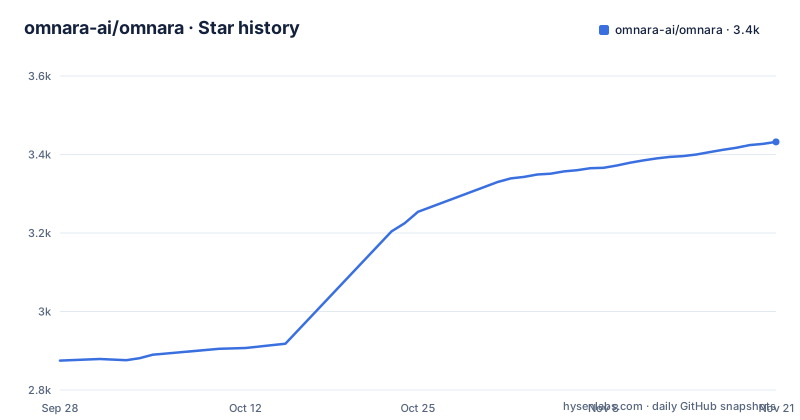
- omnara-ai/omnara3,432 ★ · +557
| Repository | 2026-09-28 | 2026-11-21 |
|---|---|---|
| omnara-ai/omnara | 2.9k | 3.4k |
557 Stars in the last 54 days, measured from the daily GitHub snapshot. Compare with other projects
Editorial analysis
Two positioning lines and two independent version lines
Omnara describes itself twice before it says anything else. The repository summary calls it the open-source alternative to Claude Managed Agents, the first line of the documentation calls it the API for production-grade agents, and the paragraph under that calls it an open source platform for running managed agents. The division of responsibility is stated plainly: Omnara handles execution and state, while you choose the models, tools, machines, and how users interact with each agent. For developers that split goes further, with your application controlling who can use an agent, what input it receives, and how its output reaches users.
The release tags do not describe one product line. The two most recent releases carry different component names and different version numbers, omnarad v0.1.33 and cluster v0.1.39, both dated 2026-10-03, and a third tag names a moving omnarad stable channel dated 2026-08-05. Nothing in the documentation says what the daemon is, what the cluster is, or how the two version numbers relate to each other.
The compose stack starts with the database password set to the user name
Everything the stack needs is in compose.yaml, and several of its settings are credentials that equal their own names. The app points at `postgres://omnara:omnara@postgres:5432/omnara?sslmode=disable`, the database container sets its user, password and database all to omnara, and the object store runs with access key omnara and secret omnara-blobs. TLS to Postgres is off in that same URL. Three settings that protect your own material ship present but empty.
  OMNARA_DATABASE_URL: postgres://omnara:omnara@postgres:5432/omnara?sslmode=disable
  OMNARA_ALLOW_INSECURE_DEV_DEFAULTS: ${OMNARA_ALLOW_INSECURE_DEV_DEFAULTS:-1}
  OMNARA_SECRET_ENCRYPTION_KEYS: ${OMNARA_SECRET_ENCRYPTION_KEYS:-}
  OMNARA_SECRET_ENCRYPTION_ACTIVE_KEY_ID: ${OMNARA_SECRET_ENCRYPTION_ACTIVE_KEY_ID:-}
  OMNARA_SKILL_DOWNLOAD_SIGNING_KEY: ${OMNARA_SKILL_DOWNLOAD_SIGNING_KEY:-}
That last group is the one to read twice. A deployment with no encryption key set has nothing to encrypt stored secrets with, and a deployment with no signing key has nothing to verify downloaded skills with. The documentation treats none of this as a trap: it says local development uses intentionally insecure defaults and that those defaults must not be used in a deployed environment, then points at a self-hosting guide and a configuration reference. What it does not do is describe what a hardened deployment looks like.
Four listening addresses and three built binaries
The environment example file enumerates four addresses: the API on :8080 and separate metrics addresses for the API, the worker and the maintenance process on :8081, :8082 and :8083, under a comment saying those servers are only for health and metrics endpoints. The Dockerfile builds three binaries from one Go base, an API from ./cmd/api, a worker from ./cmd/worker and a maintenance binary, each cross compiled with CGO_ENABLED=0 and -trimpath against explicit TARGETOS and TARGETARCH values, and the Go version there is pinned to 1.27.1 to match go.mod.
Worker parallelism is three separate numbers. OMNARA_WORKER_CAPACITY is 4, the async tool capacity is 32 and the background tool capacity is 8, so concurrency at the agent level is deliberately narrow while tool fan out is an order of magnitude wider. Maintenance can also be a process of its own, with `go run ./cmd/maintenance` given in a comment for running it separately from workers, and it ticks on a one second interval by default.
Redis is a wakeup hint, and Postgres is the record
The durability claim is one sentence: agent state is committed atomically to Postgres, and agents recover automatically from crashes, restarts, and temporary machine disconnects. The dependency list backs the mechanism rather than the marketing. jackc/pgx is the driver, pressly/goose runs migrations out of a migrations directory with a 30 minute timeout configured, and the two sqlc files at the repository root mean SQL and generated access code are checked together. Redis sits beside Postgres, pointing at a valkey 9 container with a healthcheck on ping.
What Redis does is narrower, and the example file says so directly: Redis Pub/Sub wakeups are best effort, and the fallback drain interval of 30s with 10s of jitter is the API side floor for connected daemon sockets when wakeups are missed. A dropped message costs a delay, not state, which is the arrangement you want if you are running this yourself. The further promise for self-hosted deployments is that agent history can be queried directly in Postgres for analytics, evals, prompt analysis, and training datasets, which makes your own schema the interface to everything the agents did.
Seven sandbox providers, or a laptop you connect yourself
Machines are the most open-ended part of the design. The named providers are Blaxel, Daytona, Modal, Unikraft, Freestyle, Tenki and Arker, and the same paragraph allows your own laptop or VM, with the explicit note that an agent can run with no machines at all or several at once, and that machines can be added or removed while the agent is running. A default-machine-pools-example.yaml sits at the repository root for the pool shape, and one of the example directories is named after the Unikraft path.
The direct dependencies say which of these are code and which are configuration. modal-client is a direct requirement, and so are a websocket library and a PTY package, which together describe reaching something that behaves like a shell rather than an HTTP request. Machines also have to call back into your instance, which is what the additional server allowed hosts setting in the example file is for, with a comment naming Slack and sandboxes as the two cases that need a tunnel. Neither the tool layer above them nor the machine handshake is limited by the provider list.
The three step walkthrough reads a variable nothing assigns
The getting started path is three steps, and the third one reads a variable that no step sets. Creating a profile prints an id, and launching the agent passes `--profile $AGENT_PROFILE_ID`, but nothing in between assigns it. The closing line has the same shape, an `open` call whose URL holds [$PROJECT_ID] and [$AGENT_ID] in square brackets with neither defined anywhere in the walkthrough. That `open` is also the macOS opener, in a project whose self-hosted path is otherwise plain containers.
$ npx omnara login
$ npx omnara profiles create --name agent --file agent.yaml
id                  aprf_aej3...
name                agent
[...]
$ npx omnara agents launch --profile $AGENT_PROFILE_ID --file agent.yaml
$ open https://app.omnara.com/projects/[$PROJECT_ID]/agents/[$AGENT_ID]
The profile is a YAML file whose fence is tagged with a filename rather than a language, naming its provider config omnara-openrouter with model name openai/gpt-6.1-sol, while the instruction text repeats that same model name in prose. Models are bring your own key through OpenRouter, LiteLLM or Ollama, and the formats named as supported are OpenAI Responses, OpenAI Chat Completions and Anthropic Messages, with more formats described as coming soon.
Twelve example agents, three named after platforms that restrict automation
The examples directory holds twelve projects, and their names are the only description of them anywhere in the repository. Three are signal agents: linkedin-signal-agent, reddit-signal-agent and x-signal-agent. The other nine cover a post analytics agent, a sharepoint mount, a slack coding agent, an sre agent, a unikraft machine, a video generation agent, a setup prompt, a CLI agent and a custom tool webhook.
Nothing states what any of them does, which direction the signal flows, or how often they run, and the tool layer above them is open ended, with built-in tools, custom tools, skills and HTTP MCP servers all available to an agent profile. So the scope question lands on whoever deploys one of the three. Those platform names belong to services whose own rules govern automated access, and an agent that polls or posts through them operates under those rules, not under anything this project documents. Read these as shapes to copy into a profile of your own rather than as behaviour to switch on, and check the terms of any service you point an agent at.
Provider backed live tests run on every push to main
Testing is split by what it costs. `make verify` is called the fast repository gate, `make web-check-all` adds React Doctor against the current branch changes, `make test-integration` is described as database backed, and `make test-service-e2e` as deterministic service end to end. The expensive tier is named by pattern rather than listed one by one: provider backed live tests sit behind the `make test-live-*` targets and require the corresponding credentials. The rule for when they run is worth quoting exactly, because CI runs them on every push to main, while a pull request has to carry the live-tests label.
Source development needs the Go version declared in go.mod, Node.js 24 or newer with Corepack, and Docker with Compose. The frontend stage of the Dockerfile lines up with that, building on a pinned Node 24 slim image with corepack enable and a frozen pnpm lockfile, and generating its client from api/openapi/openapi.yaml plus a generated agent config schema before typechecking and building. Linting is configured twice, through .golangci.yml and a .custom-gcl.yml, so the linter binary is built from a custom configuration rather than taken as published.
Editorial conclusion
Omnara is a reasonable base when you want agent execution and state to live in your own Postgres and your own containers, since the self-hosted path is documented down to the compose file and the state model is plain enough to query directly. Two things have to be settled before any deployment. Every credential in compose.yaml, because the database password matches its user name, sslmode is disabled, and the secret encryption keys, active key id and skill download signing key are all empty. And the terms of the platforms named in three of the twelve example agents, which this repository does not address at all. Check the release tags too, since omnarad and cluster version independently and one tag names a moving stable channel, so a version number from a blog post does not identify a build.
Frequently asked questions
what is omnara
Omnara is an open source platform for running managed agents. It handles execution and state while you choose the models, tools, machines, and how users interact with each agent. It is written in Go, licensed under Apache 2.0, and can be used as Omnara Cloud or self-hosted with Docker and Compose.
is omnara free
The code is Apache 2.0 and the self-hosted path needs only Docker with Compose, so running it yourself costs no licence fee. Pricing or terms for the hosted Omnara Cloud are not stated anywhere in this repository, so those have to be checked separately.
Can Omnara run entirely on my own machine instead of a hosted service?
Yes. The self-hosted requirement is Docker with Compose, and after running the compose file the documentation says to open http://localhost:8000, where the local authentication email is written to the compose logs for the api. An agent can also run with no machines at all, or with your own laptop or VM as the machine.
What does Omnara keep in Postgres, and can I query it directly?
Agent state, committed atomically, which is what lets agents recover from crashes, restarts and temporary machine disconnects. Self-hosted deployments can query agent history directly in Postgres for analytics, evals, prompt analysis and training datasets.
Are the credentials in the Omnara compose file safe to deploy?
No, and the documentation says so: local development uses intentionally insecure defaults that should not be used in a deployed environment. As shipped, the compose file sets OMNARA_ALLOW_INSECURE_DEV_DEFAULTS to 1, gives Postgres a password equal to its user name, disables TLS with sslmode=disable, and leaves the secret encryption keys, the active key id and the skill download signing key empty.
Official sources
Where developers are discussing it
Posts on Hacker News, dev.to and Lobsters that link to this repository, found by our scan of those communities. 0 in the last 30 days; newest first.
- Show HN: Omnara – Open-source alternative to Claude Managed AgentsHacker News · Oct 21, 2026 · 112 points · 34 comments
Add this badge to your README
If you maintain this project, the badge below links readers to this analysis and shows its maintenance status from the daily GitHub snapshot. Paste the markdown into your README; add ?metric=license or ?metric=stars to the image URL for a different field.

[](https://hysenlabs.com/projects/omnara-ai-omnara)Star history chart for your README
[](https://hysenlabs.com/projects/omnara-ai-omnara)Was this useful?