omnirush.ai is a desktop coding agent that only runs after you sign in to its account
A desktop coding agent with free access to frontier models.
At a glance
- What is it?
- omnirush-ai/omnirush-gui is a TypeScript desktop app for working with a coding agent on your own projects. Models come from your omnirush.ai account, bring-your-own keys are not supported, and macOS builds are not notarized yet.
- Who is it for?
- Choose omnirush-gui if you are on Apple Silicon or Linux, are happy to sign in to an omnirush.ai account, and want an agent that does git and pull request work with approval prompts. Skip it if you need your own provider keys, an Intel Mac build, remote MCP servers, or a license you can read in one place.
- Can I use it commercially?
- Check first. The repository uses a licence we do not classify automatically, so read its LICENSE file before any commercial use.
- Is it still maintained?
- Yes. The repository last received commits 2 days ago.
- What is it written in?
- Mainly TypeScript, according to GitHub's language statistics.
Answers come from the project's GitHub data, last synced on November 7, 2026, and from our analysis. They are not legal advice.
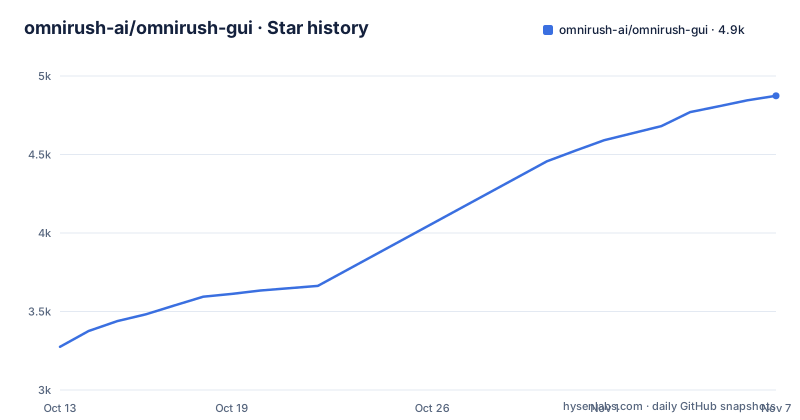
Star history
- omnirush-ai/omnirush-gui4,874 ★ · +1,599
| Repository | 2026-10-13 | 2026-11-07 |
|---|---|---|
| omnirush-ai/omnirush-gui | 3.3k | 4.9k |
1,599 Stars in the last 25 days, measured from the daily GitHub snapshot. Compare with other projects
Editorial analysis
The app does nothing until a device-code sign-in to omnirush.ai completes
omnirush-gui is a desktop app for working with a coding agent on your own projects. Its description promises free access to frontier models, and the homepage is https://omnirush.ai. The default model is GPT 6 Astra. GPT 6.1 Sol and the other models in your account's catalog appear in the model picker.
The account is not optional. You click Sign in to omnirush.ai in the sidebar or on the Settings page, and your browser opens omnirush.ai/console with a device code. You approve it there and the app is ready. Until an account is connected, the app does not run prompts at all.
The catalog is whatever your account holds, and the README does not list it or explain the terms behind the word free. It also says your own provider keys are not supported. If you hold an API key for another vendor and want to point an editor at it, this app is the wrong shape. Everything routes through the omnirush.ai account, so the app's usefulness depends on that service staying available to you.
Nine download files cover macOS on Apple Silicon and both Linux architectures, and Intel Macs get nothing
Releases carry the version in the file name, for example omnirush-mac-arm64-3.0.1.dmg. macOS on Apple Silicon gets a .dmg with a .zip also attached. Linux x64 gets a .deb for Debian and Ubuntu, a .pacman for Arch, an .rpm for Fedora and RHEL, plus an AppImage or tar.gz for anything else. Linux arm64 mirrors that list with its own five files. Each release includes SHA256SUMS.txt for verifying downloads.
There is no build for Intel Macs. The README says so in one sentence. Anyone on an Intel MacBook has no installer and no documented workaround, so the only remaining path is the development setup described further down.
Windows is missing from the table too. The platform table lists macOS and Linux only, and the Updating section talks about macOS and Linux only. No Windows installer appears anywhere in the README.
macOS builds are not notarized, so the first launch needs Open Anyway or a quarantine command
The README states that builds are not notarized yet. On first open, macOS reports that it could not verify the app. You click Done, open System Settings > Privacy & Security, click Open Anyway next to omnirush, then Open. The alternative is a terminal command:
xattr -dr com.apple.quarantine /Applications/omnirush.appThen macOS asks to use omnirush.ai Safe Storage. You enter your login password and choose Always Allow. The README says this keychain item only holds the key that encrypts your sign-in on this Mac. The README does not say what happens if you refuse it.
The quarantine command removes a macOS safety check for that one app, so run it only on a file whose checksum you have compared against SHA256SUMS.txt from the same release. On a managed Mac where policy blocks unnotarized software, the Privacy & Security route may not be available at all.
Linux AppImage and tar.gz need the GTK runtime, and the sign-in store falls back to a plain file
The .deb, .rpm and .pacman packages install their dependencies. The AppImage and tar.gz do not, so you install the GTK runtime first:
sudo apt install libgtk-3-0 libnss3 libatk-bridge2.0-0 libasound2 # libasound2t64 on Ubuntu 24.04Then you run chmod +x on the AppImage or unpack the tarball. The README names the failure to expect: an error about libatk-1.0.so.0 means these packages are missing.
Sign-in storage differs by desktop. When a system keyring is available, the app uses it: gnome-keyring, KeePassXC with Secret Service, or KWallet. Without one, which the README calls common on tiling window managers, it falls back to an owner-only file in the app's data folder, and Settings says so. The consequence is a weaker store on those setups. A file readable by your user account is protected by file permissions alone.
To choose a store explicitly, start the app with --password-store=gnome-libsecret, kwallet5 or kwallet6. Those are the three values the README gives, and no flag is listed for KeePassXC, so that route depends on Secret Service being exposed.
MCP support is limited to local servers from the account's supported list
Skills are added from the Library in Settings, and every model sees the same skills, so switching models does not change what the agent can do with them. Models and effort are chosen per chat, with effort levels low, high, xhigh and max.
MCP is where the restrictions are sharpest. The app takes local MCP servers from the account's supported list, and the README names filesystem, git, SQLite, memory, sequential thinking, time, and Playwright on local pages. Remote and account-linked servers are not supported. You configure them under Settings > MCP, and docs/skills-and-mcp.md covers the details.
The consequence is that a hosted MCP server your team already runs cannot be attached, and neither can one tied to another account. The Playwright entry is also scoped to local pages, so browser automation against a live external site is outside what is listed. For a coding agent that is meant to touch only your own projects the list may be enough, but anyone expecting arbitrary MCP configuration should read the supported list before committing to the app.
Git work runs through gh with one approval for writes and a prompt every time for destructive commands
The agent clones, branches, creates worktrees, commits, pushes, and opens and reviews pull requests with gh. That means the GitHub CLI has to be on the machine, because the pull request steps are described in terms of that tool. docs/git-workflows.md has the full flow.
Approvals follow a two-tier rule. Write commands ask once per session. Destructive ones always ask. The composer also has a full-permissions toggle that switches between asking and allowing every tool call, and docs/approvals.md explains it. Flipping that toggle turns off the per-call prompts, so a destructive git command would no longer stop for confirmation under the README's own description of the toggle.
The practical advice is to keep full permissions off in repositories with unpushed work. The one-per-session approval for writes means a single yes covers every later commit and push in that session, which is convenient and also the reason to read the first prompt carefully.
Updates are in-app on macOS and Linux, installs older than 1.0.5 need one manual download, and the license line needs a second look
The app updates itself on macOS and Linux through Settings > Updates or the Check for Updates menu item. On macOS it downloads the new DMG and opens it, and you drag the app to Applications to replace the old copy. On Linux the AppImage, .deb, .rpm and .pacman installs update in place. The tar.gz does not update itself, so you download new releases by hand. Installs older than 1.0.5 cannot update in-app. docs/updates.md lists what the updater contacts.
The release cadence is fast. v3.8.0 shipped on 2026-10-26, v3.8.1 on 2026-10-27 and v3.8.2 on 2026-10-30. The last push to the repository was 2026-10-30. The example file name in the README still says 3.0.1, so the number in a file name is not a reliable guide to the current version.
On licensing, the repository metadata reports NOASSERTION, meaning no license was detected. The README says the desktop app is available under the repository's MIT terms, that code under ee/ is governed by its own license in ee/LICENSE, and that third-party components keep their owners' licenses. Developing locally needs Node.js 24, pnpm 11.4 and Bun 1.3.10 or newer, with these commands:
pnpm install --frozen-lockfile
pnpm --filter @omnirush/desktop dev      # run the desktop app
pnpm typecheck                           # type-check the app
pnpm --filter @omnirush/desktop test     # desktop tests
Releases are built by the Desktop Release workflow when a v* tag is pushed. Security reports go by e-mail to [email protected] with the subject security, not to a public issue.
Editorial conclusion
Choose omnirush-gui if you are on Apple Silicon or Linux, are happy to sign in to an omnirush.ai account, and want an agent that does git and pull request work with approval prompts. Skip it if you need your own provider keys, an Intel Mac build, remote MCP servers, or a license you can read in one place. Before installing, check the licence terms on the GitHub page, because the metadata says no license was detected while the README points to MIT.
Frequently asked questions
Does omnirush-gui work with my own API keys?
No. The README states that your own provider keys are not supported. Models come from the catalog in your omnirush.ai account, and you choose them per chat in the model picker.
Is there an omnirush-gui build for Intel Macs or Windows?
No Intel Mac build exists, according to the README. Its download table lists only macOS on Apple Silicon and Linux on x64 and arm64.
Do I need an account to run omnirush-gui?
Yes. You sign in through omnirush.ai/console with a device code, and the app does not run prompts until an account is connected.
Official sources
Add this badge to your README
If you maintain this project, the badge below links readers to this analysis and shows its maintenance status from the daily GitHub snapshot. Paste the markdown into your README; add ?metric=license or ?metric=stars to the image URL for a different field.

[](https://hysenlabs.com/projects/omnirush-ai-omnirush-gui)Star history chart for your README
[](https://hysenlabs.com/projects/omnirush-ai-omnirush-gui)Was this useful?