Edgar for Unity: graph-shaped dungeons built from room templates
Unity Procedural Level Generator
At a glance
- What is it?
- Edgar is a Unity plugin that generates 2D dungeons from a room graph and handmade tilemap templates, with the advanced features, including the platformer generator, reserved for a paid PRO edition.
- Who is it for?
- Edgar fits a Unity team that wants 2D dungeon layouts decided by a room graph and filled with authored templates, and it does not fit a project that needs 3D output, a platformer generator, or custom fields on rooms and connections, since those sit in the paid PRO edition.
- Can I use it commercially?
- Yes. MIT is a permissive licence: you can use, modify and sell software built on it, as long as you keep its copyright and licence notices.
- Is it still maintained?
- Yes. The repository last received commits 82 days ago.
- What is it written in?
- Mainly C#, according to GitHub's language statistics.
Answers come from the project's GitHub data, last synced on November 7, 2026, and from our analysis. They are not legal advice.
Star history
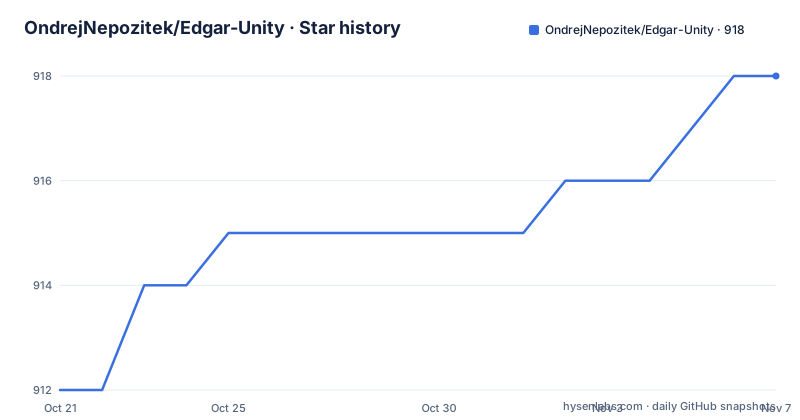
- OndrejNepozitek/Edgar-Unity918 ★ · +6
| Repository | 2026-10-21 | 2026-11-07 |
|---|---|---|
| OndrejNepozitek/Edgar-Unity | 912 | 918 |
6 Stars in the last 17 days, measured from the daily GitHub snapshot. Compare with other projects
Editorial analysis
The layout is a graph you draw, not a dungeon the tool invents
Edgar is a Unity plugin for procedural generation of 2D dungeons and platformers, and its central idea is that the designer decides the structure. You specify how many rooms a level has and how those rooms connect, and the generator produces a level that follows that structure exactly. A boss room at the end, a shop partway through, a second entrance somewhere else, all of that is expressed in the graph rather than left to chance. That is a different bargain from generators that randomise a level and hope the result is playable. Here the randomness is mostly about which template fills which room and how the shapes fit together, while the topology is authored. The project page puts it plainly: the graph-based approach is what makes a boss room or a mid-level shop possible. For a designer who wants controllable procedural content, that trade is usually the right one.
Room templates are the authored half of the output
The second half of the system is the room template, a pre-authored building block the algorithm selects during generation. Templates are made with Unity tilemaps, and they are allowed to carry extra game objects such as lights, enemies, or chests holding loot, so a template is a whole room with contents rather than a floor pattern. Templates can also be assigned per room type, which is how a spawn room ends up looking different from a boss room. Connections between rooms can be made either directly through doors or through short corridors, and door compatibility can be expressed with door sockets, where each door declares which other doors it fits. The practical consequence is that the generator's output can only be as good as the template set behind it, and building a usable template library is the bulk of the work a team takes on when it adopts this plugin.
The generator runs on a separate .NET library
Under the hood the plugin is a wrapper, not the engine itself. The project page states that Edgar for Unity uses Edgar for .NET underneath, and the repository layout matches that description: Runtime/ and Editor/ hold the Unity side, while a Libraries/ directory sits at the root alongside it, and there is a solution file with DotSettings. The split matters in practice because the generation algorithm and the Unity integration are separate pieces with separate upgrade paths. A bug in a layout algorithm is not necessarily a Unity bug, and a change in the underlying .NET library can alter generated output without any change in the Unity project. The repository also carries Tests/ and Examples/ directories, with example scenes for Grid2D among them, so the behaviour of a given version can be compared against a scene rather than inferred from release notes.
What the free edition leaves out, and why that decides adoption
This asset ships in two editions and the split is the single most important fact for an evaluating team. The free version contains the core of the generator and is described as sufficient for simple procedural dungeons. The PRO version, sold on the Unity Asset Store, adds: a platformer generator, isometric levels, two advanced example scenes, custom rooms with extra fields on rooms and connections, directed level graphs with entrance-only and exit-only doors, door sockets, fog of war, minimap support, custom input that modifies a level graph before generation, and a coroutine mode so the game does not freeze while a level is generated. That is a long list, and the coroutine entry and custom input are the ones that change how you integrate the tool rather than merely what it can draw. A team that plans on fog of war, on editing a graph at runtime, or on platformer output is buying the PRO version, and should price it that way rather than treating the free tier as the product.
Installing the package and the Unity version mismatch to check
The repository root carries a Unity package manifest, and it identifies the package and its version:
{
    "name": "com.ondrejnepozitek.edgar.unity",
    "version": "2.1.0",
    "displayName": "Edgar - Procedural Level Generator",
    "description": "2D procedural level generator",
    "unity": "2019.3",
    "author": {
        "name": "Ondřej Nepožitek",
        "email": "[email protected]"
    },
    "samples": [
        {
          "displayName": "Examples",
          "description": "All example scenes. They currently cannot be added individually because of package manager limitations.",
          "path": "Examples~"
        }
    ]
}
The name field is the identifier a Unity Package Manager install refers to, and the samples entry shows the example scenes shipping as one bundled sample, because the project notes that package manager limitations prevent them being added individually. Note the version conflict: the manifest declares unity 2019.3 as its minimum, while the badge on the project page advertises Unity 2018.4 and newer. A team on an older editor has to reconcile those two statements before committing, and it is the first thing to verify after install.
Customising the output is a code path, not a setting
Customisation comes in two documented forms, and one of them is a paid feature. The free edition supports custom post-processing logic, so a project can adjust the result of a generation run in its own code, and the package exposes the generator to be called from a Unity coroutine only in the PRO edition, where the point is that the game does not freeze during generation. In the PRO edition, custom input goes further and allows a level graph to be modified before it is used by the generator, with a random secret room given as the example. The two directions matter differently. Post-processing means the structure of a level is already fixed when you get to change it, while custom input means the structure itself can vary at run time, which is what a roguelike loop needs. A free-edition user who needs run time variation in the graph has no documented path, and that is a real ceiling rather than a missing convenience.
Release state, licence and the scope of the tool
The plugin is MIT licensed, with the LICENSE file at the repository root, and the free edition carries no restriction tied to that licence. Releases are published on GitHub, with v2.1.0 on 2026-07-30 following v2.0.10 on 2025-04-27 and v2.0.9 on 2024-11-06, and the last push to the repository was on 2026-08-18, so the project is being worked on. Scope is the thing to keep in view. The project page states that it currently works only in 2D and may support 3D in future, and the sibling asset Frigga covers the other half of the design space, specialising in open-space levels such as caves and islands, whereas Edgar focuses on levels made of rooms. So a project needing caves, islands, or 3D geometry is looking at a different tool or a different asset, not at a configuration flag in this one. The MIT licence and the free core make Edgar a low-cost trial, but the feature split between editions is where the real cost sits.
Editorial conclusion
Edgar fits a Unity team that wants 2D dungeon layouts decided by a room graph and filled with authored templates, and it does not fit a project that needs 3D output, a platformer generator, or custom fields on rooms and connections, since those sit in the paid PRO edition. Verify the Unity version your project runs before installing, because the package manifest asks for 2019.3 while the project page advertises support from 2018.4, and check the PRO feature list before designing around a boss room graph, since custom rooms and directed graphs are listed as PRO features.
Frequently asked questions
What is Edgar for Unity used for?
It is a Unity plugin that generates 2D dungeons and platformers by following a graph of rooms you define, filling them with handmade room templates authored in Unity tilemaps.
Which Unity versions does Edgar support?
The project page advertises Unity 2018.4 and newer, while the package manifest at the repository root declares unity 2019.3 as its minimum, so the older statement is worth checking against your own editor.
What does the PRO version of Edgar add?
It adds a platformer generator, isometric levels, two advanced example scenes, custom fields on rooms and connections, directed level graphs, door sockets, fog of war, minimap support, custom input, and coroutine mode so the game does not freeze during generation.
Can Edgar generate 3D levels?
No. The project page states that the plugin currently works only in 2D and may support 3D in future, and open-space levels such as caves and islands are covered by the separate Frigga generator.
Official sources
Add this badge to your README
If you maintain this project, the badge below links readers to this analysis and shows its maintenance status from the daily GitHub snapshot. Paste the markdown into your README; add ?metric=license or ?metric=stars to the image URL for a different field.

[](https://hysenlabs.com/projects/ondrejnepozitek-edgar-unity)Star history chart for your README
[](https://hysenlabs.com/projects/ondrejnepozitek-edgar-unity)Was this useful?