One root secret, an unauthenticated Redis, and a compose file with no services
Keep passwords and other sensitive information out of your chat logs and inboxes.
At a glance
- What is it?
- OneTime Secret is a Ruby application that shares a link which self-destructs after one reading. Its quick start publishes Redis on every interface with TLS off, its entire key material derives from one unrecoverable secret, and its root compose file starts nothing because the stack is an include.
- Who is it for?
- OneTime Secret is a good fit if you need to hand a credential to one person without leaving it in a chat log, and the mechanism is small enough to read. Four things to settle before you run it anywhere real.
- Can I use it commercially?
- Yes. MIT is a permissive licence: you can use, modify and sell software built on it, as long as you keep its copyright and licence notices.
- Is it still maintained?
- Yes. The repository received new commits within the last day.
- What is it written in?
- Mainly Ruby, according to GitHub's language statistics.
Answers come from the project's GitHub data, last synced on November 15, 2026, and from our analysis. They are not legal advice.
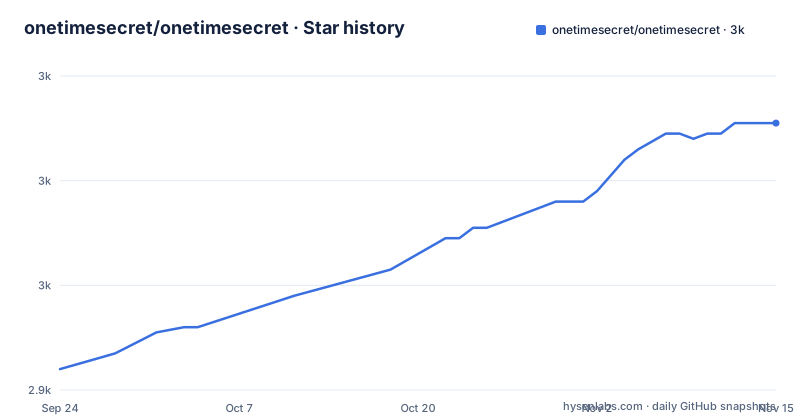
Star history
- onetimesecret/onetimesecret2,991 ★ · +47
| Repository | 2026-09-24 | 2026-11-15 |
|---|---|---|
| onetimesecret/onetimesecret | 2.9k | 3k |
47 Stars in the last 52 days, measured from the daily GitHub snapshot. Compare with other projects
Editorial analysis
One root secret derives everything, and losing it is unrecoverable
The single most consequential line in the configuration is the one that is empty. The example environment file describes SECRET as the single root secret, states that all other cryptographic material is derived from it through HKDF, and tells you to back it up. A second variable sits below it for a different job: ACCOUNT_ID_SECRET obfuscates numeric account ids in email verification links and remember-me cookies, and is described as required for full-authentication production.
Both are left blank in the shipped file, and the comment explains why that is deliberate rather than an oversight: a copied file should never ship a known secret. The generation is left to a setup script that the file names, which copies the example into place and fills in the values.
The consequence is stated in the README as an important warning rather than a footnote. Losing the SECRET key is not recoverable, and it makes existing secrets unreadable among other things. That is a direct consequence of deriving everything from one root, and it is the correct trade for a service whose whole promise is that nobody else can read the message.
The quick start publishes Redis on every interface with TLS switched off
The three command quick start is short enough to read in full, and every line of it is a default you will want to change.
# 1. Start Redis
docker run -p 6379:6379 -d redis:trixie

# 2. Generate and store a persistent secret key — back this up safely
openssl rand -hex 32 > .ots_secret && chmod 600 .ots_secret

# 3. Run Onetime Secret (set SSL=true for production)
docker run -p 3000:3000 -d \
  --name onetimesecret \
  --add-host=host.docker.internal:host-gateway \
  -e REDIS_URL=redis://host.docker.internal:6379/0 \
  -e SECRET="$(cat .ots_secret)" \
  -e HOST=localhost:3000 \
  -e SSL=false \
  onetimesecret/onetimesecret:v0.26.14
Publishing Redis with a bare port mapping puts it on every interface the host has, with no password in the command. The application container then reaches it through a host gateway mapping, which is the standard way to do that, and TLS is explicitly off with a note to set it for production. The example environment file is candid about the result: the default matches the quick start, which is plain HTTP on localhost and no TLS anywhere in the stack.
In production mode, disabling SSL no longer downgrades the cookie
The same variable does two jobs, and the documentation is explicit about both. SSL controls the scheme of generated links, so it decides whether the secret URLs a user receives are http or https, and together with the session settings it controls the Secure flag on the session cookie.
The behaviour that matters is in a note further down. In production mode, setting SSL to false no longer downgrades the session cookie's Secure flag on its own; the application fails closed instead. The sentence is cut off there, but the direction is stated, and it is the right direction: a misconfigured production deployment should refuse to issue a cookie over a plaintext connection rather than quietly doing so.
So the two failure modes are different, and worth separating when you deploy. On localhost, as the quick start does, everything is plaintext by design. In production, the link scheme will follow whatever you set, but the cookie will not be downgraded by that setting alone.
The root compose file contains no services at all
docker-compose.yml at the repository root is a dispatcher. It has no service definitions; it has an include directive pointing at one file in the docker directory, and the other candidate is present but commented out.
include:
  - path: docker/compose/docker-compose.simple.yml
  # - path: docker/compose/docker-compose.full.yml
Switching between the simple stack, which is the application plus a Valkey cache, and the full production stack with TLS termination, a message broker, workers and a scheduler, is therefore a matter of editing a comment. The header of the file spells out both commands, and the first line of the header tells you to copy the example environment file if one does not exist before starting.
The naming convention is documented too, under a ticket reference. The root file is the deployment entry point that includes one stack, while a separate test file carries only service dependencies on ports in the 21xx range and never runs the application, and an end-to-end file sits beside it for the same reason.
Two documented paths generate different key sizes and name different variables
The image's own header documents how to run the container, and it does not match the README.
The README generates the secret with 32 random bytes written as hex, and passes only SECRET. The image header generates 24 bytes as hex, copies the output by hand, reads it into a variable with a silent prompt, and then passes both SECRET and SESSION_SECRET. So the same product documented in two places suggests two key sizes and two secret variables, and a reader who mixes the two instructions ends up with a session secret that one of them never mentions.
The rest of the header is more careful than the README. It asks you to create a dedicated Docker network first, names the cache container with a volume attached so data survives, and states that the image requires Docker Bake, with named targets for the main image, a supervisor variant and all of them, plus a dry-run print. The base context is injected by the bake definition rather than declared as a stage in the Dockerfile, and the syntax line pins the frontend version by digest with checking turned into an error.
The JavaScript manifest is version 0.0.0-rc0 with an empty description
This is a Ruby application that carries a Node package manifest beside it, and that manifest is not versioned with the product. Its version is 0.0.0-rc0 and its description field is empty, while the released container image is tagged with a patch version in the 0.26 line and the repository's own releases follow the same numbering. Anything that reads a version from the JavaScript side therefore reads a placeholder rather than the build it came from.
The rest of the manifest describes a two-language build. The default build runs Vite once, then runs it again with a build target set to admin, and a separate local variant points at its own config file. A prebuild step synchronises locales and generates JSON schemas first, so the build depends on both.
The dependency pins are unusually complete for a polyglot repository: separate version files for the shell, for Ruby and twice for Node in two different formats, a package manager declaration, a Ruby lockfile and a Node lockfile, and a workspace definition tying the JavaScript side together.
The build crosses from the Node toolchain into bundle exec rake
The clearest sign that this is one project in two languages is the schema tooling. Generating, refreshing, measuring and validating schemas are all Node scripts that shell out to Ruby: each one invokes bundle exec rake with a task name, and two of them pass template and output directories as rake environment variables pointing at the web templates and a public schemas directory.
So a build step written in JavaScript depends on the Ruby virtual machine, the Rakefile and a working bundle install, in a repository where the primary language is Ruby and the release artefacts are containers. It is a deliberate choice rather than a leftover, since the schema definitions themselves live on the Ruby side, but it means the two toolchains cannot be installed independently.
The favicon tooling shows the same pattern with a twist: it runs a package install scoped to a subdirectory using the npm client, even though the repository declares pnpm as its package manager, and then runs a Node script. Four presets are offered, including this project's own and three others, so the branding generator is shared across a family of related services.
The README states that AI tools were used, and the tree is full of agent config
One section of the README is devoted to disclosure. It says the project was developed with help from AI tools for architecture design, code generation and documentation, and that the maintainers remain responsible for all design decisions and the final code, and that they believe in being transparent about the tools involved. That is a short paragraph doing a lot of work, and it is unusual to find it stated this plainly in a project README.
The repository layout is consistent with it. There is an instruction file for coding agents at the root, a directory of the same name with a leading dot, an editor configuration for two editors and one for a review tool, a development container definition, and a patch for a linter's configuration file, alongside the conventional continuous integration, pre-commit and pre-push hook files.
The rest of the tree shows the same attention to process. Tests are split into a directory for end-to-end runs and one for test assets, the changelog is a reStructuredText file fed by a directory of fragments, and there is a rubocop todo file, which is where a project records the lint suppressions it has accumulated rather than fixed.
Editorial conclusion
OneTime Secret is a good fit if you need to hand a credential to one person without leaving it in a chat log, and the mechanism is small enough to read. Four things to settle before you run it anywhere real. Generate the root secret properly and store it, because losing it makes existing secrets unreadable and there is no recovery path. Close Redis to the network, since the quick start publishes it on every interface with no authentication. Set SSL to true behind your proxy, and rely on the documented behaviour that production mode fails closed rather than downgrading the session cookie. And remember that the administrator role is created by a command that prints a password to your terminal, so treat that output as a secret in its own right.
Frequently asked questions
what is onetimesecret
OneTime Secret builds links that can be viewed only once. A one-time secret is defined as a single-use URL that self-destructs after viewing, so a password sent over chat or email is not left behind in copies of the conversation. It is MIT licensed, written in Ruby, and offered both as self-hosted software and as a hosted service.
how to use onetimesecret
The documented quick start is three commands: start a Redis container, generate a persistent key with openssl into a file and lock it to the owner, then run the published image with the Redis URL, the secret, the host and SSL set to false. Afterwards you create an administrator with a colonel role using the customers create command inside the container, which prints a generated password.
Is onetimesecret free?
The repository is MIT licensed and the quick start runs the published image yourself, so the software is free to self-host. What the hosted service at onetimesecret.com charges is not stated anywhere in this repository, so that part has to be checked on the service's own pages.
Is onetimesecret secure?
The repository does not make that argument for itself. It documents the mechanics: one root secret from which all other key material is derived through HKDF, and a warning that losing it is unrecoverable and makes existing secrets unreadable. It also ships a security policy and a self-hosting guide, and notes that in production mode switching SSL off no longer downgrades the session cookie flag.
What does onetimesecret need before it will run?
For the quick start, Docker and a Redis container, plus the root secret you generate yourself. Full authentication adds PostgreSQL and RabbitMQ along with multi-factor authentication and WebAuthn, and the self-hosting guide covers the reverse proxy and hardening. A bare metal path exists too, using a setup script that copies the example environment file and generates the secrets.
Official sources
Add this badge to your README
If you maintain this project, the badge below links readers to this analysis and shows its maintenance status from the daily GitHub snapshot. Paste the markdown into your README; add ?metric=license or ?metric=stars to the image URL for a different field.

[](https://hysenlabs.com/projects/onetimesecret-onetimesecret)Star history chart for your README
[](https://hysenlabs.com/projects/onetimesecret-onetimesecret)Was this useful?