ankane/blazer: SQL Dashboards Inside a Rails App
Business intelligence made simple
At a glance
- What is it?
- Blazer is a Ruby gem that mounts a query, chart and dashboard interface onto an existing Rails application, using the app's own database connection and authentication. It is for teams that already run Rails and want SQL exploration without standing up a separate BI service.
- Who is it for?
- Adopt Blazer if you already run Rails, want your existing authentication to guard the dashboard, and are willing to create a read-only database user rather than rely on transaction rollback alone. Skip it if you need a standalone BI tool that non-Rails services can query, or if you cannot give it a database account with SELECT-only grants.
- Can I use it commercially?
- Yes. MIT is a permissive licence: you can use, modify and sell software built on it, as long as you keep its copyright and licence notices.
- Is it still maintained?
- Yes. The repository last received commits 6 days ago.
- What is it written in?
- Mainly Ruby, according to GitHub's language statistics.
Answers come from the project's GitHub data, last synced on November 14, 2026, and from our analysis. They are not legal advice.
Star history
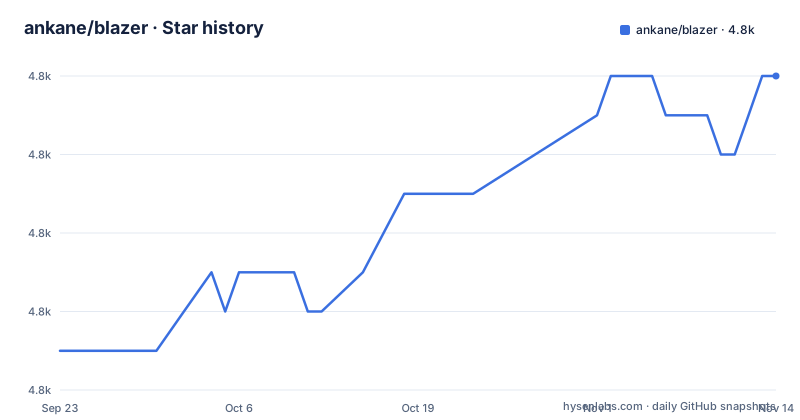
- ankane/blazer4,808 ★ · +7
| Repository | 2026-09-23 | 2026-11-14 |
|---|---|---|
| ankane/blazer | 4.8k | 4.8k |
7 Stars in the last 52 days, measured from the daily GitHub snapshot. Compare with other projects
Editorial analysis
What Blazer Is For, and Who Ends Up Using It
Blazer answers a narrow question: how do you let analysts and support staff run SQL against production data without handing them a psql prompt or buying a BI licence? It ships as a Rails engine, so the dashboard lives at a path you choose inside an application you already deploy. The README describes it as a way to "Explore your data with SQL" with charts and dashboards shared with a team.
The intended user is a Rails team whose data already sits in PostgreSQL, MySQL or Redshift. The README lists those three first and links to a longer list of data sources. Because the engine mounts into Rails, whoever can reach the mount path can use it, which means the audience is internal: analysts, ops staff, product managers who can write a SELECT. It is not a customer-facing analytics product and the README makes no attempt to present it as one.
Blazer is also available as a Docker image, which lives in a separate repository, ankane/blazer-docker.
How the Engine Mounts and Where Queries Actually Run
Blazer is a Rails engine, not a standalone server. Installation runs a generator and rails db:migrate, and the queries you write in the UI run against whatever BLAZER_DATABASE_URL points at, which the README says to set in production.
The safety mechanism is described plainly in the README: when possible, Blazer runs each query inside a transaction and rolls it back, so a stray UPDATE or DELETE does not commit. The README immediately qualifies this, calling a read-only user the safer approach. That qualification is the honest part of the design. Transaction rollback protects against statements that respect transactional semantics; it is not a permission system, and the README does not claim otherwise.
Auditing is built in rather than bolted on. The feature list says all queries are tracked. That means every query a colleague runs is recorded.
Variables are the other mechanism worth understanding. A query can contain {gender}, or the reserved {start_time} and {end_time} pair, and Blazer renders a form for the values. Smart variables go further: you point a variable name at a SQL statement, and the first column becomes the value while the second becomes the label. That is how you avoid asking people to memorise occupation ids.
Installing Blazer in a Rails App and Running a First Query
Add the gem to your Gemfile. The README gives this exact line.
gem "blazer"Then run the generator and the migration.
rails generate blazer:install
rails db:migrate
Mount the engine in config/routes.rb. The README uses the path "blazer", which is what the rest of this article assumes.
mount Blazer::Engine, at: "blazer"In production, point Blazer at the database you want to query. The README shows a postgres URL; substitute your own host, port and credentials.
ENV["BLAZER_DATABASE_URL"] = "postgres://user:password@hostname:5432/database"Before opening the dashboard, protect it. The README's simplest option is a username and password pair set in the environment.
ENV["BLAZER_USERNAME"] = "andrew"
ENV["BLAZER_PASSWORD"] = "secret"
Start the server and visit /blazer. If you set the credentials above, the browser will prompt for them first. If the page loads without a prompt, your mount is unprotected and you should stop and fix that before going further.
Checks, Alerts and the Scheduling You Have to Own
Checks are Blazer's answer to "tell me when the data goes wrong." You write a query that returns rows when something is broken, and Blazer emails you. The README is explicit that emails need a host configured in config/environments/production.rb through config.action_mailer.default_url_options.
Nothing runs on its own. The README lists three default schedules (5 minutes, 1 hour, 1 day) and says to set up a task for each. The rake tasks are the interface.
rake blazer:run_checks SCHEDULE="5 minutes"
rake blazer:run_checks SCHEDULE="1 hour"
rake blazer:run_checks SCHEDULE="1 day"
Separately, failing checks can be batched into a daily digest with rake blazer:send_failing_checks. The README shows a crontab with four entries, and an equivalent config/recurring.yml for Solid Queue that calls Blazer.run_checks(schedule: ...) and Blazer.send_failing_checks.
This is the sharpest edge in the project. A check that is never scheduled produces no error and no email. It sits in the UI looking configured. If you deploy with cron in a container that restarts, verify the entries survive the restart, because the README offers no scheduler of its own. Slack is available as an alternative to email through BLAZER_SLACK_WEBHOOK_URL, set to an incoming webhook URL.
Where Blazer Is the Wrong Tool
The read-only user requirement is not optional in practice, and it is the first thing that rules Blazer out for some teams. If your database is a managed service where you cannot create a role with GRANT SELECT, or if your security policy forbids a second credential with production read access, the transaction rollback is the only protection you have. The README itself calls the read-only user the safer approach, which is an admission that rollback alone is not sufficient. The README does show the SQL for creating such a user on PostgreSQL and on MySQL or MariaDB, so the path exists, but it is work your DBA has to approve.
Second, Blazer is built as a Rails engine, and the README's installation path assumes a Rails application. The README does point to a separate Docker image (ankane/blazer-docker), which is the route to check if you have no Rails app to mount it in.
Third, the README points sensitive-data users elsewhere. It recommends Hypershield for shielding sensitive or personal data, and blind indexing for searching encrypted values, with a documented hook (Blazer.transform_variable) for transforming variables before they reach the query. That hook is a real escape hatch, but it is a lambda you write, not a policy engine. If your compliance requirements include column-level masking enforced centrally, Blazer does not provide it and the README does not pretend it does.
Blazer Against Metabase and Redash
The obvious comparison is Metabase, and the difference is architectural rather than a matter of feature count. Metabase is a separate application you run alongside your stack, connect to one or more databases, and give its own user accounts. Blazer is a library inside your application. That single choice cascades.
With Blazer, authentication is your authentication. The README shows three routes: BLAZER_USERNAME and BLAZER_PASSWORD, a Devise authenticate block that mounts the engine only for admin users, or a before_action_method named in config/blazer.yml and defined in ApplicationController. There is no separate user table to manage and no second login for your team. With Metabase, you get a purpose-built permission model and a user directory, at the cost of running and securing another service.
Deployment follows the same split. Blazer ships with your app, so it is covered by your existing deploy, your existing backups and your existing uptime monitoring. Metabase is another container, another database for its own metadata, and another thing to upgrade. For a small Rails team this is a genuine advantage. For an organisation with data in five systems and no single Rails app, it is a disqualifier.
Redash sits closer to Metabase in shape: a standalone query and dashboard server with its own scheduler and alerting. If your problem is "we need one place for queries across many data sources and many teams," a standalone tool is the right shape and Blazer is not.
Licence, Maintenance and What Upgrades Cost
Blazer is MIT licensed, per the LICENSE.txt file at the repository root. MIT is permissive: you can use it commercially, modify it and redistribute it, provided the copyright notice and licence text are retained. That is the extent of what can be said here without giving legal advice; if you vendor or modify the gem, keep the notice.
The repository is not archived, and the last push was on 2026-10-31. The repository layout includes a CHANGELOG.md, which is where version-to-version changes are recorded, and the repository has no published releases, so the changelog is the place to look before upgrading rather than a release feed.
Upgrade cost is low in the normal case because Blazer is a gem and upgrades arrive with bundle update. The other upgrade hazard is the config/blazer.yml file, which holds smart_variables, linked_columns and before_action_method. Keep the previous gem version pinned in your lockfile until you have loaded the dashboard once after deploying.
Editorial conclusion
Adopt Blazer if you already run Rails, want your existing authentication to guard the dashboard, and are willing to create a read-only database user rather than rely on transaction rollback alone. Skip it if you need a standalone BI tool that non-Rails services can query, or if you cannot give it a database account with SELECT-only grants. Before deploying, verify three things: that BLAZER_DATABASE_URL points at the database you want to query, ideally through a read-only user, that your before_action_method renders or redirects for unauthorized users, and that a cron or Solid Queue entry actually fires rake blazer:run_checks, because a check that never runs looks identical to a check that passes.
Frequently asked questions
How do you install Blazer in a Rails app?
Add gem "blazer" to the Gemfile, run rails generate blazer:install followed by rails db:migrate, and mount Blazer::Engine at a path such as "blazer" in config/routes.rb. In production you also set BLAZER_DATABASE_URL to the database you want to query.
How do you use Blazer to run a query?
Once the engine is mounted, visit the mount path and create a query containing SQL. Queries can include variables such as {gender} or the reserved {start_time} and {end_time} pair, and Blazer renders a form for the values.
Does Blazer need a read-only database user?
The README says Blazer tries to protect against queries that modify data by running each query in a transaction and rolling it back, but calls a read-only user the safer approach. It provides the SQL to create one on PostgreSQL and on MySQL or MariaDB.
How do Blazer checks send alerts?
Checks are run by scheduling rake blazer:run_checks with a SCHEDULE argument, using cron, Solid Queue or a similar scheduler, and failing checks can be batched with rake blazer:send_failing_checks. Email requires a host set in config.action_mailer.default_url_options, and Slack notifications use BLAZER_SLACK_WEBHOOK_URL.
How do you protect the Blazer dashboard in production?
The README shows three options: set BLAZER_USERNAME and BLAZER_PASSWORD, mount the engine inside a Devise authenticate block, or name a before_action_method in config/blazer.yml and define that method in ApplicationController. It warns that the method must render or redirect for unauthorized users.
What licence does Blazer use?
Blazer is MIT licensed, according to LICENSE.txt in the repository root.
Official sources
Where developers are discussing it
Posts on Hacker News, dev.to and Lobsters that link to this repository, found by our scan of those communities. 1 in the last 30 days; newest first.
- Building DataTeller #0: Why I Don't Let an LLM Write SQLdev.to · Nov 10, 2026 · 3 points · 4 comments
Add this badge to your README
If you maintain this project, the badge below links readers to this analysis and shows its maintenance status from the daily GitHub snapshot. Paste the markdown into your README; add ?metric=license or ?metric=stars to the image URL for a different field.

[](https://hysenlabs.com/projects/ankane-blazer)Star history chart for your README
[](https://hysenlabs.com/projects/ankane-blazer)Was this useful?