Open ACE keeps the real keys on the server and hands out proxy tokens
Self-hosted enterprise AI workspace and governance platform
At a glance
- What is it?
- open-ace is a self-hosted workspace and governance control plane that puts five AI coding CLIs behind one browser workspace on the team's own machines. Keys stay encrypted server-side, sessions receive short-lived revocable proxy tokens, and the default deployment runs as a single non-root container on port 19888.
- Who is it for?
- Open ACE suits a team moving coding agents onto real internal machines who needs one access, key, quota and audit model without replacing every CLI. It does not suit a single developer who just wants a terminal, since the value is in the shared control plane.
- Can I use it commercially?
- Yes. Apache-2.0 is a permissive licence: you can use, modify and sell software built on it, as long as you keep its copyright and licence notices.
- Is it still maintained?
- Yes. The repository last received commits 6 days ago.
- What is it written in?
- Mainly Python, according to GitHub's language statistics.
Answers come from the project's GitHub data, last synced on October 22, 2026, and from our analysis. They are not legal advice.
Star history
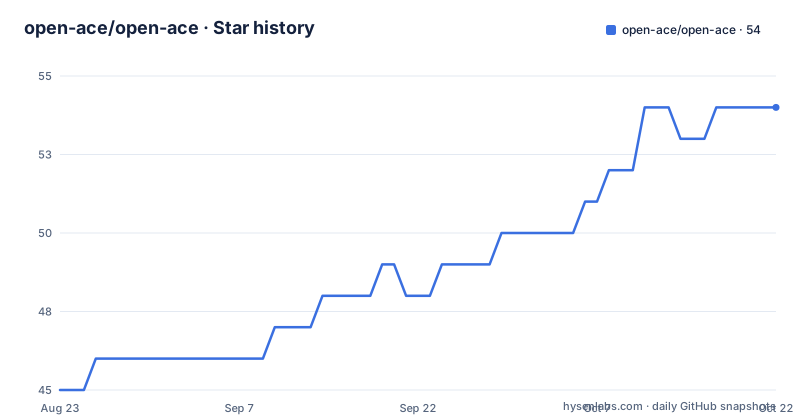
- open-ace/open-ace54 ★ · +9
| Repository | 2026-08-23 | 2026-10-22 |
|---|---|---|
| open-ace/open-ace | 45 | 54 |
9 Stars in the last 60 days, measured from the daily GitHub snapshot. Compare with other projects
Editorial analysis
Real keys stay on the server, sessions get proxy tokens
The API key design is the part that distinguishes this from a wrapper around somebody's terminal. Keys are encrypted on the server and never handed to a remote agent. Instead, a local or remote session receives a short-lived, revocable proxy token, and those tokens carry unified quota and usage tracking, so metering still works even though the credential itself never leaves the server. That is what makes the central key store possible at all: the agent needs to call a model, and what it gets is a scoped capability rather than a credential. Revocability is the other half. Because a token is short-lived and revocable independently of the key behind it, disabling one person's access does not require rotating a secret that other people are also using, and a leaked token has a bounded window rather than an unbounded one.
Single-user is the default, and it runs as uid 1000
The compose file is written as documentation first, and it starts by naming its two deployment modes. Single-user mode is the default: the container runs as non-root with uid 1000, needs no additional configuration, and is brought up with a single command. The quick start in the file comments gives the whole sequence and the address to visit:
docker compose up -dThe stated principle behind that default is least privilege, and the file argues the point rather than assuming it. The developer path is documented too: an image tagged for local testing is built with a specific target, then compose is started with the image name passed in as an environment variable so it does not rebuild. HTTPS is handled separately, with a guide under docs/guide for putting a reverse proxy in front. So the base case is one command, one non-root container and one port, with everything else layered on deliberately.
Multi-user needs root, and the file tells you not to edit it
Multi-user workspace mode enables per-user workspace isolation, and it inverts the container's privilege model: the container must run as root so it can create system users, chown directories and drop into them with sudo. That requirement creates an obvious temptation, and the compose file pre-empts it with a warning not to modify the default file to turn multi-user mode on. The instruction is to use the dedicated overlay instead, either through a one-click script or by passing two compose files to one command:
./scripts/start-multi-user.shdocker compose -f docker-compose.yml -f docker-compose.multi-user.yml up -dThree reasons are given for that rule: the default follows least privilege, the entrypoint validates configuration consistency and fails fast rather than starting into a half-configured state, and the overlay pattern is the official recommendation from Docker Compose itself. It is a good example of a deployment file encoding a decision rather than merely expressing one.
The distribution name is open-ace-server, and that was not the plan
One comment in the Python manifest explains more about the project's constraints than any feature list. The package name is open-ace-server, and the comment says why: open-ace is rejected by PyPI as too similar to an unrelated project called openace, while the import names and the openace command are unchanged. So the distribution name, the import name and the command a user types are three different strings, and only one of them was chosen freely. Anyone scripting against this should note which one appears where. The rest of the manifest is conventional and informative: version 2.1.1, Apache-2.0, Python 3.10 and above, a beta development status, and classifiers naming Flask as the framework with support declared through 3.14.
Two build identities, and a comment about layer caching
The Dockerfile carries a short engineering lesson in its comments that is worth reading on its own. The frontend build identity is declared with two build arguments, one for the version and one for the commit SHA, and they are placed at a specific point in the stage rather than at the top. The comment explains the reason: every instruction after a build argument sees it, so declaring a per-commit value earlier in the stage would invalidate the cached dependency install on every commit, which is why the arguments come after the install step. That is a small thing, but it is the difference between a frontend layer cache that survives a commit and one that never does. The frontend itself is built inside the image rather than shipped prebuilt, which the file attributes to a specific issue about supporting one-click deployment.
Mirrors for networks that cannot reach Docker Hub
Several lines in the build exist purely so the project can be built on networks outside the default path, and each one names its cause. The base image is parameterised through a registry argument defaulting to Docker Hub, overridable at build time or through an environment variable, with the stated example being a mainland China network where the hub is unreachable. The frontend stage sets the npm registry to a domestic mirror explicitly, and the Python stage uses a regional Debian mirror rather than the default archive. Those are not stylistic choices; they are what makes docker compose up work at all on the networks the author targets. It also means the build is not hermetic in the strict sense, since the mirror contents and the registry index both vary, and a reproducible build needs the base image pinned by digest rather than by a movable tag.
Three dependency files for three audiences
Dependency management is layered rather than minimal. There is a plain requirements file, a locked requirements file, and a separate pair for continuous integration, an input file and a lock. The plain file is organised into commented groups that map to roles rather than to alphabetical order: core dependencies, production server, WebSocket support, database, configuration, PostgreSQL driver, report generation, caching, and monitoring, the last of which carries an issue reference explaining why the metrics exporter is there at all. The stack itself is Flask with gunicorn and gevent in front, websockets and aiohttp for the asynchronous side, SQLAlchemy with Alembic for persistence, psycopg2 with psycogreen for PostgreSQL, PyJWT and cryptography with bcrypt for tokens and credentials, signxml and filetype for document handling, and openpyxl with jinja2 for the reporting that produces compliance downloads.
Two audiences, one platform, and a hard boundary between them
The README splits the product into Work Mode and Manage Mode, and the split is by audience rather than by feature. Work Mode is for developers: multi-CLI integration, choosing a remote machine in the browser, starting sessions and terminals and browsing directories there, autonomous issue-driven workflows with queueing, pause and resume, branching and guided handoff points, session recovery and cross-tool history sync, a shared prompt library, and search across conversations. Manage Mode is for administrators: token consumption trends, cost analysis and heatmaps, quota warnings and anomaly and overspending alerts, sensitive content detection with conversation trails and compliance reports and CSV downloads, tenant-scoped isolation with permission control and resource quotas, and ROI estimates. The enterprise integration list sits behind both, covering OIDC, OAuth2 and SAML 2.0 single sign-on, organisation import and sync for Feishu and DingTalk, alert bots on those same platforms, Kubernetes, a reverse proxy, and multi-tenant permissions. The autonomous loop is the piece that reaches furthest: from a GitHub issue it plans, implements, opens a pull request, comments, and resumes after a human interrupts it.
Editorial conclusion
Open ACE suits a team moving coding agents onto real internal machines who needs one access, key, quota and audit model without replacing every CLI. It does not suit a single developer who just wants a terminal, since the value is in the shared control plane. Before deploying, check four things: whether you need single-user or per-user workspace isolation, since that decides root versus non-root and which compose file you use, which single sign-on protocol your organisation runs, what retention you want for conversation trails, and whether your network can reach the package registries or needs the registry override the Dockerfile provides.
Frequently asked questions
How does Open ACE handle API keys for AI coding agents?
Keys are encrypted on the server and never sent to a remote agent. Local and remote sessions receive short-lived, revocable proxy tokens instead, and those tokens carry unified quota and usage tracking, so the real credential stays on the server while every call is still metered.
Which AI coding agents can Open ACE run?
Claude Code, Qwen Code, Codex, ZCode and OpenClaw share one workspace with session recovery, permission modes and history sync. A user picks a remote machine in the browser and starts CLI sessions, terminals and directory browsing there, without sharing SSH credentials repeatedly.
How do you deploy Open ACE for multiple users?
The default compose deployment runs a single-user workspace as non-root on uid 1000 and serves port 19888. Multi-user workspace isolation needs a root container so it can create system users, and the compose file tells you to use the overlay through the start-multi-user.sh script or a second compose file rather than editing the default one.
Why is the Open ACE package called open-ace-server on PyPI?
The manifest says the shorter name was rejected by PyPI as too similar to an unrelated project called openace. The distribution name is open-ace-server while the import names and the openace command are unchanged, so the three differ by design rather than by accident.
Official sources
Add this badge to your README
If you maintain this project, the badge below links readers to this analysis and shows its maintenance status from the daily GitHub snapshot. Paste the markdown into your README; add ?metric=license or ?metric=stars to the image URL for a different field.

[](https://hysenlabs.com/projects/open-ace-open-ace)Star history chart for your README
[](https://hysenlabs.com/projects/open-ace-open-ace)