The OpenTelemetry Java repository ships four shaded copies of its own API
OpenTelemetry auto-instrumentation and instrumentation libraries for Java.
At a glance
- What is it?
- open-telemetry/opentelemetry-java-instrumentation attaches an agent jar to any Java 8 or newer application and injects bytecode to capture telemetry from libraries you did not write, and the repository behind it is far larger than the agent: four shaded copies of the API and its annotations exist so that instrumented code and the agent's own classes cannot collide, the agent itself is split across six modules, and there is a module whose job is deciding whether an instrumentation applies to a given library version at all. The page also warns that configuration parameter names are likely to change, and that its own debug logging costs application performance.
- Who is it for?
- Use the Java agent when you want traces from a service you cannot recompile or would rather not recompile, because attaching a jar is the cheapest possible instrumentation and the library coverage is the best in the ecosystem. Three things to know before you adopt it.
- Can I use it commercially?
- Yes. Apache-2.0 is a permissive licence: you can use, modify and sell software built on it, as long as you keep its copyright and licence notices.
- Is it still maintained?
- Yes. The repository received new commits within the last day.
- What is it written in?
- Mainly Java, according to GitHub's language statistics.
Answers come from the project's GitHub data, last synced on November 14, 2026, and from our analysis. They are not legal advice.
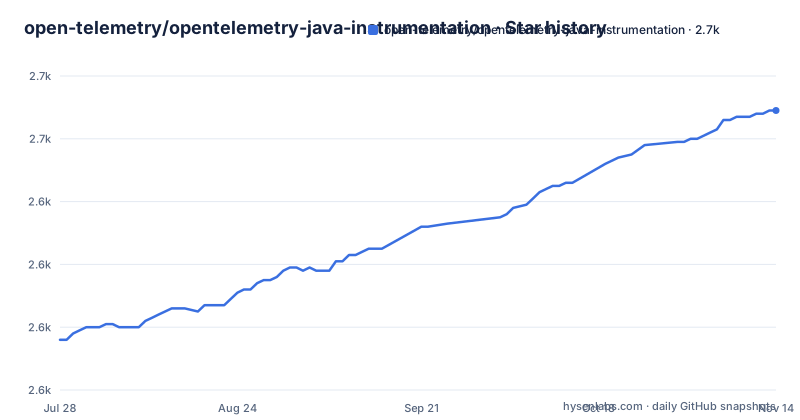
Star history
- open-telemetry/opentelemetry-java-instrumentation2,669 ★ · +73
| Repository | 2026-07-28 | 2026-11-14 |
|---|---|---|
| open-telemetry/opentelemetry-java-instrumentation | 2.6k | 2.7k |
73 Stars in the last 109 days, measured from the daily GitHub snapshot. Compare with other projects
Editorial analysis
Four shaded copies of the same API exist on purpose
Four modules in the root are the same idea four times over: a shaded copy of the API, a shaded copy of the extended annotations, a shaded copy of the instrumentation annotations and a shaded copy of the instrumentation API, each named to say what it is for. Shading means relocating a library's classes under new package names inside the agent jar, and the reason to do it here is collision avoidance. The agent injects code into somebody else's application, and that application may already contain the API on its classpath, at a different version, loaded by a different classloader. If both were loaded normally one would win and the instrumentation would attach to the wrong types. Renaming the agent's copy removes the question. It is an inelegant solution executed at scale, and the four modules are the receipt.
The agent is six modules and the repository is several dozen
The single jar a user downloads is assembled from a bootstrap module, the agent itself, an extension API for third party additions, a tooling module, and two separate internal logging modules, one for the application and one simpler path. Attaching the jar a user downloads is one line:
java -javaagent:path/to/opentelemetry-javaagent.jar \
     -jar myapp.jar
Around that sit the instrumentation API, an incubator version of it, annotations, an annotations support module and a documentation module, then a directory containing the instrumentations themselves, then three bill of materials, one stable and one for incubating work. And then the parts that explain the rest: a module dedicated to deciding whether an instrumentation applies to a given library version, several benchmark modules including one for the agent's own overhead and one that analyses Java Flight Recorder output, three smoke test suites including one for a module system, and a set of build plugins and conventions. A contributor needs a map, and the build files are it.
Configuration names are declared likely to change
The configuring section is enthusiastic about how configurable the agent is, and then adds a note in italics that configuration parameter names are very likely to change over time, asking you to check back when trying a new version and to report anything unexpected. That is a rare admission to find in a project's own documentation, and it is worth taking at face value. The agent covers a large number of libraries, each of which brings its own configuration keys, and a rename that fixes a confusing name or aligns with a specification will be made without the ceremony of a major version. The mitigation the page offers is the documentation and the bug tracker, not a compatibility promise. Two separate configuration documents are referenced, one for the agent and one for the underlying SDK, which is a second thing to keep straight.
Extensions are recommended over building your own distribution
There are two documented ways to change what the agent does, and the page tells you to pick the first one. An extension adds capability to the agent without a separate distribution and without forking the repository: you write a custom sampler or a span exporter, or set new defaults, and it is embedded into a single jar. Building a distribution, the second way, is also documented, with its own example directory, and it repackages the agent wholesale with your changes folded in. The page's reason for preferring extensions is that they are simpler and do not require rebuilding every time a new agent release ships. That is a maintenance argument rather than a capability one, and it is the argument that matters for anyone who would otherwise be maintaining a fork of this repository purely to change one default.
The page says impressively huge and right out of the box
Two phrases in the supported libraries section are worth quoting rather than paraphrasing, because they are the only marketing language on an otherwise plain page. It says the project supports an impressively huge number of libraries and frameworks and a majority of the most popular application servers, right out of the box. The word majority is doing careful work: it is a claim that some, not all, of the popular servers are covered. The substance is all in the linked document rather than here, and the page usefully points at three separate things inside it: the full list, the instrumentation that is disabled, and how to suppress instrumentation you do not want. That third link is the one a user with a conflicting library actually needs, and it is a single clause deep in a sentence about breadth.
Debug logging is documented as a performance cost
The troubleshooting section is four lines long and three of them are a warning. You turn on the agent's internal debug logging with one system property, and the page then tells you in bold that the logs are extremely verbose, that you should enable them only when needed, and that debug logging negatively impacts the performance of your application. It is an unusually plain admission for a piece of tooling whose entire purpose is to sit inside somebody else's hot path, and it is the kind of sentence that saves an incident. The property is off by default, so the cost is opt in, and the same section's brevity suggests there is no other supported diagnostic beyond it, which means the choice really is between no visibility and expensive visibility.
A maintainer list with employers, and a link that stops mid word
The contributing section names two maintainers with their employers, then eight approvers, also with employers, spanning several companies, and then a section for people who have stepped back. Naming the employer next to each approver is a deliberate choice in a foundation project: it makes the distribution of review labour visible, which is the point of the role. Both role descriptions link to the same page in the community repository with different anchors, so the guidance lives in one place. The list of people who have stepped back, however, ends with an entry whose link stops partway through its address, which is either a truncated page or a broken edit. It is the last line of the section and the only formatting error in an otherwise careful page.
Editorial conclusion
Use the Java agent when you want traces from a service you cannot recompile or would rather not recompile, because attaching a jar is the cheapest possible instrumentation and the library coverage is the best in the ecosystem. Three things to know before you adopt it. Configuration is by system property or environment variable and the page warns the names are likely to change, so treat your deployment configuration as something you re-verify on every upgrade. Instrumentations can be suppressed individually, which is the lever to pull when one library's instrumentation misbehaves. And debug logging is a diagnostic tool with a stated performance cost, not something to leave on in a production container.
Frequently asked questions
What is instrumentation in OpenTelemetry Java?
Two things this project publishes: an agent jar you attach to any Java 8 or newer application, which injects bytecode to capture telemetry from popular libraries and frameworks, and standalone instrumentation libraries for several of those libraries for applications that prefer them to the agent.
How do I turn on OpenTelemetry for a Java application?
Attach the agent jar with the java agent flag on the command line. By default it exports over OTLP to a collector running on the same machine, and configuration is passed as Java system properties or as environment variables.
Are OpenTelemetry Java agent configuration names stable?
The page says they are very likely to change over time and asks you to recheck them when trying a new version, pointing at the configuration documentation and the issue tracker rather than promising compatibility.
How do I add support for a library the OpenTelemetry Java agent does not cover?
Write an extension, which adds capability to the agent without a separate distribution or a fork, such as a custom sampler or span exporter, and is embedded into a single jar. Building your own distribution is also documented, but the page recommends extensions for most users.
How do I turn off OpenTelemetry instrumentation I do not want?
The supported libraries document has a section on instrumentation that is disabled, and the page links a separate page on suppressing unwanted instrumentation, so both the coverage list and the suppression mechanism live outside the agent itself.
Does the OpenTelemetry Java agent slow my application down?
The page gives no figure. It does state that the agent's internal debug logging is extremely verbose, should be enabled only when needed, and negatively impacts the performance of your application.
Official sources
Add this badge to your README
If you maintain this project, the badge below links readers to this analysis and shows its maintenance status from the daily GitHub snapshot. Paste the markdown into your README; add ?metric=license or ?metric=stars to the image URL for a different field.

[](https://hysenlabs.com/projects/open-telemetry-opentelemetry-java-instrumentation)Star history chart for your README
[](https://hysenlabs.com/projects/open-telemetry-opentelemetry-java-instrumentation)Was this useful?