Open Web Analytics defaults to a 364 day visitor id, and the option that finally controls it
Official repository for Open Web Analytics which is an open source alternative to commercial tools such as Google Analytics. Stay in control of the data you collect about the use of your website or app. Please consider sponsoring this project.
At a glance
- What is it?
- A self hosted PHP analytics server with a first party JavaScript tracker, GPL-2.0, on a jQuery UI and jqGrid reporting stack with several static analysis baselines. The most substantive part of its README is about tracker cookies, including a server setting that has governed cookies since 2016 and was never read by the tracker.
- Who is it for?
- Open Web Analytics suits an operator who wants the raw event data on their own hardware and is prepared to run a PHP application with a database and a webpack front end. It does not suit anyone who wants a deploy in an afternoon, because the installation steps live in the wiki rather than the repository and a fresh clone has to be built before it will serve anything.
- Can I use it commercially?
- Yes, with conditions. GPL-2.0 is a copyleft licence: if you distribute software that includes it, you must release that software's source code under the same licence. Running it internally without distributing it does not trigger that obligation.
- Is it still maintained?
- Yes. The repository received new commits within the last day.
- What is it written in?
- Mainly PHP, according to GitHub's language statistics.
Answers come from the project's GitHub data, last synced on November 14, 2026, and from our analysis. They are not legal advice.
Star history
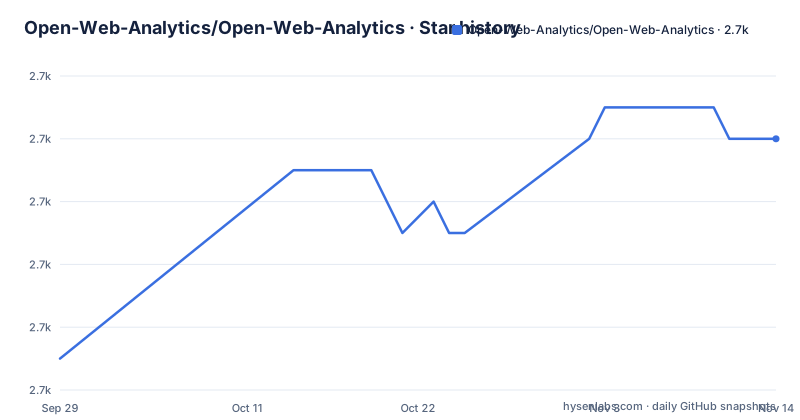
- Open-Web-Analytics/Open-Web-Analytics2,696 ★ · +7
| Repository | 2026-09-29 | 2026-11-14 |
|---|---|---|
| Open-Web-Analytics/Open-Web-Analytics | 2.7k | 2.7k |
7 Stars in the last 46 days, measured from the daily GitHub snapshot. Compare with other projects
Editorial analysis
The visitor identifier ships with a 364 day lifetime
The tracker sets three cookies with fixed lifetimes and no configuration required: 364 days for the visitor id, named `owa_v`, 60 days for the campaign store called `owa_c`, and 364 days for the session store. The project does not defend that choice, it flags it. The README says plainly that a year long identifier is longer than some sites want or can justify, and that the snippet can ask for something shorter.
One detail changes what shortening means. Each cookie is rewritten on every page view, so the lifetime is a rolling window: a visitor's id expires that many days after their last visit, not after their first, which means somebody who keeps coming back is never forgotten no matter how short you set it. Shortening a lifetime deletes nothing already collected. What it limits is how far back the returning visitor and days since first visit reports can reach for people who stop visiting.
There is also a ceiling you cannot raise past. Chrome caps cookie expiry at 400 days and Safari caps script written cookies considerably lower, so the 364 day default sits under the first limit and the project declines to give a number for the second.
cookie_persistence has governed server cookies since 2016 and the tracker ignored it
There used to be two names for one idea, and only one of them did anything. A server side setting called `cookie_persistence` has governed server set cookies since 2016, and the tracker never read it. The tracker now has its own option, `cookiePersistence`, described as the tracker side counterpart of that older setting. In other words, a site that had been setting `cookie_persistence` and expecting the tracker's `owa_v` cookie to follow was getting nothing, for years, without an error.
What the new option does is blunt: `cookiePersistence: false` turns every one of the three cookies into a session cookie, with no expiry date, discarded when the browser closes, and a returning visitor counted as new. It overrides the lifetimes outright, so setting it together with `stateStoreExpirations` means session cookies win. The settings are otherwise ordinary tracker options, pushed from the snippet the same way `cookie_domain` and the campaign keys already were, which means no new configuration file is involved.
For a site that has to argue a small privacy impact to stay outside a consent requirement, the difference between a year long id and a session cookie is the whole argument.
stateStoreExpirations is keyed by store, and bad values are ignored
The per store override is one option with three keys:
owa_cmds.push(['setOption', 'stateStoreExpirations', {"v": 90, "s": 7}]);
owa_cmds.push(['setOption', 'cookiePersistence', false]);
`v` is the visitor id, `c` the campaign store, `s` the session store. Stores you leave out keep their defaults, which is why the example shortens the visitor id to 90 days and the session store to 7 while the campaign store stays at 60. Values are whole days of one or more, and anything else is ignored rather than guessed at, so a zero, a negative number, or a fractional value does not fall back to a default quietly, it simply has no effect.
Ordering matters more than usual here. Both options have to be pushed before `trackPageView`, because the command queue is drained in push order and `trackPageView` is the call that writes the first cookie. An option pushed afterwards is not a late adjustment to a cookie that already exists, it is a command against a cookie that was already issued with the old lifetime.
vendor/ and the built public/ tree are not in git, so a clone is not a server
The development section is the only place the repository tells you how to get a working copy, and it starts from a clone with nothing usable in it. You install Composer for the PHP dependencies and Node.js with npm for the JavaScript build, then:
composer install
npm install && npm run build
What those two commands produce is not optional. `vendor/` and the built `public/` asset tree, including the JavaScript tracker itself, are explicitly not tracked in git, so a fresh clone cannot serve a request until both have been built. The JavaScript side is a webpack build, with `build` running the CLI in production mode and `start` running it in development mode with a watch, and `babel.config.js` and `webpack.config.js` sitting at the root next to `composer.json` and `composer.lock`.
Actual installation is somewhere else entirely. There is no install command in the repository, only a pointer to a technical requirements page and a step by step installation guide in the project wiki, which means the prerequisites for the PHP side, the database, and the web server are documented outside the tree you just cloned.
A clone also hands you PHP entry points sitting in the web root rather than beside it: `index.php`, `install.php`, `log.php`, `queue.php`, `cli.php`, and `blank.php`, alongside an `.htaccess` and directories named `conf/` and `owa-data/`. Nothing tracked here says how those are meant to be exposed, so what a fresh checkout looks like to the web depends on your own server configuration.
Five static analysis configuration files and four Playwright configurations
The root shows a codebase mid-migration, and the config files are the evidence. Static analysis is configured across `phpstan.neon`, `phpstan-baseline.neon`, `phpstan-migration.neon`, `phpstan-migration-baseline.neon`, and `phpstan-templates.neon`. Three baselines in one project is the point to notice: a baseline file is a recorded list of findings that are not treated as errors, and having one named for a migration means there is a migration in progress with its findings parked rather than fixed.
Testing runs on three runners. JavaScript goes through jest with `jest.config.js`, PHP through `phpunit.xml`, and end to end work goes through Playwright with four separate configurations: `playwright.config.js`, `playwright.install.config.js`, `playwright.install-nostash.config.js`, and `playwright.selfhost.config.js`. The names say the same deployment is exercised in at least four shapes.
The JavaScript runner also shells into PHP. Seeding and tearing down reporting fixtures calls `php tests/e2e/seed_reporting_fixtures.php` with a seed or teardown argument, and there are separate doctor scripts for the install and self hosted harnesses. So an end to end run spans two runtimes, and a failure can come from either side.
The reporting stack is jQuery UI and jqGrid, with four forced overrides
The dashboard dependencies place the project in a particular era. `jquery` at `^3.6.0` is joined by `jquery-migrate` at `^3.4.1` to keep older call sites working, `jquery-ui-dist` at `^1.13.3` for widgets, `free-jqgrid` at `^4.15.5` for grids, and `jquery.flot` at `^0.8.3` for the chart layer, alongside `chosen-js`, `jquery-sparkline`, and `jgrowl` for selects, sparklines, and notifications. That is the reporting interface the feature list calls a dashboard for viewing and customizing reports, heatmaps, and Domstream session recordings, with a multi user reporting interface on top.
Then there is the `overrides` block, which forces four transitive packages to versions the packages above did not necessarily ask for: `brace-expansion` at `^5.0.9`, `fast-uri` at `^3.1.6`, `js-yaml` at `^3.15.1`, and `nanoid` at `^3.3.18`. Overrides exist because something in the resolved tree needed pinning, and the practical consequence is that your installed tree is not the one the manifests imply.
One smaller oddity: the manifest names `index.js` as its entry point, while the root listing has `index.php` and no `index.js`. The tracked entry points are PHP, and the JavaScript is a build product under `public/`.
GPL-2.0-only in the manifest, version 2 or later in the README
The licensing terms disagree in a way that matters. The README says the project is licensed under the GNU GPL version 2 or later, which is the or later variant, where you may combine it with GPL-3 code. The package manifest says `GPL-2.0-only`, which forbids exactly that. The licence file and the repository's licensing field both sit on plain GPL-2.0 without settling the question. If you are relicensing, vendoring, or combining this with anything, get the answer in writing rather than inferring it from whichever file you opened.
Other gaps are worth knowing before you commit time. There is no Dockerfile and no compose file in the repository root, so the container route that people search for is not in this tree. The feature list has a typo in it, naming a reporting dashboard as a dashboard portral. And the support policy is blunt: issue tickets without the necessary debug information will be closed automatically, with a troubleshooting guide to read first.
Next to the licence file the root carries `SECURITY.md`, `UPGRADING.md`, `CONTRIBUTING.md`, and `CODE_OF_CONDUCT.md`. `UPGRADING.md` is the one the README points you at when you are maintaining a third party module, a local template override, or a custom theme, because the interfaces that are deprecated but still supported, and what replaces each one, live there rather than in the README.
The project also asks for money in two places. It describes itself as free while asking for a donation if you need support, links a PayPal address, and the repository description asks people to consider sponsoring it. Copyright is attributed to Peter Adams, and the licence is GPL version 2.
Editorial conclusion
Open Web Analytics suits an operator who wants the raw event data on their own hardware and is prepared to run a PHP application with a database and a webpack front end. It does not suit anyone who wants a deploy in an afternoon, because the installation steps live in the wiki rather than the repository and a fresh clone has to be built before it will serve anything. Before you install, settle three things: which license variant actually applies, since the manifest and the README say different things; what you want the visitor identifier lifetime to be, because the 364 day default is the project's own stated privacy problem; and which of the three Playwright configurations your own deployment resembles, since install, install without stashing, and self hosted are separate paths.
Frequently asked questions
what is open web analytics
An open source alternative to commercial web analytics tools such as Google Analytics. It is a PHP server paired with a first party JavaScript tracking client that you add to your own pages, and a single server instance can track an unlimited number of websites. The feature list covers visitors, pageviews, e-commerce transactions, configurable actions, heatmaps, Domstream session recordings, geolocation, a REST API for administration and data access, and extension through custom modules. Licensed GPL version 2.
How long do Open Web Analytics tracking cookies last by default?
364 days for the visitor id, named owa_v, 60 days for the campaign store named owa_c, and 364 days for the session store. Each cookie is rewritten on every page view, so the window is rolling and counts from the last visit rather than the first. The tracker accepts a stateStoreExpirations option keyed per store and a cookiePersistence option that turns all three into session cookies, and Chrome caps cookie expiry at 400 days regardless of what you set.
Does Open Web Analytics need a build step after cloning the repository?
Yes. The vendor directory and the built public asset tree, including the JavaScript tracker, are not tracked in git and must be produced before the server can serve anything. The documented setup installs Composer and Node.js with npm, then runs composer install and npm install with npm run build, where the JavaScript side is a webpack build. The installation instructions themselves live in the project wiki rather than in the repository.
How does Open Web Analytics compare with Matomo?
The project makes no comparison with Matomo anywhere in its own files. It positions itself as an open source alternative to commercial web analytics tools such as Google Analytics and stops there, offering a feature list covering pageviews, e-commerce transactions, heatmaps, session recordings, geolocation, a REST API, and custom modules. Treat any head to head as something you would have to build yourself from both projects.
Official sources
Add this badge to your README
If you maintain this project, the badge below links readers to this analysis and shows its maintenance status from the daily GitHub snapshot. Paste the markdown into your README; add ?metric=license or ?metric=stars to the image URL for a different field.

[](https://hysenlabs.com/projects/open-web-analytics-open-web-analytics)Star history chart for your README
[](https://hysenlabs.com/projects/open-web-analytics-open-web-analytics)Was this useful?