codex-universal: a local stand-in for the OpenAI Codex sandbox image
Base docker image used in Codex environments
At a glance
- What is it?
- codex-universal is OpenAI's reference implementation of the base Docker image used in Codex environments, built on Ubuntu 24.04 with pinned package versions and a set of CODEX_ENV_* variables that select language runtime versions. It is meant for local debugging rather than as a production image, it only runs the amd64 build even though it publishes an arm64 one, and the Swift runtime is missing on arm64.
- Who is it for?
- Adopt codex-universal if you develop against the Codex environment and need to reproduce a container locally to debug a build or a toolchain issue, since it mirrors the platform's base image closely enough for that purpose. Do not adopt it as a production base image, since the README says it is not an identical environment, and do not build your workflow around the arm64 variant, which the project does not run and which is missing Swift.
- Can I use it commercially?
- Not without permission. GitHub finds no licence file in the repository, and without a licence all rights are reserved by default: you may read the code but not reuse it. Check the README, or ask the authors, before using it.
- Is it still maintained?
- Activity is slowing. The repository last received commits 6 months ago.
- What is it written in?
- Mainly Dockerfile, according to GitHub's language statistics.
Answers come from the project's GitHub data, last synced on November 7, 2026, and from our analysis. They are not legal advice.
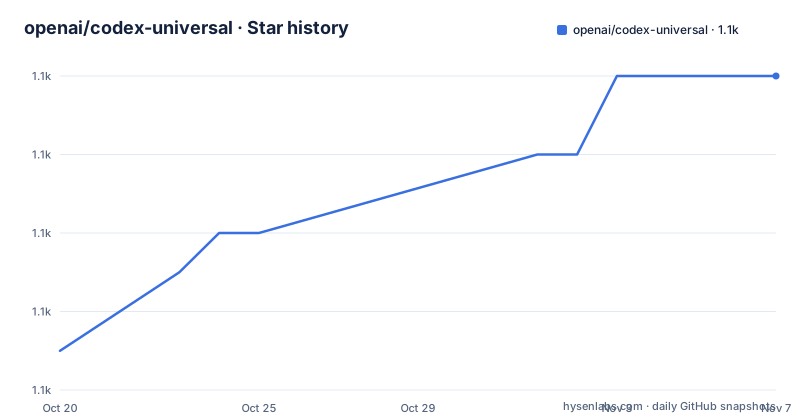
Star history
- openai/codex-universal1,104 ★ · +7
| Repository | 2026-10-20 | 2026-11-07 |
|---|---|---|
| openai/codex-universal | 1.1k | 1.1k |
7 Stars in the last 18 days, measured from the daily GitHub snapshot. Compare with other projects
Editorial analysis
A reference image for debugging the hosted environment
codex-universal is a reference implementation of the base Docker image available in OpenAI Codex, and it exists for a narrow, practical reason. The repository is intended to help developers customize environments in Codex by providing a similar image that can be pulled and run locally. The README is careful about the limits of that claim: this is not an identical environment but should help for debugging and development.
That distinction is the whole story of the project. Codex runs your work in a container with a specific set of language runtimes preinstalled, and when something fails inside that container, the natural question is whether it is your code or the environment. Running the same kind of image locally, with the same package pins and the same runtime selection mechanism, turns a guess into an experiment.
The intended user is therefore a developer working on a Codex environment or an agent configuration who needs a faithful local sandbox to iterate in. It is not a general purpose development image and it is not a hardened production base.
The implementation is a single Dockerfile with two helper scripts, `setup_universal.sh` and `entrypoint.sh`, plus a `verify.sh`, and the repository keeps a `LICENSES/` directory. The primary language is recorded as Dockerfile, the default branch is `main`, and the last push was on 2026-05-02. There are no GitHub releases, and the licence is not stated in the project metadata, so anyone shipping the image should resolve that with OpenAI rather than assume a grant.
The image is published on the GitHub Container Registry:
docker pull ghcr.io/openai/codex-universal:latestand the tag used everywhere is `latest`, which is worth remembering when you are debugging a specific failure, since a moving tag means two runs a week apart may not be the same image.
The CODEX_ENV_ contract and its version whitelist
The way you choose what goes in the image is through environment variables, and the mechanism is described in one sentence: codex-universal includes setup scripts that look for `CODEX_ENV_*` environment variables and configures the language version accordingly.
The important constraint is the table's third column. The README says that a limited subset of versions is supported, and lists them per runtime. Python supports `3.10`, `3.11.12`, `3.12`, `3.13` and `3.14.0`. Node supports `18`, `20` and `22`. Rust supports a long list from `1.83.0` through `1.95.0`, including patch-specific entries like `1.84.1` and `1.91.1`. Go supports `1.22.12`, `1.23.8`, `1.24.3` and `1.25.1`. Swift supports `5.10`, `6.1` and `6.2`. Ruby supports `3.2.3`, `3.3.8` and `3.4.4`. PHP supports `8.4`, `8.3` and `8.2`. Java supports `25`, `24`, `23`, `22`, `21`, `17` and `11`.
The mix of exact patch versions and bare minor versions is a detail that matters. `3.11.12` and `1.91.1` are pinned to a specific patch release, while `3.12` and `1.90` are not, so the exact build you get for a bare minor depends on what the installer resolves at that moment. If you are trying to reproduce a specific hosted environment, pick the exact versions from the whitelist rather than the minor ones.
The Python row also carries a set of additional packages, `pyenv`, `poetry`, `uv`, `ruff`, `black`, `mypy`, `pyright` and `isort`, and the Node row carries `corepack`, `yarn`, `pnpm` and `npm`. Those are the toolchains a coding agent reaches for, which is a good indication of what the hosted environment is expected to do.
The run recipe: a mounted directory and a set of version variables
The README shows how to approximate the setup environment in Codex with a single `docker run`, and the command is worth reading carefully because it teaches you how the pieces fit together.
# See below for environment variable options.
# This script mounts the current directory similar to how it would get cloned in.
docker run --rm -it \
    -e CODEX_ENV_PYTHON_VERSION=3.12 \
    -e CODEX_ENV_NODE_VERSION=20 \
    -e CODEX_ENV_RUST_VERSION=1.87.0 \
    -e CODEX_ENV_GO_VERSION=1.23.8 \
    -e CODEX_ENV_SWIFT_VERSION=6.2 \
    -e CODEX_ENV_RUBY_VERSION=3.4.4 \
    -e CODEX_ENV_PHP_VERSION=8.4 \
    -v $(pwd):/workspace/$(basename $(pwd)) -w /workspace/$(basename $(pwd)) \
    ghcr.io/openai/codex-universal:latest
The volume mount is the part that matters most, and the comment explains why it is shaped that way. The current directory is mounted at `/workspace/` followed by the basename of the directory, and the working directory is set to match. That mirrors how a repository would be cloned into the workspace, so paths behave the same way locally and in the hosted environment, which is exactly the property you need when you are chasing a path-dependent bug.
The rest of the command sets one variable per language. The setup scripts read them at startup and install the requested version, and any variable you leave unset simply means that runtime is not installed. That is a useful lever: a container with only Python and Node starts faster and behaves more like a minimal agent run than a full multi-language image.
The flags are ordinary. `--rm -it` gives you an ephemeral container with an interactive shell, so quitting removes it and you keep a clean slate for the next run.
Two architectures, one runnable build, and no Swift on arm64
The repository builds the image for both `linux/amd64` and `linux/arm64`. However we only run the `linux/amd64` version. Your installed Docker may support `linux/amd64` emulation by passing the `--platform linux/amd64` flag.
That is an unusual admission for a project that publishes multi-architecture images, and it has a practical consequence. On an Apple Silicon machine, the arm64 image exists and pulls, and the only thing standing between you and it is that the project does not run it. The workaround the README offers is emulation, which means the arm64 build is there for completeness rather than for use.
The arm64 image differs from the amd64 image in two ways. OpenJDK 10 is not available on amd64, and the arm64 image skips installing Swift because of a current bug with mise. The first is a small difference in what a JDK version is available, and the second is a missing language runtime.
The Swift gap is the one to plan around. `CODEX_ENV_SWIFT_VERSION` is still a documented variable, and Swift `5.10`, `6.1` and `6.2` are still on the supported list, so the setup logic exists, but on arm64 the install step is skipped because of a tool problem. In practice that means a Swift task cannot be reproduced on an Apple Silicon machine from this image, and you either emulate amd64 or reproduce the Swift toolchain yourself.
The `mise` reference is worth noting as a piece of information about the implementation. The `mise` mention is a reminder that a single tool bug can knock out a language install on one architecture.
Ubuntu 24.04 with every package pinned
The Dockerfile starts from `ubuntu:24.04` and sets `LANG` to `C.UTF-8`, `HOME` to `/root` and `DEBIAN_FRONTEND=noninteractive`, then installs a long list of system packages with exact version pins, such as `binutils=2.42-*`, `sudo=1.9.*`, `build-essential=12.10*`, `curl=8.5.*`, `git=1:2.43.*`, `jq=1.7.*`, `libc6=2.39-*`, `make=4.3-*`, `pkg-config=1.8.*`, `ripgrep=14.1.*` and `rsync=3.2.*`, along with the usual development headers for libcurl, libssl, libsqlite3, libxml2, libpq, protobuf and zlib.
The pinning is the point. A floating `apt-get install` produces a different image every time the base repository updates, which is precisely the failure mode this project exists to avoid: you cannot debug a hosted environment if your local copy drifts under you. The wildcard suffixes, `2.42-*` rather than `2.42`, keep the build reproducible within a patch series while still allowing security updates to flow through.
The apt steps use buildkit cache mounts, with `--mount=type=cache` for both `/var/cache/apt` and `/var/lib/apt` and `sharing=locked`, so repeated image builds reuse the downloaded packages instead of refetching them. That is a build-time optimisation, and it is also what makes the pin workable, because a pinned version is only fetchable while the repository still carries it.
The `ARG TARGETOS` and `ARG TARGETARCH` at the top are the standard buildkit arguments, and they are how one Dockerfile produces both the amd64 and the arm64 variants.
The `LICENSES/` directory in the repository is the part to look at before you base anything commercial on this image, since the project metadata records the licence as unknown and the individual packages in a base image carry their own terms.
The extras that are always present
Beyond the per-runtime packages in the table, the README lists what is installed regardless of which `CODEX_ENV_*` variables you set: `bun` at 1.2.10, `bazelisk` and `bazel`, `erlang` at 27.1.2, and `elixir` at 1.18.3.
Those four are worth reading as a list rather than individually. Bun and Bazel are the two build tools a coding agent reaches for when the project it is dropped into uses them, and Erlang and Elixir are there for the same reason, since the language pairs that an agent is most likely to meet in a repository are JavaScript, Go, Rust and Elixir, beyond the ones with a version variable.
The comment at the end of that section points to the Dockerfile for the full details of installed packages, which is the right place to look if you need to know whether something is present, since the README list is explicitly incomplete.
The `verify.sh` script at the repository root is the other piece of the picture. A script with that name in a repository like this is a self check, and for a reference implementation whose purpose is to be as close as possible to the hosted image, a script that verifies the built image matches the expected set of runtimes and versions is the mechanism that keeps the reference honest.
The `CONTRIBUTING.md` file is where the process for changing that baseline lives, and the `.github/` directory holds the workflows that build and publish the image to the registry.
Where codex-universal is the wrong tool
There are three cases where this image is the wrong answer, and the first is the most consequential.
The first is production. The README says this is not an identical environment, and that framing is not a technical footnote, it is the project's own statement of its limits. A `latest` tag on a container registry, a base with a `root` home directory, and no hardening described, are all fine for a debugging sandbox and all wrong for anything that runs unattended with your credentials in it. The hosted Codex environment is the supported artefact; this is the thing you use to understand it.
The second is Apple Silicon developers who need Swift, since the arm64 image skips installing Swift and the project's own recommendation is to emulate amd64 instead. Emulation works, and it is slow, and for a Swift project the toolchain you end up debugging under is not the toolchain the task runs under.
The third is a project whose runtime version is not on the whitelist. If your repository needs Python 3.9, or Node 16, or Rust 1.80, the setup scripts will not install it, and you have left the reference image. The whitelist is also moving, so a version that worked last quarter may have been dropped, which means a local image built from an old tag can differ from the current hosted environment in a way that is exactly the kind of thing you were trying to debug.
The alternative approach, for comparison, is to use a language specific official image as your base and add the tools you need, which gives you a smaller and more current base and the guarantee that the runtime is the one you expect. The difference in approach is that codex-universal prioritises matching the hosted environment, at the cost of being a large, pinned, root-privileged image whose contents are decided by someone else's build, while a language specific image prioritises currency and size, at the cost of no longer reproducing what Codex does.
For the stated purpose, debugging the Codex environment, the reference implementation wins, because the entire value is in the match. For anything else, the question to ask is whether you need the match at all.
Editorial conclusion
Adopt codex-universal if you develop against the Codex environment and need to reproduce a container locally to debug a build or a toolchain issue, since it mirrors the platform's base image closely enough for that purpose. Do not adopt it as a production base image, since the README says it is not an identical environment, and do not build your workflow around the arm64 variant, which the project does not run and which is missing Swift. Verify three things first: that the `CODEX_ENV_*` version you set is on the supported list, since an unsupported value will not install, that the image you pull matches the platform image for the task you are debugging, and that the toolchain versions Codex actually provisions are the ones the setup scripts install, because the whitelist moves and your local environment will drift from the hosted one if you pin an old version.
Frequently asked questions
What is the openai/codex-universal repository?
It is a reference implementation of the base Docker image available in OpenAI Codex, intended to help developers customize Codex environments by providing a similar image that can be pulled and run locally. The README is explicit that it is not an identical environment but should help for debugging and development.
How do I pull and run the codex-universal image?
Pull it with `docker pull ghcr.io/openai/codex-universal:latest` and run it with `docker run --rm -it`, passing `CODEX_ENV_*` variables for the language versions you want and mounting your working directory under `/workspace/` the way the README's example does.
Which language versions does codex-universal support?
Only a limited subset. Python supports 3.10, 3.11.12, 3.12, 3.13 and 3.14.0, Node supports 18, 20 and 22, Rust supports 1.83.0 through 1.95.0, Go supports 1.22.12, 1.23.8, 1.24.3 and 1.25.1, Swift supports 5.10, 6.1 and 6.2, Ruby supports 3.2.3, 3.3.8 and 3.4.4, PHP supports 8.4, 8.3 and 8.2, and Java supports 25, 24, 23, 22, 21, 17 and 11.
Does the codex-universal image work on Apple Silicon?
The repository builds both linux/amd64 and linux/arm64 but the project only runs the linux/amd64 version, and the README suggests passing the `--platform linux/amd64` flag for emulation. The arm64 image also skips installing Swift because of a current bug with mise.
What is always installed in the codex-universal image?
Besides the packages tied to the chosen language versions, the image always includes bun 1.2.10, bazelisk and bazel, erlang 27.1.2 and elixir 1.18.3. The Dockerfile has the full details of installed packages, and the repository also carries setup_universal.sh, entrypoint.sh and verify.sh.
Official sources
Add this badge to your README
If you maintain this project, the badge below links readers to this analysis and shows its maintenance status from the daily GitHub snapshot. Paste the markdown into your README; add ?metric=license or ?metric=stars to the image URL for a different field.

[](https://hysenlabs.com/projects/openai-codex-universal)Star history chart for your README
[](https://hysenlabs.com/projects/openai-codex-universal)Was this useful?